1. Introduzzjoni
Thank you for choosing the Sudio F4 Bluetooth Wireless Speaker. This manual provides essential information for setting up, operating, and maintaining your speaker. Please read it thoroughly before use to ensure optimal performance and longevity of your device.
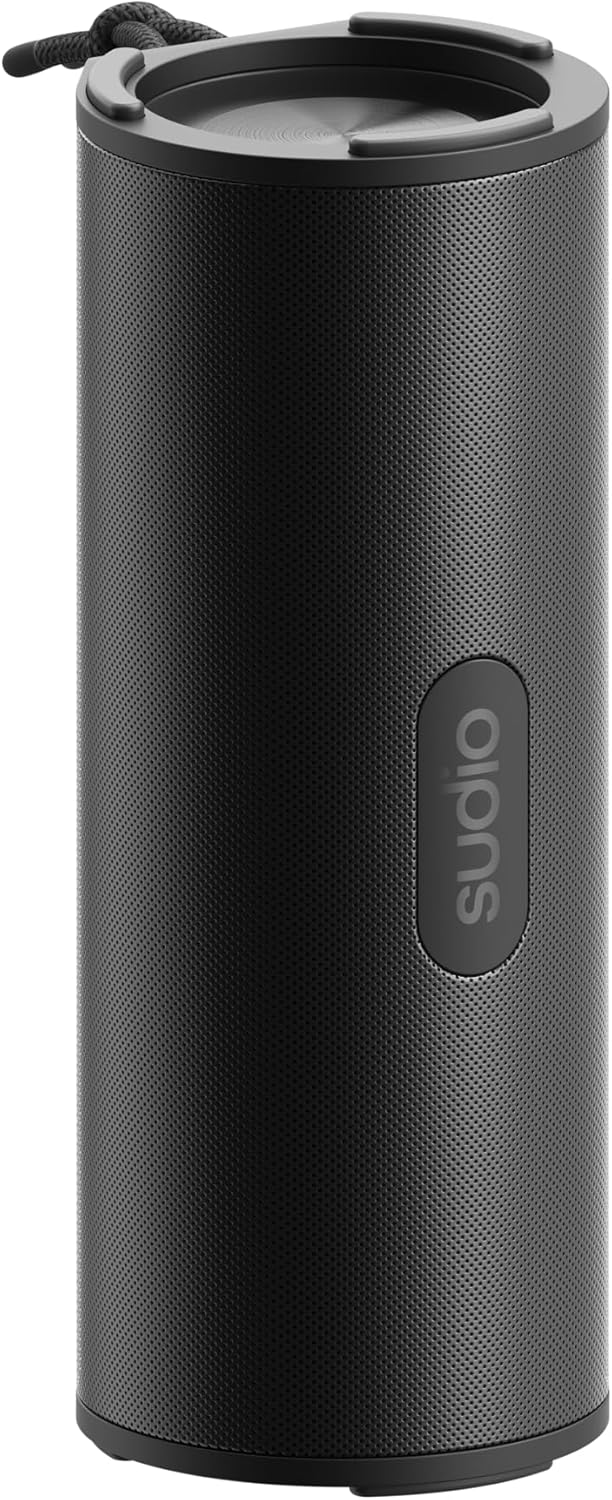
Figure 1: Sudio F4 Bluetooth Wireless Speaker
2. Informazzjoni dwar is-Sigurtà
- Tesponix l-ispiker għal temperaturi estremi, dawl tax-xemx dirett, jew fjammi mikxufa.
- Evita li twaqqa’ jew tissuġġetta lill-kelliem għal impatti qawwija.
- Tippruvax tiżżarma, issewwi, jew timmodifika l-ispiker. Dan jannulla l-garanzija.
- Keep the speaker away from water and liquids, except for splashes as per its IPX4 rating. Do not submerge.
- Use only the provided or a certified USB-C charging cable.
- Armi l-prodott u l-batterija tiegħu b'mod responsabbli skont ir-regolamenti lokali.
3. Kontenut tal-Pakkett
Kun żgur li l-oġġetti kollha huma preżenti fil-pakkett:
- Sudio F4 Bluetooth Wireless Speaker
- Cable tal-Iċċarġjar tal-USB-C
- Manwal għall-Utent
4. Prodott Aktarview
Familiarize yourself with the Sudio F4 speaker's components and controls.

Figura 2: Ġenb view with control buttons and USB-C port
- Buttuna tal-Qawwa: Agħfas u żomm biex tixgħel/titfi. Agħfas qasir biex tara l-istatus tal-batterija.
- Buttuna Volum 'l isfel / Trakka Preċedenti: Short press to decrease volume. Long press to go to the previous track.
- Play / Pause / Call Button: Short press to play/pause music. Short press to answer/end calls. Long press to reject calls.
- Buttuna tal-Volum 'il Fuq / tat-Trakka li Jmiss: Short press to increase volume. Long press to go to the next track.
- Buttuna ta' Tqabbil tal-Bluetooth: Agħfas qasir biex tidħol fil-modalità ta 'tqabbil Bluetooth.
- Port tal-Iċċarġjar USB-C: Għall-iċċarġjar tal-ispiker.
- Mikrofonu: Għal sejħiet hands-free.
- It-twaħħil tal-lanyard: Għall-portabbiltà.

Figura 3: Fuq view with speaker grille and lanyard
5. Setup
5.1 Iċċarġjar tal-Ispeaker
- Qabbad il-kejbil tal-iċċarġjar USB-C mal-port USB-C tal-ispiker.
- Qabbad it-tarf l-ieħor tal-kejbil ma' adapter tal-enerġija USB (mhux inkluż) jew mal-port USB tal-kompjuter.
- Id-dawl indikatur tal-iċċarġjar jixgħel waqt l-iċċarġjar u jintefa meta jkun iċċarġjat kompletament.
- Ċarġ sħiħ jipprovdi sa 25-il siegħa ta' daqq.
5.2 Power On/Off
- Biex Tixgħel: Press and hold the Power button for approximately 2 seconds until you hear an audible prompt.
- Biex Tifi: Press and hold the Power button for approximately 2 seconds until you hear an audible prompt.
5.3 Tqabbil tal-Bluetooth
- Ensure the speaker is powered on and within 1 meter of your Bluetooth device.
- The speaker will automatically enter Bluetooth pairing mode when powered on for the first time, indicated by a flashing LED light. If already paired, short press the Bluetooth pairing button to enter pairing mode.
- Ippermetti l-Bluetooth fuq l-ismartphone, it-tablet, jew apparat awdjo ieħor tiegħek.
- In your device's Bluetooth settings, select "Sudio F4" from the list of available devices.
- Ladarba jkun imqabbad b'suċċess, l-ispiker se jipprovdi konferma li tinstema', u d-dawl LED se jieqaf iteptep.
6. Istruzzjonijiet Operattivi
6.1 Daqq tal-Awdjo
- Play/Pawsa: Short press the Play/Pause/Call button.
- Track li jmiss: Agħfas fit-tul il-buttuna Volume Up.
- Track preċedenti: Agħfas fit-tul il-buttuna Volum 'l isfel.
6.2 Kontroll tal-Volum
- Żid il-Volum: Agħfas fil-qosor il-buttuna Volume Up.
- Naqqas il-Volum: Agħfas fil-qosor il-buttuna Volum 'l isfel.
6.3 Ġestjoni tas-Sejħiet
The Sudio F4 includes a built-in microphone for hands-free calling.
- Tweġiba/Tmiem Sejħa: Short press the Play/Pause/Call button.
- Irrifjuta Sejħa: Long press the Play/Pause/Call button.
6.4 Reżistenza għall-Ilma IPX4
The Sudio F4 speaker is rated IPX4, meaning it is resistant to splashing water from any direction. This makes it suitable for outdoor use where it might encounter light rain or splashes. It is le designed to be submerged in water.
7. Manutenzjoni
- Tindif: Wipe the speaker with a soft, dry, lint-free cloth. Do not use abrasive cleaners, alcohol, or chemical solvents.
- Ħażna: Aħżen l-ispiker f'post frisk u niexef 'il bogħod mix-xemx diretta u minn temperaturi estremi meta ma jkunx qed jintuża għal perjodi twal.
- Kura tal-batterija: To preserve battery life, charge the speaker fully at least once every three months if not used regularly.
8 Issolvi l-problemi
| Problema | Soluzzjoni Possibbli |
|---|---|
| L-ispiker ma jixgħelx. | Kun żgur li l-ispiker huwa ċċarġjat. Qabbad ma' sors ta' enerġija billi tuża l-kejbil USB-C. |
| Ma tistax tgħaqqad ma' apparat Bluetooth. |
|
| L-ebda ħoss jew volum baxx. |
|
| Kwalità tal-ħoss ħażina. |
|
9. Speċifikazzjonijiet
| Mudell | Sudio F4 |
| Verżjoni Bluetooth | 5.4 |
| Ħin tal-daqq | Sa 25 sigħat |
| Port tal-Iċċarġjar | USB-C |
| Reżistenza għall-Ilma | IPX4 (Reżistenti għall-ilma) |
| Output Speaker | 15W |
| Dimensjonijiet (L x W x H) | 8.9 x 8.7 x 20.6 ċm |
| Piż | 300 g |
| Mikrofonu | Iva |
10. Garanzija u Appoġġ
For warranty information, technical support, or any inquiries regarding your Sudio F4 speaker, please visit the official Sudio webis-sit jew ikkuntattja lis-servizz tal-konsumatur tagħhom direttament. Żomm il-prova tax-xiri tiegħek għal talbiet ta' garanzija.
Official Sudio Websit: www.sudio.com


