Introduzzjoni
The MCHOSE Mix 87 is a wired magnetic switch TKL gaming keyboard designed for high-performance gaming and efficient daily use. It features advanced Hall effect switches, rapid trigger technology, and extensive customization options to enhance your computing experience.

Figure 1: MCHOSE Mix 87 Magnetic Switch Rapid Trigger Gaming Keyboard (Red variant).
X'hemm fil-Kaxxa
- MCHOSE Mix 87 Keyboard
- USB-C Wired Cable
- Keycap Puller
- Manwal għall-Utent
- Extra Switches (2 pieces)
Setup
- Ħoll it-Tastiera: Carefully remove the MCHOSE Mix 87 keyboard and all accessories from the packaging.
- Qabbad il-Cable USB: Insert the USB-C end of the provided cable into the keyboard's USB-C port. Connect the other end (USB-A) to an available USB port on your computer.
- Rikonoxximent tas-Sistema: Your computer should automatically detect and install the necessary drivers for the keyboard. No additional software download is required for basic functionality.
- Test Inizjali: Iftaħ editur tat-test jew browser u ittestja t-tajping biex tiżgura li ċ-ċwievet kollha qed jaħdmu sew.

Figure 2: MCHOSE Mix 87 keyboard connected via USB-C to a computer setup.
Istruzzjonijiet Operattivi
Karatteristiċi ewlenin u Prestazzjoni
- Rapid Trigger (RT) Technology: The Mix 87 supports Rapid Trigger, allowing keys to react instantly upon actuation and reset immediately upon release. This feature is crucial for competitive gaming, enabling faster repeated inputs.
- Attwazzjoni Aġġustabbli: Equipped with Hall effect Apollo magnetic switches, the keyboard offers ultra-precise 0.001 mm adjustment of the trigger point, ranging from 0.01-3.4 mm. Key travel is dynamically calibrated with each trigger.
- Ultra-High Polling Rate: Experience minimal input latency with an 8000 Hz polling rate and a 256K ultra-high scan rate, ensuring every keystroke is registered with extreme speed.
- Advanced Gaming Functions: Supports SOCD (Simultaneous Opposite Cardinal Directions), DKS (Dynamic Keystrokes), MT (Macro Toggle), TGL (Toggle), and RS (Rapid Stop) functions for enhanced control and customization beyond traditional macros.

Figure 3: Visual representation of the MCHOSE Mix 87's high performance metrics including 0.001mm precision and 8K Hz polling rate.
Layout and Controls
The Mix 87 features a compact 80% TKL (Tenkeyless) layout with 87 keys, balancing functionality with a smaller footprint. It includes a multi-function knob and three practical function keys.
- Pum b'ħafna funzjonijiet: Located on the top right, this knob primarily controls volume.
- Ċwievet tal-Funzjoni: Three dedicated keys provide quick access to:
- One-click return to desktop (customizable)
- Mode switching (e.g., gaming/office)
- Adjusting light brightness
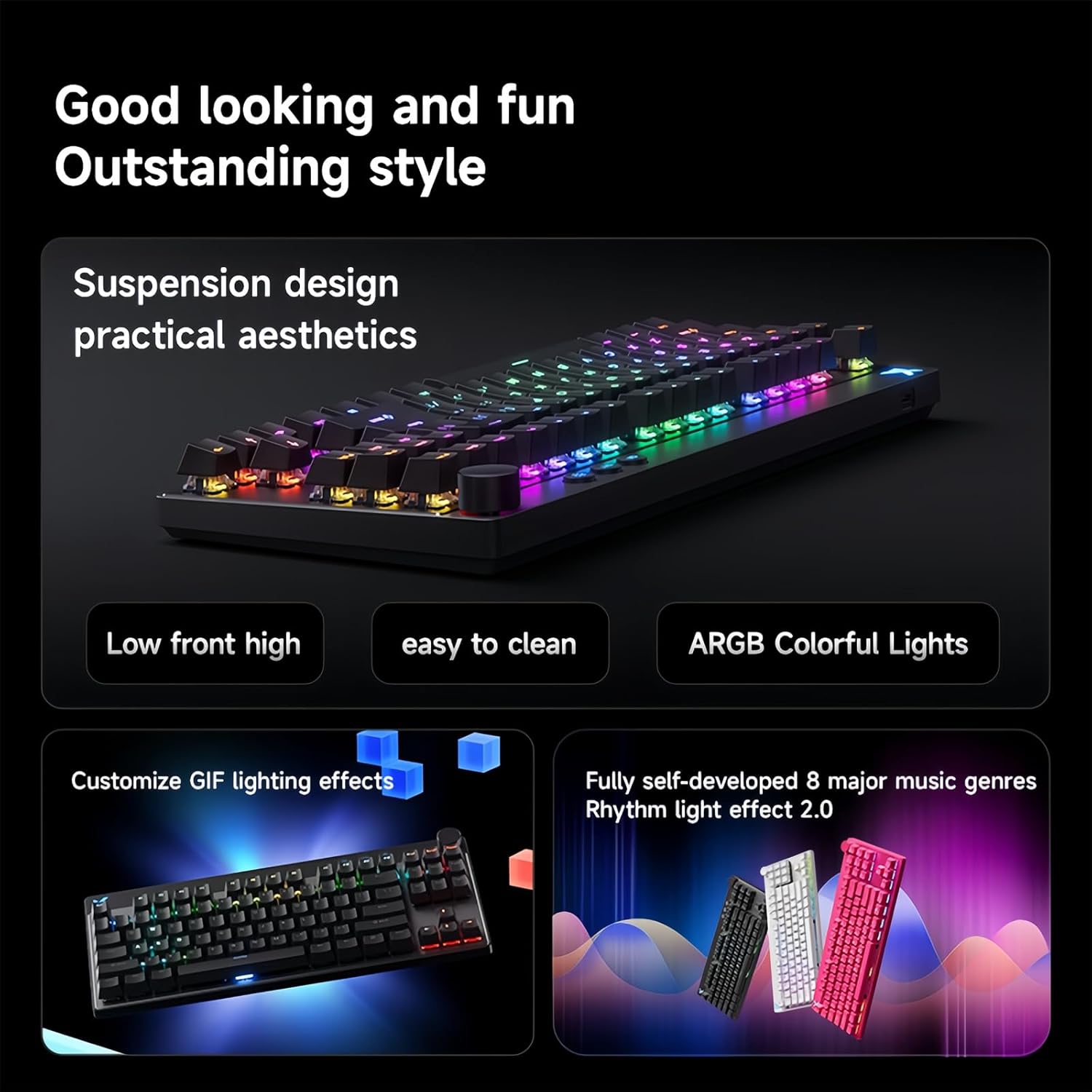
Figure 4: The MCHOSE Mix 87 keyboard seamlessly transitions between office and game modes.
Personalizzazzjoni tad-Dawl ta' Wara RGB
The keyboard features 16 million colors with north-facing LEDs. You can personalize lighting effects using FN shortcut keys or the websewwieq ibbażat fuq.
- FN Shortcut Keys: Use combinations of the FN key with other keys to cycle through various lighting modes, adjust brightness, and change colors. Refer to the included quick start guide for specific combinations.
- Music Rhythm Support: The RGB lighting can be synchronized with music for an immersive experience.

Figure 5: MCHOSE Mix 87 keyboard showcasinl-effetti tad-dawl RGB vibranti tiegħu.
Programmabbli Web Driver (MCHOSE HUB)
The MCHOSE Mix 87 supports customization via a web-based HUB driver, eliminating the need for software downloads. This ensures compatibility across various operating systems.
- Accessing the Driver: Visit the official MCHOSE websit biex taċċessa l- webgħodda ta 'konfigurazzjoni bbażata fuq.
- Għażliet ta' Personalizzazzjoni: Within the driver, you can:
- Personalize individual key functions.
- Adjust actuation points for each key.
- Configure macros and advanced gaming functions.
- Ippersonalizza l-effetti tad-dawl u l-luminożità RGB.
Figure 6: Screenshot of the MCHOSE HUB web-based driver for advanced keyboard settings.
Manutenzjoni
- Tindif tal-Għotjien taċ-Ċwievet: Use the provided keycap puller to carefully remove keycaps. Clean them with a soft, damp drapp u sapun ħafif jekk meħtieġ. Kun żgur li jkunu niexfa għalkollox qabel ma terġa’ twaħħalhom.
- Tindif tal-Korp tat-Tastiera: Use a soft, lint-free cloth to wipe down the keyboard body. For dust between keys, use compressed air.
- Manutenzjoni tal-iswiċċ: The Hall effect switches are designed for durability. Avoid exposing them to excessive moisture or dust.
Issolvi l-problemi
- It-Tastiera Mhux Tirrispondi:
- Kun żgur li l-kejbil USB-C huwa konness sew kemm mat-tastiera kif ukoll mal-kompjuter.
- Ipprova qabbad it-tastiera ma' port USB differenti fuq il-kompjuter tiegħek.
- Ittestja t-tastiera fuq kompjuter ieħor biex teskludi problemi speċifiċi tas-sistema.
- Dwal RGB Mhux Jaħdmu/Mhux Korretti:
- Check FN key combinations for lighting control (refer to quick start guide).
- Kun żgur li t-tastiera hija konnessa sew u qed tirċievi l-enerġija.
- Access the MCHOSE HUB web driver to verify lighting settings.
- Keys Not Actuating Correctly:
- Verify actuation point settings in the MCHOSE HUB web sewwieq.
- Ensure no debris is obstructing the switch mechanism.
- If a specific switch is faulty, replace it with one of the provided extra switches using the keycap/switch puller.
Speċifikazzjonijiet
| Isem tal-Mudell | Mix 87 Keyboard |
| Konnessjoni | USB-C bil-wajer |
| Numru ta' Ċwievet | 87 keys (80% TKL Layout) |
| Tip ta' Swiċċ | Hall Effect Apollo Magnetic Switch |
| Attwazzjoni aġġustabbli | 0.01-3.4 mm (0.001 mm precision) |
| Scan Rata | 256K |
| Ir-Rata tal-Votazzjoni | 8K Hz |
| Latency | 0.08ms |
| Backlight RGB | 16 million colors, North-facing LEDs |
| Struttura | Gasket Mount Keyboard |
| NKRO | Appoġġjati |
| Kompatibilità tas-Sistema | Windows/Mac/iOS/Android |
| Dimensjonijiet tal-Prodott | 14.1 x 6 x 1.4 pulzieri |
| Piż tal-oġġett | 2 liri |
Vidjo Uffiċjali tal-Prodott
Vidjo 1: Overview of the MCHOSE Mix 87 TKL Wired Magnetic Keyboard, demonstrating its features and functionality.
Garanzija u Appoġġ
For warranty information, technical support, or further assistance, please refer to the official MCHOSE webis-sit jew ikkuntattja lis-servizz tal-konsumatur tagħhom direttament. Żomm l-irċevuta tax-xiri tiegħek għal talbiet ta' garanzija.


