1. Introduzzjoni
Thank you for choosing the MCHOSE Mix 87 Magnetic Switch Gaming Keyboard. This manual provides detailed instructions for setting up, operating, and maintaining your keyboard to ensure optimal performance. The Mix 87 is designed for competitive gaming, featuring Hall Effect magnetic switches with rapid trigger technology and adjustable actuation.
2. Kontenut tal-Pakkett
Jekk jogħġbok ivverifika li l-oġġetti kollha huma preżenti fil-pakkett tiegħek:
- MCHOSE Mix 87 Gaming Keyboard
- USB-C Cable
- Keycap Puller
- Extra Switches (2 pieces)
- Manwal għall-Utent (dan id-dokument)
3. Prodott Aktarview
The MCHOSE Mix 87 is a Tenkeyless (TKL) keyboard featuring 87 keys, Hall Effect magnetic switches, and a dedicated volume knob. Its design prioritizes speed, precision, and customization for an enhanced gaming experience.

Stampa 3.1: Fuq view of the MCHOSE Mix 87 Gaming Keyboard, showcasing its 87-key layout, dedicated function keys, and volume knob. The keyboard features RGB backlighting visible through the translucent keycaps.
Karatteristiċi ewlenin:
- Hall Effect Magnetic Switches: Offers adjustable actuation points from 0.01mm to 3.4mm.
- Rapid Trigger (RT) Mode: Allows keys to react instantly upon release, enhancing responsiveness.
- 8000 Hz Polling Rate: Minimizes input latency for competitive gaming.
- Dawl ta' wara RGB: Customizable 16 million color options with various effects.
- Dedicated Volume Knob: For convenient audio control.
- Struttura tal-Immuntar tal-Gasket: Provides a comfortable typing feel and acoustic profile.

Stampa 3.2: Close-up of the MCHOSE Mix 87 keyboard highlighting its magnetic switch technology. The image emphasizes the 0.001mm precision and 0.08ms event-level delay, crucial for high-performance gaming.
4. Setup
4.1 Konnessjoni tat-Tastiera
- Locate the USB-C port on the back of your MCHOSE Mix 87 keyboard.
- Qabbad tarf wieħed tal-kejbil USB-C provdut mat-tastiera.
- Qabbad it-tarf l-ieħor tal-kejbil USB-C ma' port USB disponibbli fuq il-kompjuter tiegħek.
- It-tastiera tiġi rikonoxxuta awtomatikament mis-sistema operattiva tiegħek.
4.2 Kompatibilità tas-Sistema
The MCHOSE Mix 87 keyboard is compatible with the following operating systems:
- Windows
- macOS
- iOS
- Android
5. Istruzzjonijiet Operattivi
5.1 Funzjonijiet Bażiċi tat-Tastiera
The MCHOSE Mix 87 features a standard 87-key TKL layout. All keys function as labeled. Use the Fn key in combination with other keys for secondary functions, typically indicated by icons or alternative labels on the keycaps.
5.2 Tħaddim tal-Buttula tal-Volum
The dedicated knob located in the upper right corner of the keyboard controls audio output.
- Dawwar lejn ix-Xellug: Naqqas il-volum.
- Dawwar Lemin: Żid il-volum.
- Agħfas 'l isfel: Iftaħ/Iftaħ l-awdjo.
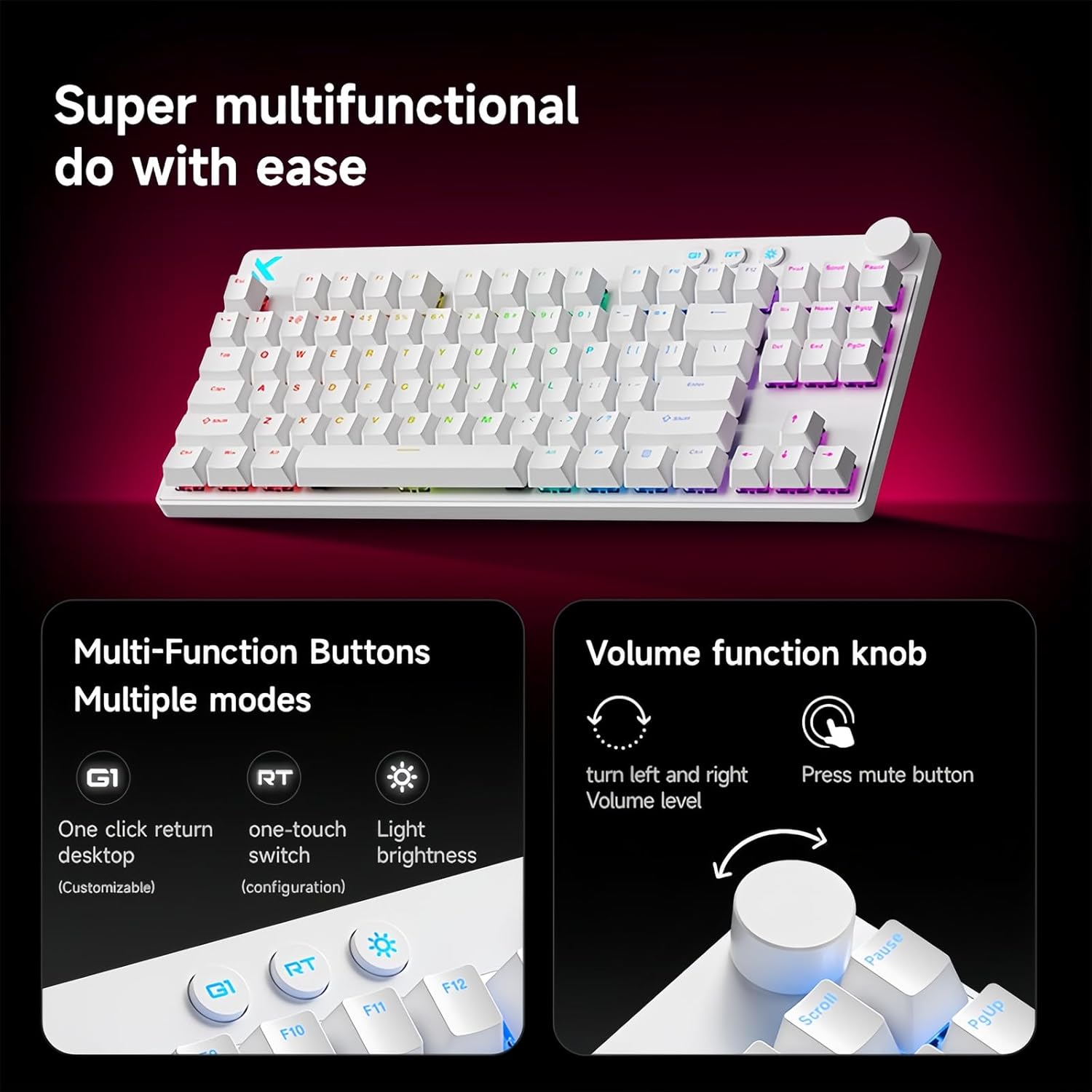
Stampa 5.1: Illustration of the multi-function buttons (G1, RT, Light) and the volume knob on the MCHOSE Mix 87 keyboard. The image details the functions of the knob for volume adjustment and muting, and the customizable nature of the G1 button.
5.3 Buttuni Multi-Funzjoni
Above the numeric row, there are three dedicated buttons:
- G1 Button: Customizable function, typically set to return to desktop.
- RT Button: Toggles or adjusts Rapid Trigger mode.
- Buttuna tad-Dawl: Adjusts RGB lighting brightness or cycles through lighting modes.
5.4 Rapid Trigger (RT) Mode and Adjustable Actuation
The Mix 87 features Hall Effect magnetic switches that allow for precise control over actuation and de-actuation points.
- Attwazzjoni Aġġustabbli: The trigger point can be set from 0.01mm to 3.4mm, allowing you to customize key sensitivity. This is configured via the web sewwieq.
- Rapid Trigger (RT): This mode allows a key to register a new press as soon as it begins to move upwards, without needing to return to its reset point. This significantly reduces input delay for repeated key presses. The RT Smart Mode offers 1-15 adjustable levels for fine-tuning responsiveness.
- Funzjonijiet Avvanzati: Supports SOCD (Simultaneous Opposite Cardinal Directions), DKS (Dynamic Keystrokes), MT (Macro Toggle), and TGL (Toggle) functions for advanced control.

Stampa 5.2: Visual representation of the MCHOSE Mix 87's performance capabilities, including 0.001mm precision, 256K ultra-high scanning rate, 0.08ms ultra-low latency, and 8K ultra-high polling rate. It also highlights the magnetic axis Algorithm 3.0, 15-level adjustable RT Smart mode, and ADC Direct Link for WASD keys.
5.5 Backlighting RGB
The keyboard features 16 million color RGB backlighting with various effects. Use the dedicated Light button or the software driver to customize lighting:
- Cycle through preset lighting effects.
- Aġġusta l-livelli tal-luminożità.
- Customize individual key lighting.
- Enable music rhythm synchronization.
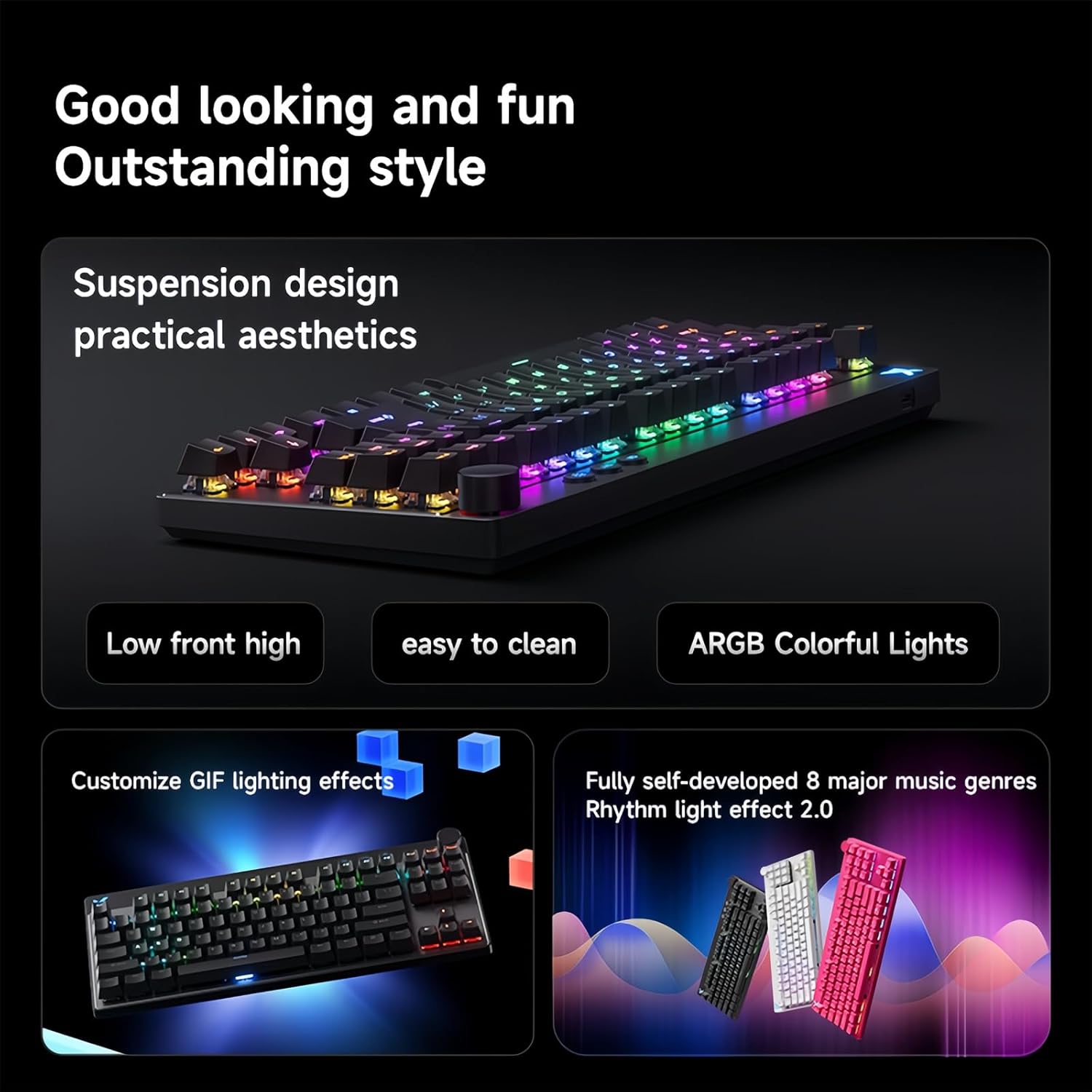
Stampa 5.3: The MCHOSE Mix 87 keyboard showcasing its suspension design and ARGB colorful lighting. The image highlights the aesthetic appeal and practical features like easy cleaning and customizable GIF lighting effects, along with music rhythm light effects.
6. Software Driver
The MCHOSE Mix 87 supports a customizable web-based driver, eliminating the need for software downloads and installations. This driver provides access to advanced settings and customization options.
6.1 Aċċess għall- Web Sewwieq
Biex taċċessa l- web driver, open your web browser and navigate to one of the following URLs:
- MCHOSE Uffiċjali Web Sewwieq: https://www.mchose.com.cn
- Alternative M HUB Client Driver: https://www.maicong.cn
Il- web driver allows you to:
- Aġġusta l-punti ewlenin tal-attwazzjoni.
- Configure Rapid Trigger (RT) levels.
- Ippersonalizza l-effetti tad-dawl u l-kuluri RGB.
- Program macros and reassign key functions.
- Update firmware (if available).

Stampa 6.1: Screenshot illustrating the MCHOSE web-based driver interface. This driver allows users to customize keyboard settings without installing dedicated software, offering cross-platform compatibility.
7. Manutenzjoni
7.1 Tindif tat-Tastiera
Biex iżżomm id-dehra u l-funzjonalità tat-tastiera tiegħek:
- Skonnettja t-tastiera mill-kompjuter tiegħek qabel ma tnaddafha.
- Uża drapp ratba u mingħajr ħelu ftit dampImlaħlaħ bl-ilma jew b'soluzzjoni ħafifa tat-tindif biex timsaħ il-keycaps u x-chassis.
- Għat-trab u l-fdalijiet bejn il-keycaps, uża arja kkompressata jew il-puller tal-keycaps ipprovdut biex tneħħi l-keycaps u naddaf taħthom.
- Avoid using harsh chemicals, abrasives, or solvents, as these can damage the keyboard's finish.
7.2 Ħażna
When not in use, store the keyboard in a dry, cool place away from direct sunlight and extreme temperatures.
8 Issolvi l-problemi
8.1 It-Tastiera Ma Tirrispondix
- Kun żgur li l-kejbil USB-C huwa konness sew kemm mat-tastiera kif ukoll mal-kompjuter.
- Ipprova qabbad it-tastiera ma' port USB differenti fuq il-kompjuter tiegħek.
- Ittestja t-tastiera fuq kompjuter ieħor biex teskludi problemi speċifiċi tas-sistema.
- Ibda mill-ġdid il-kompjuter tiegħek.
8.2 RGB Lighting Not Working or Incorrect
- Check the brightness settings using the dedicated Light button or the web sewwieq.
- Ensure no software conflicts are present (e.g., other RGB control software).
- Reset the keyboard settings via the web driver if customization issues persist.
8.3 Actuation Issues or Inconsistent Key Presses
- Verify your actuation point settings in the web sewwieq.
- Ensure Rapid Trigger (RT) mode is configured to your preference.
- Clean around the affected switch to remove any debris.
- If an extra switch is available, consider replacing the problematic switch.
9. Speċifikazzjonijiet
| Isem tal-Mudell | Mix 87 Keyboard |
| Tip ta' Konnessjoni | USB-C bil-wajer |
| Numru ta' Ċwievet | 87 keys (TKL Layout) |
| Tip ta' Swiċċ | Hall Effect Magnetic Switches (Apollo) |
| Attwazzjoni aġġustabbli | 0.01mm - 3.4mm |
| Rapid Trigger (RT) Mode | Supported, 1-15 Level Adjustable |
| Ir-Rata tal-Votazzjoni | 8K Hz |
| Scan Rata | 256K |
| Latency | 0.08ms |
| Dawl ta' wara | 16 Miljun Kulur RGB |
| Struttura | Muntatura tal-gasket |
| Materjal Keycap | Trasluċidi |
| Dimensjonijiet tal-Prodott | 14.1 x 6 x 1.4 pulzieri (35.8 x 15.2 x 3.6 ċm) |
| Piż tal-oġġett | 2 liri (0.91 kg) |
| Kompatibilità tas-Sistema | Windows, macOS, iOS, Android |
10. Garanzija u Appoġġ
For warranty information and technical support, please refer to the official MCHOSE webis-sit jew ikkuntattja lill-bejjiegħ tiegħek. Żomm il-prova tax-xiri tiegħek għal talbiet ta' garanzija.


