1. Introduzzjoni
This manual provides detailed instructions for the Deeyaple Computer Speakers (Model: G4C). This 40W wireless soundbar is designed for desktop PCs, offering Bluetooth 5.3 and USB audio connectivity, dynamic RGB lighting, and custom EQ software. It is compatible with various devices including laptops, gaming consoles, and smartphones.

Immaġni: Quddiem view of the Deeyaple Computer Speakers, showcasing its sleek design and dynamic RGB lighting.

Image: The Deeyaple Computer Speakers integrated into a compact desktop setup, highlighting its stylish and space-saving design.
2. Kontenut tal-Pakkett
Jekk jogħġbok ivverifika li l-oġġetti kollha huma preżenti fil-pakkett:
- Deeyaple Computer Speaker (Model: G4C)
- Kejbil tal-Enerġija
- Type-C to USB Audio Cable
- Gwida Quick Start
3. Setup
3.1 Konnessjoni tal-Enerġija
- Connect the provided power cable to the DC IN port on the back of the speaker.
- Ipplaggja t-tarf l-ieħor tal-kejbil tal-enerġija f'sokit standard tal-ħajt.
- The speaker will power on automatically or can be turned on using the power button.
3.2 Għażliet ta' Konnessjoni tal-Awdjo
The Deeyaple Computer Speakers support both Bluetooth 5.3 wireless and USB wired audio connections.
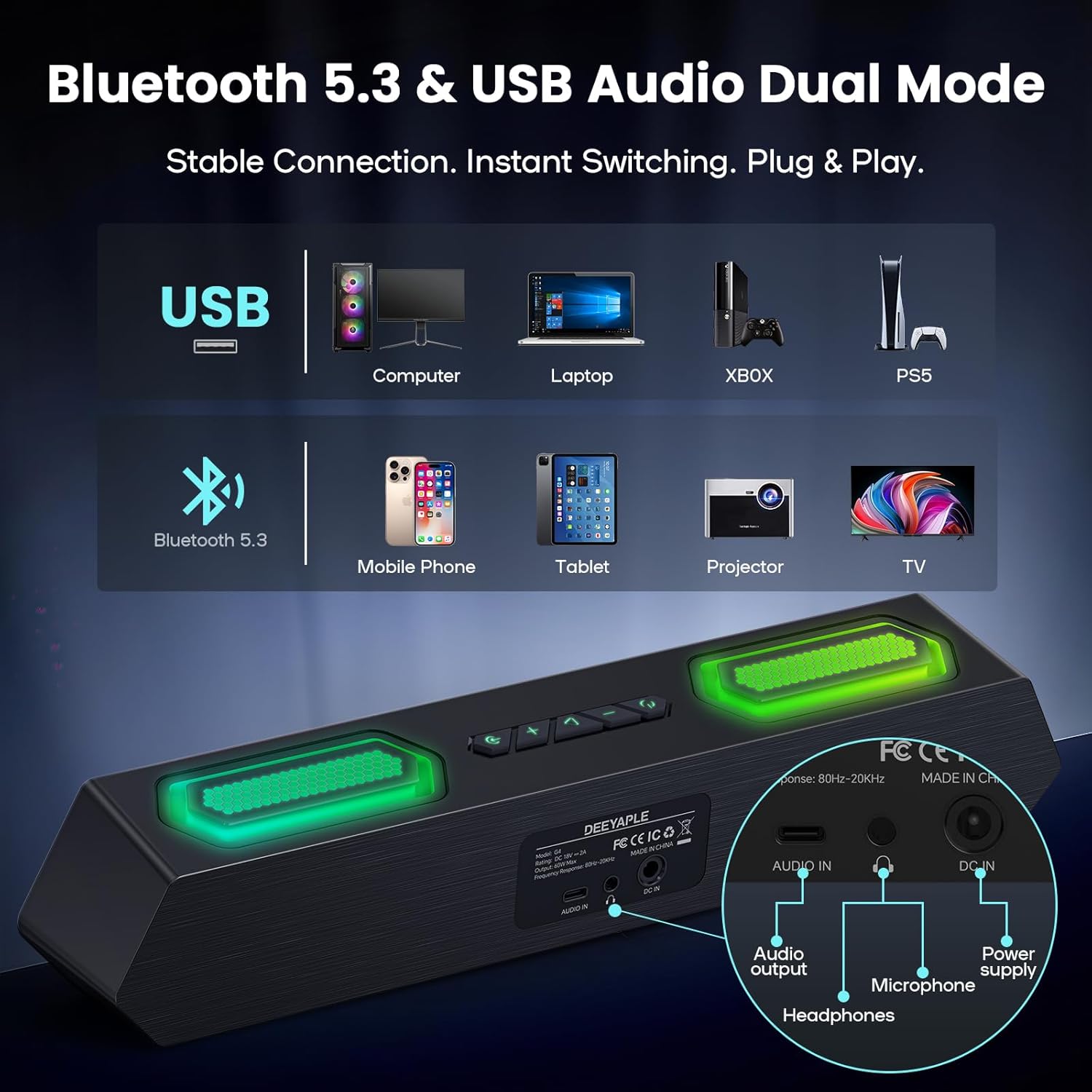
Immaġni: Wara view of the speaker showing USB, Audio In, DC In ports, and compatible devices for Bluetooth and USB connections.
3.2.1 Konnessjoni Bluetooth
- Kun żgur li l-kelliem ikun mixgħul.
- Press the Bluetooth button on the speaker to enter pairing mode (indicator light will flash).
- On your device (PC, laptop, smartphone, tablet), navigate to Bluetooth settings and search for "Deeyaple G4C".
- Agħżel il-kelliem li trid tqabbad. Ladarba jkun konness, id-dawl indikatur jibqa' mixgħul.
3.2.2 USB Audio Connection
- Connect one end of the provided Type-C to USB Audio Cable to the USB port on the speaker.
- Connect the other end of the cable to an available USB port on your computer or compatible device.
- The speaker will automatically switch to USB audio mode. You may need to select "Deeyaple G4C" as the audio output device in your computer's sound settings.
4. Operazzjoni
4.1 Kontrolli Bażiċi
The speaker features full-button control for various functions:
- Buttuna tal-Qawwa: Press and hold to turn on/off. Double-click to turn RGB lights completely off.
- Buttuni Volum 'il fuq /' l isfel: Adjust the audio volume. The volume level will be indicated by the bottom RGB bar.
- Buttuna tal-Modalità: Switch between Bluetooth and USB audio input modes.
- Buttuna tad-Dawl RGB: Iċċikla bejn effetti tad-dawl RGB differenti.
4.2 Daqq tal-Awdjo
Once connected via Bluetooth or USB, audio from your device will play through the Deeyaple speakers. Use your device's media controls for play/pause and track skipping.

Image: Diagram illustrating the internal components of the speaker, including full-range drivers and bass diaphragms, highlighting 40W Hi-Fi Stereo Sound capabilities.

Image: A user engaged with a computer setup, experiencing immersive sound and dynamic RGB lighting from the Deeyaple Computer Speakers.
5. Software Control (Custom EQ & RGB Lighting)
For advanced customization of sound and lighting, download and install the dedicated PC software (often referred to as "Eduplight" or similar, check the Quick Start Guide for the exact name and download link).
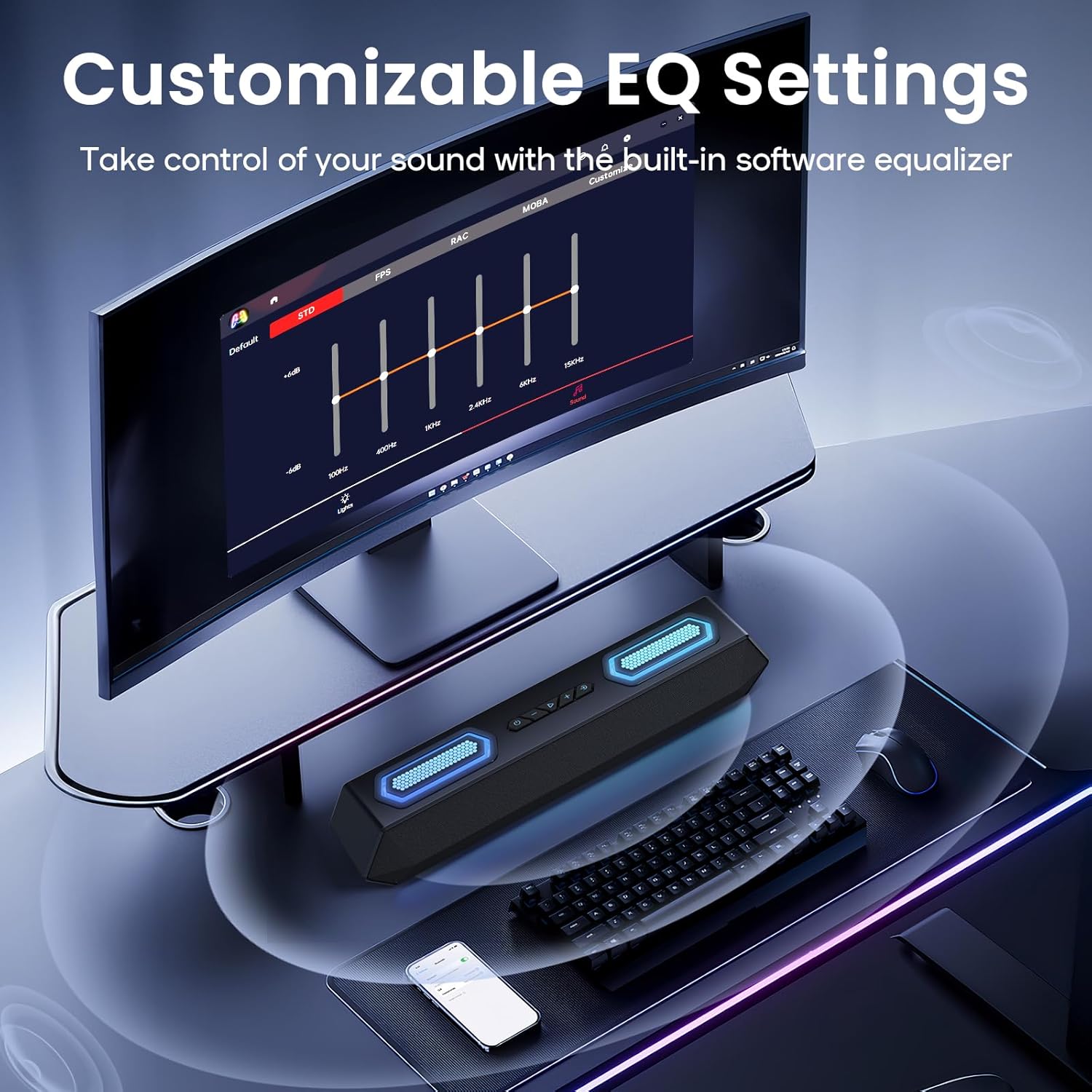
Image: Screenshot of the software interface for customizable EQ settings, showing sliders for bass, treble, and midrange adjustments.
5.1 Settings tal-EQ li jistgħu jiġu personalizzati
- The software allows you to adjust bass, treble, and midrange frequencies to create your preferred sound profile.
- Pre-set EQ modes may be available for different content types (e.g., gaming, music, movies).
5.2 Modi ta' Dawl RGB

Image: The Deeyaple Computer Speakers displaying various vibrant RGB lighting effects, including 12 presets and transitions controlled via PC software.
- Access 12 dynamic RGB effects through the software.
- Customize colors, brightness, and lighting patterns.
- Features include Screen Color Sync, which matches on-screen colors, and Music Reactive Lighting, which pulses with your audio.
Note: Some users have reported that the software may require an online account or login. If you prefer not to use the software, basic lighting modes can be cycled via the physical button, and volume can be controlled via your connected device.
6. Speċifikazzjonijiet
| Karatteristika | Dettall |
|---|---|
| Isem tal-Mudell | G4C |
| Tip ta' Kelliem | Speaker li jista ’jinġarr |
| Qawwa tal-Ħruġ Massimu tal-Ispeaker | 40 Watts |
| Teknoloġija tal-Konnettività | Bluetooth 5.3, USB Audio |
| Karatteristiċi Speċjali | Bass Boost, LED Light (RGB), Software Custom EQ, Screen Color Sync, Music Reactive Lighting |
| Apparati Kompatibbli | PC, Laptop, Smartphone, Tablet, Gaming Console (Xbox, PS4) |
| Kulur | Iswed |
| Dimensjonijiet tal-Prodott | 13.5"D x 2.5"W x 3.34"H |
| Piż tal-oġġett | 2.27 liri |
| Provvista tal-Enerġija | Adapter tal-Enerġija Esterna |
| UPC | 850060113321 |
7 Issolvi l-problemi
| Problema | Soluzzjoni Possibbli |
|---|---|
| L-ebda ħoss mill-kelliema. |
|
| Tqabbil Bluetooth ifalli. |
|
| Id-dwal RGB mhumiex jaħdmu jew huma mwaħħlin. |
|
| Sound quality issues (e.g., distortion, weak bass). |
|
| Software requires login/account. |
|
8. Manutenzjoni
- Tindif: Uża drapp artab u niexef biex tnaddaf il-wiċċ tal-ispiker. Tużax prodotti tat-tindif likwidi jew materjali li joborxu.
- Ħażna: Aħżen l-ispiker f'post frisk u niexef 'il bogħod mix-xemx diretta u minn temperaturi estremi.
- Immaniġġjar: Avoid dropping the speaker or exposing it to strong impacts.
- Espożizzjoni għall-Ilma: This product is not waterproof. Keep it away from water and high humidity.
9. Garanzija u Appoġġ
For warranty information and technical support, please refer to the warranty card included with your product or visit the official Deeyaple websit. Żomm l-irċevuta tax-xiri tiegħek għal pretensjonijiet ta' garanzija.
For further assistance, you may contact Deeyaple customer service through their official channels.


