Introduzzjoni
The MUSKY MS5K Smart Karaoke Machine offers an enhanced entertainment experience with advanced features for various occasions. This manual provides detailed instructions to help you set up and operate your device effectively.
Karatteristiċi ewlenin:
- 1080P Wireless Screen Mirroring: Seamlessly connect smartphones, tablets, or TV boxes to a TV or projector.
- Theater-Grade 3D Surround Sound: Equipped with 6 high-performance sound units and DSP 3D surround sound for rich acoustics and enhanced bass.
- Pro-Grade Wireless Microphones: Two DSP-optimized wireless microphones with 12-hour runtime, real-time echo control, and anti-howling technology. Features three scene modes: Outdoor, Karaoke, and Conference.
- MUSKY Audio Hearing-Safe Technology: Automatically adjusts high frequencies when detecting children's voices (85dB+ threshold) to protect hearing.
- Użu f'Xenarji Multipli: Ideal for home parties, birthdays, business meetings, or online teaching.
X'hemm fil-Kaxxa
Ivverifika li l-komponenti kollha huma preżenti fil-pakkett:
- MS5K Smart Karaoke Machine
- 2 Mikrofoni Wireless
- Adattatur AC għal DC
- Kontroll mill-bogħod
- Kejbil tas-Sajjetti
- Type-C Cable Line
- HDMI Cable Line
- Manwal għall-Utent

Image: The MUSKY MS5K Smart Karaoke Machine is shown alongside its included accessories: two wireless microphones, a remote control, an AC adapter, a Lightning cable, a Type-C cable, an HDMI cable, and the user manual.
Setup
1. Tixgħil u Iċċarġjar
Connect the provided AC to DC adapter to the DC IN port on the back of the MS5K unit and plug it into a power outlet. The unit has a built-in Lithium Ion battery for portable use. The wireless microphones require 2 AAA batteries (included) and can be charged by placing them in their designated slots within the main unit.

Image: A diagram illustrating the back panel of the MS5K unit, showing the DC IN port for the power adapter, along with USB, HDMI IN/OUT, Micro SD, and AUX ports.
2. Issettjar tal-Mikrofonu
- To power on a microphone, press and hold the power button on the microphone.
- The microphones automatically connect to the MS5K unit.
- Adjust microphone volume using the +/- buttons on the microphone.
- To charge, place the microphones into the dedicated slots under the flip-up screen.
3. Screen Mirroring (iOS Example)
The MS5K supports wireless screen mirroring to display content on a larger screen (TV/projector).
- Connect the MS5K to your TV via the HDMI OUT port.
- Press and hold the power button on the MS5K for 3 seconds to turn it on.
- Press the "MODE" button on the MS5K to switch to "HDMI" mode.
- On your iOS device, enable screen mirroring.
- Select the MS5K device (e.g., "Dualcast-XXXXXX") from the available devices.
- Input the PSK Key displayed on your TV screen into your iOS device.
- Ikklikkja OK biex tistabbilixxi l-konnessjoni.
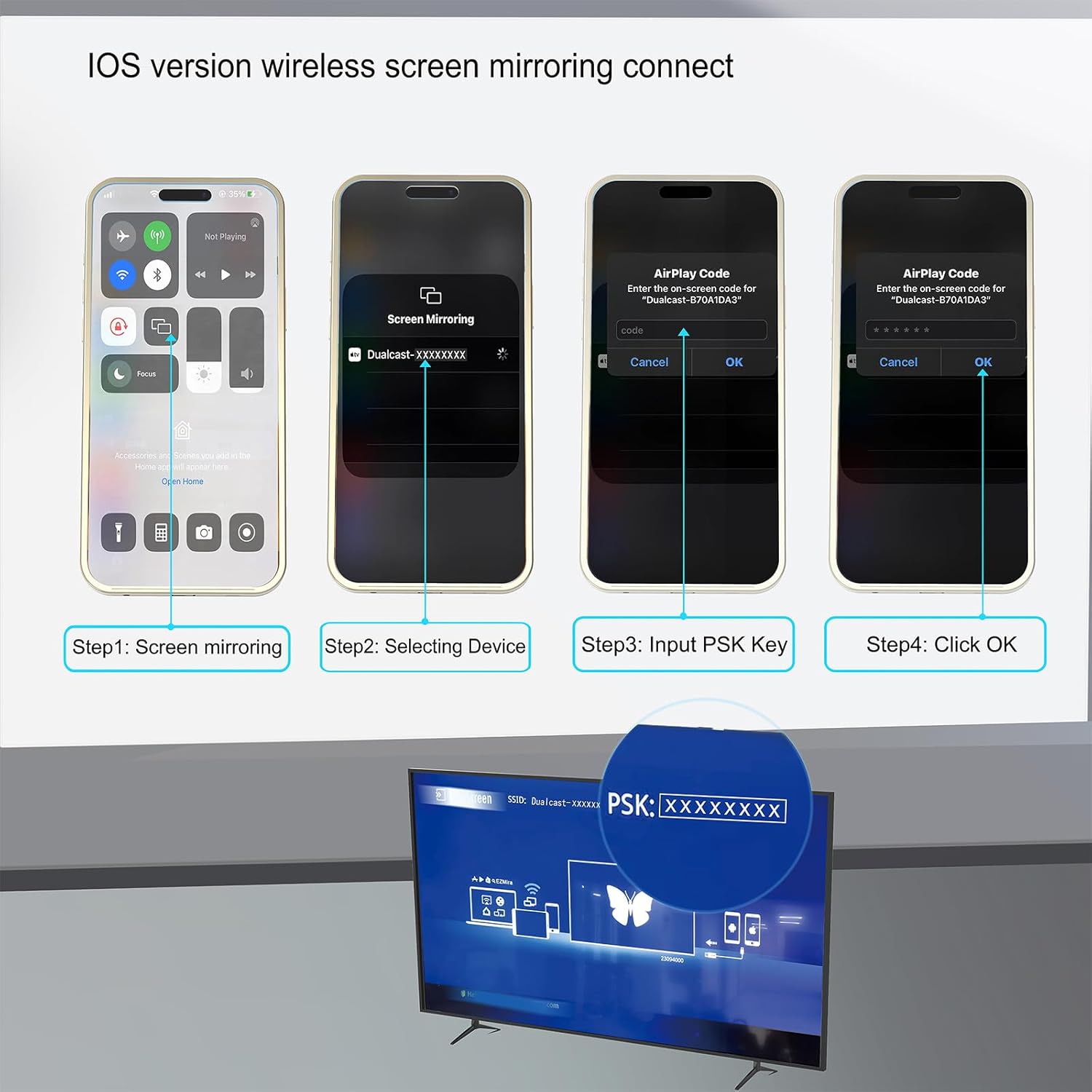
Image: A step-by-step visual guide demonstrating how to connect an iOS device to the MS5K for screen mirroring, showing the device selection and PSK key input on the TV.

Image: A detailed diagram showing the connections and steps for FHD Wireless Screen Mirroring from a mobile device to a TV via the MS5K unit.
Istruzzjonijiet Operattivi
1. Main Interface and App Usage
The MS5K features a flip-up touchscreen display that provides access to various applications and settings. Ensure the unit is connected to Wi-Fi for online features.
- YouTube: Stream karaoke videos directly from YouTube (requires Wi-Fi connection).
- Librerija tal-Mużika: Access and manage your local music files.
- Local Media: Play offline music and video content.
- KaraFun: A dedicated karaoke app to unleash your inner singer (may require subscription).
- Spotify: Connect your Spotify account to stream music.
- Other Apps: Access additional apps like Chrome, Play Store, etc.

Image: The main interface of the MUSKY MS5K touchscreen, displaying icons for YouTube, Music Library, Local Media, KaraFun, and other apps.
2. Audio Controls and Effects
- Volum Prinċipali: Adjust the overall speaker volume using the large rotary knob on the top panel or the on-screen controls.
- Modi tal-Mużika: Select from various music modes such as Hi-Fi, Outdoor, and Bass to optimize sound for different environments.
- Microphone Modes/Effects: Choose from different microphone effects including Original, Karaoke, Super, Professional, Monster, Popular, Cartoon, and Custom settings for reverb, treble, and bass.
- Tbaxxija tal-Mużika: Use the music ducking feature to automatically lower background music volume when speaking or singing into the microphone.
Video: A demonstration of the MUSKY MS5K Karaoke Machine's operation, showcasing its interface and various functions.
Speċifikazzjonijiet
| Karatteristika | Dettall |
|---|---|
| Piż tal-oġġett | 8.18 liri |
| Dimensjonijiet tal-Prodott | 8.3 x 11.8 x 10.6 pulzieri |
| Numru tal-Mudell tal-Oġġett | MS5K |
| Batteriji | 2 batteriji AAA meħtieġa (inklużi) |
| Apparati Kompatibbli | Screen mirroring, HDMI, USB, AUX IN, AUX OUT, TF, SD |
| Tip ta' Konnettur | HDMI, USB Type A |
| Għadd tal-Kelliem | 4 |
| Tip ta 'batterija | Jonju tal-litju |
| Sors tal-Enerġija | Ipplaggja l-Elettriku |
| Karatteristika Speċjali | Smart Karaoke System with Screen mirroring, 2 Wireless Self-Charging Mics, 300W Peak Power Rechargeable Speaker, Portable to connect TV, AUX-IN/OUT, WiFi 2.4G/5G, Bluetooth 5.3 |


