1. Introduzzjoni
This manual provides essential information for the proper setup, operation, and troubleshooting of your HCDZ replacement remote control. This remote is designed to be compatible with specific QFX portable PA speaker systems, including models PBX-621501, PBX-2100, and PBX-710700BTL.
The remote control operates using infrared (IR) technology and requires no programming. Simply insert the batteries, and it will be ready for use.
2. Konfigurazzjoni: Installazzjoni tal-Batterija
Your HCDZ replacement remote control requires two (2) AAA batteries for operation. Batteries are not included with the remote control.
- Sib il-kompartiment tal-batterija fuq wara tal-kontroll remot.
- Żerżaq l-għatu tal-kompartiment tal-batterija 'l isfel jew 'il barra biex tiftaħu.
- Insert two new AAA batteries, ensuring the positive (+) and negative (-) terminals align correctly with the markings inside the compartment. Incorrect insertion can prevent the remote from functioning.
- Żerżaq l-għatu tal-kompartiment tal-batterija lura f'postu sakemm tikklikkja sew.

Figura 2.1: View tal-kontroll remot bil-kompartiment tal-batteriji miftuħ, li juri fejn għandek iddaħħal żewġ batteriji AAA.
Once batteries are installed, the remote control is ready for immediate use with your compatible QFX PA speaker system. No additional programming or pairing is required.
3. Istruzzjonijiet Operattivi
The HCDZ replacement remote control operates via infrared (IR) signals. Ensure a clear line of sight between the remote control and the IR sensor on your QFX PA speaker system for optimal performance. The maximum effective range is approximately 8 meters (26 feet).
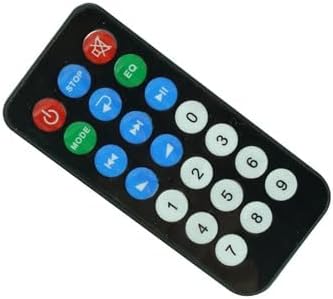
Figura 3.1: Quddiem view of the HCDZ replacement remote control, showing various function buttons.
Familiarize yourself with the buttons on the remote control. Common functions typically include:
- Buttuna tal-Qawwa: To turn the speaker system on or off.
- Buttuna tal-Modalità: To switch between input modes (e.g., Bluetooth, USB, SD, FM Radio, AUX).
- Kontroll tal-Volum: Buttons to increase or decrease the volume.
- Kontrolli tal-daqq: Play/Pause, Skip Forward, Skip Backward buttons for media playback.
- Buttuna EQ: To cycle through equalizer presets.
- Buttuna Mute: To temporarily silence the audio output.
- Tastiera numerika: For direct track selection or FM radio frequency input.
Refer to your QFX PA speaker system's original manual for specific functions and their corresponding remote control buttons, as functionality may vary slightly between speaker models.
4. Manutenzjoni u Kura
To ensure the longevity and proper functioning of your remote control, observe the following guidelines:
- Kundizzjonijiet Ambjentali: Do not expose the remote control to extremely hot or humid environments. Avoid direct sunlight or placement near heat sources.
- Użu tal-batterija: Always replace all batteries with new ones of the same type (AAA). Do not mix new batteries with old ones, as this can lead to leakage or improper operation.
- Ħażna fit-Tul: If the remote control will not be used for an extended period, remove the batteries to prevent potential damage from battery leakage and corrosion.
- Tindif: Naddaf il-kontroll remot b'ċarruta ratba u niexfa. Tużax prodotti tat-tindif likwidi jew materjali li joborxu.

Figura 4.1: Lura view of the HCDZ remote control with the battery compartment cover securely closed.
5 Issolvi l-problemi
If you experience issues with your remote control, refer to the following troubleshooting steps:
- Il-Kontroll mill-bogħod ma Jirrispondix:
- Ibdel il-batteriji: The most common cause of malfunction is depleted batteries. Replace both AAA batteries with fresh ones.
- Iċċekkja t-Terminali tal-Batterija: Ensure the batteries are inserted correctly, with positive (+) and negative (-) terminals aligned as indicated inside the battery compartment. Check for any corrosion on the terminals and clean if necessary.
- Limited Range or Intermittent Function:
- Imxi Eqreb: The remote control has a maximum range of 8 meters. Move closer to the QFX PA speaker system.
- Neħħi l-Ostruzzjonijiet: Ensure there are no physical obstructions (e.g., furniture, people) between the remote control and the IR sensor on the speaker system.
- Evita l-Interferenza: Direct sunlight or strong artificial lighting (e.g., fluorescent lights) can interfere with IR signals. Try operating the remote in a different lighting condition or angle.
- Speaker System Not Responding to Any Remote Command:
- Check Speaker Power: Ensure the power cord to your QFX PA speaker system is securely plugged in and the speaker is turned on.
- Speaker IR Sensor: Verify that the IR sensor on your speaker system is not blocked or dirty.
If the issue persists after following these steps, consult the original manual for your QFX PA speaker system or contact the speaker system manufacturer for further assistance.
6. Speċifikazzjonijiet
- Ditta: HCDZ
- Kompatibilità: QFX PBX-621501, PBX-2100, PBX-710700BTL Portable PA Speaker Systems
- Teknoloġija tal-Konnettività: Infra-aħmar (IR)
- Karatteristika Speċjali: No programming needed; works out of the package
- Medda massima: Madwar 8 metri (26 pied)
- Number of Supported Devices: 1 (one QFX PA speaker system at a time)
- Batteriji Meħtieġa: 2 x AAA (mhux inklużi)


