1. Prodott Aktarview
The Algo 8180 SIP Audio Alerter is a high-performance IP speaker designed for versatile audio applications, including voice paging, emergency notifications, and loud ringing. It features a Wideband G.722 HD voice codec for clear audio and is suitable for various environments such as education, enterprise, and public spaces. The device can function as a loud ringer, playing custom WAV files from its 1GB memory, and supports up to 10 Ring extensions for integration with telephone systems. It also supports multicast send/receive for scalable integration with other Algo IP devices.
This product bundle includes the Algo 8180 IP Audio Alerter, an Ethernet Cable, Cable Ties, and a 6th Avenue Fiber Cloth.
2. Karatteristiċi ewlenin
- Wideband Audio Performance: Equipped with the Wideband G.722 codec for clear, intelligible voice paging and emergency alerts.
- Scalable Multicast Compatibility: Supports up to 50 multicast zones for dynamic paging across expansive areas, minimizing network traffic.
- Dynamic Volume Control & Talkback: Features Ambient Noise Compensation to automatically adjust speaker volume and supports two-way communication.
- Multi-Application Functionality: Multiple SIP registrations for Page (50), Emergency Alert (10), and Ring (10) extensions, allowing diverse use cases.
- Custom WAV File Appoġġ: Capable of playing custom WAV files from its 1GB memory for alerts and ringing.
3. Komponenti u Kontrolli

Figura 3.1: Algo 8180 IP Audio Alerter shown with included Ethernet cable, cable ties, and fiber cloth.

Figura 3.2: Side profile of the Algo 8180, highlighting its compact design.

Figura 3.3: Wara view of the Algo 8180, displaying the RJ45 network port, speaker output terminals, audio output, and relay connections. The serial number and MAC address are also visible.

Figura 3.4: Dimensional drawing of the Algo 8180, indicating its height (7 inches / 17.8 cm), width (4 inches / 10.2 cm), and depth (2.6 inches / 6.5 cm).
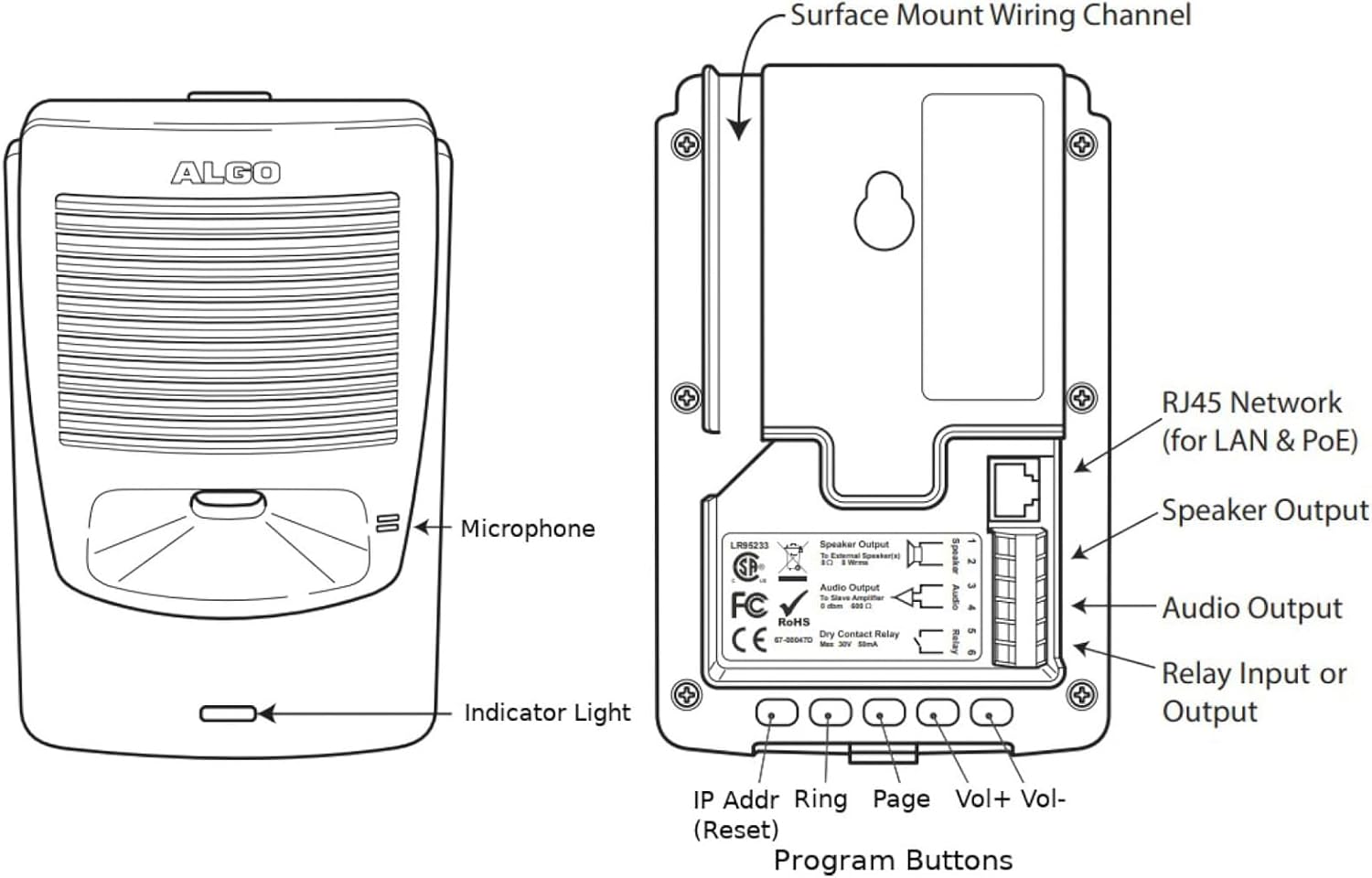
Figura 3.5: Detailed diagram of the Algo 8180, identifying the microphone, indicator light, RJ45 network port (for LAN & PoE), Speaker Output, Audio Output, Relay Input or Output, and Program Buttons (IP Addr, Ring, Page, Vol+, Vol-).
3.1. Portijiet u Konnessjonijiet
- Port tan-Netwerk RJ45: Used for Ethernet connection and Power over Ethernet (PoE).
- Riżultat tal-Kelliem: Terminals for connecting external speakers (8 Ohm, 8 Wrms).
- Output Awdjo: For connecting to a slave amplifier (0 dBm, 600 Ohm).
- Dry Contact Relay: Input or output for external device control (Max 30V, 50mA).
3.2. Front Panel Indicators and Controls
- Mikrofonu: Integrated for talkback functionality.
- Dawl Indikatur: Provides visual status of the device.
- Buttuni tal-Programm: Located on the rear, these buttons are used for configuration and control:
- IP Addr (Reset): Used to display or reset the IP address.
- Ring: For configuring ring group settings.
- Paġna: For configuring paging settings.
- Vol+ / Vol-: Jaġġusta l-volum tal-kelliem.
4. Setup
4.1. Spakkjar
Carefully remove all components from the packaging. Verify that all items listed in the bundle contents are present and undamaged.
4.2. Immuntar
The Algo 8180 can be surface mounted. Use appropriate screws and anchors for the mounting surface. Ensure the mounting location allows for proper cable routing and access to controls.
4.3. Network Connection (PoE)
- Connect one end of the provided Ethernet cable to the RJ45 port on the Algo 8180.
- Connect the other end of the Ethernet cable to a PoE-enabled network switch or a PoE injector.
- The device will power on automatically via PoE. The indicator light will illuminate to show power status.
4.4. Audio Connections (Optional)
If connecting external speakers or a slave ampaktar ħaj:
- For external speakers, connect speaker wires to the 'Speaker Output' terminals. Observe polarity.
- For a slave amplifier, connect an audio cable to the 'Audio Output' terminals.
4.5. Relay Connections (Optional)
To integrate with external devices via the dry contact relay:
- Connect the control wires from the external device to the 'Dry Contact Relay' terminals.
- Configure the relay behavior via the device's web interface.
5. Operazzjoni
5.1. Konfigurazzjoni Inizjali (Web interface)
Aċċess għall-apparat web interface for full configuration. The IP address can be found using a network scanner or by pressing the 'IP Addr' button on the device.
- Iftaħ a web browser and enter the Algo 8180's IP address.
- Log in using the default credentials (refer to the Algo documentation for default username/password).
- Configure SIP registration details, network settings, and audio parameters.
5.2. Paging Functionality
The Algo 8180 supports SIP paging and multicast paging.
- SIP Paging: Register the device as a SIP extension on your IP PBX. Dial the extension to initiate a voice page.
- Multicast Paging: Configure multicast zones in the web interface. Send multicast audio streams to the configured IP address and port.
5.3. Loud Ringer Functionality
The device can act as a loud ringer for telephone systems.
- Register the Algo 8180 as a SIP extension for ringing.
- Upload custom WAV files for ringtones via the web interface.
- Assign ring extensions to specific ring groups or individual telephones.
5.4. Emergency Alerting
Pre-configured WAV files can be triggered for emergency alerts.
- Configure emergency alert extensions in the web interface.
- Alerts can be triggered by dialing the assigned extension or via a connected button.
5.5. Dynamic Volume Control (Ambient Noise Compensation)
The Algo 8180 can automatically adjust its volume based on ambient noise levels. Enable and configure this feature in the web interface to ensure messages are always audible without being excessively loud.
5.6. Talkback Function
The integrated microphone allows for two-way communication during paging or emergency situations. This feature can be enabled and configured via the web interface.
6. Manutenzjoni
6.1. Tindif
To clean the Algo 8180, gently wipe the exterior with a soft, dry, or slightly damp cloth. Do not use abrasive cleaners or solvents. Ensure the device is powered off before cleaning.
6.2. Aġġornamenti tal-Firmware
Periodically check the Algo website for firmware updates. Firmware updates can provide new features, performance improvements, and security enhancements. Follow the instructions provided by Algo for the update process, typically performed via the web interface.
7 Issolvi l-problemi
| Ħruġ | Kawża Possibbli | Soluzzjoni |
|---|---|---|
| Ebda enerġija/Dawl indikatur mitfi | No PoE connection; Faulty Ethernet cable; PoE source issue. | Verify Ethernet cable connection; Ensure PoE switch/injector is active; Try a different PoE port or cable. |
| Ebda output awdjo | Volume too low; Incorrect SIP registration; Network connectivity issue; Speaker wiring issue. | Increase volume via web interface or buttons; Check SIP registration status; Verify network connection; Inspect speaker wiring. |
| Ma jistax jaċċessa web interface | Indirizz IP mhux korrett; Problema ta' konnettività tan-netwerk; Firewall li jimblokka l-aċċess. | Confirm IP address (press IP Addr button); Check network cable; Temporarily disable firewall for testing; Ensure device is powered on. |
| Kwalità fqira tal-awdjo | Network congestion; Incorrect codec settings; Environmental noise. | Check network bandwidth; Verify G.722 codec is used; Enable Ambient Noise Compensation. |
| Ringer not activating | Incorrect ring extension configuration; WAV file issue; SIP registration problem. | Review ring extension settings in web interface; Ensure WAV file is valid and uploaded; Verify SIP registration for ringing. |
8. Speċifikazzjonijiet
| Speċifikazzjoni | Valur |
|---|---|
| Brand | Algo |
| Mudell | 8180 |
| Dimensjonijiet tal-Prodott | 7 x 5 x 3 pulzieri (17.8 x 12.7 x 7.6 ċm) |
| Piż tal-oġġett | 1.73 liri (0.78 kg) |
| Sors tal-Enerġija | Enerġija fuq Ethernet (PoE) |
| Codec Awdjo | Wideband G.722 HD voice |
| Memorja | 1GB for custom WAV files |
| SIP Registrations | Page (50), Emergency Alert (10), Ring (10) |
| Żoni Multicast | Sa 50 |
| Output Relay | Dry Contact, Max 30V, 50mA |
| Manifattur | Algo |
| Data L-Ewwel Disponibbli | 23 ta’ Mejju, 2025 |
| UPC | 094148724423 |
9. Informazzjoni dwar Garanzija
Algo products typically come with a manufacturer's warranty covering defects in materials and workmanship. For specific warranty terms, duration, and conditions, please refer to the official warranty statement provided with your product or visit the Algo Communications Products Ltd. websit.
10. Appoġġ Tekniku
For technical assistance, troubleshooting beyond this manual, or further product information, please contact Algo Technical Support. You can find contact details and additional resources, including FAQs and software downloads, on the official Algo Communications Products Ltd. websit.
Websit: www.algosolutions.com


