1. Introduzzjoni
This manual provides essential information for the proper setup, operation, and maintenance of your Ulefone Armor 29 Ultra 5G rugged smartphone. Please read this guide thoroughly before using your device to ensure optimal performance and longevity.
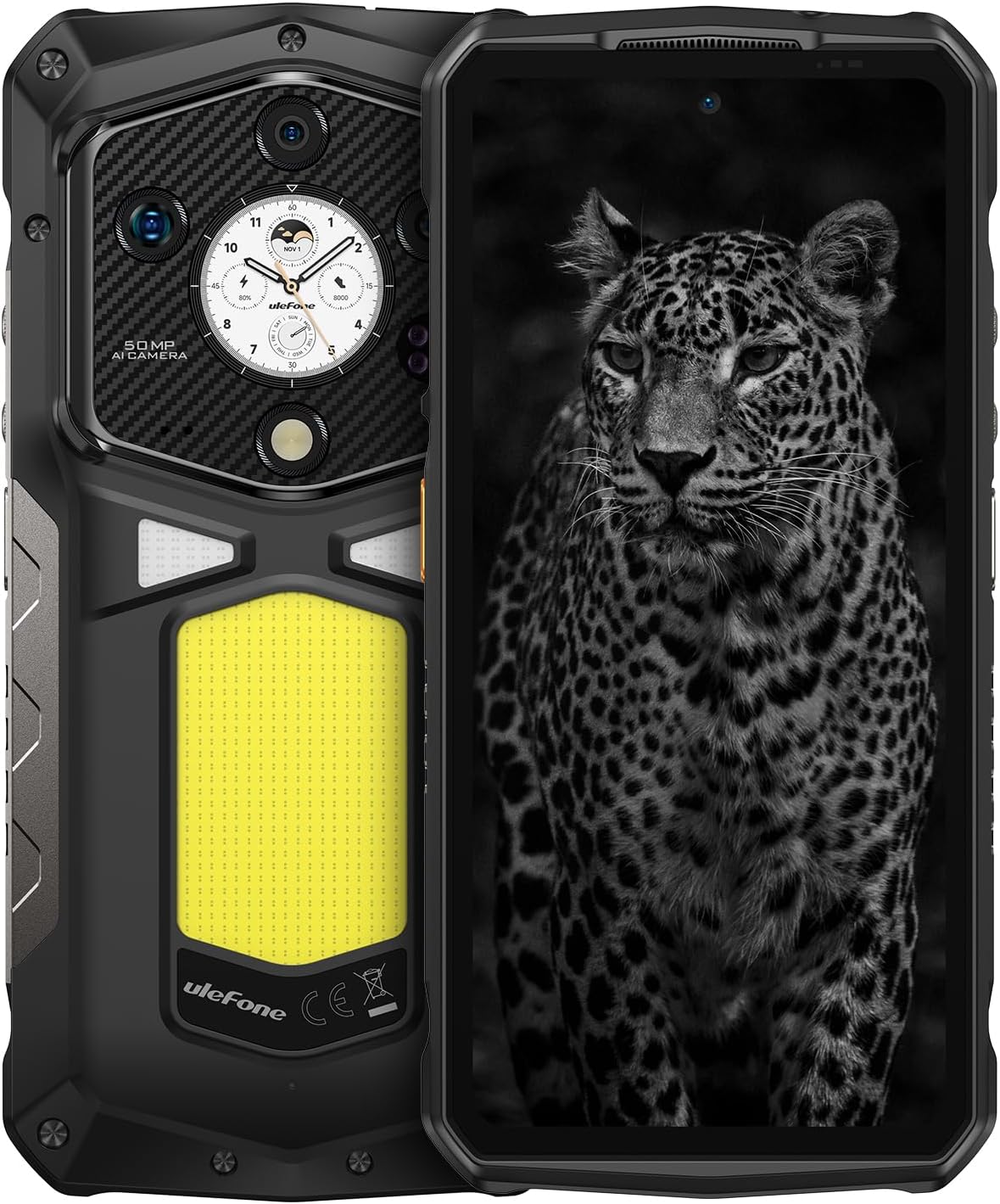
Immaġni 1.1: Quddiem u wara view of the Ulefone Armor 29 Ultra 5G smartphone.
2. Setup
2.1 Kontenut tal-Kaxxa
Ivverifika li l-oġġetti kollha huma preżenti fil-pakkett:
- Ulefone Armor 29 Ultra 5G Smartphone
- Ċarġer tal-Enerġija AC (100~240V)
- Kejbil tad-Data tat-Tip-Ċ għal tat-Tip-Ċ (100cm)
- Protettur tal-Iskrin (applikat minn qabel jew separat)
- SIM Trej Ejector
- Lanyard

Image 2.1: Contents included in the Ulefone Armor 29 Ultra retail box.
2.2 Installazzjoni tal-Karta SIM
- Sib it-trej tal-kard SIM fuq il-ġenb tal-apparat.
- Daħħal l-għodda tal-ejecter tat-trej tas-SIM fit-toqba ż-żgħira ħdejn it-trej u agħfas sew sakemm it-trej joħroġ 'il barra.
- Poġġi l-kard(s) Nano-SIM u/jew il-kard microSD tiegħek fl-islottijiet apposta fuq it-trej. Kun żgur li l-orjentazzjoni tkun korretta.
- Erġa' daħħal it-trej fit-telefon bir-reqqa sakemm ikun laħlaħ mal-qafas tal-apparat.
2.3 Qawwa Inizjali
Press and hold the Power button (located on the right side of the phone) until the Ulefone logo appears. Follow the on-screen instructions to complete the initial setup, including language selection, Wi-Fi connection, and Google account setup.
3. Istruzzjonijiet Operattivi
3.1 Prestazzjoni u Ħażna
The Armor 29 Ultra is powered by the MediaTek Dimensity 9300+ processor, offering robust performance. It features up to 32GB RAM (16GB physical + 16GB virtual) and 1TB internal storage, expandable up to 2TB via microSD card.
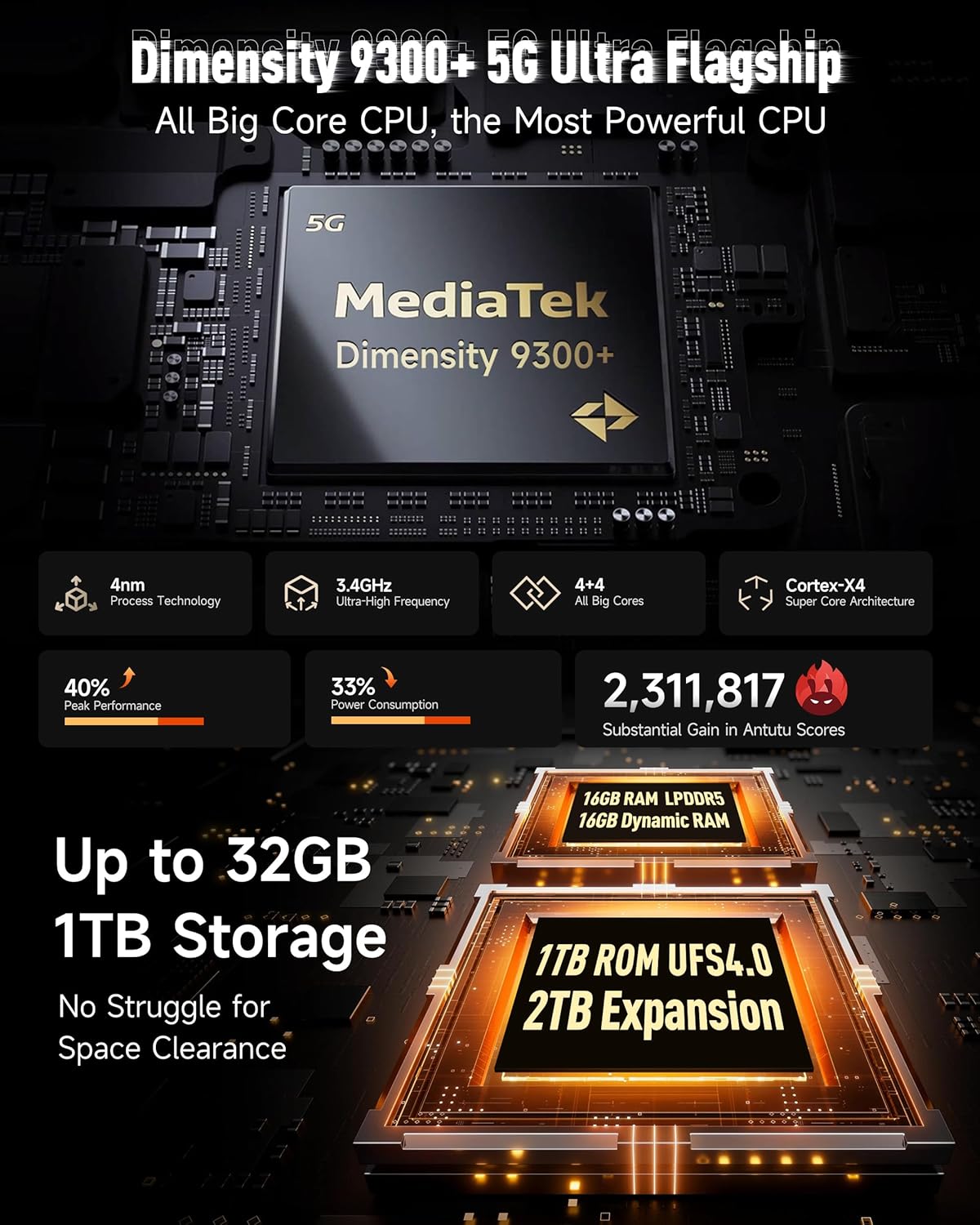
Immaġni 3.1: Fuqview of the Dimensity 9300+ processor and memory configuration.
3.2 Dual AMOLED Display
The device features a 6.67-inch flexible AMOLED main display with a 120Hz refresh rate and up to 2200 nits peak brightness. A 1.04-inch flexible AMOLED sub-display on the rear provides quick access to notifications, music controls, and selfie previews.

Image 3.2: Details of the 6.67-inch main AMOLED display and the 1.04-inch sub-display.
3.3 Sistema tal-Kamera
The Armor 29 Ultra is equipped with a versatile camera system:
- Kamera Prinċipali ta' 50MP: 1-inch Sony IMX989 sensor, capable of 8K video recording.
- Kamera tal-Viżjoni bil-Lejl ta' 64MP: OMNIVISION OV64B sensor with 4 infrared LEDs for enhanced low-light visibility.
- 50MP Ultra-wide Macro Lens: Samsung JN1 sensor with a 117.3° field of view.
- Kamera ta' Quddiem ta' 50MP: Għal selfies u sejħiet bil-vidjo b'riżoluzzjoni għolja.

Immaġni 3.3: Fuqview of the triple rear camera setup and front camera.
3.4 Batterija u Iċċarġjar
The device features a 21200mAh battery. It supports 120W flash charging, allowing for a 20% charge in approximately 10 minutes. Additionally, it offers 10W reverse charging to power other devices.

Image 3.4: Details on the 21200mAh battery capacity and 120W fast charging capabilities.
3.5 LED Light and Warning Lights
The Armor 29 Ultra includes a powerful 1000-lumen LED camping light with 570 LEDs and a 5-watt output. It also features red and blue warning lights for emergency situations, which can operate in constant or flashing modes with selectable alarm sounds.

Image 3.5: Illustration of the 1000-lumen LED light and emergency warning lights.
3.6 Robustezza u Durabilità
The phone is designed to meet MIL-STD 810G standards and boasts IP68 and IP69K ratings, providing protection against water, dust, dirt, sand, humidity, and salt mist. The display is protected by Corning Gorilla Glass 5.

Image 3.6: Visual representation of the phone's IP68/IP69K and MIL-STD-810H durability ratings.
3.7 Konnettività
The Armor 29 Ultra supports global 5G networks with dual SIM dual standby. It features Wi-Fi 7, Bluetooth 5.4, NFC, Infrared, USB 3.2 Gen 2, and comprehensive GPS (GPS + GLONASS + Beidou + Galileo).

Image 3.7: Information on 5G network support and Wi-Fi 7 capabilities.
3.8 Konnettur ta' Espansjoni uSmart
The device includes a uSmart Expansion Connector for compatibility with various external accessories, enhancing its functionality for specialized tasks.

Image 3.8: The uSmart Expansion Connector and examples of compatible accessories.
3.9 Android 15 and AI Features
The Armor 29 Ultra runs on Android 15, offering the latest features and security updates. It integrates an AI engine for enhanced computations and supports third-party AI applications.

Image 3.9: Visual representation of the Android 15 operating system interface.
4. Manutenzjoni
4.1 Kura Ġenerali
- Evita li tesponi t-telefon għal temperaturi estremi jew dawl tax-xemx dirett għal perjodi twal.
- Tippruvax tiżżarma l-apparat, għax dan jannulla l-garanzija u jista' jikkawża ħsara.
- Keep the charging port and other openings free from dust and debris.
4.2 Tindif
To clean the device, use a soft, lint-free cloth. For stubborn dirt, a slightly damp cloth with mild soap can be used, ensuring all ports are securely closed. Avoid using harsh chemicals or abrasive materials.
4.3 Aġġornamenti tas-Software
Iċċekkja u installa aġġornamenti tas-softwer regolarment biex tiżgura prestazzjoni ottimali, sigurtà, u aċċess għal karatteristiċi ġodda. Mur fuq Settings > Sistema > Aġġornament tas-sistema biex tiċċekkja għal aġġornamenti disponibbli.
5 Issolvi l-problemi
5.1 L-Apparat Mhux Qed Jixgħel
- Kun żgur li l-batterija hija ċċarġjata. Qabbad it-telefon mal-ċarġer u stenna ftit minuti qabel ma tipprova tixgħelu mill-ġdid.
- Agħfas u żomm il-buttuna tal-Qawwa għal mill-inqas 10-15-il sekonda biex twettaq restart furzat.
5.2 Kwistjonijiet ta' Iċċarġjar
- Iċċekkja li l-kejbil tal-iċċarġjar u l-adapter huma konnessi sew u bla ħsara.
- Try using a different compatible charger and cable.
- Clean the charging port gently with a dry, soft brush to remove any debris.
5.3 Problemi ta' Konnettività tan-Netwerk
- Iċċekkja jekk il-kard tas-SIM hijiex imdaħħla u attivata sew.
- Ibda mill-ġdid it-telefon.
- Mur fuq Settings > Netwerk u internet > Netwerk mobbli and ensure mobile data is enabled and the correct network type is selected.
- Irrisettja s-settings tan-netwerk: Settings > Sistema > Għażliet ta' reset > Irrisettja Wi-Fi, mobbli u Bluetooth.
5.4 Camera Malfunction
- Clear the cache and data of the Camera app: Settings > Apps > See all apps > Camera > Storage & cache > Clear cache / Clear storage.
- Ibda mill-ġdid it-telefon.
- Kun żgur li m'hemm l-ebda ostaklu fiżiku fuq il-lentijiet tal-kamera.
6. Speċifikazzjonijiet
| Karatteristika | Speċifikazzjoni |
|---|---|
| Dimensjonijiet tal-Prodott | 6.98 x 3.37 x 1.32 pulzieri |
| Piż tal-oġġett | 2.66 libbra (688g) |
| Numru tal-Mudell tal-Oġġett | arm29u |
| Sistema Operattiva | Android 15 |
| Veloċità tas-CPU | 3.4 GHz (Dimensity 9300+) |
| Daqs tal-Memorja RAM Installata | 32 GB (16GB fiżiku + 16GB virtwali) |
| Kapaċità tal-Ħżin tal-Memorja | 1024 GB (1TB), expandable up to 2TB |
| Daqs tal-Wiri tal-Iskrin Permanenti | 6.67 Inches (Main AMOLED) |
| Sub-Display Size | 1.04 Pulzieri (AMOLED) |
| Riffriskar Rata | 120 Hz (Wiri Prinċipali) |
| Riżoluzzjoni | 8K (Scanner Resolution, likely referring to video recording capability) |
| Kamera Prinċipali | 50MP (Sony IMX989, f/1.9) |
| Kamera tal-Viżjoni ta 'Lejl | 64MP (OV64B, f/1.79) with 4 IR LEDs |
| Ultrawide/Macro Camera | 50MP (Samsung JN1, f/2.2, 117.3° FOV) |
| Kamera ta' Quddiem | 50MP |
| Kapaċità tal-batterija | 21200 Milliamp Sigħat |
| Iċċarġjar | Iċċarġjar Flash ta' 120W, Iċċarġjar bil-maqlub ta' 10W |
| Teknoloġiji tal-Konnettività | Bluetooth 5.4, Infrared, NFC, USB 3.2 Gen 2, Wi-Fi 7, 5G |
| GPS | GPS, GLONASS, Beidou, Galileo |
| Karatteristiċi Speċjali | Always On Display, Dual Screen, Fast Charging, Rugged Body, Water Resistant, 1000LM LED Light, Custom Key, uSmart Expansion Connector |
| Awdjo Jack | 3.5 mm |
| Trasportatur Wireless | Jinfetaħ |
7. Garanzija u Appoġġ
7.1 Informazzjoni dwar Garanzija
Ulefone provides a 12-month manufacturer warranty service in the US for the Armor 29 Ultra. This warranty covers manufacturing defects under normal use. Please retain your proof of purchase for warranty claims.
7.2 Appoġġ għall-Klijent
For any questions, technical assistance, or warranty inquiries regarding your Ulefone Armor 29 Ultra, please contact Ulefone customer support. Refer to the contact information provided in your product packaging or visit the official Ulefone websit għal dettalji ta 'appoġġ.


