1. Prodott Aktarview
The MIKIBY Alux60 is a 60% compact wired gaming keyboard featuring Hall Effect magnetic switches, rapid trigger technology, and a durable aluminum gasket-mounted design. It is engineered for high performance and customization, suitable for various operating systems.

Figure 1: MIKIBY Alux60 Hall Effect Gaming Keyboard. This image shows the compact 60% layout with red and black keycaps, highlighting its sleek design.

Figure 2: Alux60 Key Performance Metrics. This image illustrates the core technical specifications of the Alux60 keyboard, including its 0.01mm accuracy, 8K polling rate, 0.125ms ultra-low latency, and 128K ultra-high scanning rate.
2. Kontenut tal-Pakkett
Ivverifika li l-oġġetti kollha huma preżenti fil-pakkett:
- MIKIBY Alux60 Keyboard x 1
- Kejbil USB-C x 1
- Keycap Puller x 1
- Żigarella x 1
- Manwal għall-Utent x 1

Figure 3: Package Contents. This image displays all items included in the product package: the Alux60 keyboard, USB-C cable, ribbon, keycap puller, and user manual.
3. Istruzzjonijiet ta' Setup
3.1 Konnessjoni tat-Tastiera
- Locate the USB-C port on the MIKIBY Alux60 keyboard.
- Qabbad tarf wieħed tal-kejbil USB-C provdut mat-tastiera.
- Connect the other end of the USB-C cable to an available USB port on your computer (PC, Laptop, Mac) or compatible device.
- It-tastiera hija plug-and-play u għandha tiġi rikonoxxuta awtomatikament mis-sistema operattiva tiegħek.
3.2 Kompatibilità tas-Sistema
The MIKIBY Alux60 keyboard is compatible with the following operating systems:
- Windows Vista/XP/7/8/10/11
- Mac OS
3.3 Tibdil bejn Sistemi
To switch between operating system modes:
- For Mac OS: Press FN + A
- For Windows OS: Press FN + S

Figure 4: System Switching and Compatibility. This image provides a visual guide for switching between Mac and Windows systems and confirms broad compatibility.
4. Istruzzjonijiet Operattivi
4.1 Hall Effect Magnetic Switches
The Alux60 utilizes Hall Effect magnetic switches, which detect key presses without physical contact, allowing for instantaneous actuation and ultra-low latency (0.125ms). These switches are ideal for gaming due to their speed and precision.

Figure 5: Magnetic Rookie Switch Details. A detailed diagram showing the internal components of a Magnetic Rookie Switch, including its operating force (32±10gf), total travel (3.4±0.2mm), and service life (100 million times), featuring RT function.
4.2 Modalità ta' Trigger Rapidu
Rapid Trigger mode allows for highly customizable actuation sensitivity and faster double-taps. This feature, combined with a 128K polling rate, provides precise control for competitive gaming.

Figure 6: Rapid Trigger Mode. This image explains the Rapid Trigger Mode, emphasizing its 0.01mm RT accuracy and ultra-low latency for fully customizable trigger points and zero deadzone.
4.3 Kontroll tad-Dawl RGB
The keyboard features 16.8 million color dynamic RGB lighting. You can adjust lighting effects, brightness, and colors using the dedicated web driver or FN key combinations.
- Ixgħel/itfi d-dawl: Fn + X
- Keyboard brightness +: Fn + "
- Keyboard brightness -: Fn + :
- Switch lighting effect: Fn + \|
- Toggle backlight direction: Fn +
- Adjust keyboard light speed -: Fn + [{
- Switch lighting color: Fn + >
- Adjust keyboard light speed +: Fn + ]}
- Irrestawra l-issettjar tal-fabbrika: Fn + Spacebar (hold)

Figure 7: RGB Lighting Controls. An illustration detailing the FN key combinations used to control the keyboard's 16.8 million color RGB backlight, including brightness, effects, and color switching.
4.4 Programmabbli Web Sewwieq
The Alux60 features a professional web-based driver for advanced customization. This driver allows you to configure DKS (Dynamic Keystroke), MT (Mod Tap), TGL (Toggle Key) functions, key mapping, macro editing, and RGB lighting settings directly from your web browser on Windows systems, without requiring software installation.

Figura 8: Web Driver Interface. A screenshot of the web-based driver interface, showing options for keyboard settings, FN layer settings, macro editing, and lighting adjustments.
4.5 FN Shortcuts
The keyboard includes various FN key combinations to access additional functions and multimedia controls. Refer to the diagram below for a comprehensive list of shortcuts.

Figure 9: FN Shortcuts. A comprehensive diagram illustrating various FN key shortcuts for accessing multimedia controls, function keys (F1-F12), and other special commands.
4.6 Qlib tal-Key N
The N-Key Rollover feature ensures that all keys pressed simultaneously are registered accurately without conflict. This is beneficial for fast-paced gaming and complex key combinations.

Figure 10: N-Key Rollover. An image demonstrating the N-Key Rollover feature, which ensures all simultaneous key presses are registered accurately without conflict.
5. Manutenzjoni
5.1 Tindif tat-Tastiera
Biex iżżomm prestazzjoni u dehra ottimali:
- Skonnettja t-tastiera mill-kompjuter tiegħek qabel ma tnaddafha.
- Use a soft, dry cloth to wipe down the keycaps and chassis.
- Għal ħmieġ iebes, ftit damp Jista' jintuża drapp b'sapun ħafif, biex tiżgura li l-ebda likwidu ma jidħol fit-tastiera.
- Uża arja kkompressata biex tneħħi t-trab u l-fdalijiet minn bejn il-keycaps.
5.2 Swiċċijiet li jistgħu jinbidlu bis-sħana
The Alux60 supports hot-swappable magnetic switches, allowing for easy replacement or customization without soldering. Use the included keycap puller and switch puller (if applicable) for this process.
- Neħħi l-għatu taċ-ċwievet bil-mod billi tuża l-puller tal-għatu taċ-ċwievet.
- Using a switch puller, carefully grip the switch and pull it straight up to remove it from the PCB.
- Align the pins of the new magnetic switch with the sockets on the PCB.
- Press the new switch firmly until it clicks into place. Ensure it is seated correctly.
- Ibdel il-għatu taċ-ċwievet.
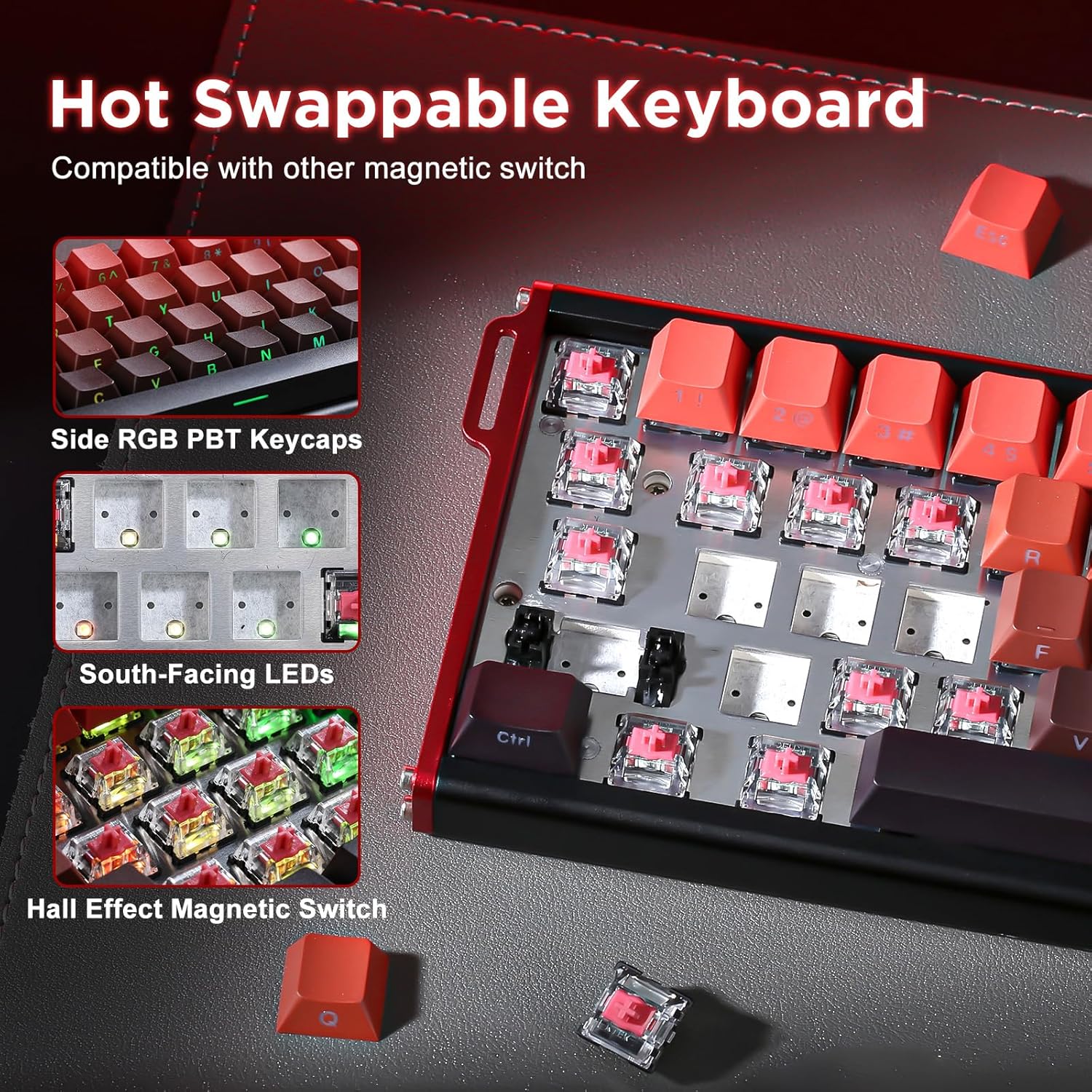
Figure 11: Hot Swappable Keyboard. A close-up view demonstrating the hot-swappable nature of the keyboard, showing how magnetic switches can be easily removed and replaced.
6 Issolvi l-problemi
6.1 It-Tastiera Ma Tirrispondix
- Kun żgur li l-kejbil USB-C huwa konness sew kemm mat-tastiera kif ukoll mal-kompjuter.
- Ipprova qabbad it-tastiera ma' port USB differenti fuq il-kompjuter tiegħek.
- Ittestja t-tastiera fuq kompjuter ieħor biex teskludi problemi speċifiċi tas-sistema.
- If the issue persists, try restoring factory settings by holding Fn + Spacebar.
6.2 RGB Lighting Not Working or Incorrect
- Check the RGB lighting controls using Fn key combinations (refer to Section 4.3).
- Aċċess għall- web driver to verify and adjust lighting settings.
- Ensure the keyboard firmware is up to date (check the MIKIBY webis-sit għal aġġornamenti).
6.3 Customization Issues with Web Sewwieq
- Ensure your keyboard is connected to your computer and recognized.
- Access the customization web interface as instructed in the manual.
- Uża kompatibbli web brawżer (eż., Chrome, Firefox).
- Clear your browser's cache and cookies if you experience loading issues.
7. Speċifikazzjonijiet
| Karatteristika | Dettall |
|---|---|
| Mudell | Alux60 |
| Brand | MIKIBY |
| Teknoloġija tal-Konnettività | USB-C (Bil-fili) |
| Deskrizzjoni tat-Tastiera | Mekkaniċi |
| Tip ta' Swiċċ | Hall Effect Magnetic Rookie Switch |
| Ir-Rata tal-Votazzjoni | 8K Hz |
| Actuation Latency | 0.125ms |
| Qlib taċ-ċavetta | Qlib N-Key |
| Backlighting | 16.8 Miljun Kulur RGB |
| Tappijiet ewlenin | Side-printed PBT Keycaps |
| Materjal | Aluminum (CNC machined body) |
| Apparati Kompatibbli | Konsol tal-Logħob, Laptop, PC, Smartphone, Tablet |
| Piż tal-oġġett | 3.14 liri |
| Dimensjonijiet tal-Pakkett | 14.84 x 5.55 x 2.4 pulzieri |
| Data L-Ewwel Disponibbli | 23 ta’ Mejju, 2025 |
8. Garanzija u Appoġġ
8.1 Informazzjoni dwar Garanzija
Please refer to the product packaging or the official MIKIBY website for detailed warranty information regarding your Alux60 keyboard. Warranty terms typically cover manufacturing defects for a specified period from the date of purchase.
8.2 Appoġġ għall-Klijent
For technical assistance, troubleshooting, or any product-related inquiries, please contact MIKIBY customer support through the official brand webis-sit jew l-informazzjoni ta' kuntatt ipprovduta mad-dokumentazzjoni tax-xiri tiegħek.


