1. Introduzzjoni
Grazzi tax-xiriasing the Sheawasy Mini Retro Digital Camera. This compact and lightweight camera is designed to capture your memories with a unique retro aesthetic, offering both photo and video capabilities. This manual provides detailed instructions on how to set up, operate, and maintain your camera to ensure optimal performance and longevity.

Figure 1.1: Key features of the Sheawasy Mini Retro Digital Camera, highlighting its 1.3-inch LCD screen, video and photo capabilities, included 32GB memory card, compact size, retro aesthetic, and overall design as a cool gadget.
2. Prodott Aktarview u Komponenti
2.1 Kontenut tal-Pakkett
Jekk jogħġbok iċċekkja l-kontenut tal-pakkett biex tiżgura li l-oġġetti kollha huma preżenti:
- 1 x Sheawasy Mini Retro Digital Camera (Main Unit)
- 1 x 32GB Memory Card (Pre-installed)
- 1 x Cable tal-Iċċarġjar tal-USB Type-C
- 1 x Ċinga
- 1 x Keychain
- 1 x Manwal tal-Utent (Dan id-dokument)

Figure 2.1: The Sheawasy Mini Retro Digital Camera shown with its complete set of accessories, including the camera body, a 32GB memory card, a USB Type-C charging cable, a strap, and a keychain.
2.2 Partijiet tal-Kamera
Iffamiljarizza ruħek mal-buttuni u l-portijiet tal-kamera:

Figure 2.2: An annotated image of the camera highlighting its operational controls: the Power/Mode switch, buttons for Time Stamp ON/OFF, Filter Function, and the Shutter Button.
- Power/Mode Switch: Turns the camera on/off and switches between photo, video, and playback modes.
- Ħin St.amp Buttuna ON/OFF: Toggles the date and time stamp on recorded media.
- Filter Function Button: Cycles through available retro filters.
- Buttuna tas-shutter: Jaqbad ritratti jew jibda/jwaqqaf ir-reġistrazzjoni tal-vidjow.
- Skrin LCD bil-kulur ta' 1.3 pulzieri: Displays live feed, status, and allows playback.
- Port USB tat-Tip Ċ: Għall-iċċarġjar u t-trasferiment tad-dejta.
- Slott tal-Karta MicroSD: Għall-inserzjoni ta' memory card.
3. Setup
3.1 Iċċarġjar tal-Kamera
Before first use, fully charge the camera's internal battery. Use the provided USB Type-C cable.
- Connect one end of the USB Type-C cable to the camera's Type-C port.
- Qabbad it-tarf l-ieħor ma' adapter tal-enerġija USB (mhux inkluż) jew mal-port USB tal-kompjuter.
- Id-dawl indikatur tal-iċċarġjar se jixgħel. Se jintefa jew jibdel il-kulur meta l-iċċarġjar ikun komplut.
3.2 Tiddaħħal il-Memory Card
The camera comes with a 32GB memory card pre-installed. If you need to remove or re-insert it:
- Sib is-slott tal-kard microSD fuq il-ġenb tal-kamera.
- Gently push the memory card into the slot until it clicks into place. Ensure the gold contacts face the correct direction (usually towards the screen).
- To remove, push the card in again until it clicks, and it will spring out slightly for you to pull it out.
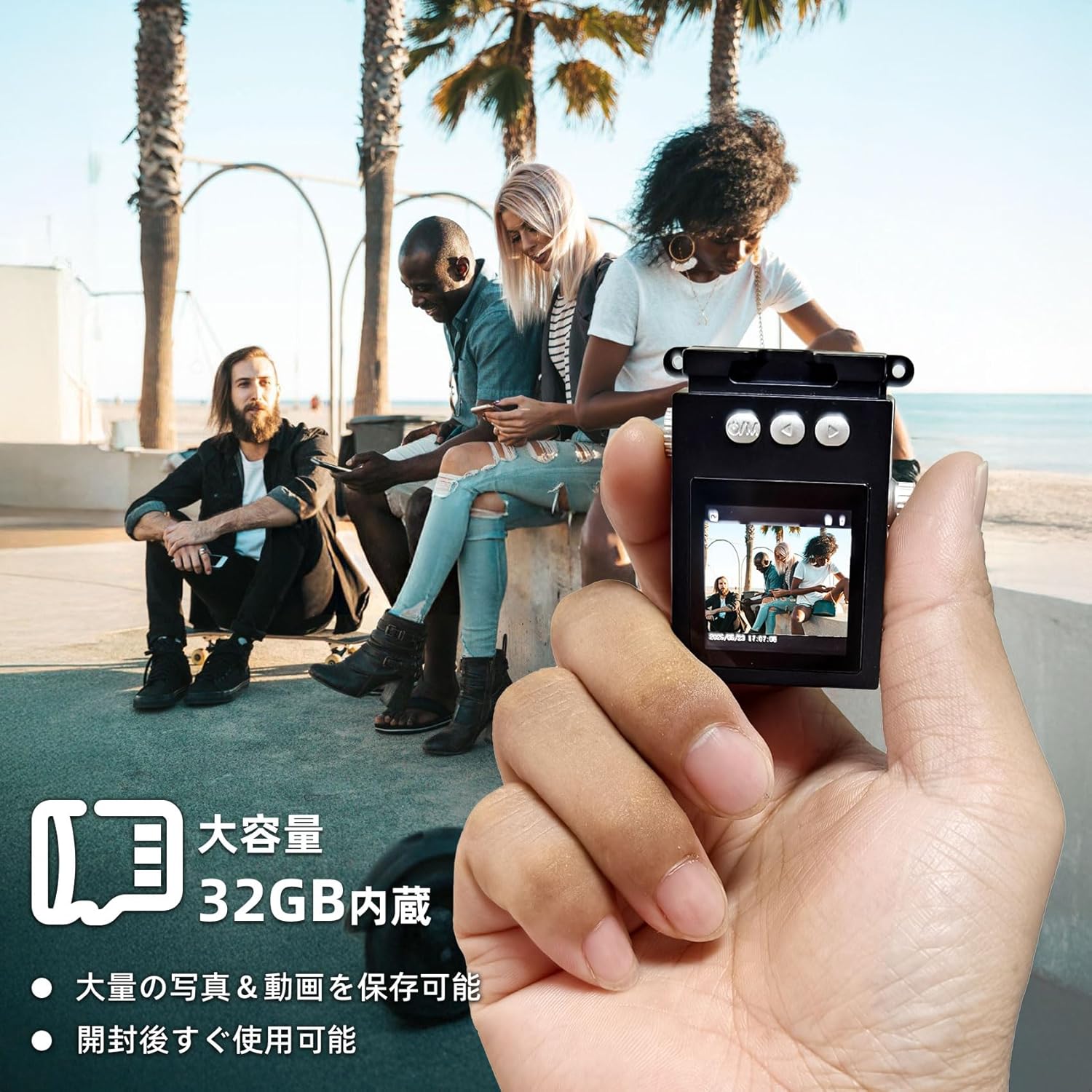
Figure 3.1: The camera is shown in hand, emphasizing its compact size and the inclusion of a 32GB memory card for ample storage of photos and videos.
4. Istruzzjonijiet Operattivi
4.1 Tixgħel/Jitfi
- Biex tixgħel, żżerżaq il- Qawwa/Modalità Swiċċ to the desired mode (Photo or Video).
- Biex titfi, żżerżaq il- Qawwa/Modalità Swiċċ għall-pożizzjoni OFF.
4.2 Tieħu Ritratti
The camera captures photos at 1920x1080 pixels.
- Żerżaq il- Qawwa/Modalità Swiċċ to the Photo mode. The screen will display a live preview.
- Agħmel qafas għar-ritratt tiegħek billi tuża l-iskrin LCD ta' 1.3 pulzieri.
- Agħfas il- Buttuna tax-Xatt to take a photo. The screen may briefly flash or show a capture animation.

Figure 4.1: The camera's screen shows sample images, demonstrating the nostalgic and retro photographic style it produces.
4.3 Reġistrar Vidjows
The camera records videos at 1920x1080P resolution with a wide-angle lens.
- Żerżaq il- Qawwa/Modalità Swiċċ to the Video mode. The screen will display a live preview.
- Agħfas il- Buttuna tax-Xatt once to start recording. A recording indicator (e.g., red dot or timer) will appear on the screen.
- Agħfas il- Buttuna tax-Xatt għal darb'oħra biex tieqaf tirrekordja.

Figure 4.2: The camera's 1.3-inch color LCD screen shows a live feed, illustrating its capacity for 1080P video recording and high-definition photography, enhanced by a wide-angle lens.
4.4 Daqq
Tista 'terġa'view your captured photos and videos directly on the camera's screen.
- Żerżaq il- Qawwa/Modalità Swiċċ to the Playback mode.
- Use the navigation buttons (if available, or the filter/timestamp buttons may double as navigation in playback mode) to browse through your files.
- Agħfas il- Buttuna tax-Xatt biex view ritratt jew idoqq vidjo.
4.5 Applying Filters
Enhance your photos with various retro filters.
- Fil-modalità Ritratt jew Vidjo, agħfas il-buttuna Filter Function Button to cycle through available filters (e.g., Wine Red, Grass Green, Light Blue, Monochrome, Sunshine Yellow).
- The selected filter will be applied to the live preview and the captured media.
4.6 Trasferiment Files
To transfer photos and videos to your computer or other devices:
- Connect the camera to your computer using the provided USB Type-C cable.
- Il-kamera għandha tidher bħala disk drive li jista' jitneħħa fuq il-kompjuter tiegħek.
- Navigate to the camera's storage, usually a folder named "DCIM" or similar, to access your files.
- Alternatively, you can remove the microSD card and insert it into a card reader (not included) connected to your computer.

Figure 4.3: Instructions for file transfer, illustrating connection options to a smartphone (via adapter) or a laptop (via USB cable). A reminder is included that a card reader is not part of the package.
5. Manutenzjoni
5.1 Tindif tal-Kamera
- Uża drapp artab, niexef u mingħajr suf biex tnaddaf il-korp tal-kamera.
- For the lens and screen, use a specialized lens cleaning cloth and solution if necessary. Avoid abrasive materials.
- Tużax deterġenti jew solventi qawwija.
5.2 Kura tal-Batterija
- Avoid exposing the camera to extreme temperatures (hot or cold) as this can affect battery life.
- Iċċarġja l-batterija regolarment, anke jekk ma tkunx qed tużaha ta' spiss, biex iżżommha f'saħħitha.
- Jekk taħżenha għal perjodu twil ta' żmien, iċċarġja l-batterija sa madwar 50% qabel ma taħżenha.
5.3 Ħażna
- Aħżen il-kamera f'post frisk u niexef 'il bogħod mix-xemx diretta u minn umdità għolja.
- Keep it away from dust and dirt. Consider using a protective pouch.
6 Issolvi l-problemi
Jekk tiltaqa' ma' problemi bil-kamera tiegħek, jekk jogħġbok irreferi għall-problemi u s-soluzzjonijiet komuni li ġejjin:
| Problema | Kawża Possibbli | Soluzzjoni |
|---|---|---|
| Il-kamera ma tixgħelx. | Il-batterija hija mnixxfa. | Iċċarġja l-kamera kompletament. |
| Ma nistax nieħu ritratti/vidjows. | Memory card is full or not inserted correctly. | Check memory card insertion; delete old files or replace card. |
| Kwalità fqira tal-immaġni/vidjow. | Lens is dirty; insufficient lighting. | Clean the lens; ensure adequate lighting for your shots. |
| Il-kamera tiffriża. | Problema temporanju tas-softwer. | Turn off the camera and turn it back on. If persistent, try charging it. |
| Filemhux qed jiġi trasferit għall-kompjuter. | Incorrect cable connection; driver issue. | Ensure cable is securely connected; try a different USB port or computer. |
Jekk il-problema tippersisti wara li tipprova dawn is-soluzzjonijiet, jekk jogħġbok ikkuntattja l-appoġġ għall-klijenti.
7. Speċifikazzjonijiet
| Karatteristika | Dettall |
|---|---|
| Brand | Sheawasy |
| Isem tal-Mudell | SH-A100 |
| Daqs tal-Iskrin | 1.3 pulzieri |
| Riżoluzzjoni tal-vidjo | 1080P (1920x1080) |
| Riżoluzzjoni tal-Immaġni Ftit | 1 MP (Riżoluzzjoni Effettiva ta' Fotografija) |
| Tip ta' Lenti | Wide-angle, Macro |
| Stabbilizzazzjoni tal-Immaġni | Diġitali |
| Included Memory | 32GB Karta MicroSD |
| Konnettività | USB Tip-Ċ |
| Kulur | Iswed |
| Dimensjonijiet | 15.4 x 9.1 x 4.8 ċm; 70 g (Daqs tal-Pakkett) |
| Product Weight (Body Only) | 31g |
| Appoġġjati File Format | AVI |

Figure 7.1: The compact design of the camera is illustrated by comparing its size to a typical smartphone, highlighting its small dimensions for easy portability.
8. Garanzija u Appoġġ
No specific warranty information is provided in the product details. For any warranty-related inquiries, please refer to the retailer's policy or contact the manufacturer directly.
Appoġġ għall-Klijent
If you have any questions, concerns, or require technical assistance with your Sheawasy Mini Retro Digital Camera, please contact our customer support team through the retailer's platform or visit the official Sheawasy brand store on Amazon:
Sheawasy Official Store on Amazon.co.jp
Please have your product model (SH-A100) and purchase details ready when contacting support.


