1. Introduzzjoni
This manual provides comprehensive instructions for the operation and maintenance of your ZEALOT P12 60W Portable Bluetooth Speaker. Please read this manual thoroughly before using the device to ensure proper function and to maximize your listening experience. Retain this manual for future reference.
2. Prodott Aktarview
2.1 Karatteristiċi ewlenin
- 60W total audio output for clear and powerful sound.
- Integrated deep bass subwoofer for enhanced low frequencies.
- Disinn portabbli u ħafif għal trasport faċli.
- IPX5 waterproof rating, suitable for outdoor use.
- 8000mAh built-in battery providing up to 28 hours of playtime.
- Multiple connectivity options: Bluetooth 5.3, TF card, AUX input, USB drive.
- EQ modes for customizable sound effects (Bass, Vocal, Normal).
2.2 Kontenut tal-Pakkett
- ZEALOT P12 Bluetooth Speaker
- Kejbil tal-Enerġija
- Manwal għall-Utent (dan id-dokument)
2.3 Identifikazzjoni tal-Komponent

Figura 1: Quddiem view of the ZEALOT P12 Bluetooth Speaker, showing the main grille and control panel.
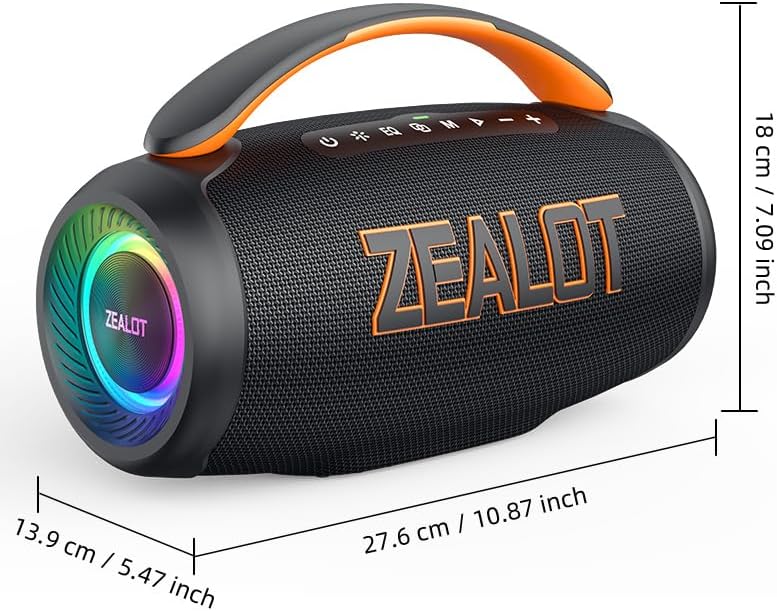
Figura 2: Wara view of the ZEALOT P12 Bluetooth Speaker, illustrating the protective flap covering the TF card slot, AUX input, DC5V charging port, and USB port.

Figure 3: Close-up of the control panel, highlighting the power, EQ, mode, play/pause, and volume buttons.
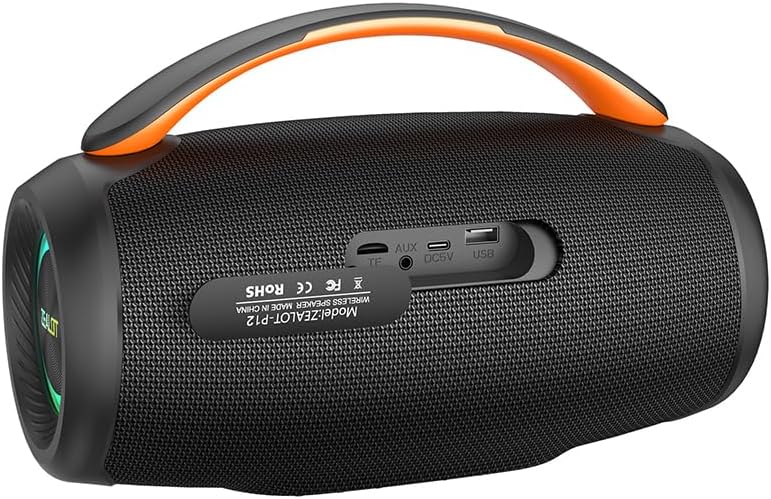
Figure 4: Diagram illustrating the internal acoustic components of the ZEALOT P12, including a 10W tweeter, 50W woofer, and two independent bass passive diaphragms for 360-degree sound.
The speaker features a top-mounted control panel with buttons for power, EQ mode selection, input mode switching (M), play/pause, and volume adjustment. The rear panel houses protected ports for charging, auxiliary input, TF card, and USB drive.
3. Setup
3.1 Iċċarġjar inizjali
- Qabel l-ewwel użu, iċċarġja l-ispiker kompletament.
- Locate the DC5V charging port on the rear of the speaker, typically under a protective flap.
- Connect the provided power cable to the speaker's charging port and a suitable USB power adapter (not included).
- Id-dawl indikatur tal-iċċarġjar jixgħel. Ladarba jkun iċċarġjat kompletament, id-dawl jista' jibdel il-kulur jew jintefa, skont il-mudell.
3.2 Tixgħel/Jitfi
- Biex tixgħel: Agħfas u żomm il-buttuna Buttuna tal-qawwa (
 ) for approximately 3 seconds until you hear an audible prompt or see the indicator lights activate.
 - Biex titfi: Agħfas u żomm il-buttuna Buttuna tal-qawwa () for approximately 3 seconds until the indicator lights turn off.
4. Istruzzjonijiet Operattivi
4.1 Tqabbil tal-Bluetooth
- Kun żgur li l-ispiker huwa mixgħul u fil-modalità Bluetooth. Jekk le, agħfas il-buttuna Buttuna tal-mod (M) to switch to Bluetooth mode. The Bluetooth indicator light will flash, indicating it is ready for pairing.
- On your smartphone, tablet, laptop, or other Bluetooth-enabled device, navigate to the Bluetooth settings.
- Fittex għal available devices. The speaker will appear as "ZEALOT P12".
- Select "ZEALOT P12" to connect. Once connected, the Bluetooth indicator light will become solid, and you may hear a confirmation tone.
- Jekk tintalab għal password, daħħal "0000".
4.2 Daqq tal-Awdjo
- Play/Pawsa: Agħfas il- Buttuna Play/Pause () to start or pause playback.
- Volum 'il fuq: Agħfas il- buttuna "+" biex iżżid il-volum.
- Volum 'l isfel: Agħfas il- buttuna "-" biex tnaqqas il-volum.
- Track li jmiss: Agħfas u żomm il- buttuna "+" għal madwar 2 sekondi.
- Track preċedenti: Agħfas u żomm il- buttuna "-" għal madwar 2 sekondi.
4.3 Modi EQ
The ZEALOT P12 offers three distinct EQ sound effects to optimize your listening experience:
Figure 5: Illustration of the EQ button and its three modes: Bass, Vocal, and Normal.
- Agħfas il- buttuna EQ () biex tiċċikla bejn il-modi disponibbli:
- Bass: Enhances low-frequency sounds for a deeper, richer bass experience.
- Vokali: Jottimizza l-frekwenzi tan-nofs il-medda għal vokali aktar ċari.
- Normali: Jipprovdi ħoss bilanċjat profile adattat għal smigħ ġenerali.
4.4 True Wireless Stereo (TWS) Pairing (Optional)
If you have two ZEALOT P12 speakers, you can pair them together for a stereo sound experience.
- Kun żgur li ż-żewġ kelliema huma mixgħula u mhumiex konnessi ma' xi apparat Bluetooth.
- Fuq kelliem wieħed (dan se jkun il-kelliem primarju), agħfas u żomm il-buttuna Buttuna tal-mod (M) for approximately 3 seconds. You will hear a prompt indicating TWS pairing mode.
- The primary speaker will automatically search for the secondary speaker. Once connected, you will hear a confirmation tone, and the indicator lights on both speakers will synchronize.
- Issa, qabbad l-apparat Bluetooth tiegħek mal-ispiker primarju kif deskritt fit-taqsima 4.1. L-awdjo se jindaqq stereo permezz taż-żewġ kelliema.
- Biex tiskonnettja TWS, agħfas u żomm il- Buttuna tal-mod (M) on either speaker for 3 seconds.
5. Konnettività
In addition to Bluetooth, the ZEALOT P12 supports several other audio input methods:
- Daqq tal-Karta TF: Daħħal kard TF (microSD) li fiha awdjo MP3 files fl-islott tal-kard tat-TF. L-ispiker awtomatikament jaqleb għall-modalità tal-kard tat-TF u jibda d-daqq.
- Input AUX: Connect an audio device (e.g., MP3 player, PC) to the speaker's AUX port using a 3.5mm audio cable (not included). Press the Buttuna tal-mod (M) biex taqleb għall-modalità AUX.
- Daqq ta' Drive tal-USB: Daħħal flash drive USB li fih awdjo MP3 files into the USB port. The speaker will automatically switch to USB mode and begin playback.
6. Iċċarġjar u Batterija
The ZEALOT P12 is equipped with an 8000mAh rechargeable battery, providing extended playtime.
- Ħajja tal-batterija: A full charge provides up to 28 hours of continuous music playback, depending on volume level and audio content.
- Iċċarġjar: Use the provided power cable and a standard USB power adapter (DC5V) to charge the speaker. The charging port is located on the rear panel.
- Indikatur tal-Batterija Baxxa: When the battery level is low, the speaker may emit an audible warning or an indicator light may flash. Charge the speaker promptly to avoid interruption.
7. Manutenzjoni
7.1 Klassifikazzjoni ta' Reżistenti għall-Ilma (IPX5)
The ZEALOT P12 speaker has an IPX5 waterproof rating, meaning it is protected against low-pressure water jets from any direction. This makes it suitable for outdoor use and resistant to splashes, rain, and sweat.
- Importanti: IPX5 rating does not mean the speaker can be submerged in water. Do not immerse the speaker in water.
- Ensure the protective flap covering the charging and input ports on the rear is securely closed when using the speaker near water or in wet conditions.
7.2 Kura Ġenerali
- Naddaf l-ispiker b'ċarruta ratba u niexfa. Tużax prodotti tat-tindif jew solventi li joborxu.
- Avoid exposing the speaker to extreme temperatures, direct sunlight for prolonged periods, or high humidity.
- Aħżen l-ispiker f'post frisk u niexef meta ma jkunx qed jintuża.
- Tippruvax tiżżarma jew issewwi l-ispiker int stess, għax dan jannulla l-garanzija.
8 Issolvi l-problemi
| Problema | Kawża Possibbli | Soluzzjoni |
|---|---|---|
| L-ispiker ma jixgħelx. | Batterija baxxa. | Iċċarġja l-ispiker kompletament. |
| L-ebda ħoss. | Volume too low; incorrect input mode; device not connected. | Increase volume; press 'M' button to select correct input mode; ensure Bluetooth device is paired or AUX/USB/TF card is properly inserted. |
| Il-konnessjoni Bluetooth mhix stabbli jew tfalli. | Speaker too far from device; interference; device's Bluetooth off. | Move speaker closer to device (within 10 meters); avoid obstacles; ensure Bluetooth is enabled on your device; try re-pairing. |
| It-tqabbil tat-TWS ifalli. | L-ispikers diġà huma konnessi ma' apparati oħra; proċedura ta' tqabbil mhux korretta. | Ensure both speakers are disconnected from all Bluetooth devices before initiating TWS pairing. Follow TWS pairing instructions carefully. |
9. Speċifikazzjonijiet

Figure 6: Dimensions of the ZEALOT P12 Bluetooth Speaker: 27.6 cm (10.87 inch) length, 13.9 cm (5.47 inch) width, 18 cm (7.09 inch) height.
| Karatteristika | Dettall |
|---|---|
| Isem tal-Mudell | ŻELOTA P12 |
| Tip ta' Kelliem | Speaker li jista ’jinġarr |
| Teknoloġija tal-Konnettività | Bluetooth 5.3, Auxiliary (3.5mm), TF Card Slot, USB Port |
| Modalità tal-Ħruġ tal-Awdjo | Stereo |
| Qawwa tal-Ħruġ Massimu tal-Ispeaker | 60 Watts |
| Rispons ta' Frekwenza | 20 Hz - 20 KHz |
| Kapaċità tal-batterija | 8000mAh |
| Ħin tal-logħob | Sa 28 sigħat |
| Klassifikazzjoni li ma jgħaddix ilma minnha | IPX5 |
| Dimensjonijiet tal-Prodott | 27.6D x 13.9W x 18H ċm (10.87D x 5.47W x 7.09H pulzieri) |
| Piż tal-oġġett | 1.55 kg (1550 Gramma) |
| Materjal | Acrylonitrile Butadiene Styrene (ABS) |
| Apparati Kompatibbli | Smartphone, Tablet, Laptop, PC, Television, Projector |
| Komponenti Inklużi | Kejbil tal-Enerġija |
| Manifattur | ZELOT |
| Pajjiż ta' Oriġini | Iċ-Ċina |
10. Garanzija u Appoġġ
For warranty information and technical support, please refer to the warranty card included with your product or contact ZEALOT customer service directly. Contact details can typically be found on the manufacturer's official webis-sit jew fuq l-imballaġġ tal-prodott.
Jekk jogħġbok żomm il-prova tax-xiri tiegħek għal pretensjonijiet ta' garanzija.


