1. Introduzzjoni
This manual provides detailed instructions for the LIGE Smart Watch Gift Set, which includes two distinct models: the TX1-G Slivery (round display) and the FV12-H Black (rectangular display). Please read this manual carefully before using your smartwatches to ensure proper operation and to maximize their features. Keep this manual for future reference.
2. Prodott Aktarview
The LIGE Smart Watch Gift Set offers two versatile smartwatches designed for various lifestyles. Both watches feature advanced health monitoring, fitness tracking, and smart communication capabilities. The TX1-G model presents a classic, elegant round design, while the FV12-H model offers a rugged, sporty rectangular aesthetic.

This image displays the two smartwatches included in the gift set: the LIGE TX1-G with a round, rose gold bezel and black mesh strap, and the LIGE FV12-H with a rectangular, rugged black and silver design and a metal link strap. Both watches show their respective digital interfaces.
3. Setup
3.1. Iċċarġjar tal-Ismartwatch Tiegħek
Before initial use, fully charge your smartwatch. Both models typically use a magnetic charging cable.
- Connect the USB end of the charging cable to a power adapter (5V/1A recommended) or a computer's USB port.
- Align the magnetic pins of the charging cable with the charging contacts on the back of your smartwatch. The cable will snap into place.
- Id-displej tal-arloġġ se jindika l-istatus tal-iċċarġjar. Ħalli madwar 2-3 sigħat għal iċċarġjar sħiħ.
3.2. Installazzjoni u Tqabbil tal-App
To unlock the full potential of your LIGE smartwatch, you need to install the companion application on your smartphone.
- Niżżel l-App: Scan the QR code provided in the watch's packaging or search for the designated app (e.g., 'LIGE Smart' or 'Smart Health') in your smartphone's app store (App Store for iOS, Google Play Store for Android).
- Irreġistra/Idħol: Iftaħ l-app u segwi l-istruzzjonijiet fuq l-iskrin biex toħloq kont jew tidħol.
- Ippermetti Bluetooth: Kun żgur li l-Bluetooth huwa attivat fuq l-ismartphone tiegħek.
- Imqabbad l-Arloġġ: In the app, navigate to the 'Device' or 'My Watch' section. Tap 'Add Device' or 'Scan for Device'. Select your smartwatch from the list of available devices (e.g., 'LIGE-TX1G' or 'LIGE-FV12H').
- Ikkonferma l-Imqabbad: A pairing request may appear on your watch and/or phone. Confirm the pairing on both devices.
3.3. Konfigurazzjoni Inizjali
After successful pairing, configure your personal information and preferences within the app.
- Set your gender, age, height, and weight for accurate fitness tracking.
- Adjust notification settings for calls, messages, and other applications.
- Synchronize time and date with your phone.
4. Istruzzjonijiet Operattivi
4.1. Navigazzjoni Bażika
Both smartwatches feature a full-touch display and physical buttons for navigation.
- Touchscreen: Swipe up/down/left/right to navigate through menus and features. Tap to select.
- Buttuni tal-ġenb: Typically, one button serves as a Power/Back/Menu button, while others might be dedicated to Sports modes or quick access functions. Refer to the on-screen prompts for specific button functionalities.
4.2. Sejħiet bil-Bluetooth
The smartwatches support Bluetooth calling, allowing you to make and receive calls directly from your wrist when connected to your smartphone.

This visual guide illustrates the LIGE FV12-H's communication capabilities. It shows the watch interface for Bluetooth calling with a dial pad, contact list, and call records. Below, it depicts message notifications from various social media apps and the activation of the smart voice assistant.

This image focuses on the LIGE TX1-G smartwatch, illustrating its Bluetooth call and message notification functions. It shows the watch receiving an incoming call and displaying notifications from various social media applications, along with options for dial keypad, contact lists, and call records.
- Tagħmel Sejħiet: Access the 'Dial' or 'Phone' icon on your watch. You can dial a number directly, select from your synced contacts, or view rekords ta' sejħiet riċenti.
- Jirċievu Sejħiet: When a call comes in, the watch will display the caller ID. You can answer or reject the call directly from your wrist.
4.3. Notifiki tal-Messaġġ
Irċievi notifiki mill-apps tal-ismartphone tiegħek direttament fuq l-ismartwatch tiegħek.
- Ensure notification permissions are enabled for the companion app on your smartphone.
- In the app, select which applications you want to receive notifications from (e.g., SMS, WhatsApp, Facebook, Instagmuntun).
- Notifications will appear on your watch screen. Swipe to dismiss or view more details if available.
4.4. Sports Modes and Fitness Tracking
Both watches offer extensive sports tracking capabilities to monitor your physical activity.
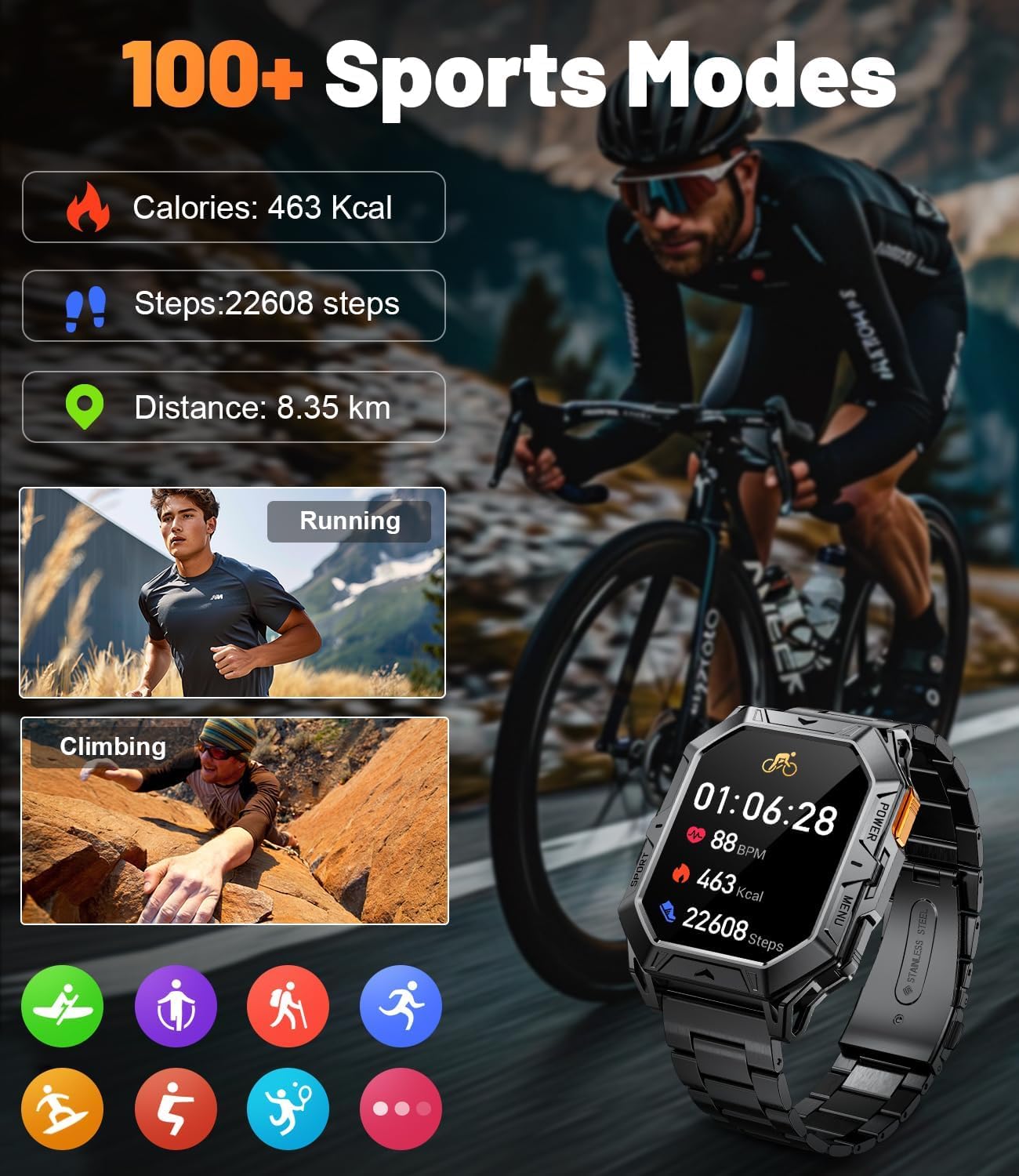
The LIGE FV12-H smartwatch is featured displaying its sports tracking interface, showing calories burned, steps taken, and distance covered. Examples of activities like running and climbing are depicted, emphasizing the watch's ability to monitor over 100 different sports modes.

This image illustrates the LIGE TX1-G smartwatch's capability to track 121 sports modes. It shows the watch interface displaying exercise duration, calories burned, and steps taken, with icons representing various activities like cycling, jump rope, running, and yoga.
- Access Sports Modes: Swipe on the watch face or press the dedicated sports button (if available) to access the list of sports modes (e.g., Running, Walking, Cycling, Climbing, Yoga).
- Start Activity: Select your desired activity. The watch will begin tracking metrics such as duration, calories burned, steps, distance, and heart rate.
- End Activity: Swipe or press the button to pause or end the activity. Data will be synced to the app.
4.5. Monitoraġġ tas-Saħħa
Monitor key health metrics directly from your wrist.
- Rata tal-qalb: Access the heart rate monitor feature on your watch. Ensure the watch is snug on your wrist for accurate readings.
- Passi u Kaloriji: These metrics are continuously tracked throughout the day. View daily summaries on your watch or in the app.
4.6. Watch Faces and Customization
Ippersonalizza l-ismartwatch tiegħek b'varjetà ta' wiċċijiet tal-arloġġ.

The LIGE TX1-G smartwatch is highlighted, showcasing its 1.43-inch AMOLED full-screen colorful display with 466*466 high resolution. The image also demonstrates the availability of over 200 free and DIY watch dials, allowing for extensive personalization.
- Bidla l-Wiċċ tal-Għassa: Long-press the watch face on your screen to enter the watch face selection menu. Swipe left/right to browse and tap to select.
- More Watch Faces: Access the companion app to download additional watch faces or create custom DIY watch faces using your own photos.
4.7. Smart Voice Assistant
Utilize the integrated smart voice assistant for quick commands and information.
- Ensure your watch is connected to your smartphone and the voice assistant feature is enabled in the app.
- Activate the voice assistant on your watch (usually by a specific swipe gesture or button press).
- Speak your command or question (e.g., "What is the weather like today?", "Call Jack").
5. Manutenzjoni
5.1. Tindif
- Imsaħ l-iskrin u l-qafas tal-arloġġ b'ċarruta ratba u mingħajr suf.
- Għal ħmieġ iebes, neħħi ftitampLaħlaħ id-drapp bl-ilma. Evita li tuża kimiċi ħarxa jew materjali li joborxu.
- Naddaf il-kuntatti tal-iċċarġjar regolarment biex tiżgura iċċarġjar effiċjenti.
5.2. Reżistenza għall-Ilma
The LIGE smartwatches are designed to be splash-proof and resistant to sweat and light rain. They are generally not suitable for swimming, showering, or diving unless explicitly stated otherwise in the product specifications. Avoid exposing the watches to hot water or steam.
5.3. Kura tal-batterija

The LIGE FV12-H smartwatch is shown charging, highlighting its 1000mAh battery. The image indicates a standby time of over 100 days, typical usage of over 14 days, and heavy usage of 7 days.
- Evita li tiċċarġja l-batterija kompletament ta' spiss.
- Charge the watch using the provided cable and a compatible power adapter.
- Aħżen l-arloġġ f'post frisk u niexef meta ma jkunx qed jintuża għal perjodi twal.
6 Issolvi l-problemi
6.1. L-Għassa Ma Tixgħelx
- Kun żgur li l-arloġġ ikun iċċarġjat kompletament. Qabbad mal-ċarġer għal mill-inqas 30 minuti.
- Agħfas u żomm il-buttuna tal-qawwa għal 10-15 sekondi.
6.2. Ma tistax tqabbad ma' Smartphone
- Kun żgur li l-Bluetooth huwa attivat fuq l-ismartphone tiegħek u fuq l-arloġġ.
- Make sure the watch is within the Bluetooth range of your phone (typically 10 meters).
- Erġa' ibda kemm l-ismartphone tiegħek kif ukoll l-ismartwatch.
- Clear the Bluetooth cache on your phone or forget the device in Bluetooth settings, then try pairing again.
- Kun żgur li l-app anċillari hija aġġornata.
6.3. Notifications Not Working
- Check if notifications are enabled in the companion app for specific applications.
- Verify that the app has the necessary permissions on your smartphone (e.g., notification access).
- Kun żgur li l-arloġġ huwa konness permezz tal-Bluetooth.
6.4. Inaccurate Health Data
- Kun żgur li l-arloġġ jintlibes sew fuq il-polz tiegħek, la maħlul wisq u lanqas issikkat wisq.
- Verify that your personal information (height, weight, age) is correctly entered in the app.
- Environmental factors and movement can affect accuracy.
7. Speċifikazzjonijiet
7.1. LIGE TX1-G (Round Display)
| Karatteristika | Dettall |
|---|---|
| Wiri | 1.43 inch AMOLED Full Screen Colorful |
| Riżoluzzjoni | 466*466 High Resolution |
| Watch Faces | 200+ Free Dials & DIY options |
| Modi sportivi | 121 Modalità Sportiva |
| Konnettività | Bluetooth for calls and data sync |
| Karatteristiċi Ewlenin | Bluetooth Calling, Message Notifications, Health Monitoring, Smart Voice Assistant |
7.2. LIGE FV12-H (Rectangular Display)
| Karatteristika | Dettall |
|---|---|
| Kapaċità tal-batterija | 1000mAh |
| Ħin ta' Standby | Up to 100+ Days |
| Użu Tipiku | 14+ Jiem |
| Użu tqil | 7 Jiem |
| Modi sportivi | 100+ Modalità Sportiva |
| Konnettività | Bluetooth for calls and data sync |
| Karatteristiċi Ewlenin | Bluetooth Calling, Message Reminders, Smart Voice Assistant, Health Monitoring |
8. Garanzija u Appoġġ
For warranty information and customer support, please refer to the documentation included with your product packaging or visit the official LIGE websit. Jekk tiltaqa' ma' xi kwistjonijiet li mhumiex koperti f'dan il-manwal, jekk jogħġbok ikkuntattja lis-servizz tal-klijenti ta' LIGE għall-għajnuna.


