1. Introduzzjoni
Welcome to the King Lucky i121 Open Ear Clip-On Wireless Bluetooth Earbuds user manual. These earbuds are designed to provide a comfortable audio experience while maintaining awareness of your surroundings. This manual provides essential information for setting up, operating, and maintaining your new earbuds.
2. Kontenut tal-Pakkett
Jekk jogħġbok ivverifika li l-oġġetti kollha huma preżenti fil-pakkett tiegħek:
- King Lucky i121 Open Ear Earbuds (L/R)
- Kawża tal-Iċċarġjar
- Cable tal-Iċċarġjar tal-USB-C
- Manwal għall-Utent
- Detachable Decorative Clips (optional, may vary by package)

Figura 2.1: Kontenut tal-Pakkett. This image displays the King Lucky i121 earbuds, their charging case, a USB-C charging cable, and a pair of decorative clips.
3. Setup
3.1. Iċċarġjar tal-Earbuds u l-Kaxxa
Before first use, fully charge the earbuds and charging case. Connect the provided USB-C cable to the charging port on the case and a compatible USB power source. The indicator light on the case will show charging status.

Figure 3.1: Battery Life and Charging. The earbuds offer approximately 6 hours of playback on a single charge, with the charging case providing up to 50 hours of total battery life.
3.2. Tqabbil tal-Bluetooth
- Kun żgur li l-earbuds huma ċċarġjati.
- Iftaħ il-kaxxa tal-iċċarġjar. Il-earbuds jidħlu awtomatikament fil-modalità ta' tqabbil.
- Fuq l-apparat tiegħek (smartphone, tablet, eċċ.), attiva l-Bluetooth u fittex apparati disponibbli.
- Select "King Lucky i121" from the list of devices to connect.
- Ladarba jkun konness, se tinstema' twissija bil-vuċi biex tikkonferma li l-akkoppjar sar b'suċċess.
4. L-ilbies tal-Earbuds
The King Lucky i121 earbuds feature an open-ear clip-on design for comfort and situational awareness.
- Identifika l-earbuds tax-Xellug (L) u tal-Lemin (R).
- Gently open the ear clip and position it over the top of your ear, allowing the speaker part to rest near your ear canal without entering it.
- Adjust for a secure and comfortable fit.
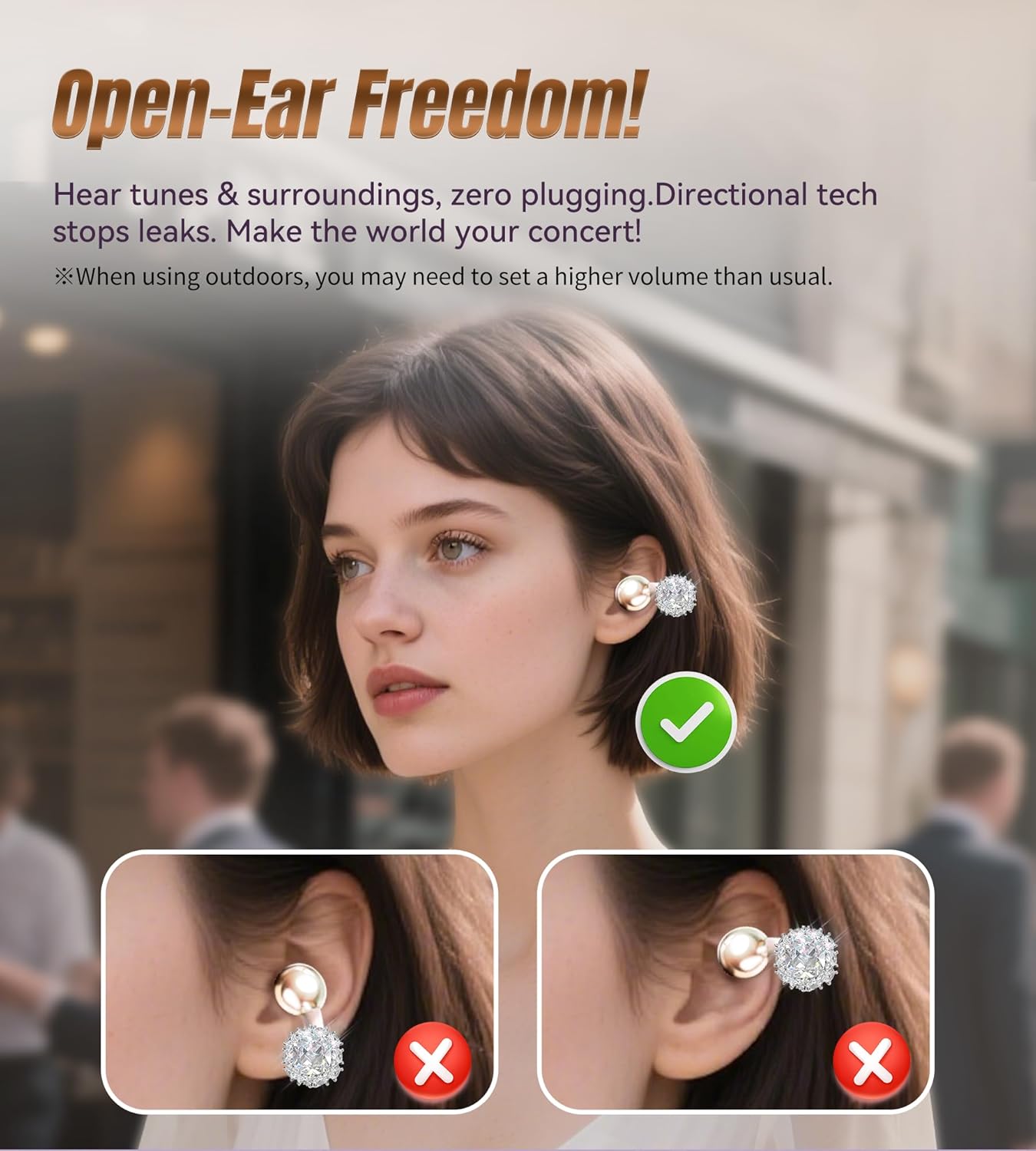
Figure 4.1: Open-Ear Design. This diagram shows how the earbuds sit on the ear, providing audio without blocking ambient sounds.
4.1. Attaching Detachable Decorative Clips
If your package includes detachable decorative clips, follow these steps to attach them:
- Neħħi l-earbuds mill-kaxxa tal-iċċarġjar.
- Carefully clip the decorative element onto the ear hook of the earbud.
- Ensure the clip is securely fastened.
Nota: The charging case may not close properly with the decorative clips attached. It is recommended to remove them before placing the earbuds back into the case for charging or storage.

Figure 4.2: Attaching Decorative Clips. This visual guide demonstrates the process of attaching the decorative clips to the earbuds for a customized look.

Figure 4.3: Earbuds with Decorative Clips. A woman is shown wearing the King Lucky i121 earbuds with the detachable jewelry, illustrating their integration as a fashion accessory.
5. Kontrolli Operattivi
The King Lucky i121 earbuds feature touch controls for easy management of audio and calls.
| Azzjoni | Funzjoni |
|---|---|
| Tektek x1 (Xellug/Lemin) | Wieġeb Sejħa |
| Tektek x2 (Xellug/Lemin) | End Call / Play/Pause Music |
| Tektek x1 (L) | Volum 'l isfel |
| Tektek x1 (R) | Volum Up |
| Tektek x3 (L) | Attiva Voice Assistant (Siri, Google Assistant) |
| Tektek x3 (R) | Mod tal-Logħba |
| Long Press 2" (L/R) | Irrifjuta Sejħa |
| Long Press 2" (L) | Track Preċedenti |
| Long Press 2" (R) | Track li jmiss |
| Tektek x5 (Xellug/Lemin) | Irrisettja l-Fabbrika |
6. Karatteristiċi ewlenin
- Disinn tal-widna miftuħa: Allows you to hear your audio content while remaining aware of your surroundings, ideal for outdoor activities or office environments.
- Ħoss Immersiv: Equipped with 12mm dynamic drivers for clear audio and enhanced bass.
- Sejħiet ċari: Features Environmental Noise Cancellation (ENC) microphones for clear voice transmission during calls.
- Bluetooth 5.4: Jipprovdi konnessjoni mingħajr fili stabbli u b'latenza baxxa.
- Reżistenza għall-Ilma IPX5: Protects against sweat and light rain, suitable for workouts and outdoor use.
- Ħajja twila tal-batterija: Up to 6 hours of listening time per charge, with the charging case extending total playtime to 50 hours.
- Ħfief: Each earbud weighs approximately 5.2g for comfortable extended wear.

Figure 6.1: 12mm Dynamic Driver. Intern view of the earbud highlighting the 12mm dynamic driver, which contributes to the audio quality.
7. Manutenzjoni
- Tindif: Uża drapp artab u niexef biex tnaddaf il-earbuds u l-kaxxa tal-iċċarġjar. Evita li tuża kimiċi ħarxa jew materjali li joborxu.
- Ħażna: Aħżen il-earbuds fil-kaxxa tal-iċċarġjar tagħhom meta ma tkunx qed tużahom biex tipproteġihom mit-trab u l-ħsara.
- Espożizzjoni għall-Ilma: While IPX5 rated, avoid submerging the earbuds in water. Dry them thoroughly if exposed to sweat or rain before placing them back in the charging case.
8 Issolvi l-problemi
| Problema | Soluzzjoni |
|---|---|
| Earbuds ma jingħaqdux | Ensure earbuds are charged. Turn off and on Bluetooth on your device. Perform a factory reset (Tap x5 on either earbud). |
| L-ebda ħoss | Check device volume and earbud volume. Ensure earbuds are properly connected to your device. |
| Kwalità tal-ħoss fqira | Ensure earbuds are clean and free of debris. Move closer to your connected device to avoid interference. |
| Kwistjonijiet ta' ċċarġjar | Verify the USB-C cable and power source are working. Ensure earbuds are correctly seated in the charging case. |
9. Speċifikazzjonijiet
- Mudell: i121
- Ditta: Re Xorti
- Konnettività: Bluetooth 5.4
- Reżistenza għall-Ilma: IPX5
- Piż tal-Earbud: Madwar 5.2g għal kull earbud
- Daqs tas-sewwieq: 12mm Dinamika
- Ħajja tal-Batterija (Earbuds): Sa 6 sigħat
- Battery Life (with Case): Sa 50 sigħat
- Port tal-Iċċarġjar: USB-C
10. Vidjo Uffiċjali tal-Prodott
Video 10.1: King Lucky Jewelry Clip-on Earbuds with Detachable Aurora. This official video from King Lucky showcases the design and features of the earbuds, including the detachable decorative elements and their versatile use.
11. Garanzija u Appoġġ
King Lucky products come with a manufacturer's warranty. For detailed warranty information, product support, or service inquiries, please refer to the contact information provided in your product packaging or visit the official King Lucky website. The seller, KING LUCKY 100-Day Return Guarantee, offers a return policy as specified at the point of purchase.


