1. Introduzzjoni
The DOOGEE Fire 5 is a rugged smartphone designed for durability and extended use in challenging environments. It features a robust construction, a large capacity battery, and a responsive display, powered by Android 15. This manual provides essential information for setting up, operating, maintaining, and troubleshooting your device.
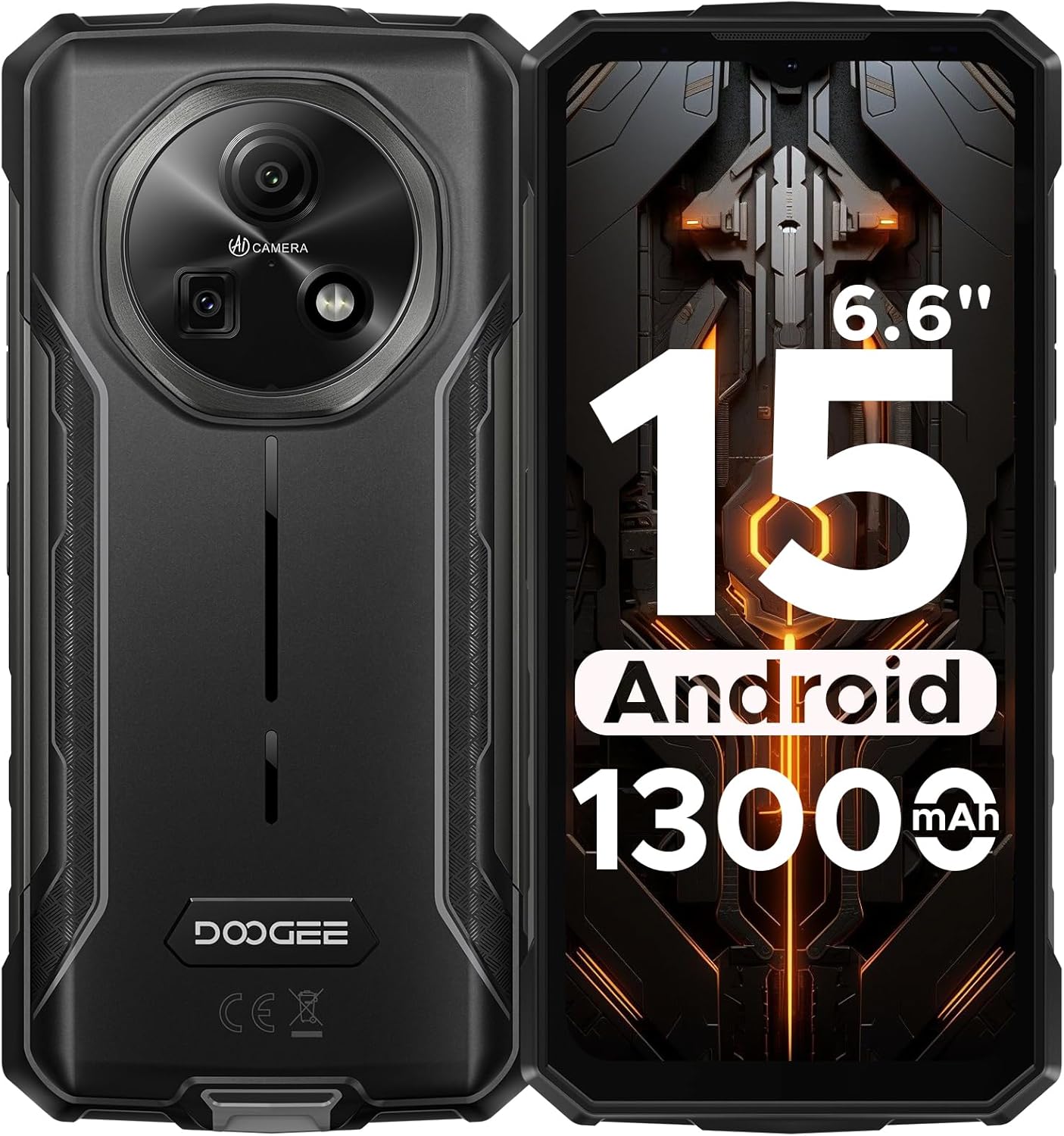
Figura 1: Quddiem u wara view of the DOOGEE Fire 5 Rugged Smartphone.
2. X'hemm fil-Kaxxa
Ivverifika li l-oġġetti kollha huma preżenti fil-pakkett tal-prodott tiegħek:
- 1x DOOGEE Fire 5 Rugged Smartphone
- 1x Cable USB tat-Tip-C
- 1x Ċarġer tal
- 1x Gwida ta 'Ħeffa
- 1x Karta tal-Garanzija

Figure 2: Package contents of the DOOGEE Fire 5.
3. Karatteristiċi tal-prodott
3.1 Rugged Design
The Fire 5 is engineered to withstand harsh conditions, meeting military standards IP68, IP69K, and MIL-STD-810H. This ensures resistance against drops, dust, and water immersion, making it suitable for outdoor work and adventurous activities.

Figure 3: The DOOGEE Fire 5 is built to withstand water, dust, and drops.
3.2 Unbeatable Battery Life & Reverse Charging
Equipped with a 13000mAh battery, the Fire 5 provides extended usage times. It also supports 5W reverse charging via its Type-C port, allowing you to power other devices like headphones or smartwatches.

Figure 4: The 13000mAh battery offers extensive power and reverse charging.
3.3 Vivid HD+ Display
Experience smooth visuals on the 6.6-inch HD+ IPS screen with a 90Hz refresh rate. The display's full lamination reduces glare, enhancing outdoor visibility.

Figure 5: The 6.6-inch HD+ 90Hz display provides a clear and responsive viewing esperjenza.
3.4 Prestazzjoni Qawwija
Running on Android 15 and powered by a UNISOC octa-core processor, the Fire 5 offers seamless app switching with 12GB (3GB + 9GB extended) of RAM and 64GB of internal storage, expandable up to 2TB.

Figure 6: The UNISOC SC9863A chipset ensures stable and efficient performance.
3.5 AI Camera System
Capture clear and vibrant photos with the 13MP main camera and 8MP front camera. The AI camera intelligently optimizes settings for various scenes, enhancing your photography experience.

Figure 7: The 13MP main camera and 8MP front camera for crisp shots.
3.6 Connectivity and Tools
The Fire 5 supports dual SIM functionality and is compatible with major carriers like T-Mobile and MetroPCS. It includes NFC for convenient payments, Face ID for secure unlocking, and a pre-loaded professional toolbox with utilities like a compass, sound meter, and gradienter.

Figure 8: Additional features include NFC, Face Unlock, and a 3-card slot.
4. Setup
4.1 Installazzjoni tal-Karta SIM
- Sib it-trej tal-kard SIM fuq il-ġenb tal-apparat.
- Use the provided SIM eject tool to open the tray.
- Poġġi l-kard(s) Nano-SIM u/jew il-kard microSD tiegħek fit-trej, waqt li tiżgura l-orjentazzjoni korretta.
- Imbotta bil-mod it-trej lura fl-apparat sakemm tikklikkja f'postha.
4.2 Qawwa Inizjali
- Agħfas u żomm il-buttuna tal-Power sakemm jidher il-logo ta' DOOGEE.
- Segwi l-istruzzjonijiet fuq l-iskrin biex tlesti s-setup inizjali, inkluż l-għażla tal-lingwa, il-konnessjoni Wi-Fi, u l-login tal-kont tal-Google.
5. Tħaddim tat-Tagħmir Tiegħek
5.1 Navigazzjoni Bażika
- Skrin tad-dar: Skrolla lejn ix-xellug jew il-lemin biex taċċessa pannelli differenti tal-iskrin tad-dar.
- App Drawer: Swipe 'l fuq mill-qiegħ tal-iskrin għal view l-applikazzjonijiet kollha installati.
- Notifiki u Settings Mgħaġġla: Skrolla 'l isfel minn fuq l-iskrin biex taċċessa n-notifiki u t-toggles tas-settings rapidi.
- Multitasking: Skrolla 'l fuq u żomm mill-qiegħ tal-iskrin biex view apps riċenti.
5.2 Użu tal-Kamera
Open the Camera app to access various modes:
- Modalità tar-Ritratti: Standard mode for still images. The AI will automatically optimize settings.
- Modalità Video: Irreġistra vidjows.
- Modalità Ritratt: Create photos with a blurred background.
- Modalità Pro: Manually adjust settings like ISO, white balance, and exposure.
5.3 Pre-loaded Tools
The device includes a professional toolbox accessible from the app drawer. This toolbox contains useful utilities such as:
- Boxxla
- Miter tal-Ħoss
- Gradienter
- Flashlight
- Magnifier
- Plumb Bob
6. Manutenzjoni
6.1 Reżistenza għall-Ilma u t-Trab
The DOOGEE Fire 5 is IP68/IP69K rated for water and dust resistance. Ensure all port covers are securely closed before exposing the device to water or dust. Avoid prolonged submersion in water or exposure to high-pressure water jets.
6.2 Tindif
Biex tnaddaf l-apparat tiegħek, imsaħ b'ċarruta ratba u damp cloth. Avoid using harsh chemicals or abrasive materials that could damage the device's rugged exterior or screen.
7 Issolvi l-problemi
If you encounter issues with your DOOGEE Fire 5, try the following steps:
- Device Lagging or Freezing:
- Close background applications to free up RAM.
- Uninstall unused applications to free up storage.
- Perform a restart by long-pressing the power button and selecting "Restart".
- Kwistjonijiet ta' Konnettività tan-Netwerk:
- Kun żgur li l-karta SIM tiegħek hija mdaħħla sew.
- Verify that your carrier is compatible with the device's supported bands (GSM:B2/3/5/8 WCDMA:B1/2/4/5/8 TDD:B34/38/39/40/41 FDD:B1/2/3/4/5/7/8/18/19/20/25/26/28AB/66).
- Check your network settings and ensure mobile data is enabled.
- Problemi tal-iċċarġjar:
- Use the original charger and Type-C cable provided with the device.
- Kun żgur li l-port tal-iċċarġjar ikun nadif u ħieles minn debris.
Vidjo 1: Overview of the DOOGEE Fire 5 Rugged Phone, highlighting its features and design.
8. Speċifikazzjonijiet
| Dimensjonijiet tal-Prodott | 6.95 x 0.74 x 3.25 pulzieri |
| Piż tal-oġġett | 6.9 uqija |
| Numru tal-Mudell tal-Oġġett | Nar5 |
| Batteriji | 1 batterija tal-Lithium Polymer meħtieġa (inkluża) |
| Sistema Operattiva | Android 15 |
| Teknoloġiji tal-Konnettività | Bluetooth, Infra-aħmar, NFC, USB, Wi-Fi |
| Karatteristiċi oħra tal-Wiri | Wireless |
| Karatteristiċi Oħra tal-Kamera | Quddiem, Wara |
| Fattur tal-Formola | Bar |
| Kulur | Iswed |
| Klassifikazzjoni tal-Qawwa tal-Batterija | 13000 Milliamp Sigħat |
| Kapaċità tal-Ħżin tal-Memorja | 64 GB |
| Daqs tal-Wiri tal-Iskrin Permanenti | 6.6 Pulzier |
| Daqs tal-Memorja RAM Installata | 12 GB |
| Riffriskar Rata | 90 Hz |
| Trasportatur Wireless | Jinfetaħ għat-Trasportaturi Kollha |
| Teknoloġija Ċellulari | 4G |
9. Garanzija u Appoġġ
The DOOGEE Fire 5 Rugged Smartphone comes with a comprehensive 2-year warranty, ensuring peace of mind with your purchase. For any technical assistance, product inquiries, or warranty claims, please contact DOOGEE's professional support team through their official channels or visit their webis-sit għal informazzjoni dettaljata dwar l-appoġġ.
You can find additional support and product information by scanning the QR code provided in the quick guide or visiting the official DOOGEE websit.


