Introduzzjoni
This user manual provides comprehensive instructions for the setup, operation, maintenance, and troubleshooting of your Pisichen 21.5-Inch Touchscreen Monitor. Please read this manual thoroughly before using the product to ensure proper functionality and to prevent damage.
The Pisichen 21.5-inch touch monitor is designed to enhance your work efficiency and provide an interactive experience with its responsive 10-point capacitive touchscreen. It features a Full HD 1920x1080 resolution display, built-in speakers, and versatile connectivity options including HDMI, VGA, and USB for touch functionality.
Karatteristiċi Ewlenin
- Sensitive 10-Point Capacitive Touchscreen: Offers seamless and responsive interaction, allowing direct engagement with content and simultaneous multi-finger input.
- Stunning FHD 1080P Display: A 21.5-inch Full HD (1920x1080) resolution screen with a 1000:1 contrast ratio, 250cd/㎡ brightness, 170° viewing angle, and 60Hz refresh rate for clear and smooth visuals. Includes low-blue-light and eye-care technology.
- Kompatibilità Wiesgħa tal-Apparat: Equipped with USB2.0 (for touch), HDMI, VGA, and DC ports for easy connection to PCs, laptops, PS3/4, and gaming consoles.
- Modi tal-Wiri versatili: Supports duplicate, extend, and second-screen modes to enhance productivity and workspace.
- Built-in Speakers and VESA Mounting: Integrated speakers provide audio, and the 75x75mm VESA mount allows for flexible installation options.
Kontenut tal-Pakkett
Jekk jogħġbok ivverifika li l-oġġetti kollha huma preżenti fil-pakkett qabel ma tipproċedi bis-setup.

The package includes the Pisichen 21.5-inch touchscreen monitor, a user manual, an HDMI cable, a USB cable, and a power adapter, ensuring it is ready for immediate use.
- Pisichen 21.5-Inch Touchscreen Monitor
- Adapter tal-Enerġija
- Cable HDMI
- USB Cable (for touch function)
- Manwal għall-Utent
Setup Istruzzjonijiet
1. Tqabbad il-Monitor
The monitor offers various connection options to suit your needs. Ensure all connections are secure before powering on the device.

Dettaljati view of the monitor's input/output ports, including HDMI, VGA, headphone, DC power, and USB 2.0 touch ports.
- Konnessjoni tal-Enerġija: Connect the provided power adapter to the DC power port on the monitor and then plug it into a wall outlet.
- Konnessjoni tal-Vidjo (HDMI): Use the HDMI cable to connect the monitor's HDMI port to the HDMI output port on your computer, laptop, or gaming console.
- Konnessjoni tal-Vidjo (VGA): Alternatively, use a VGA cable to connect the monitor's VGA port to the VGA output port on your computer or laptop.
- Touch Function Connection: To enable the touch function, connect the included USB cable from the monitor's USB 2.0 touch port to an available USB port on your computer. This step is crucial for touch signal transmission.
- Ħruġ tal-Awdjo (Mhux obbligatorju): If you prefer external audio, you can connect headphones or external speakers to the headphone jack. The monitor also has built-in speakers.
2. Għażliet ta 'Immuntar
The Pisichen monitor supports both desktop placement and VESA wall mounting for flexible setup.
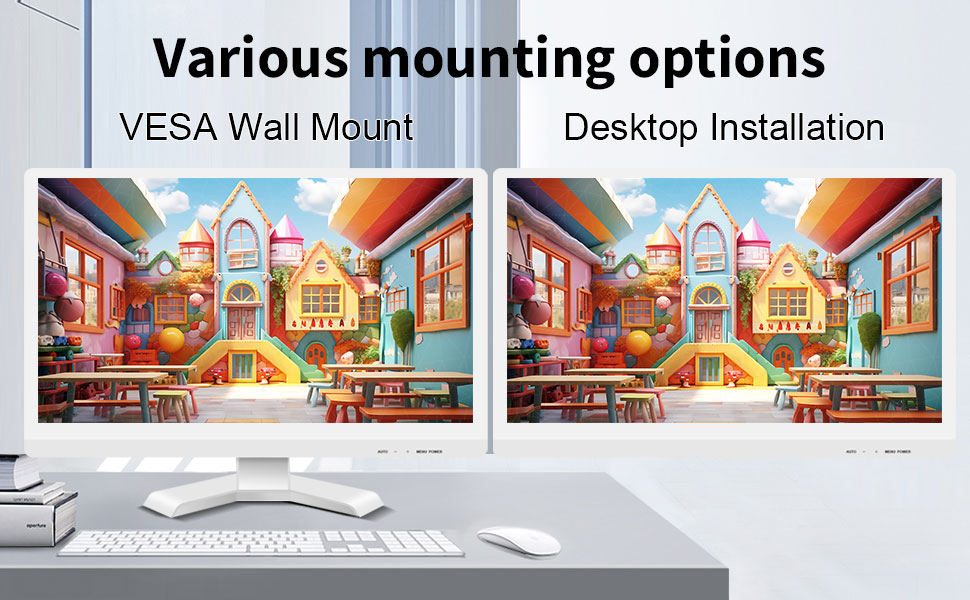
The monitor can be set up on a desktop stand or mounted on a wall using a VESA compatible bracket.
- Installazzjoni tad-Desktop: Attach the provided stand to the monitor base and place it on a stable, flat surface.
- VESA Wall Mount: The monitor features a 75x75mm VESA mounting pattern. Use a compatible VESA bracket (not included) to mount the monitor on a wall or an adjustable arm. Ensure the mount can support the monitor's weight (9.88 pounds).

Wara view of the monitor highlighting the VESA 75x75mm mounting pattern and overall dimensions.
Istruzzjonijiet Operattivi
1. Tixgħil / Mitfi
Locate the power button on the monitor. Press it to turn the monitor on or off. The power indicator light will illuminate when the monitor is on.
2. Using the Touchscreen Function
Once the USB cable is connected to your computer, the 10-point capacitive touch function will be active. You can interact with the screen using your fingers or a passive capacitive stylus.

The monitor supports direct touch interaction for intuitive control.
- Mess Uniku: Ekwivalenti għal klikk tal-maws.
- Tektek u Żomm: Ekwivalenti għal klikk bil-lemin.
- Iddreggja: Move items by touching and dragging.
- Agħfas biex Tiżżumja: Uża żewġ swaba' biex tagħmel zoom in jew zoom out fuq il-kontenut.
- Multi-Touch: The monitor supports up to 10 simultaneous touch points, enabling collaborative work or complex gestures.

The 10-point multi-touch feature allows for multiple users or complex interactions simultaneously.
Nota Importanti: The touch functionality is disabled on Mac OS, iPad OS, and iOS. This monitor only supports passive capacitive styluses.
3. Modi tal-Wiri
The monitor supports various display modes when connected to a computer:
- Modalità Duplikata: Displays the same content on both your primary screen and the Pisichen monitor.
- Modalità Estendi: Testendi d-desktop tiegħek fuq iż-żewġ skrins, u b'hekk tipprovdi aktar spazju tax-xogħol.
- Modalità tat-Tieni Skrin Biss: Displays content only on the Pisichen monitor, turning off your primary screen.
You can typically switch between these modes through your operating system's display settings (e.g., Windows Display Settings).
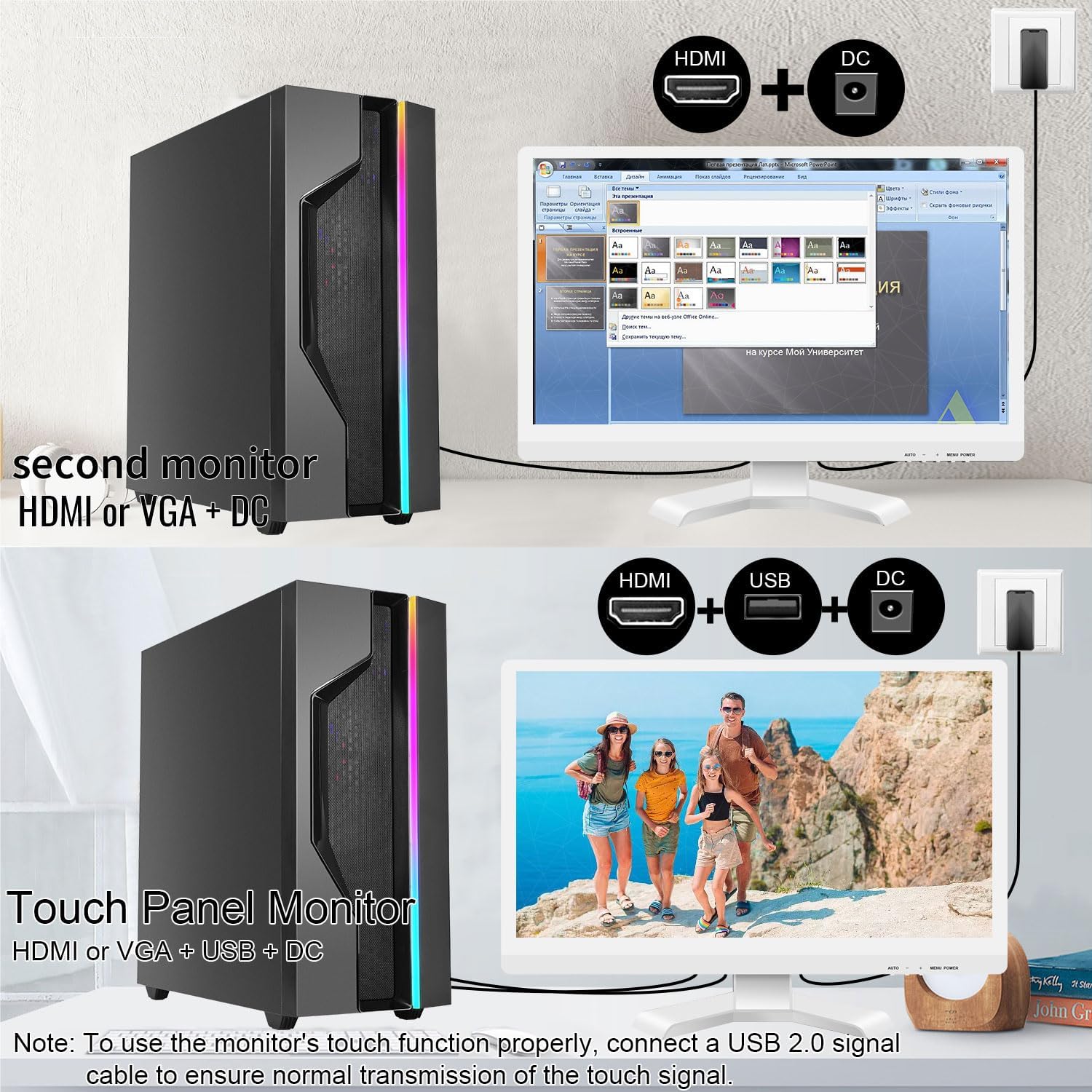
Illustrations of connecting the monitor as a secondary display or as a touch-enabled display.
4. Menu tal-Wiri fuq l-Iskrin (OSD).
The monitor features an OSD menu for adjusting display settings. Use the buttons located on the monitor's frame (usually on the bottom right) to navigate and select options.
- Buttuna tal-menu: Jiftaħ il-menu OSD.
- Buttuni 'l fuq /' l isfel: Innaviga permezz tal-għażliet tal-menu.
- Buttuna Enter/Select: Jikkonferma għażla jew jidħol f'submenù.
- Buttuna tal-Ħruġ: Joħroġ mill-menù jew mill-OSD kurrenti.
Common OSD settings include brightness, contrast, color temperature, input source selection, and aspect ratio.
Manutenzjoni u Kura
- Tindif tal-Iskrin:
Always power off the monitor and unplug it before cleaning. Use a soft, lint-free cloth lightly dampened with water or a non-abrasive, monitor-specific cleaning solution. Do not spray liquid directly onto the screen. Avoid using alcohol, ammonia, or abrasive cleaners, as they can damage the screen surface.
- Tindif tas-Casing:
Imsaħ il-monitor casing with a soft, dry cloth. If necessary, a slightly damp cloth can be used, but ensure no moisture enters the vents or ports.
- Ħażna:
Meta ma tkunx qed tużah għal perjodi twal, aħżen il-monitor f'post frisk u niexef, 'il bogħod mix-xemx diretta u minn temperaturi estremi. Jekk possibbli, uża l-imballaġġ oriġinali għall-protezzjoni.
- Ventilazzjoni:
Ensure the monitor's ventilation openings are not blocked. Proper airflow is essential to prevent overheating.
- Immaniġġjar:
Handle the monitor with care. Avoid dropping it or subjecting it to strong impacts. Do not place heavy objects on top of the monitor.
Issolvi l-problemi
| Problema | Kawża Possibbli | Soluzzjoni |
|---|---|---|
| L-ebda immaġni fuq l-iskrin |
|
|
| Touchscreen ma jirrispondix |
|
|
| L-immaġni hija mċajpra jew distorta |
|
|
| L-ebda ħoss minn kelliema integrati |
|
|
Speċifikazzjonijiet
| Numru tal-Mudell | 21.5INTS-White-NEW |
| Daqs tal-Iskrin | 21.5 Pulzier |
| Riżoluzzjoni | 1920 x 1080 Pixel (FHD 1080p) |
| Proporzjon ta' l-aspett | 16:9 |
| Luminożità | 250 Candela (cd/㎡) |
| Proporzjon ta' Kuntrast | 1000:1 |
| ViewIng Angolu | 170° |
| Riffriskar Rata | 60Hz |
| Touch Teknoloġija | 10-Punti Touch Capacitive |
| Portijiet tad-dħul | HDMI, VGA, USB 2.0 (for touch), DC Power |
| Awdjo | Kelliema integrati, Jack tal-headphones |
| Kompatibilità tal-Immonta VESA | 75x75mm |
| Dimensjonijiet tal-Prodott (L x W x H) | 0.78 x 20.4 x 14.9 pulzieri |
| Piż tal-oġġett | 9.88 liri |
| Manifattur | Shenzhen Konowa Electronics Co., LTD |
| Pajjiż ta' Oriġini | Iċ-Ċina |
Garanzija u Appoġġ
For warranty information and technical support, please refer to the official Pisichen website or contact their customer service directly. Details are typically provided on the product packaging or the manufacturer's official support channels.
Tista 'żżur il- Pisichen Store on Amazon for more product information and potential support contacts.


