Introduzzjoni
This manual provides detailed instructions for the assembly, operation, and maintenance of your FLEXISPOT Standing Desk with a 40x24 inch one-piece desktop. Please read this manual thoroughly before assembly and use to ensure proper function and safety.
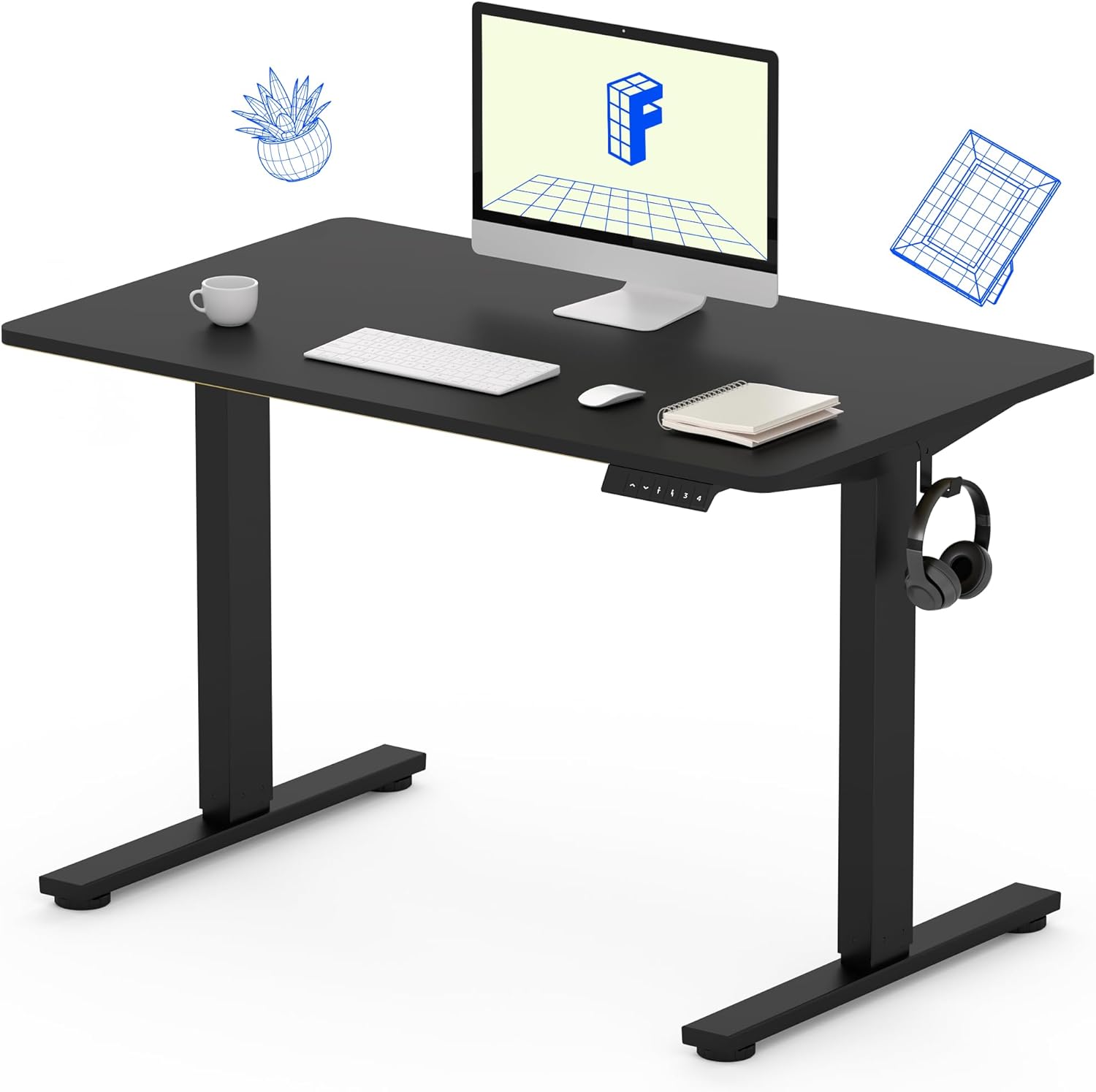
Image 1: The FLEXISPOT Standing Desk, showcasing its black desktop, black frame, and integrated control panel with a headphone hook.
Informazzjoni dwar is-Sigurtà
TWISSIJA:
- Always use caution when assembling the desk, especially when using a drill.
- Teċċedix il-limitu massimu tal-piż ta' 154 lbs (70 kg).
- Keep hands and body parts away from moving parts during height adjustment to prevent injury.
- Ensure all cables are properly managed to avoid entanglement during desk movement.
Kontenut tal-Pakkett
Qabel tibda l-assemblaġġ, ivverifika li l-komponenti kollha huma preżenti u mhux imħassra. Jekk xi partijiet huma neqsin jew imħassra, jekk jogħġbok ikkuntattja l-appoġġ għall-klijenti.
- One-Piece Desktop (40" x 24", Black)
- Desk Legs (Black Frame, Dual-Stage)
- Kaxxa tal-Mutur u l-Kontroll
- Panel tal-Kontroll b'Presets tal-Memorja
- Ganċ tal-headphone
- Ħardwer tal-Assemblaġġ (viti, Allen wrench)
- Kejbil tal-Enerġija

Image 2: Illustration highlighting the seamless design of the FLEXISPOT one-piece desktop, contrasting it with multi-piece alternatives.
Setup u Assemblea
Assembly typically requires 30 minutes to an hour. It is recommended to have two people for assembly due to the weight of the package. A power drill (not included) may be needed for some steps.
- Ħoll il-Komponenti: Carefully remove all parts from the packaging. Inspect for any damage. Note that the packaging can be heavy.
- Arma l-Qafas tal-Iskrivanija: Attach the crossbar to the lifting columns (legs) using the provided hardware. Ensure all screws are tightened securely.
- Waħħal is-Saqajn: Secure the desk feet to the bottom of the lifting columns.
- Immuntar id-Desktop: Carefully place the one-piece desktop upside down on a soft, clean surface. Position the assembled frame onto the desktop. Align the pre-drilled holes (if present) or mark positions for screws. Secure the frame to the desktop using the provided screws. A power drill may be helpful for this step.
- Install Control Box and Panel: Mount the control box and control panel to the underside of the desktop in the designated locations. Connect the motor cables and control panel cable to the control box.
- Waħħal Aċċessorji: Install the headphone hook to the side of the desktop as desired.
- Ġestjoni tal-Kejbil: Route all cables neatly using cable ties or management clips (not included) to prevent interference with desk movement.
- Pożizzjoni Finali: With assistance, carefully flip the desk upright and place it in its desired location. Ensure it is stable and level.

Image 3: The FLEXISPOT Standing Desk integrated into a home office setup, demonstrating its spacious desktop and functionality.
Istruzzjonijiet Operattivi
Your FLEXISPOT Standing Desk features an electric motor for smooth height adjustments and a control panel with memory presets.
Aġġustament Għoli
- Agħfas il- 'Il fuq (▲) button to raise the desk.
- Agħfas il- 'L isfel (▼) button to lower the desk.
- The desk moves smoothly and quietly (under 50 dB) between 28.7 pulzieri (73 ċm) u 46.5 pulzieri (118 ċm).
Presets tal-Memorja
Il-pannell tal-kontroll jippermettilek li ssalva sa erba' settings tal-għoli preferuti.
- Set a Height: Adjust the desk to your desired sitting or standing height using the Up/Down buttons.
- Ħlief issettjat minn qabel: Agħfas il- "M" button, then immediately press one of the numbered preset buttons (1, 2, 3, jew 4). The display will show "S-" followed by the number, indicating the height is saved.
- Recall Preset: Press the corresponding numbered preset button (1, 2, 3, jew 4) biex iċċaqlaq l-iskrivanija awtomatikament għall-għoli ssejvjat.

Image 4: Visual representation of the desk's adjustable height range, showing it at its lowest (29") and highest (46.6") positions.
Manutenzjoni
- Tindif: Imsaħ id-desktop u l-qafas b'ċarruta ratba u damp drapp. Evita kimiċi ħarxa jew prodotti tat-tindif li joborxu.
- Iċċekkja tal-Cable: Periodically inspect all cables for wear or damage. Ensure they are securely connected and not pinched.
- Issikkar tal-viti: Occasionally check and tighten any loose screws on the frame or desktop connections.
Issolvi l-problemi
| Problema | Kawża Possibbli | Soluzzjoni |
|---|---|---|
| L-iskrivanija ma tiċċaqlaqx. | Power cable disconnected, control box cable loose, overload. | Check power connection. Ensure all cables to the control box and motor are secure. Reduce weight on the desk if exceeding 154 lbs. |
| L-iskrivanija tiċċaqlaq b'mod irregolari jew tagħmel ħoss mhux tas-soltu. | Konnessjonijiet laxki, ostruzzjoni, distribuzzjoni irregolari tal-piż. | Check all assembly screws. Ensure no objects are obstructing the legs. Distribute weight evenly on the desktop. |
| Control panel display shows an error code. | Kundizzjoni ta' żball speċifika. | Refer to the specific error code in the full product manual (if available) or contact customer support. Often, a power cycle (unplug for 10 seconds, then plug back in) can resolve temporary errors. |
Speċifikazzjonijiet
| Karatteristika | Dettall |
|---|---|
| Brand | FLEXISPOT |
| Mudell | B0F747SWWB |
| Desktop Dimensions (D x W) | 24" x 40" (One-Piece) |
| Medda Għoli | 28.7" - 46.5" (73 ċm - 118 ċm) |
| Kapaċità massima tal-piż | 154 lbs (70 kg) |
| Livell ta' Storbju | Inqas minn 50 dB |
| Materjal tal-qafas | Azzar Liga |
| Materjal ta 'fuq | Injam Inġinerija |
| Kulur | Black Frame / Black Top |
| Assemblea Meħtieġa | Iva |

Image 5: Details of the desk's construction, including the dual-stage lifting columns and the convenient backpack/headphone hook.
Garanzija u Appoġġ
Your FLEXISPOT Standing Desk is backed by a comprehensive warranty:
- Qafas u Mutur: Garanzija limitata ta '5 snin.
- Elettronika: Garanzija limitata ta '2 snin.
For warranty claims, technical assistance, or any questions regarding your product, please contact FLEXISPOT customer support through their official websit jew il-bejjiegħ bl-imnut minn fejn inxtara l-prodott.


