1. Introduzzjoni
The GEARELEC S3 is an advanced motorcycle helmet Bluetooth headset integrated with a 1080P HD camera. Designed for enhanced communication and recording during rides, it supports full-duplex intercom for up to 8 riders, features G-Sensor collision detection, and offers various audio functionalities including music sharing and FM radio. This manual provides detailed instructions for the proper setup, operation, and maintenance of your S3 unit.
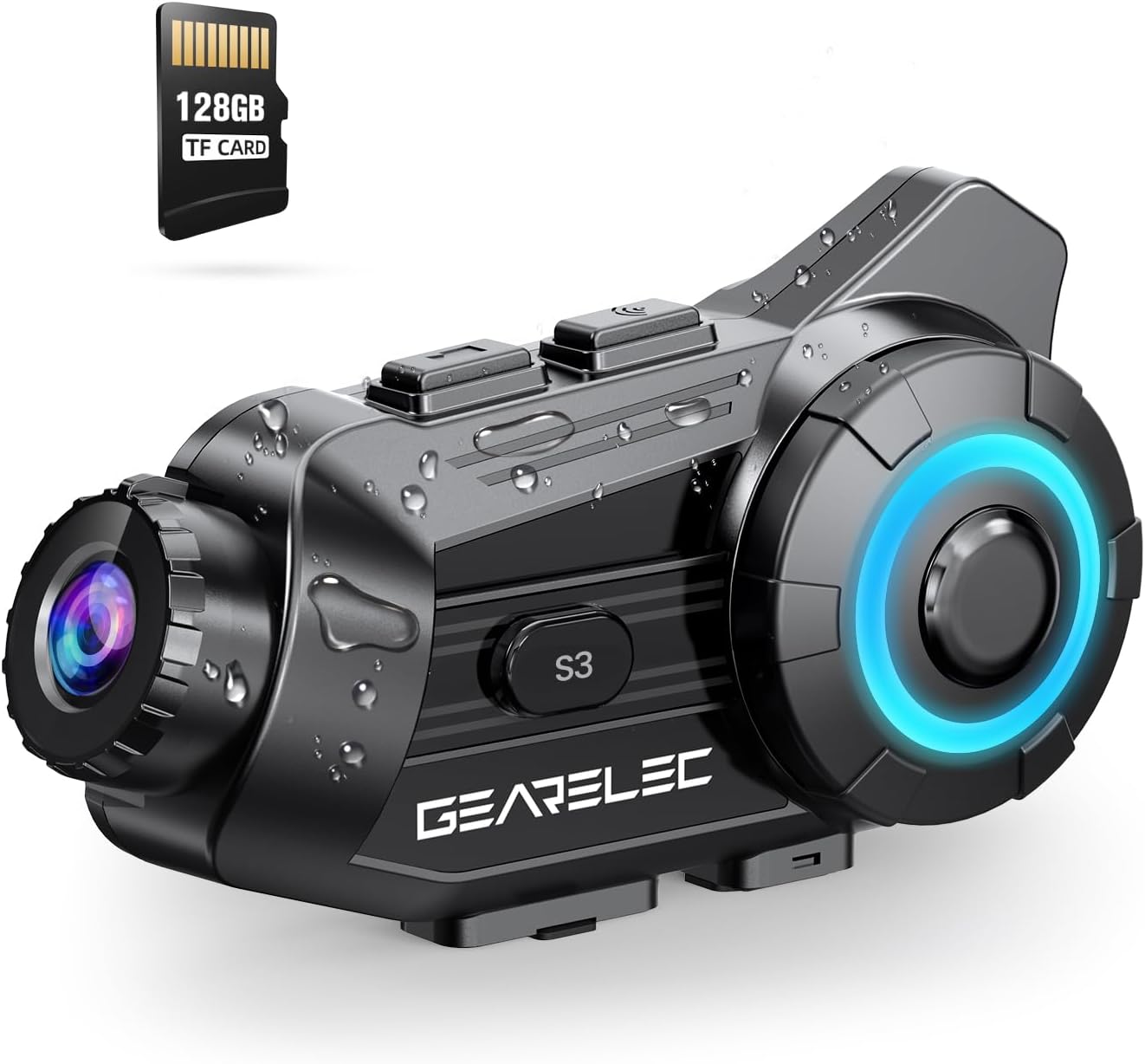
Figure 1.1: GEARELEC S3 Unit Overview. This image displays the compact design of the S3 unit, highlighting its integrated camera lens and control buttons, along with an included 128GB TF card.
2. Informazzjoni dwar is-Sigurtà
- Dejjem tagħti prijorità lis-sigurtà fit-triq. Tħaddimx l-apparat b'mod li jtelliflek l-attenzjoni mis-sewqan.
- Ensure the unit is securely mounted to your helmet before riding.
- Tippruvax tiżżarma jew timmodifika l-unità. Dan jista' jannulla l-garanzija u jikkawża ħsara.
- Żomm l-apparat 'il bogħod minn temperaturi estremi u dawl tax-xemx dirett għal perjodi twal.
- Uża biss il-kejbil tal-iċċarġjar u l-aċċessorji pprovduti.
3. Kontenut tal-Pakkett
Jekk jogħġbok iċċekkja l-kontenut tal-pakkett meta tiftaħ il-kaxxa:
- GEARELEC S3 Main Unit
- Bracket tal-Immuntar tal-Elmu
- Speaker and Microphone Kit
- Cable tal-Iċċarġjar tal-USB
- Karta TF 128GB
- Manwal għall-Utent
4. Setup
4.1 Iċċarġjar inizjali
Before first use, fully charge the S3 unit. The 2000mAh battery provides extended usage times.
- Connect the provided USB charging cable to the charging port on the S3 unit.
- Qabbad it-tarf l-ieħor tal-kejbil ma' adapter tal-enerġija USB (mhux inkluż) jew port USB tal-kompjuter.
- The charging indicator light will illuminate. Once fully charged (approximately 3 hours), the light will change or turn off.

Figure 4.1: Battery Capacity and Charging. This image illustrates the 2000mAh battery capacity, showing a 3-hour charging time and various usage durations like 100 hours music time and 7 hours video recording.
4.2 Daħħal il-Karta tat-TF
The S3 unit supports up to 128GB TF cards for video recording. A 128GB TF card is included.
- Locate the TF card slot on the S3 unit.
- Gently insert the TF card into the slot until it clicks into place. Ensure the card is oriented correctly.
- Biex tneħħiha, agħfas il-karta 'l ġewwa sakemm toħroġ 'il barra.
4.3 Mounting the Unit to Your Helmet
Securely attach the S3 unit to your helmet using the provided mounting bracket.
- Choose a suitable location on the side of your helmet for optimal camera view and accessibility.
- Attach the mounting bracket firmly to the helmet. Ensure it is stable and does not obstruct your vision.
- Slide the S3 main unit onto the mounting bracket until it locks securely.
- Connect the speaker and microphone kit to the S3 unit and position them inside your helmet for clear audio.
5. Istruzzjonijiet Operattivi
5.1 Power On/Off
- Qawwa Mixgħul: Press and hold the Power button for approximately 3 seconds until the indicator light illuminates and you hear a power-on prompt.
- Itfi: Press and hold the Power button for approximately 3 seconds until the indicator light turns off and you hear a power-off prompt.
5.2 Tqabbil tal-Bluetooth
Pair your S3 unit with your mobile phone or other Bluetooth devices.
- With the S3 unit powered off, press and hold the Power button for about 5-7 seconds until the indicator light flashes rapidly, indicating pairing mode.
- On your mobile phone, enable Bluetooth and search for available devices.
- Select "GEARELEC S3" from the list of devices to connect.
- Once connected, the indicator light will change to a slow flash.
5.3 Intercom Communication
The S3 supports full-duplex communication for 2-8 riders within a 2000-meter range.

Figure 5.1: Multi-Rider Intercom. This image depicts multiple riders communicating via the S3 intercom system, illustrating the 6500ft (approx. 2000m) range for group communication.
- Nibdew l-Intercom: After pairing multiple S3 units, short press the Intercom button on your unit to initiate a connection with another paired unit.
- Ingħaqad ma' Grupp: Follow the pairing instructions for each unit to create a group intercom. The system automatically connects to available units within range.
- Tmiem l-Intercom: Short press the Intercom button again to end the communication.
5.4 Funzjonijiet tal-Kamera
The integrated 1080P HD camera offers various recording features.

Figure 5.2: 1080P HD Lens Capability. This image compares 720P and 1080P video quality, demonstrating the S3's clear shooting capabilities and its 20° lens rotation feature.
- Ibda/Waqqaf ir-Reġistrazzjoni: Press the Camera button once to start recording. Press it again to stop.
- Rotazzjoni tal-Lenti: The lens supports 20° rotation for adjusting the shooting angle.
- G-Sensor Lock: In case of a collision, the built-in G-Sensor automatically locks the current video footage biex tevita li jiġi miktub fuqu.
- Reġistrazzjoni Loop: When the TF card is full, the system automatically overwrites the oldest unprotected files, ensuring continuous recording.

Figure 5.3: Intelligent Gravity Sensor. This image illustrates the G-Sensor feature, showing how it automatically locks video footage in the event of a collision, securing it as evidence.
5.5 App Connection (RoadCam)
Use the "RoadCam" application to view and manage recorded videos and photos.

Figure 5.4: Built-in WiFi Hotspot and App Control. This image shows a rider using the 'RoadCam' app on a smartphone to view recorded videos and images, highlighting the convenience of the built-in WiFi hotspot.
- Download the "RoadCam" app from your device's app store (available on Google Play and App Store).
- Turn on the S3 unit's Wi-Fi hotspot (refer to the device's specific Wi-Fi activation instructions).
- Connect your smartphone to the S3 unit's Wi-Fi network.
- Open the RoadCam app to access recorded content.
5.6 Karatteristiċi tal-awdjo
Enjoy high-quality audio for music, calls, and FM radio.

Figure 5.5: Stereo and Crystal-Clear Sound. This diagram illustrates the internal structure of the 40mm HiFi speaker, emphasizing its design for strong bass and clear audio output.
- Daqq tal-mużika: Once paired with your phone, play music through your helmet speakers.
- Qsim tal-Mużika: Share music with another S3 user within 30-50 meters.
- Radju FM: Activate the FM radio function to listen to local stations.
- Tnaqqis tal-Ħsejjes: The S3 features DSP & CVC noise reduction and a windproof microphone for clear audio even at high speeds.

Figure 5.6: Triple Noise Reduction Technology. This image highlights the three components of the S3's noise reduction system: a windproof microphone, DSP noise reduction, and CVC noise-canceling technology, ensuring clear audio at speeds up to 80mph.
6. Manutenzjoni
- Tindif: Uża artab, damp drapp biex tnaddaf il-barra tal-unità. Tużax kimiċi ħarxa jew prodotti tat-tindif li joborxu.
- Kura tal-Lenti: Gently wipe the camera lens with a microfiber cloth to avoid scratches.
- Ħażna: Store the unit in a cool, dry place when not in use. If storing for extended periods, charge the battery to about 50% to prolong its lifespan.
- Reżistenza għall-Ilma: The S3 has an IP65 protection level, making it suitable for outdoor use in rain or snow. However, avoid submerging the unit in water.
7 Issolvi l-problemi
Irreferi għat-tabella t'hawn taħt għal kwistjonijiet komuni u s-soluzzjonijiet tagħhom.
| Problema | Kawża Possibbli | Soluzzjoni |
|---|---|---|
| L-unità ma tixgħelx | Batterija baxxa | Iċċarġja l-unità kompletament. |
| Ma nistax nqabbad mat-telefon | Not in pairing mode / Bluetooth off on phone | Ensure S3 is in pairing mode (rapid flashing light). Turn on phone's Bluetooth and retry. |
| Intercom not connecting | Units out of range / Not properly paired | Move closer to other units. Re-pair all units in the group. |
| Kwistjonijiet ta' reġistrazzjoni tal-vidjo | TF card full / TF card error | Check TF card storage. Format or replace TF card if corrupted. |
| Kwalità fqira tal-awdjo | Microphone/speakers improperly positioned / High wind noise | Adjust microphone and speaker placement. Ensure microphone is not directly exposed to wind. |
8. Speċifikazzjonijiet
| Karatteristika | Dettall |
|---|---|
| Isem tal-Mudell | S3 |
| Riżoluzzjoni tal-Qbid tal-Vidjo | 1080p |
| Format tal-Qbid tal-Vidjo | MP4 |
| Teknoloġija tas-Sensor tar-Ritratti | CMOS |
| Apertura massima | 1.8 Millimetru |
| Angolu tal-Lenti | 135° Angolu Wide |
| Rotazzjoni tal-Lenti | 20° |
| Intercom Medda | Up to 2000 meters (2-8 riders) |
| Kapaċità tal-batterija | 2000mAh |
| Ħin tal-Iċċarġjar | Appross. 3 sigħat |
| Ħin tal-Mużika | Sa 100 sigħat |
| Ħin tar-Reġistrazzjoni tal-Vidjo | Sa 7 sigħat |
| Klassifikazzjoni li ma jgħaddix ilma minnha | IP65 |
| Teknoloġija tal-Konnettività | Wireless (Bluetooth 5.1, Wi-Fi) |
| Karatteristiċi Speċjali | G-Sensor Lock, Loop Recording, Music Sharing, FM Radio, DSP & CVC Noise Reduction |
| Piż tal-oġġett | 15.2 uqija |
9. Garanzija u Appoġġ
GEARELEC products are designed for reliability and performance. For any questions or assistance, please contact our customer support team.
- Appoġġ għall-Klijent: If you have any questions or require technical support, please reach out to "RuiSi Elctric" via the Amazon platform's "ASK A QUESTION" feature. Our team aims to reply within 6 hours.
- Informazzjoni dwar il-garanzija: Please refer to the product packaging or your purchase receipt for specific warranty terms and conditions.


