1. Introduzzjoni
This manual provides essential information for setting up, operating, and maintaining your NIMO 15.6-inch FHD Laptop. Please read this guide thoroughly to ensure optimal performance and longevity of your device. Keep this manual for future reference.
2. X'hemm fil-Kaxxa
- 1 x Laptop NIMO N155
- 1 x Ċarġer Veloċi tat-Tip Ċ 65W PD
- 1 x Manwal għall-Utent
- Windows 11 Home (Installat minn qabel)
- 2 Years Warranty, 90 Days Return Information
3. Prodott Aktarview
The NIMO 15.6-inch FHD Laptop is designed for efficiency and convenience, featuring a robust AMD Ryzen 5 processor, ample memory, and fast storage. Its sleek design and comprehensive connectivity options make it suitable for various tasks.
3.1. Laptop Components

Figure 1: NIMO 15.6-inch FHD Laptop (Rose Gold variant)
This image displays the NIMO 15.6-inch FHD Laptop in Rose Gold, showcasing its full-size keyboard, large touchpad, and the vibrant display. Key features like fingerprint sensor, Type-C PD charger, and backlit keyboard are highlighted on the screen.
3.2. Portijiet u Konnetturi

Figure 2: NIMO Laptop Ports Diagram
This diagram illustrates the available ports on the NIMO laptop, including Micro SD card reader, USB 2.0, USB 3.2 Gen1, Audio Jack, Kensington Lock on one side, and Type-C, USB 3.2 Gen1 Full-function, HDMI 1.4, and a Charge LED on the other side.
- Portijiet USB 3.0: For high-speed data transfer and connecting peripherals.
- Port USB 2.0: Għall-konnessjoni ta' apparati USB standard.
- Port tat-Tip-C: Supports 65W Power Delivery (PD) for fast charging and data transfer.
- HDMI 1.4: Għall-konnessjoni ma' displays esterni.
- Mikro SD Card Reader: Għall-espansjoni tal-ħażna jew it-trasferiment files minn karti tal-memorja.
- Awdjo Jack: Għall-konnessjoni ta' headphones jew kelliema esterni.
- Slot Kensington Lock: For physical security of the device.
4. Setup
4.1. L-Ewwel Tixgħil
- Oħroġ il-laptop u l-aċċessorji kollha mill-kaxxa.
- Connect the 65W Type-C PD Fast Charger to the laptop's Type-C port and a power outlet.
- Open the laptop lid. The laptop may power on automatically. If not, press the power button located on the top right of the keyboard.
- Segwi l-istruzzjonijiet fuq l-iskrin biex tlesti s-setup tal-Windows 11 Home, inkluż il-lingwa, ir-reġjun, il-konnessjoni tan-netwerk, u l-ħolqien tal-kont tal-utent.
4.2. Konnessjoni ma 'Netwerk
During the initial setup or at any time, you can connect your NIMO laptop to a Wi-Fi network:
- Click the Wi-Fi icon in the system tray (bottom right corner of the screen).
- Agħżel in-netwerk Wi-Fi mixtieq tiegħek mil-lista.
- Enter the network password if prompted and click 'Connect'.
5. Istruzzjonijiet Operattivi
5.1. Ġestjoni tal-Enerġija
- Qawwa Mixgħul: Agħfas il-buttuna tal-qawwa.
- Modalità Sleep: Agħlaq l-għatu jew agħfas il-buttuna tal-qawwa fil-qosor.
- Itfi: Ikklikkja l-buttuna Start, imbagħad Power > Shut down.
- Ibda mill-ġdid: Ikklikkja l-buttuna Start, imbagħad Power > Restart.
5.2. Tastiera u Touchpad
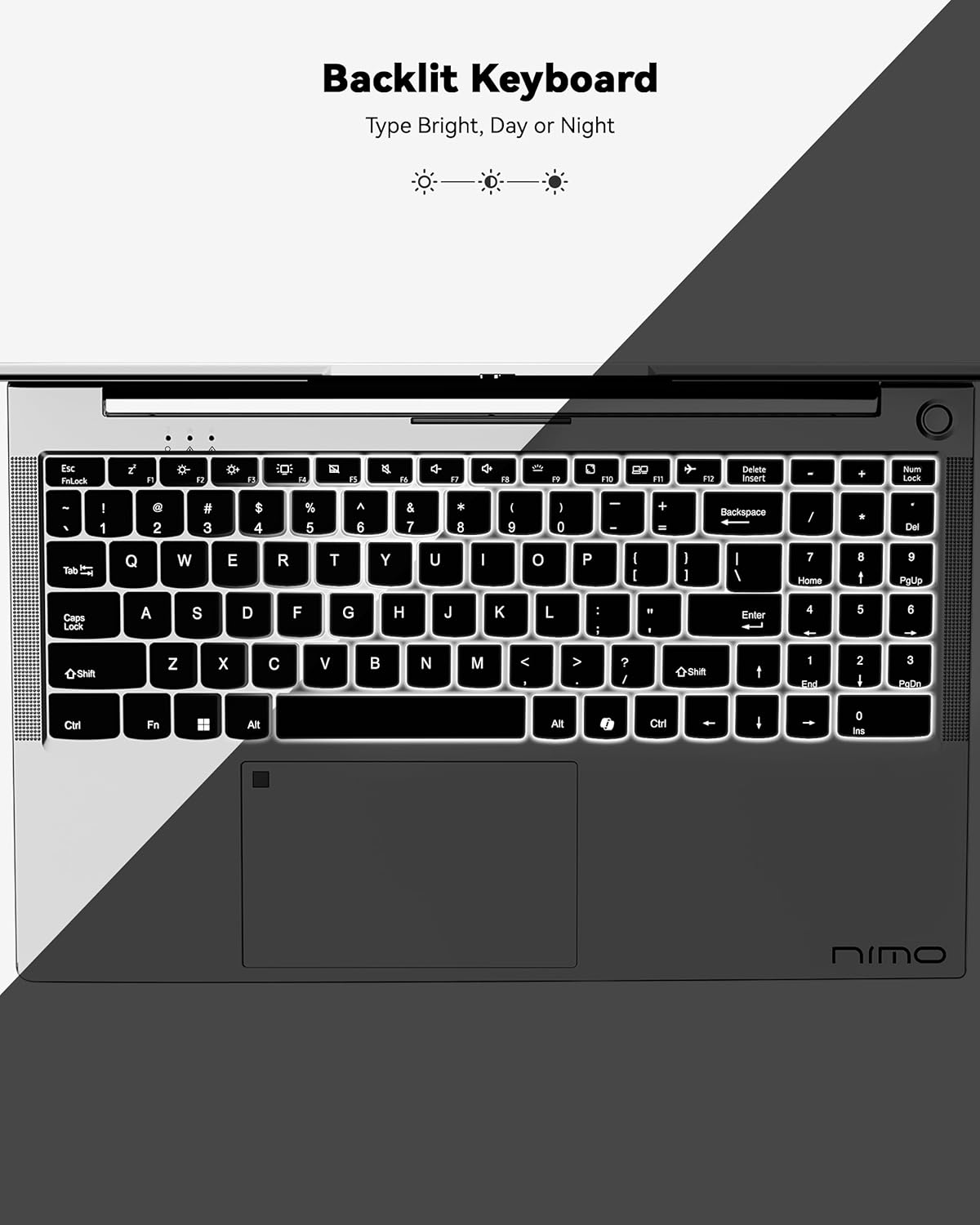
Figure 3: Backlit Keyboard
This image highlights the backlit keyboard feature of the NIMO laptop, demonstrating how the keys illuminate for typing in low-light conditions.
- Tastiera backlit: Agħfas Fn + F5 (or the key with the keyboard backlight icon) to toggle the backlight on/off or adjust brightness.
- Touchpad: Supports multi-touch gestures for scrolling, zooming, and navigation. Refer to Windows settings for customization.
- Sensor tal-marki tas-swaba': Located on the touchpad for secure and instant login. Set up your fingerprint in Windows Settings > Accounts > Sign-in options.

Figure 4: Fingerprint Sensor on Touchpad
This image shows a close-up of the NIMO laptop's touchpad, clearly indicating the integrated fingerprint sensor for quick and secure access.
5.3. Webcam
Il-laptop għandu 2MP webcam for video calls and conferences. Ensure proper lighting for best image quality.
5.4. Awdjo
The integrated speakers provide clear audio. You can also connect headphones or external speakers via the audio jack.
6. Karatteristiċi ewlenin
- Vivid 15.6" Full HD Display: Enjoy stunning visuals with the 15.6" Full HD (1920x1080) IPS anti-glare display, featuring an 85% screen-to-body ratio and micro-edge design.
- Prestazzjoni qawwija: Equipped with an AMD Ryzen 5 processor, 16GB DDR4 RAM, and a 1TB PCIe SSD for fast boot-ups, seamless multitasking, and efficient handling of applications.
- Upgradable Components: The RAM and SSD slots are expandable, allowing for future memory and storage upgrades.
- 65W USB-C PD Fast Charger: The included charger provides rapid power delivery, offering 2 hours of use from just 15 minutes of charging. It is also versatile for charging other compatible devices.
- Secure & Instant Login: Integrated fingerprint reader on the touchpad ensures quick and secure access to your device.
- Ergonomic Backlit Keyboard: Work comfortably in any environment with the backlit keyboard, featuring adjustable brightness.
- Konnettività bla xkiel: Features Wi-Fi 6 and Bluetooth 5.2 for stable, high-speed wireless connections, along with multiple USB 3.0 ports and HDMI for versatile peripheral connections.
Video 1: NIMO Laptop - Perfect for Work and Study, Anytime, Anywhere
This video demonstrates the NIMO laptop's versatility for various tasks, highlighting its portability and performance for work, study, and entertainment in different settings.
Video 2: NIMO 15.6 FHD Laptop for Students Home Work
This video showcases the NIMO 15.6 FHD laptop as an ideal device for students, home users, and professionals, emphasizing its suitability for educational and work-related tasks.
7. Manutenzjoni
- Tindif: Uża drapp artab u mingħajr suf biex tnaddaf l-iskrin u l-barra. Evita kimiċi ħarxa.
- Kura tal-batterija: Biex ittawwal il-ħajja tal-batterija, evita li tiċċarġja kompletament il-batterija ta' spiss. Aħżen il-laptop f'post frisk u niexef.
- Aġġornamenti tas-Software: Aġġorna s-sistema operattiva u d-drivers tal-Windows tiegħek regolarment biex tiżgura prestazzjoni u sigurtà ottimali.
- Ventilazzjoni: Ensure the laptop's ventilation openings are not blocked to prevent overheating. Use on a hard, flat surface.
8 Issolvi l-problemi
- Il-laptop mhux qed jixgħel: Ensure the charger is securely connected and the battery has sufficient charge. Try a different power outlet.
- L-iskrin huwa vojt: Connect to an external monitor to check if the display is the issue. Restart the laptop.
- Problemi ta' konnettività tal-Wi-Fi: Restart your router and the laptop. Check Wi-Fi settings and ensure airplane mode is off.
- Prestazzjoni bil-mod: Close unnecessary applications, check for malware, and ensure sufficient free storage space. Consider upgrading RAM or SSD if performance remains an issue.
- It-tastiera jew it-touchpad ma jirrispondux: Erġa' ibda l-laptop. Iċċekkja għal aġġornamenti tas-sewwieqa fil-Maniġer tal-Apparat.
For persistent issues, please refer to the support section or contact NIMO customer service.
9. Speċifikazzjonijiet
| Karatteristika | Speċifikazzjoni |
|---|---|
| Daqs tal-Wiri tal-Iskrin Permanenti | 15.6 Pulzier |
| Riżoluzzjoni tal-Iskrin | 1920 x 1080 pixels (Full HD) |
| Proċessur | AMD Ryzen 5 (3.7 GHz) |
| RAM | 16 GB DDR4 (Jista' jiġi aġġornat) |
| Veloċità tal-Memorja | 4800 MHz |
| Hard Drive | SSD ta' 1024 GB (Jista' jiġi aġġornat) |
| Koproċessur tal-Grafika | Grafika integrata tal-AMD |
| Sistema Operattiva | Windows 11 Home |
| Tip bla fili | 802.11a/b/g/n/ac (Wi-Fi 6) |
| Bluetooth | Bluetooth 5.2 |
| Numru ta 'USB 2.0 Ports | 1 |
| Numru ta 'USB 3.0 Ports | 3 |
| Ħajja Medja tal-Batterija | 9 Sigħat |
| Piż tal-oġġett | 5 liri |
| Dimensjonijiet tal-Prodott | 14.07 x 8.98 x 0.76 pulzieri |
| Wara WebCam Riżoluzzjoni | 2 MP |
| Karatteristiċi Speċjali | Tastiera b'dawl minn wara, Qarrej tal-marki tas-swaba', Awdjo HD, Tastiera Numerika |
10. Garanzija u Appoġġ
Il-laptop NIMO tiegħek jiġi b' Garanzija ta' 2 snin mill-manifatturBarra minn hekk, NIMO toffri Politika ta' ritorn u skambju mingħajr tbatija ta' 90 jum. Our dedicated support team is available to assist with any issues or replacements.
10.1. Ikkuntattja l-Appoġġ
- For product-related questions or technical assistance, please contact NIMO customer service via their official websit, email, jew telefon.
- Contact information can typically be found on the NIMO official webpaġna tas-sit jew tal-prodott.
11. Informazzjoni dwar is-Sigurtà
- Use only original chargers and regularly inspect cables for damage.
- Handle the laptop by its base and consider using a protective case. Avoid placing heavy objects on it.
- Place the laptop on a hard, flat surface to ensure proper ventilation and prevent overheating. Keep it away from extreme temperatures and moisture.
- Do not overcharge the battery. Discontinue use if the battery swells or shows signs of damage.
- Set strong passwords, keep software updated, use antivirus protection, and regularly back up your data.
- In case of liquid spills, immediately unplug the laptop and allow it to dry completely before attempting to power it on.
- For any technical issues, consult qualified professionals. Do not attempt to disassemble or repair the device yourself.
12. Ċaħda Legali
This laptop is provided "as is," with no express or implied warranties except for the manufacturer's limited warranty (if applicable). Implied warranties of merchantability or fitness for a specific purpose are disclaimed. NIMO is not liable for damages resulting from misuse (e.g., non-approved chargers, unauthorized repairs), physical damage, or failure to follow safety guidelines, including data loss or business interruption. Users are responsible for regularly backing up their data. This disclaimer does not exclude liability for manufacturing defects or violations of mandatory local laws. By using the NIMO laptop, you accept these terms, which are governed by applicable jurisdiction laws.


