1. Introduzzjoni
Thank you for choosing the AIWA FPH-S100/4G Simple Mobile Phone. This device is designed for ease of use, featuring large keys, a clear display, and essential functions like 4G connectivity, an SOS emergency button, FM radio, and a flashlight. This manual provides detailed instructions to help you set up, operate, and maintain your new phone.
2. Prodott Aktarview
The AIWA FPH-S100/4G is a user-friendly mobile phone with a focus on simplicity and accessibility. It supports 4G LTE for reliable calls and features a 1.8-inch color screen.

Figura 2.1: Quddiem view of the AIWA FPH-S100/4G mobile phone, displaying the screen and large, clearly labeled keypad.

Figura 2.2: Lura view of the AIWA FPH-S100/4G mobile phone, highlighting the prominent orange SOS button and the integrated camera.

Figura 2.3: Ġenb view of the AIWA FPH-S100/4G mobile phone, illustrating its ergonomic design.

Figura 2.4: Fuq view of the AIWA FPH-S100/4G mobile phone, featuring the built-in LED flashlight.
Karatteristiċi ewlenin:
- Ċwievet kbar: Easy to see and press for comfortable dialing and texting.
- Buttuna SOS: Dedicated button for quick access to emergency contacts.
- Wiri LCD ta' 1.8": Clear color screen for easy viewing of numbers and text.
- Konnettività 4G LTE: Ensures clear and stable call quality.
- Radju FM: Listen to your favorite radio stations on the go.
- Flashlight LED: Convenient for low-light situations.
- Iċċarġjar USB-C: Modern and reversible connector for easy charging.
- Appoġġ għal SIM doppju: Uża żewġ SIM cards simultanjament.
- Slott tal-Karta TF: Expandable storage for contacts, photos, and more.
3. Setup
3.1. Kontenut tal-Pakkett
Kun żgur li l-oġġetti kollha huma preżenti fil-kaxxa:
- AIWA FPH-S100/4G Mobile Phone
- Cable USB
- Manwal għall-Utent (dan id-dokument)
3.2. Installazzjoni tal-batterija
- Neħħi l-għatu ta' wara tat-telefon billi tiftaħu bil-mod mill-islott.
- Allinja l-kuntatti tal-batterija mat-terminals ġewwa t-telefon.
- Agħfas il-batterija 'l isfel sakemm tkun f'postha sew.
- Erġa' poġġi l-għatu ta' wara, waqt li tiżgura li jikklikkja f'postu.
3.3. Daħħal SIM Cards u TF Card
The phone supports two SIM cards and one TF (microSD) card for expandable storage.
- With the back cover and battery removed, locate the SIM card slots and the TF card slot.
- Carefully insert your SIM card(s) into the designated slots with the gold contacts facing down, following the orientation indicated on the phone.
- Insert the TF card into its slot, ensuring it is properly seated.
- Erġa' installa l-batterija u l-għatu ta' wara.
3.4. Iċċarġjar Inizjali
Qabel l-ewwel użu, iċċarġja l-batterija tat-telefon kompletament.
- Connect the USB-C cable to the charging port on the phone.
- Qabbad it-tarf l-ieħor tal-kejbil USB ma' adapter tal-enerġija USB kompatibbli (mhux inkluż) jew mal-port USB tal-kompjuter.
- L-indikatur tal-batterija fuq l-iskrin se juri l-istatus tal-iċċarġjar.
- Ladarba tkun iċċarġjata kompletament, skonnettja l-ċarġer.


Figura 3.1: Icons representing USB-C charging and the flash card slot.
4. Istruzzjonijiet Operattivi
4.1. Power On/Off
- Biex Tixgħel: Agħfas u żomm il- Red Call End/Power buttuna sakemm l-iskrin jixgħel.
- Biex Tifi: Agħfas u żomm il- Red Call End/Power button until the power off options appear, then select 'Power Off'.
4.2. Tagħmel u Riċeviment Sejħiet
- Biex Tagħmel Sejħa: Enter the phone number using the large keypad. Press the Sejħa Ekoloġika buttuna biex tibda s-sejħa.
- Biex Twieġeb Sejħa: Meta jdoqq it-telefon, agħfas il-buttuna Sejħa Ekoloġika buttuna.
- Biex Intemm Sejħa: Agħfas il- Red Call End/Power buttuna.

Figura 4.1: The phone's simplified interface, showing the large numeric keypad for easy dialing.
4.3. Buttuna ta 'Emerġenza SOS
Il-buttuna SOS dedikata tipprovdi mod rapidu biex tikkuntattja numri ta' emerġenza stabbiliti minn qabel.
- Setting Up Emergency Contacts: Navigate to the 'SOS Settings' in the phone's menu. Add up to 5 emergency contact numbers. These contacts will be called in sequence when the SOS button is activated.
- Attivazzjoni tal-SOS: Agħfas u żomm il-larinġ SOS button on the back of the phone for a few seconds. The phone will automatically dial the emergency contacts one by one until a connection is made. It will also send a pre-set emergency SMS message to these contacts.
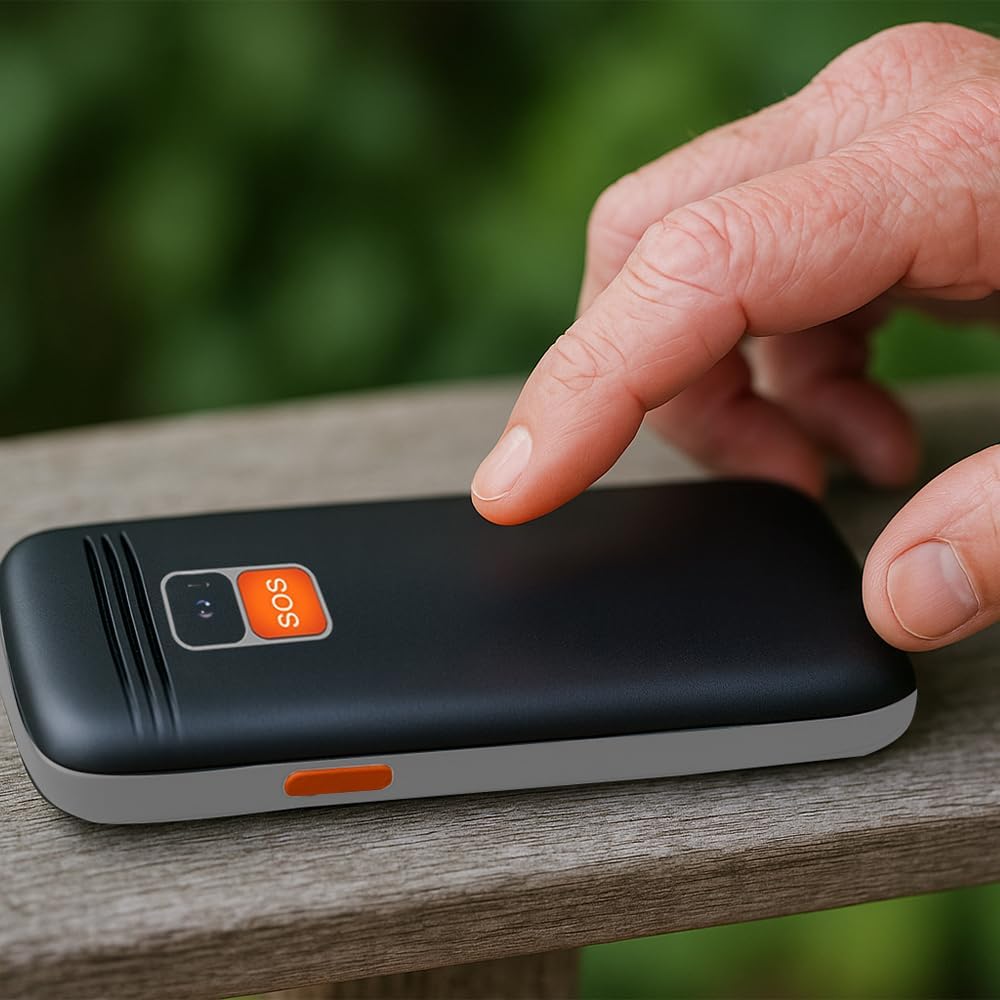
Figura 4.2: A user activating the SOS emergency function by pressing the dedicated button on the phone's rear.
4.4. L-użu tal-flashlight
To turn the LED flashlight on or off, locate the dedicated flashlight button on the side of the phone (or refer to the manual for specific key combination if not a dedicated button). Press and hold or toggle the button as instructed.

Figura 4.3: Icon indicating the flashlight function.
4.5. Radju FM
To use the FM radio, connect a wired headset (not included) to the 3.5mm audio jack, as it acts as an antenna. Navigate to the 'FM Radio' application in the phone's menu to scan for stations and adjust volume.

Figura 4.4: Icon representing the earphone output port.
4.6. Konnettività Bluetooth
Biex tqabbel ma 'apparat Bluetooth:
- Mur fuq 'Settings' > 'Bluetooth'.
- Ixgħel il-Bluetooth.
- Agħżel 'Fittex għal apparati' biex issib aċċessorji Bluetooth disponibbli.
- Select your desired device from the list and follow the on-screen prompts to pair.
5. Manutenzjoni
5.1. Tindif tal-Apparat
Use a soft, dry, lint-free cloth to clean the phone's screen and body. Avoid using harsh chemicals, cleaning solvents, or abrasive materials, as these can damage the phone's surface.
5.2. Kura tal-batterija
- Evita li tesponi l-batterija għal temperaturi estremi (sħan jew kiesaħ).
- Tittaqqabx, tiżżarmax, jew timmodifikax il-batterija.
- Jekk it-telefon ma se jintużax għal perjodu estiż, iċċarġjah sa madwar 50% qabel ma taħżnu.
5.3. Ħażna
Aħżen it-telefon f'post frisk u niexef 'il bogħod mix-xemx diretta u mill-umdità meta ma jkunx qed jintuża.
6 Issolvi l-problemi
This section addresses common issues you might encounter with your AIWA FPH-S100/4G.
| Problema | Kawża Possibbli | Soluzzjoni |
|---|---|---|
| It-telefon ma jixgħelx. | Batterija baxxa jew batterija mhux installata sew. | Iċċarġja l-batterija għal mill-inqas 30-il minuta. Kun żgur li l-batterija hija mdaħħla sew. |
| L-ebda sinjal tan-netwerk. | SIM card not inserted, out of network coverage, or SIM card issue. | Check SIM card installation. Move to an area with better network coverage. Contact your service provider if the issue persists. |
| Ma nistax nagħmel jew nirċievi telefonati. | No network signal, incorrect call settings, or insufficient balance (prepaid). | Verify network signal. Check call barring settings. Ensure sufficient credit if using a prepaid SIM. |
| Il-buttuna SOS mhux qed taħdem. | Kuntatti ta' emerġenza mhux stabbiliti jew numri żbaljati. | Go to 'SOS Settings' and ensure emergency contacts are correctly saved. Test the function in a non-emergency situation. |
| Ir-Radju FM mhux qed jaħdem. | Headset not connected or faulty. | Ensure a wired headset is properly connected, as it functions as the antenna. Try a different headset if available. |
7. Speċifikazzjonijiet
Detailed technical specifications for the AIWA FPH-S100/4G mobile phone.
| Karatteristika | Speċifikazzjoni |
|---|---|
| Isem tal-Mudell | FPH-S100/4G |
| Brand | Aiwa |
| Sistema Operattiva | Symbian 9.1 |
| Teknoloġija Mobbli | 4G |
| Fornitur tas-Servizz Wireless | All carriers |
| Kulur | Iswed |
| Tip ta' Konnettur | USB Tip-Ċ |
| Fattur tal-Formola | Bar |
| Tip ta 'Wiri | LCD |
| Daqs tal-Wiri | 1.8 pulzieri |
| Kapaċità tal-batterija | 800 mAh (Jista' jitneħħa) |
| Dimensjonijiet (Pakkett) | 15 x 15 x 10 ċm |
| Piż | 58 g |
| Komponenti Inklużi | Cable USB |


Figura 7.1: Icons highlighting the 1.8" LCD display and the phone's light weight of 58g.
8. Garanzija u Appoġġ
8.1. Garanzija tal-Prodott
The AIWA FPH-S100/4G mobile phone comes with a Garanzija tal-prodott ta '2 sena mid-data tax-xiri. Din il-garanzija tkopri difetti fil-manifattura u malfunzjonamenti taħt użu normali. Jekk jogħġbok żomm il-prova tax-xiri tiegħek għal talbiet ta' garanzija.
8.2. Appoġġ għall-Klijent
For technical assistance, troubleshooting beyond this manual, or warranty inquiries, please contact your retailer or the official Aiwa customer support. Refer to the contact information provided with your purchase or visit the official Aiwa websit għal dettalji ta 'appoġġ.


