1. Introduzzjoni
This manual provides detailed instructions for the setup, operation, and maintenance of your FREEWOLF M75 Wireless Dual-Mode Keyboard. Please read this manual thoroughly before using the product to ensure proper functionality and longevity.

Image 1.1: The FREEWOLF M75 Wireless Dual-Mode Keyboard, showcasing its compact layout and gradient keycaps.
2. Kontenut tal-Pakkett
Qabel ma tipproċedi bis-setup, jekk jogħġbok ivverifika li l-oġġetti kollha huma preżenti fil-pakkett:
- FREEWOLF M75 Keyboard x 1
- Kejbil USB-C x 1
- 2.4GHz Wireless Receiver x 1
- Manwal għall-Utent x 1

Image 2.1: Contents of the FREEWOLF M75 keyboard package, including the keyboard, USB-C cable, 2.4GHz receiver, and user manual.
3. Istruzzjonijiet ta' Setup
3.1 Iċċarġjar tat-Tastiera
The M75 keyboard is equipped with a 2000mAh rechargeable battery. For optimal performance, fully charge the keyboard before first use.
- Connect the supplied USB-C cable to the keyboard's charging port.
- Qabbad it-tarf l-ieħor tal-kejbil USB-C ma' sors ta' enerġija USB (eż., port USB tal-kompjuter, adapter tal-ħajt).
- The OLED display will indicate charging status. A full charge provides approximately 150 hours of use with the backlight off, or 24 hours with the backlight on.

Image 3.1: Visual representation of the M75 keyboard's 2000mAh battery, highlighting its estimated usage duration with and without backlighting.
3.2 Konnessjoni tat-Tastiera
The M75 keyboard supports dual-mode connectivity: 2.4GHz wireless and Bluetooth 5.1/5.2.

Image 3.2: The M75 keyboard demonstrating its dual-mode connection capabilities, supporting 2.4GHz wireless and Bluetooth for various devices.
Konnessjoni bla fili 3.2.1 2.4GHz
- Sib ir-riċevitur mingħajr fili ta' 2.4GHz fil-pakkett.
- Plug the 2.4GHz receiver into an available USB port on your computer or compatible device.
- Turn on the keyboard using the switch located on the right side.
- The keyboard will automatically connect to the receiver. The OLED display will show the 2.4G connection status.
3.2.2 Konnessjoni Bluetooth
The M75 keyboard supports up to two Bluetooth devices (BT1 and BT2).
- Turn on the keyboard using the switch on the right side.
- Agħfas u żomm il- Fn ċavetta u l- BT1 or BT2 key (usually located on the right side near the OLED display) for 3-5 seconds until the indicator light flashes, indicating pairing mode.
- On your device (Windows PC, MacBook, Linux system, tablet, or smartphone), navigate to Bluetooth settings and search for new devices.
- Select "FREEWOLF M75" from the list of available devices to pair.
- Once connected, the OLED display will show the corresponding Bluetooth connection status (BT1 or BT2).
- To switch between connected Bluetooth devices, short press Fn + BT1 or Fn + BT2.
4. Istruzzjonijiet Operattivi
4.1 Multi-functional Knob and OLED Display
The M75 keyboard features a multi-functional knob and an OLED display for enhanced control and information.

Immaġni 4.1: Mill-qrib view of the M75 keyboard's multi-functional knob and OLED display, detailing their functions and indicators.
- Funzjonalità tal-pum:
- Rotate left/right: Adjusts system volume.
- Press down: Play/Pause media.
- Press down for 5 seconds: Adjusts backlight brightness.
- Display OLED: Shows real-time information including battery level, current connection mode (2.4G, BT1, BT2), charging status, and low battery warnings.
4.2 Kontroll tad-dawl ta' wara
The M75 keyboard features rainbow backlighting.
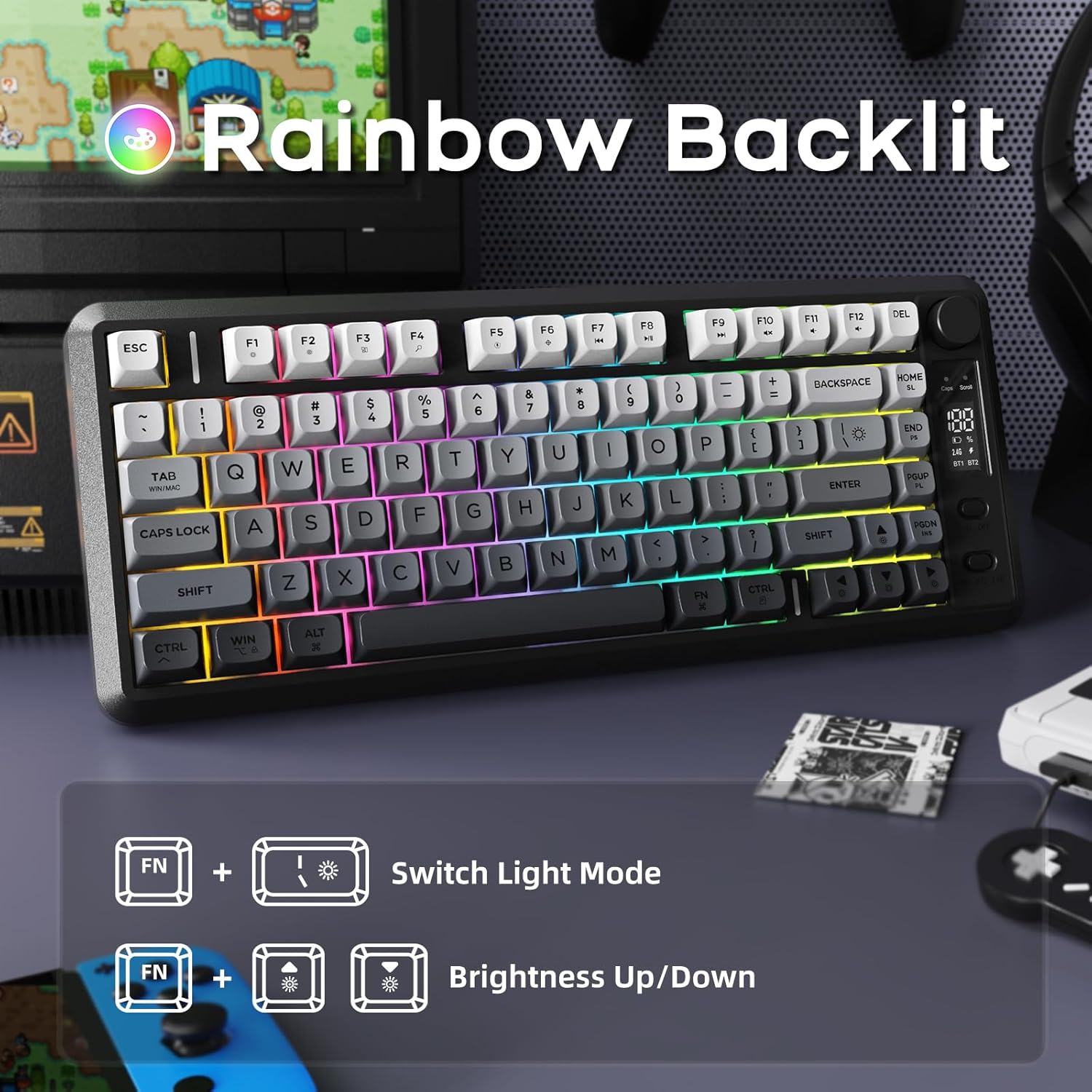
Image 4.2: Instructions for controlling the M75 keyboard's rainbow backlight, showing key combinations for mode switching and brightness adjustment.
- Agħfas Fn + I: Switches between different backlight modes.
- Agħfas Fn + ↑ (Up Arrow): Increases backlight brightness.
- Agħfas Fn + ↓ (Down Arrow): Decreases backlight brightness.
Note: The keycaps are opaque, meaning the light illuminates around the keys, not through the legends.
4.3 Kontra l-Ghosting
The M75 keyboard features 26-key rollover technology, ensuring that multiple simultaneous key presses are registered accurately without conflicts. This is particularly beneficial for gaming and fast typing.

Image 4.3: Illustration of the M75 keyboard's 26-key anti-ghosting feature, highlighting its compact 75% layout.
5. Manutenzjoni
5.1 Tindif tat-Tastiera
Biex iżżomm id-dehra u l-funzjonalità tat-tastiera:
- Skonnettja t-tastiera mis-sorsi u l-apparati kollha tal-enerġija qabel ma tnaddafha.
- Uża drapp ratba u mingħajr ħelu ftit dampLaħlaħ bl-ilma jew b'soluzzjoni ħafifa tat-tindif biex timsaħ l-għotjien taċ-ċwievet u l-wiċċ.
- Evita li tuża kimiċi ħarxa, materjali li joborxu, jew umdità eċċessiva.
- Għat-trab u l-fdalijiet bejn iċ-ċwievet, uża arja kkompressata.
5.2 Kura tal-Batterija
Biex ittawwal il-ħajja tal-batterija:
- Evita li tiċċarġja l-batterija kompletament ta' spiss.
- Aħżen it-tastiera f'post frisk u niexef meta ma tkunx qed tużaha għal perjodi twal.
- If the keyboard will not be used for a long time, charge it to about 50% before storage.
6 Issolvi l-problemi
If you encounter issues with your FREEWOLF M75 keyboard, refer to the following common solutions:
| Problema | Kawża Possibbli | Soluzzjoni |
|---|---|---|
| Keyboard not connecting via 2.4GHz | Receiver not plugged in, keyboard off, low battery, interference. | Ensure receiver is securely plugged in. Turn keyboard on. Charge keyboard. Try a different USB port. |
| It-tastiera mhux qed tikkonnettja permezz tal-Bluetooth | Keyboard not in pairing mode, device Bluetooth off, already connected to another device, low battery. | Ensure keyboard is in pairing mode (Fn+BT1/BT2 long press). Enable Bluetooth on your device. Disconnect from other devices. Charge keyboard. |
| Id-dawl ta' wara mhux qed jaħdem jew huwa mċajpar | Backlight turned off, brightness set to minimum, low battery. | Press Fn+I to cycle modes. Press Fn+↑ to increase brightness. Charge keyboard. |
| Keys not responding or ghosting | Low battery, software issue, physical obstruction. | Charge keyboard. Restart your computer. Clean under keycaps. |
| OLED display not showing information | Keyboard off, low battery, display issue. | Ensure keyboard is on and charged. If issue persists, contact support. |
| Tbattija rapida tal-batterija | Backlight constantly on at high brightness, frequent use. | Reduce backlight brightness or turn it off when not needed. Ensure keyboard is fully charged. |
7. Speċifikazzjonijiet
| Karatteristika | Dettall |
|---|---|
| Brand | FREEWOLF |
| Mudell | M75 |
| Teknoloġija tal-Konnettività | 2.4G bla fili, Bluetooth 5.1/5.2 |
| Deskrizzjoni tat-Tastiera | Membrane, Wireless |
| Materjal tal-Keycaps | Polibutilene Tereftalat (PBT) |
| Karatteristiċi Speċjali | Backlit, Ergonomic, Rechargeable, Silent, Volume Roller, OLED Display, Anti-Ghosting |
| Kapaċità tal-batterija | 2000mAh |
| Ħajja Stima tal-Batterija | 150 hours (backlight off), 24 hours (backlight on) |
| Apparati Kompatibbli | Laptop, PC, Tablet (Windows, MacBook, Linux) |
| Piż tal-oġġett | 1.65 liri |
| Dimensjonijiet tal-Pakkett | 15.75 x 6.02 x 1.89 pulzieri |
8. Garanzija u Appoġġ
Għal informazzjoni dwar il-garanzija u appoġġ tekniku, jekk jogħġbok irreferi għad-dokumentazzjoni inkluża max-xiri tiegħek jew ikkuntattja lill-manifattur direttament. Żomm il-prova tax-xiri tiegħek għal talbiet ta' garanzija.
Manufacturer: FREEWOLF


