1. Introduzzjoni
This manual provides instructions for the installation and operation of the caramco Wireless CarPlay & Android Auto Module. This device integrates wireless CarPlay and Android Auto functionality into your vehicle's existing NTG6.0 Command system, enhancing your driving experience with smartphone connectivity.
The module is a LINUX-based device designed for factory radio screens, not an aftermarket Android radio. It retains all original factory functions and controls, including steering wheel, knob, and touch controls. The system operates on both 5GHz and 2.4GHz WiFi for stable connectivity and utilizes your car's factory Bluetooth for superior audio quality.
Important Functionality Notes:
- This device does not have Google Play and does not support downloading additional applications.
- Neither CarPlay nor Android Auto supports video applications.
- The device does NOT support MirrorLink, Google Voice Assistant, or external USB playback.
2. Kompatibilità
This module is exclusively compatible with specific Mercedes-Benz models equipped with the factory NTG6.0 Command system. It is NOT compatible with NTG5.5 Command systems.
Compatible Mercedes-Benz Models and Years (with NTG6.0 Command):
- W177: 2019-2023
- W247: 2019-2023
- H247: 2020-2023
- X247: 2019-2023
- X253: 2020-2023
- V167: 2020-2022
- X167: 2020-2022
- C257: 2020-2023
- W213: 2020-2023
- EQA: 2021-2024
- EQB: 2021-2024
- EQC: 2019-2024
- Sprinter: 2019-2023 (OEM 10.25")
Kompatibilità ta 'Smartphone: Jeħtieġ Android 12+ jew iOS 12+.
To confirm compatibility, it is recommended to send a picture of your vehicle's screen to technical support before installation.

Image: Compatible Model List. This table details the Mercedes-Benz models and their corresponding years that are compatible with the NTG6.0 system.

Image: Ensure Compatibility with Your Vehicle. This image illustrates the difference between NTG5.5 (non-touch) and NTG6.0 (touch-enabled) screens, crucial for compatibility.
3. Kontenut tal-Pakkett
Ivverifika li l-komponenti kollha huma preżenti fil-pakkett qabel tibda l-installazzjoni:
- CarPlay/Android Auto Module
- Power Canbus Cable
- Cable tal-vidjo LVDS
- Cable USB
- Manwal ta' Installazzjoni (dan id-dokument)
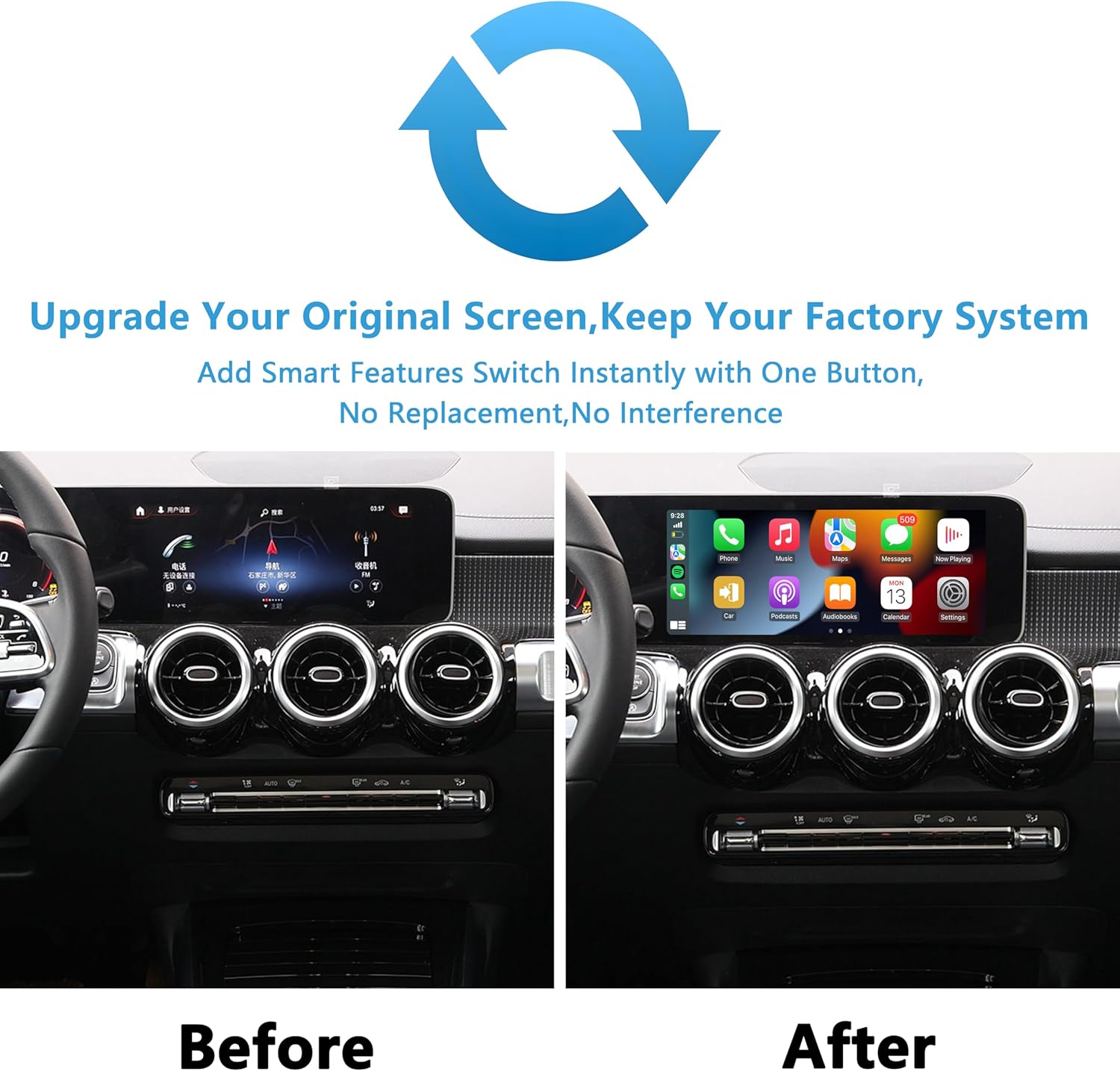
Image: Package Accessories. This image displays the main module unit and the various cables included in the kit for installation.
4. Setup u Installazzjoni
The caramco Wireless CarPlay & Android Auto Module is designed for a 100% plug-and-play installation. This means no cutting or splicing of wires is required, as it uses dedicated connectors that integrate with your vehicle's existing wiring harness.
General Installation Steps (Refer to the included detailed installation manual for specific vehicle instructions):
- Preparazzjoni: Ensure the vehicle's ignition is off and the battery is disconnected before starting.
- Aċċess: Carefully remove the necessary trim panels and the factory head unit to access the wiring.
- Connect Power/Canbus: Connect the provided Power Canbus cable between the factory head unit and the vehicle's wiring harness.
- Connect LVDS Video: Connect the LVDS video cable to the appropriate ports on the factory screen and the module.
- Qabbad USB: Connect the USB cable to the module. This cable may also be used for aftermarket camera connections.
- Modulu tal-Immuntar: Securely mount the CarPlay/Android Auto module in a suitable location behind the dashboard.
- Erġa' arma: Reconnect the battery, turn on the ignition, and test the system before reassembling all trim panels.
No programming is needed for this installation.

Image: Upgrade Your Original Screen, Keep Your Factory System. This visual demonstrates how the module integrates, showing the original interface alongside the new CarPlay interface.
5. Istruzzjonijiet Operattivi
Once installed, the module allows seamless integration of Wireless CarPlay and Android Auto while retaining access to your original factory system.
5.1 Tibdil bejn Sistemi
To switch between your factory NTG6.0 system and the CarPlay/Android Auto interface, press and hold the 'Back' button on your vehicle's controls for approximately 3 seconds.
5.2 Kontrolli
The module maintains full compatibility with your vehicle's original controls:
- Kontrolli tal-istering: Use your existing steering wheel buttons for audio, calls, and navigation within CarPlay/Android Auto.
- Pum tal-Kontroll: The factory control knob can be used to navigate menus and select options.
- Touchscreen: If your factory screen is touch-enabled (NTG6.0), you can use touch input directly on the display.
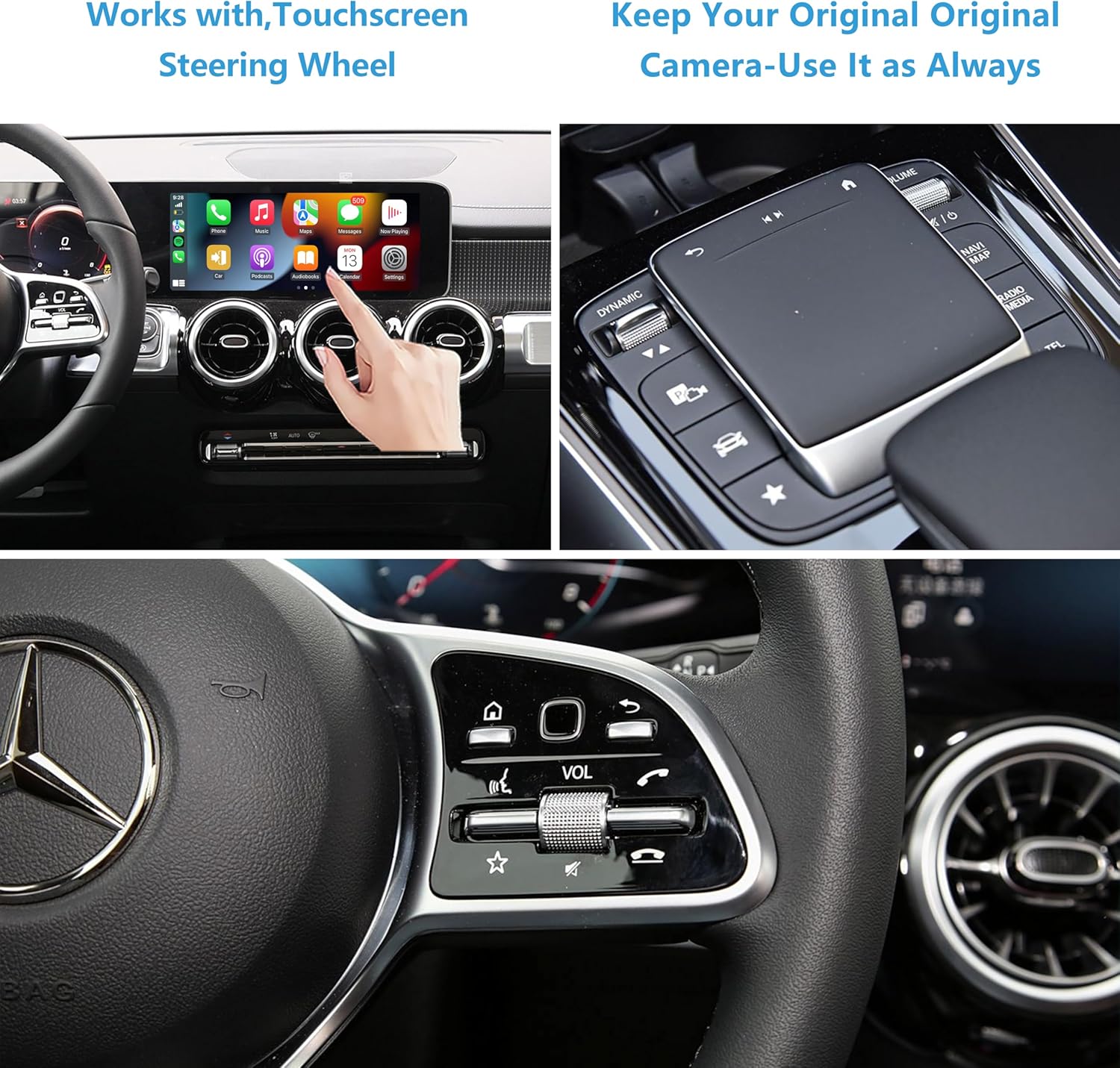
Image: Works with Touchscreen, Steering Wheel, and Original Camera. This image demonstrates the various control methods available and confirms compatibility with the original vehicle camera.
5.3 Integrazzjoni tal-Kamera
The module is compatible with both factory-installed rear/360 cameras and aftermarket cameras. Your original camera system will function as it always has.
5.4 Użu tal-Mikrofonu
The system utilizes your vehicle's original microphone for calls and voice commands within CarPlay/Android Auto. No external microphone is needed.

Image: Use Your Original Mic and Original Bluetooth Audio. This image highlights the use of the vehicle's built-in microphone and the superior sound quality of Bluetooth audio.
6. Sound Configuration
The module uses your car's factory Bluetooth system for audio output, providing better sound quality compared to AUX connections.
Steps to Configure CarPlay/Android Auto Sound:
- Kun żgur li l-Bluetooth tat-telefon tiegħek huwa mixgħul u jista' jinstab.
- Ensure your car's Bluetooth is turned on and discoverable.
- Connect your phone to the module via Bluetooth (this connection is typically automatic when entering CarPlay/Android Auto).
- The phone's Bluetooth will automatically disconnect from the module and then reconnect to your car's Bluetooth.
- Set the audio source in your car's audio settings to Bluetooth.
- Sound from CarPlay/Android Auto will now play through your car's speakers.
Nota: Some car models may require manually switching the audio source to Bluetooth within the car's infotainment system.
7 Issolvi l-problemi
If you encounter issues with the module, consider the following troubleshooting steps:
- Kwistjonijiet ta' Konnessjoni: If CarPlay or Android Auto fails to connect, try restarting your smartphone and the module (by turning the car off and on).
- Ebda Ħsejjes: Verify that your phone's Bluetooth is connected to the car and that the car's audio source is set to Bluetooth. Review the 'Sound Configuration' section.
- Konnettività intermittenti: Ensure your phone is within reasonable proximity to the module and that there are no significant obstructions. The module supports both 5GHz (faster) and 2.4GHz (longer range) WiFi for stability.
- Kontroll tal-Kompatibbiltà: Double-check that your vehicle model and year, as well as your smartphone's operating system, meet the compatibility requirements.
For persistent issues or technical assistance, please contact caramco support. Support typically responds within 24 hours.
8. Speċifikazzjonijiet
| Attribut | Speċifikazzjoni |
|---|---|
| Brand | caramco |
| Numru tal-Mudell | 06978344350645 |
| Apparati Kompatibbli | Smartphone Android 12+ and iOS 12+ |
| Karatteristiċi Speċjali | Wireless Android Auto, Wireless Apple CarPlay |
| Teknoloġija tal-Konnettività | Bluetooth, Wi-Fi (5Ghz & 2.4Ghz) |
| Modalità tal-Ħruġ tal-Awdjo | Stereo |
| Numru ta 'Kanali | 2 |
| Metodu ta' Kontroll | Touch, Steering Wheel, Control Knob (via OEM integration) |
| Tip ta' Materjal | Plastic + PCBA |
| Jinkludi Batterija Riċarġabbli | Nru |
| Kulur | Iswed |

Image: Powerful Chip for Connectivity. This image illustrates the advanced internal components, emphasizing the module's cutting-edge technology for reliable and fast connectivity.
9. Garanzija u Appoġġ
Informazzjoni dwar il-garanzija: Specific warranty details are not provided in this document. Please refer to your purchase documentation or contact caramco customer service for warranty terms and conditions.
Appoġġ Tekniku: For any technical assistance, installation queries, or troubleshooting beyond the scope of this manual, please contact caramco support. Our team aims to respond to all inquiries within 24 hours.
You can typically find contact information for support on the product packaging, the seller's webis-sit, jew permezz tal-pjattaforma tax-xiri tiegħek.