AULA WIN60 HE PRO 60% Mechanical Gaming Keyboard User Manual
Model: WIN60 HE PRO | Brand: AULA
1. Introduzzjoni
This manual provides detailed instructions for the AULA WIN60 HE PRO 60% Mechanical Gaming Keyboard. Designed for high-performance gaming, this keyboard features Hall Effect magnetic switches, rapid trigger mode, an 8000Hz polling rate, and customizable RGB lighting. Please read this manual thoroughly to ensure proper setup, operation, and maintenance of your keyboard.
Figure 1: AULA WIN60 HE PRO 60% Mechanical Gaming Keyboard with highlighted features.
2. Setup
2.1 Unboxing
Neħħi l-komponenti kollha mill-imballaġġ bir-reqqa. Kun żgur li l-oġġetti li ġejjin huma preżenti:
AULA WIN60 HE PRO Keyboard
USB-C Cable
Keycap Puller
Extra Switches (if included)
Video 1: Unboxing the AULA WIN60 HE Gaming Keyboard, showing the contents including the keyboard, USB-C cable, and switch puller.
2.2 Konnessjoni tat-Tastiera
Sib il-port USB-C fuq wara tat-tastiera.
Connect the provided USB-C cable to the keyboard.
Ipplaggja t-tarf l-ieħor tal-kejbil USB-C f'port USB disponibbli fuq il-kompjuter tiegħek.
The keyboard will automatically be recognized by your operating system (Windows PC/Laptop compatible).
Note: This keyboard is not compatible with PlayStation 5/4 (PS5/PS4) and OBOX.
2.3 Driver Installation (Web-Based)
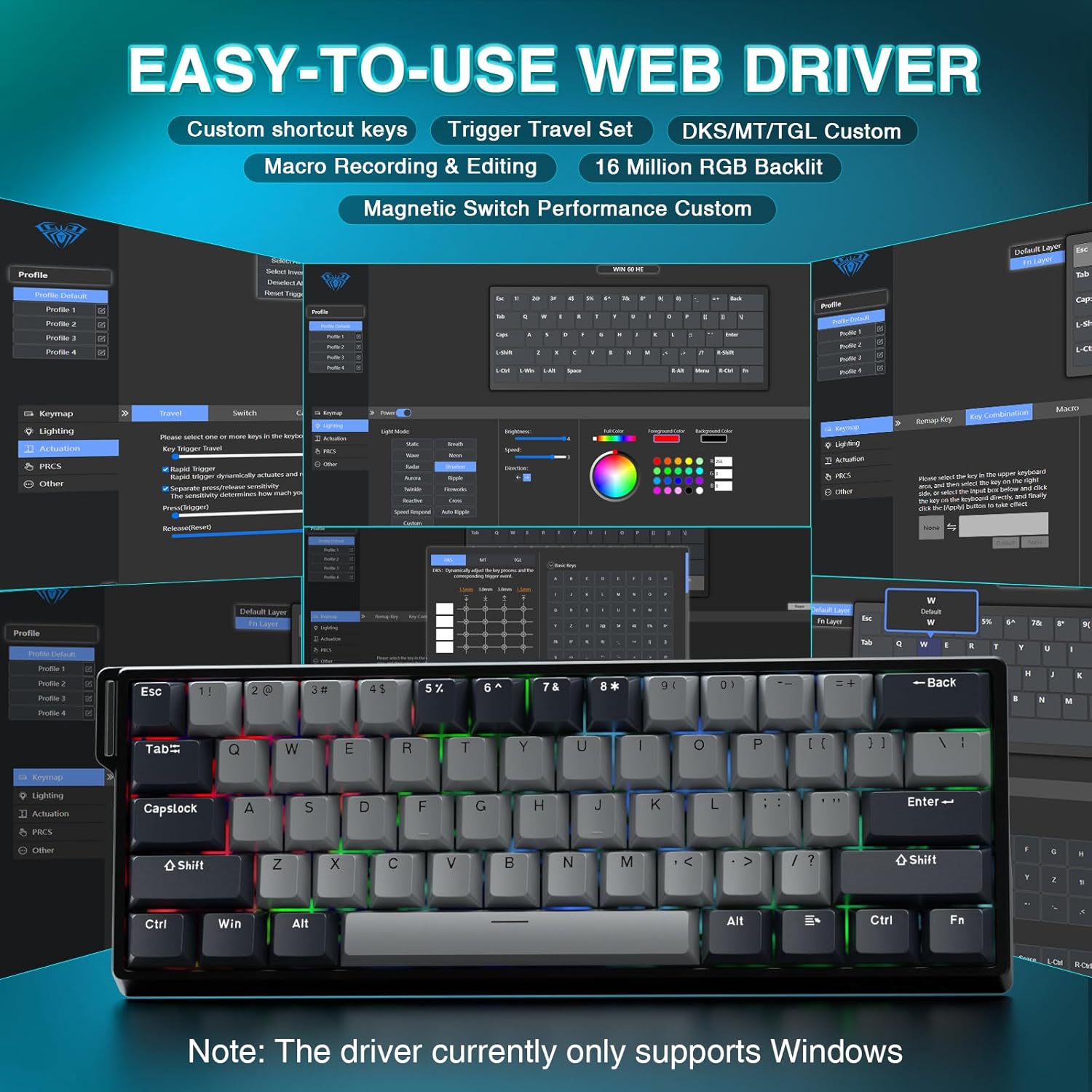
The AULA WIN60 HE PRO utilizes a web-based driver for customization, eliminating the need for software downloads.
Kun żgur li l-kompjuter tiegħek huwa konness mal-internet.
Iftaħ il-preferut tiegħek web browser.
Navigate to the official AULA web driver portal (refer to the product packaging or manufacturer's website for the exact URL).
Il- web interface will allow you to customize settings directly.
Figure 2: Easy-to-use web driver interface for customization.
Nota: Il- web driver currently only supports Windows operating systems.
3. Operazzjoni
3.1 Hall Effect Magnetic Switches & Rapid Trigger
The AULA WIN60 HE PRO features advanced Hall Effect magnetic switches, which detect key presses using magnetic fields rather than physical contact. This design provides:
Attwazzjoni Aġġustabbli: Customize the actuation point of each key to your preference for faster response or more deliberate presses.
Rapid Trigger Mode: Allows keys to activate and deactivate based on movement rather than a fixed actuation point, enabling ultra-fast repeated inputs and precise control, especially beneficial for FPS games. The ultra-low RT step distance is 0.02mm.
Durabilità: Absence of physical contact reduces wear and tear.
Figure 3: Rapid Trigger technology for enhanced gaming performance.
Video 2: Demonstrating the hot-swappable magnetic switches, including Gray Wood Magnetic Switch and Wing Chun Magnetic Switch variants.
3.2 Rata ta' Votazzjoni ta' 8000Hz
The keyboard features an 8000Hz polling rate, meaning it reports key presses to your computer 8000 times per second. This results in:
Ultra-Fast Response Times: Minimizes input lag for immediate in-game actions.
Kontroll ta' Preċiżjoni: Ensures every keystroke is registered accurately and without delay.
Figure 4: 8000Hz Hyper-Polling Technology for minimal latency.
3.3 Dawl RGB Dinamiku
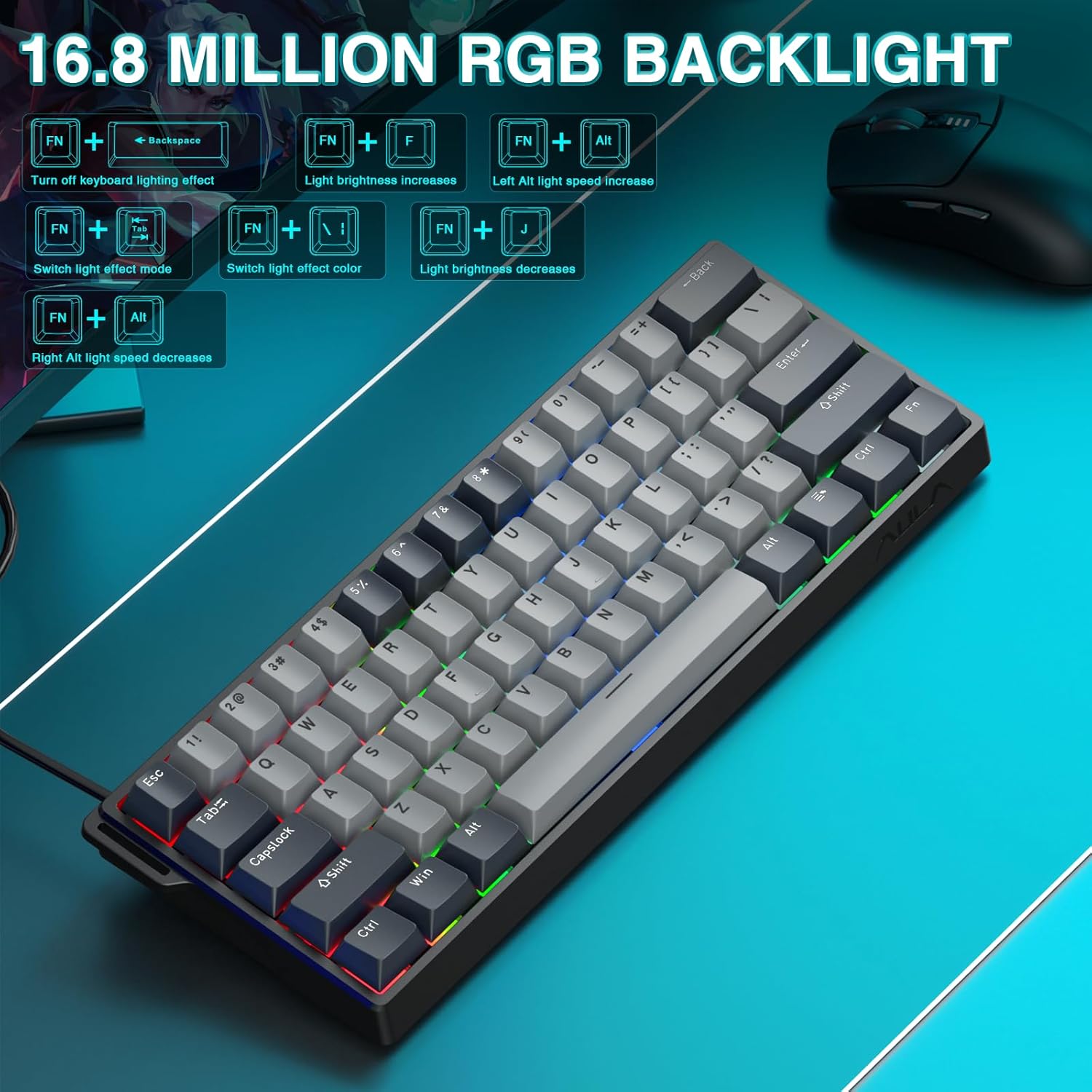
The keyboard offers 16.8 million customizable RGB color options and various lighting effects. Use the following key combinations for quick adjustments:
Rimapping taċ-ċavetta: Assign any function to any key.
Ħolqien ta' Makro: Irreġistra u assenja sekwenzi kumplessi ta' kmandi lil ċavetta waħda.
Personalizzazzjoni tad-Dawl RGB: Fine-tune lighting effects, colors, and patterns beyond the basic hotkeys.
Aġġustament tal-Punt ta' Attwazzjoni: Precisely set the actuation distance for each magnetic switch.
Aċċess għall- web driver as described in Section 2.3.
4. Manutenzjoni
4.1 Tindif tat-Tastiera
Biex iżżomm prestazzjoni u dehra ottimali:
Skonnettja t-tastiera mill-kompjuter tiegħek qabel ma tnaddafha.
Uża drapp ratba u mingħajr ħelu ftit dampImlaħlaħ bl-ilma jew b'soluzzjoni ħafifa tat-tindif biex timsaħ il-keycaps u x-chassis.
Għat-trab u l-fdalijiet bejn il-keycaps, uża arja kkompressata.
Evita kimiċi ħarxa jew materjali li joborxu.
4.2 Swiċċijiet li jistgħu jinbidlu bis-sħana
The AULA WIN60 HE PRO features hot-swappable magnetic switches, allowing for easy replacement or customization without soldering.
Use the provided keycap puller to gently remove the keycap.
Use a switch puller (not explicitly mentioned as included, but implied by "hot-swappable" and video) to carefully remove the switch.
Align the new switch with the socket and press firmly until it clicks into place.
Ibdel il-għatu taċ-ċwievet.
Caution: Apply gentle force to avoid damaging the switch sockets.
5 Issolvi l-problemi
5.1 It-Tastiera Ma Tirrispondix
Kun żgur li l-kejbil USB-C huwa konness sew kemm mat-tastiera kif ukoll mal-kompjuter.
Ipprova qabbad it-tastiera ma' port USB differenti fuq il-kompjuter tiegħek.
Ittestja t-tastiera fuq kompjuter ieħor biex teskludi problemi speċifiċi tas-sistema.
Ibda mill-ġdid il-kompjuter tiegħek.
5.2 Id-Dawl RGB Mhux Jaħdem
Check if the lighting is turned off using the FN + Backspace hotkey.
Aġġusta l-luminożità billi tuża FN + [ or FN + ].
Tiżgura l- web driver settings haven't disabled lighting.
5.3 Keys Sticking or Not Registering
Clean around the affected keycap to remove any debris.
If a specific switch is faulty, consider replacing it using the hot-swappable feature (refer to Section 4.2).
Check the actuation point settings in the web driver; it might be set too high or too low for your preference.
6. Speċifikazzjonijiet
Karatteristika
Dettall
Mudell
WIN60 HE PRO
Tip ta' Tastiera
60% Mechanical Gaming Keyboard
Tip ta' Swiċċ
Hall Effect Magnetic Switch, Hot-Swappable
Konnettività
USB-C bil-wajer
Ir-Rata tal-Votazzjoni
8000Hz
Karatteristiċi Speċjali
Rapid Trigger Mode, Adjustable Actuation, RGB Backlit, Programmable Keys, Hotkeys and Media Keys, Portable
Apparati Kompatibbli
Laptop, PC Windows (Not compatible with PS5/PS4, OBOX)
Dimensjonijiet tal-Prodott
11 x 5 x 1.1 pulzieri (27.94 x 12.7 x 2.79 ċm)
Piż tal-oġġett
2.18 liri (0.99 kg)
Manifattur
AULA
Figure 6: Detailed comparison of AULA WIN60 HE series magnetic switches.
7. Garanzija u Appoġġ
For warranty information, technical support, or service inquiries, please refer to the warranty card included with your product or visit the official AULA/CORBOBO websit. Tista' wkoll tikkuntattja lill-bejjiegħ direttament permezz tal-pjattaforma tax-xiri tiegħek għall-assistenza.
AULA WIN60 Wired Magnetic Switch Keyboard Product Manual This manual provides a comprehensive guide to the AULA WIN60 Wired Magnetic Switch Keyboard, covering its features, functions, and operating modes for both PRO/Max and Standard editions. Learn about backlight adjustments, system switching, shortcut key descriptions, and magnetic switch adjustment methods.
Manwal tal-Utent tat-Tastiera Mekkanika AULA F99 Manwal tal-utent għat-Tastiera Mekkanika AULA F99 3-in-1 Hot-Swappable RGB Gasket, li jiddeskrivi l-karatteristiċi, l-ispeċifikazzjonijiet, u l-istruzzjonijiet operattivi tagħha għall-modi bil-fili, 2.4G, u Bluetooth.
AULA F99/F9APRO 3-in-1 Hot-Swappable RGB Gasket Mechanical Keyboard User Manual This manual provides detailed instructions and features for the AULA F99/F9APRO mechanical keyboard, including connectivity options (2.4G, Bluetooth, Wired), RGB lighting effects, shortcut key functions, and operating instructions in multiple languages.
Manwal tal-Utent tat-Tastiera Mekkanika AULA F75 Discover the features and operating instructions for the AULA F75 3-in-1 Hot-Swappable RGB Gasket Mechanical Keyboard. This manual covers connectivity, functions, specifications, and troubleshooting.
AULA F108 Pro 3-in-1 Mechanical Keyboard: User Manual & Features Comprehensive guide to the AULA F108 Pro 3-in-1 mechanical keyboard. Details connectivity (Wired, 2.4G, Bluetooth), RGB lighting, LCD screen functions, shortcut keys, system compatibility, and specifications.