Introduzzjoni
This manual provides comprehensive instructions for the Soundking SPD 100 Electronic Percussion Octapad. It covers product features, setup, operation, maintenance, troubleshooting, and technical specifications to ensure optimal use of the device. Please read this manual thoroughly before operating the unit.
Prodott Overview u Karatteristiċi
The Soundking SPD 100 is an electronic percussion pad designed for drummers and musicians. It offers a wide array of sounds and functionalities in a compact format.

Immaġni: Angolata view of the Soundking SPD 100 Electronic Percussion Octapad, showing its eight pads and control panel.
Karatteristiċi ewlenin:
- 408 Sounds: Access a wide range of drum and percussion instrument sounds, including General MIDI (GM) sounds, suitable for various musical styles.
- 30 Preset Kits + 20 User Kits: Store and customize your preferred drum configurations with easy access to both user-defined and factory preset kits.
- Effetti Reverb: Utilize 6 reverb presets to adjust the sound's ambiance, suitable for different acoustic environments.
- Sekwencer: Record and edit rhythms with a single-track sequencer, capable of storing up to 1000 notes, ideal for creating custom patterns.
- Adjustable Metronome: Practice timing and improve rhythm with a metronome featuring tempo adjustments from 30 to 250 BPM.
- Teaching Modes: Enhance learning with 10 snare, rhythm, and drum exercises designed for practice.
- Input u Output MIDI: Integrate with other MIDI devices for expanded sound options and control capabilities.
- Wirja faċli għall-utent: A large 320 x 240 TFT screen provides clear and intuitive access to settings and functions.
Setup Istruzzjonijiet
Follow these steps to set up your Soundking SPD 100 Electronic Percussion Octapad:
- Spakkjar: Neħħi bir-reqqa l-komponenti kollha mill-imballaġġ. Ivverifika li l-oġġetti kollha elenkati fil-kontenut tal-prodott huma preżenti.
- Pjazzament: Place the SPD 100 on a stable, flat surface or mount it securely on a compatible stand. Ensure adequate space for playing and accessing controls.
- Konnessjoni tal-Enerġija: Connect the included power adapter to the DC IN jack on the unit and then to a suitable power outlet.
- Output Awdjo: Connect the AUDIO OUT jacks to an amplifer, mixer, jew headphones bl-użu ta' kejbils xierqa.
- Konnessjoni tal-Pedali: If using external pedals (e.g., kick drum, hi-hat), connect them to the designated PEDAL input jacks.
- Konnessjoni MIDI (Mhux obbligatorja): If integrating with other MIDI devices, connect MIDI IN/OUT ports as required.
- Qawwa Mixgħul: Press the POWER button to turn on the unit. The display should illuminate.

Image: The Soundking SPD 100 Octapad mounted on a stand, accompanied by its carrying bag and two foot pedals, illustrating a typical setup.
Istruzzjonijiet Operattivi
1. Power On/Off
- Biex tixgħel, agħfas il-buttuna QAWWA buttuna.
- Biex titfi, agħfas u żomm il-buttuna QAWWA buttuna sakemm l-unità tintefa.
2. Sound Selection and Kit Management
- Selecting Kits: Uża l- KIT buttons or navigation controls to browse through the 30 preset kits and 20 user kits.
- Assigning Sounds: In Kit Edit mode, select a pad and use the sound selection controls to assign a desired instrument sound from the 408 available sounds.
- Saving User Kits: After customizing a kit, use the SAVE function to store it in one of the 20 user kit slots.
3. Reverb Effects
- Aċċess għall- EFFETTI menu fuq id-displej.
- Select from the 6 available reverb presets to add spatial effects to your sound. Adjust parameters as needed.
4. Sekwencer
- Daħħal SEKENZJAR mod.
- Uża l- REKORD button to start recording your performance.
- Uża l- PLAY button to listen to your recorded sequence.
- Edit recorded notes and patterns as desired within the 1000-note capacity.
5. Metronomu
- Attiva l- METRONOM funzjoni.
- Adjust the tempo using the dedicated controls or navigation buttons, ranging from 30 to 250 BPM.
6. Teaching Modes
- Agħżel MOD TA' TAGĦLIM mill-menu prinċipali.
- Choose from 10 exercises focusing on snare, rhythm, and general drumming techniques to improve your skills.
7. Konnettività MIDI
- Connect the SPD 100 to external MIDI devices (e.g., computers, sound modules) using standard MIDI cables.
- Configure MIDI settings (channels, clock sync) in the system menu for proper communication.

Immaġni: Quddiem view of the Soundking SPD 100 Electronic Percussion Octapad, highlighting the eight playing pads and the control panel with its display and buttons.
Manutenzjoni
- Tindif: Use a soft, dry cloth to wipe the surface of the unit. For stubborn dirt, a slightly damp Jista' jintuża drapp, segwit minn drapp niexef. Evita prodotti tat-tindif jew solventi li joborxu.
- Ħażna: When not in use, store the SPD 100 in a cool, dry place away from direct sunlight and extreme temperatures. If transporting, use a protective case.
- Qawwa: Disconnect the power adapter when the unit is not in use for extended periods.
Issolvi l-problemi
| Problema | Kawża Possibbli | Soluzzjoni |
|---|---|---|
| Ebda output tal-ħoss. |
|
|
| Il-pads ma jirrispondux jew jattivaw b'mod inkonsistenti. |
|
|
| MIDI communication issues. |
|
|
Speċifikazzjonijiet
| Isem tal-Mudell | SPD 100 |
| Manifattur | SOUND KING |
| Dimensjonijiet tal-Prodott (L x W x H) | 67 x 32 x 7 ċm (26.4 x 12.6 x 2.8 pulzieri) |
| Piż tal-Prodott | 4 kg (8.8 lbs) |
| Kulur | Iswed |
| Numru ta' Ħsejjes | 408 |
| Kits Presetjati | 30 |
| Kits tal-Utenti | 20 |
| Effetti Reverb | 6 Presets |
| Sequencer Capacity | 1000 notes (single track) |
| Medda tal-Metronome Tempo | 30 - 250 BPM |
| Modi ta' Tagħlim | 10 exercises |
| Wiri | 320 x 240 TFT |
| Konnettività | MIDI In/Out, Audio Out, Pedal Input |
Garanzija u Appoġġ
Għal informazzjoni dwar il-garanzija u appoġġ tekniku, jekk jogħġbok irreferi għad-dokumentazzjoni pprovduta max-xiri tiegħek jew ikkuntattja lill-bejjiegħ bl-imnut/manifattur direttament. Żomm il-prova tax-xiri tiegħek għal talbiet ta' garanzija.
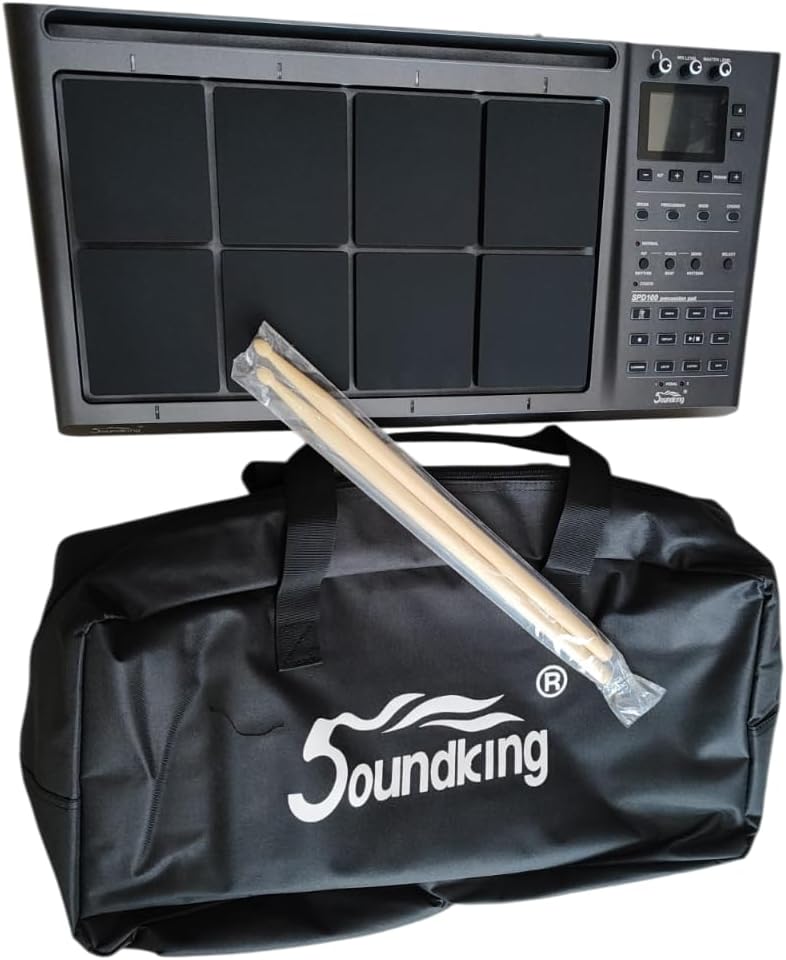
Image: The Soundking SPD 100 Octapad shown with its branded carrying bag and a pair of drumsticks, representing the complete package.


