1. Introduzzjoni
This manual provides detailed instructions for the NBD 48MP Digital Camera, Model NBD-48MP. Please read this manual thoroughly before using your camera to ensure proper operation and to maximize its features. Keep this manual for future reference.
2. Kontenut tal-Pakkett
Iċċekkja li l-oġġetti kollha elenkati hawn taħt huma inklużi fil-pakkett tiegħek:
- NBD 48MP Digital Camera Body
- Wide-angle/Macro Lens (52mm)
- Mikrofonu
- 32GB Karta tal-Memorja
- Cable USB
- Ċarġer tal-batterija
- Lithium Ion Batteries (x2)
- Qarrej tal-Kard
- Camera Neck Rope
- Black Leather Bag
- Drapp tat-Tindif tal-Lenti

Image: All components included in the NBD 48MP Digital Camera kit, including the camera body, lenses, microphone, memory card, batteries, and accessories.
3. Setup
3.1 Installazzjoni u Iċċarġjar tal-Batterija
- Iftaħ l-għatu tal-kompartiment tal-batterija li jinsab fil-qiegħ tal-kamera.
- Insert the two provided Lithium Ion batteries, ensuring correct polarity.
- Agħlaq l-għatu tal-kompartiment tal-batterija sew.
- Use the included charger and USB cable to fully charge the batteries before first use. The charging indicator will show the charging status.
3.2 Installazzjoni tal-Kard tal-Memorja
- Locate the memory card slot, typically on the side or bottom of the camera.
- Insert the 32GB SD card with the metal contacts facing the correct direction (refer to the diagram near the slot).
- Push the card gently until it clicks into place. To remove, push again until it springs out.
3.3 Lens and Microphone Attachment
- It-twaħħil tal-Lenti: Align the wide-angle/macro lens with the camera's lens mount and twist gently until it locks.
- It-twaħħil tal-mikrofonu: Slide the external microphone into the camera's hot shoe mount and connect the audio cable to the microphone input port.

Image: The NBD 48MP Digital Camera shown with its wide-angle lens, external microphone, and other included accessories.
4. Istruzzjonijiet Operattivi
4.1 Tixgħel/Jitfi
Press and hold the power button (usually located on the top of the camera) for a few seconds to turn the camera on or off.
4.2 Fotografija Bażika
- Riżoluzzjoni tal-Immaġni: The camera features a 48MP sensor for high-resolution still images.
- Zoom ottiku: Utilize the 16X optical zoom to capture distant subjects. The camera supports various zoom levels, including 4x, 8x, and 16x.
- Auto Focus: The intelligent imaging system provides fast and accurate autofocus, even in low-light conditions with its F1.8 aperture lens.
- Lenti Makro: Attach the macro lens for detailed close-up shots of small objects like flowers or insects.
- Rikonoxximent Intelliġenti tax-Xena: The camera automatically optimizes settings for various scenes, ensuring professional-quality results.
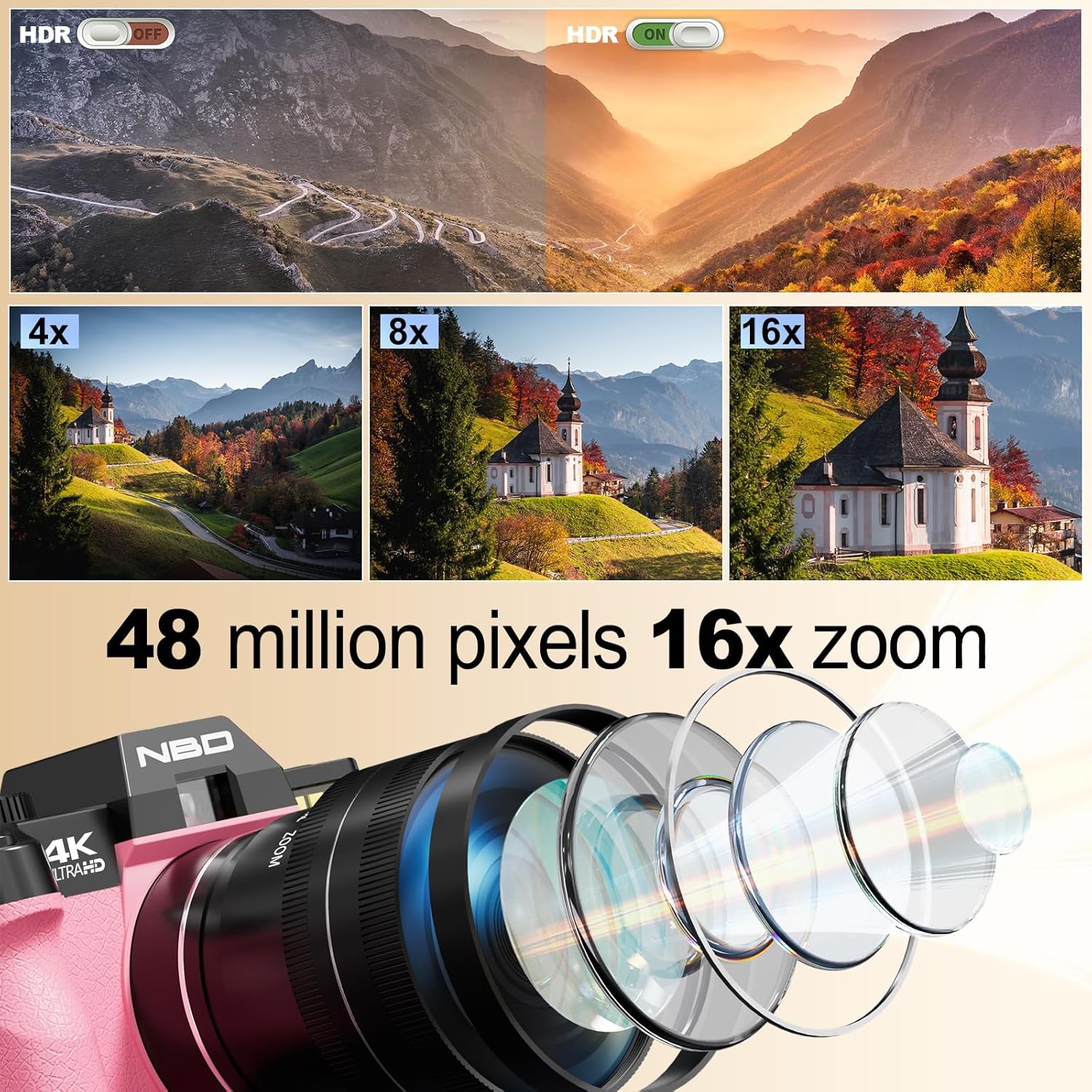
Image: Visual representation of HDR functionality, 4x, 8x, and 16x zoom capabilities, and a diagram illustrating the internal lens structure of the NBD 48MP Digital Camera.

Image: Demonstrates the camera's 48 million effective pixels, autofocus (AF) mode, low-light focusing capabilities, and key lens parameters (F1.8, f=4.58mm, 52mm).
4.3 Reġistrazzjoni tal-Vidjo
- The camera supports 4K 30fps and 1080P 60fps video recording for smooth, high-quality footage.
- Use the external microphone for enhanced audio quality during video recording.
- The 180° flip touchscreen allows for easy self-recording and vlogging.

Image: The NBD 48MP Digital Camera being used for recording life, outdoor shooting, and video live streaming, highlighting the included microphone and the 180° flip screen.
4.4 Karatteristiċi Speċjali
- Dial tal-Modalità: Rotate the mode switching dial on top of the camera to select different shooting modes.
- Time-lapse: Capture sequences of images over time to create time-lapse videos.
- Moviment bil-mod: Record videos in slow motion for dramatic effects.
- Cinematic Filters: Apply built-in filters to enhance your photos and videos directly in-camera.
- Modalità Ritratt: Achieve natural background blur for professional-looking portraits.
- Dynamic Tracking: The camera can track moving subjects like pets or children to minimize motion blur.

Image: Illustrates the camera's capabilities including Time-Lapse Recording, Macro Lenses, various Filters, Slow Motion video, and the Mode Switching Dial.
4.5 Konnettività
- Wi-Fi: Connect the camera to your smartphone via Wi-Fi for remote framing, transferring photos and videos, and instant sharing to social media platforms.
- Konnessjoni USB: Use the USB cable to connect the camera directly to a computer for file trasferiment.
- Muntatura tat-tripod: A dedicated tripod mount is included for enhanced stability during live streaming or long exposures.

Image: Shows the NBD 48MP Digital Camera connected wirelessly to a smartphone for picture transfer and remote control, alongside a QR code for app download.
5. Manutenzjoni
- Tindif: Use the provided lens cleaning cloth to gently wipe the lens and screen. For the camera body, use a soft, dry cloth. Avoid harsh chemicals.
- Kura tal-batterija: Store batteries in a cool, dry place. Do not expose them to extreme temperatures. Remove batteries if the camera will not be used for an extended period.
- Ħażna: Store the camera in the included leather bag to protect it from dust and scratches when not in use.
6 Issolvi l-problemi
| Problema | Kawża Possibbli | Soluzzjoni |
|---|---|---|
| Il-kamera ma tixgħelx. | Batterija baxxa jew eżawrita. | Kun żgur li l-batteriji huma ċċarġjati kompletament u mdaħħla b'mod korrett. |
| Kwalità fqira tal-immaġni. | Dirty lens, incorrect settings, insufficient lighting. | Clean the lens. Check shooting mode and lighting conditions. Adjust exposure settings if in manual mode. |
| Ma tistax tikkonnettja mal-Wi-Fi. | Incorrect password, camera too far from device, Wi-Fi disabled. | Verify Wi-Fi password. Ensure camera and device are within range. Enable Wi-Fi on the camera. |
| Żball fil-karta tal-memorja. | Card not inserted correctly, card corrupted, card full. | Reinsert the memory card. Format the card (this will erase all data). Use a different card if the issue persists. |
7. Speċifikazzjonijiet
| Karatteristika | Speċifikazzjoni |
|---|---|
| Sensor tal-Immaġni | 48 MP CMOS |
| Zoom ottiku | 16x |
| Riżoluzzjoni tal-vidjo | 4K (2160p) at 30fps, 1080p at 60fps |
| Wiri | 3-inch LCD, 180° Flip Screen |
| Apertura tal-Lenti | F1.8 |
| Stabbilizzazzjoni tal-Immaġni | Ottiċi |
| Konnettività | Wi-Fi, USB |
| Ħażna | Supports SD card (32GB included) |
| Tip ta 'batterija | Jonju tal-litju (2 inkluża) |
| Karatteristiċi Speċjali | Auto Focus, Macro Lens, Time-lapse, Slow-motion, Cinematic Filters, Portrait Mode, Dynamic Tracking |
8. Garanzija u Appoġġ
For warranty information and technical support, please contact NBD customer service. Refer to the product packaging or the official NBD websit għad-dettalji tal-kuntatt.


