1. Introduzzjoni
This manual provides comprehensive instructions for the installation, operation, and maintenance of your COOAU 8MP Outdoor Wireless Security Camera. Please read this manual thoroughly before use to ensure proper functionality and to maximize the benefits of your device. This camera features 8-megapixel resolution, Wi-Fi 6 connectivity, PTZ (Pan-Tilt-Zoom) capabilities, AI detection, and IP66 weather resistance, designed for reliable outdoor surveillance.
2. Prodott Aktarview
2.1 Kontenut tal-Pakkett
- Security Camera Body
- Bracket tal-Immuntar
- Adapter tal-Enerġija
2.2 Karatteristiċi ewlenin
- Ultra-Clear 8MP Resolution: Equipped with a 1/3-inch color CMOS sensor and large aperture lens, providing 3840x2160P (8-megapixel) video for sharp, detailed images. Features 8x digital zoom for closer inspection.
- Enhanced Wi-Fi 6 Connectivity: Supports Wi-Fi 6 for stable and efficient signal transmission, ensuring smooth image streaming without interruptions.
- Dual-Mode Night Vision: Offers 25-meter long-range night vision with 3 white LED lights and 3 infrared LED lights. Allows switching between black-and-white and full-color night vision modes.
- Intelligent AI Detection: Distinguishes between people, pets, vehicles, and packages, reducing false alarms and sending relevant notifications to your smartphone.
- Awdjo f'żewġ direzzjonijiet: Built-in low-latency speaker and microphone enable real-time communication through the camera.
- Wide-Angle PTZ Function: Provides 355° horizontal pan and 90° vertical tilt, remotely controllable via the app to cover a broad surveillance area.
- High-Sensitivity Auto-Tracking: Automatically detects and tracks moving targets, with an auto-reset function that returns the camera to its original position after approximately 10 seconds of inactivity.
- Sound and Light Deterrence: Activates audio and visual alarms to deter intruders upon detection.
- Modi ta' Reġistrazzjoni Multipli: Supports continuous, detection-triggered, and scheduled recording.
- Għażliet ta' Ħażna Flessibbli: Compatible with memory cards up to 256GB and optional cloud storage (paid service). Recordings are automatically overwritten when storage is full.
- Kompatibbiltà Alexa: Supports voice control via Alexa for hands-free monitoring.
- Reżistenza għat-temp IP66: Designed for outdoor use, resistant to dust and water, ensuring reliable operation in various weather conditions.

The COOAU 8MP Outdoor Wireless Security Camera, black model, shown with a smartphone displaying live footage.
3. Setup
3.1 Passi ta' Installazzjoni
- Waħħal il-Bracket tal-Immuntar: Secure the bracket to your desired outdoor location using appropriate screws.
- Immonta l-Kamera: Attach the camera body to the installed bracket.
- Qabbad l-Enerġija: Plug the power adapter into the camera and a power outlet. The camera typically comes with a 3-meter power cable.

Three-step installation guide: attaching the bracket, mounting the camera, and connecting the power cable.
3.2 Initial Connection (Bluetooth & Wi-Fi)
- Qawwa Mixgħul: Qabbad il-kamera ma 'sors ta' enerġija.
- Ippermetti Bluetooth: Fuq l-ismartphone tiegħek, attiva l-Bluetooth.
- Open App & Connect: Open the dedicated camera app on your smartphone. The app will guide you to select the camera and connect it to your Wi-Fi network. Bluetooth assists in a quick and easy initial pairing.
- Setup Tlesti: Ladarba tkun imqabbda, tista ' view your camera feed and manage settings within the app.

Step-by-step guide for connecting the camera via Bluetooth, from power-on to app integration.

Steps for connecting the camera via Bluetooth for initial setup, showing a smartphone interface.
4. Istruzzjonijiet Operattivi
4.1 Remote Monitoring via App
After successful setup, use the dedicated smartphone app to access live video feeds, review recordings, and adjust camera settings from anywhere with an internet connection.

Smartphone app displaying a list of multiple connected COOAU cameras, providing a comprehensive surveillance overview.
4.2 Kontroll PTZ
Within the app, you can control the camera's pan (horizontal 355°) and tilt (vertical 90°) movements by sliding your finger across the live view screen. This allows you to adjust the viewing angolu kif meħtieġ.

Diagram illustrating the camera's PTZ (Pan-Tilt-Zoom) capabilities with 355° horizontal and 90° vertical rotation.
4.3 Awdjo b'żewġ direzzjonijiet
Activate the microphone and speaker functions in the app to engage in two-way conversations. This is useful for communicating with visitors or deterring unwanted individuals.

Two-way audio communication feature, showing interaction with a delivery person at the door.
4.4 Modi ta' Reġistrazzjoni
The camera supports three primary recording modes:
- Reġistrazzjoni Kontinwa: Records constantly, overwriting older footage meta l-ħażna tkun mimlija.
- Reġistrazzjoni ta' Sejbien: Records only when motion or AI-detected events occur.
- Reġistrazzjoni Skedata: Rekords matul ħinijiet speċifiċi stabbiliti mill-utent.
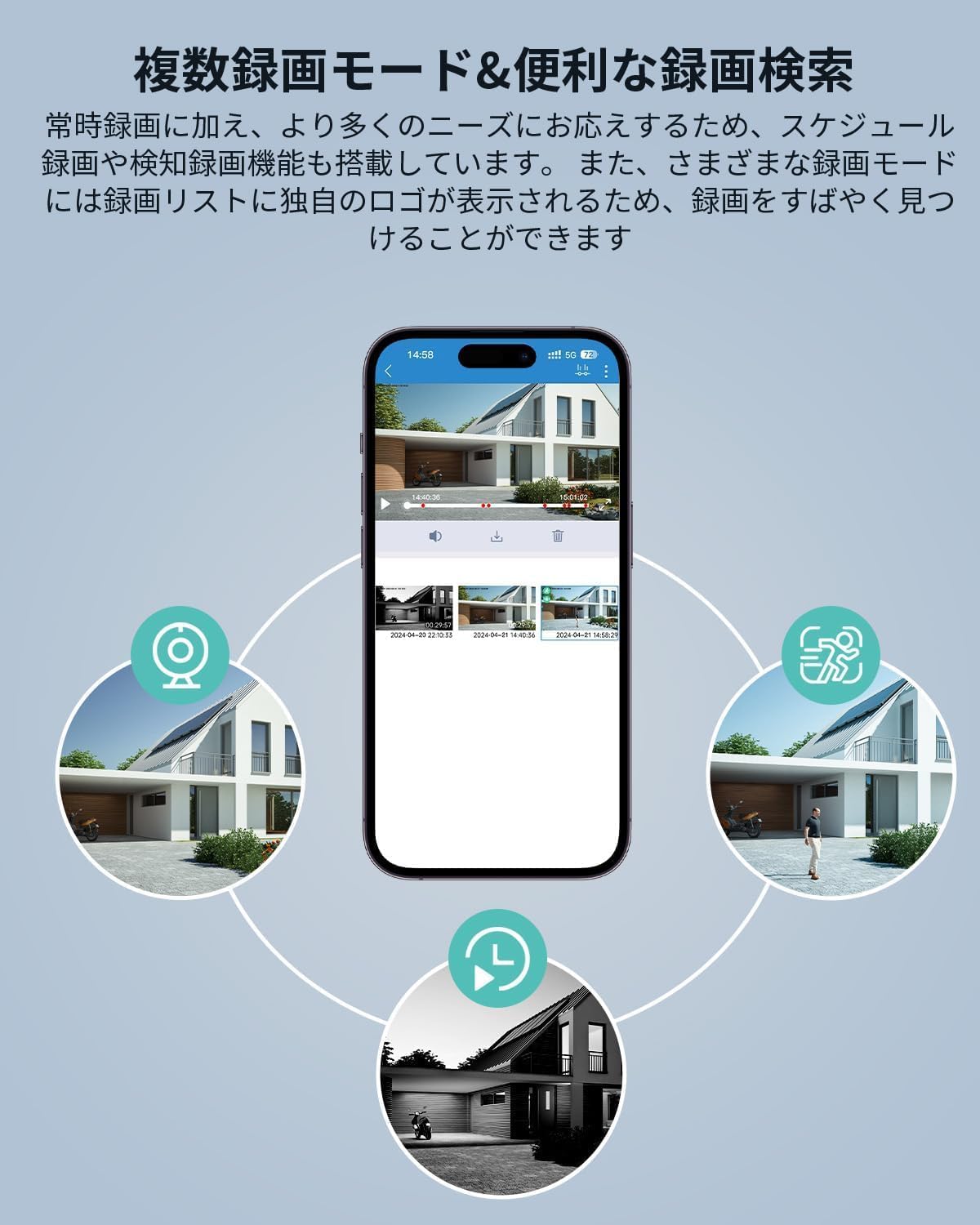
Smartphone app interface displaying various recording modes: continuous, detection, and scheduled recording.

Timeline illustrating continuous, detection, and scheduled recording modes throughout a 24-hour period.
5. Karatteristiċi Avvanzati
5.1 8MP Resolution and Digital Zoom
The camera's 8-megapixel (3840x2160P) resolution provides exceptional clarity, allowing for detailed monitoring. Utilize the 8x digital zoom feature in the app to magnify specific areas of interest without significant loss of quality.
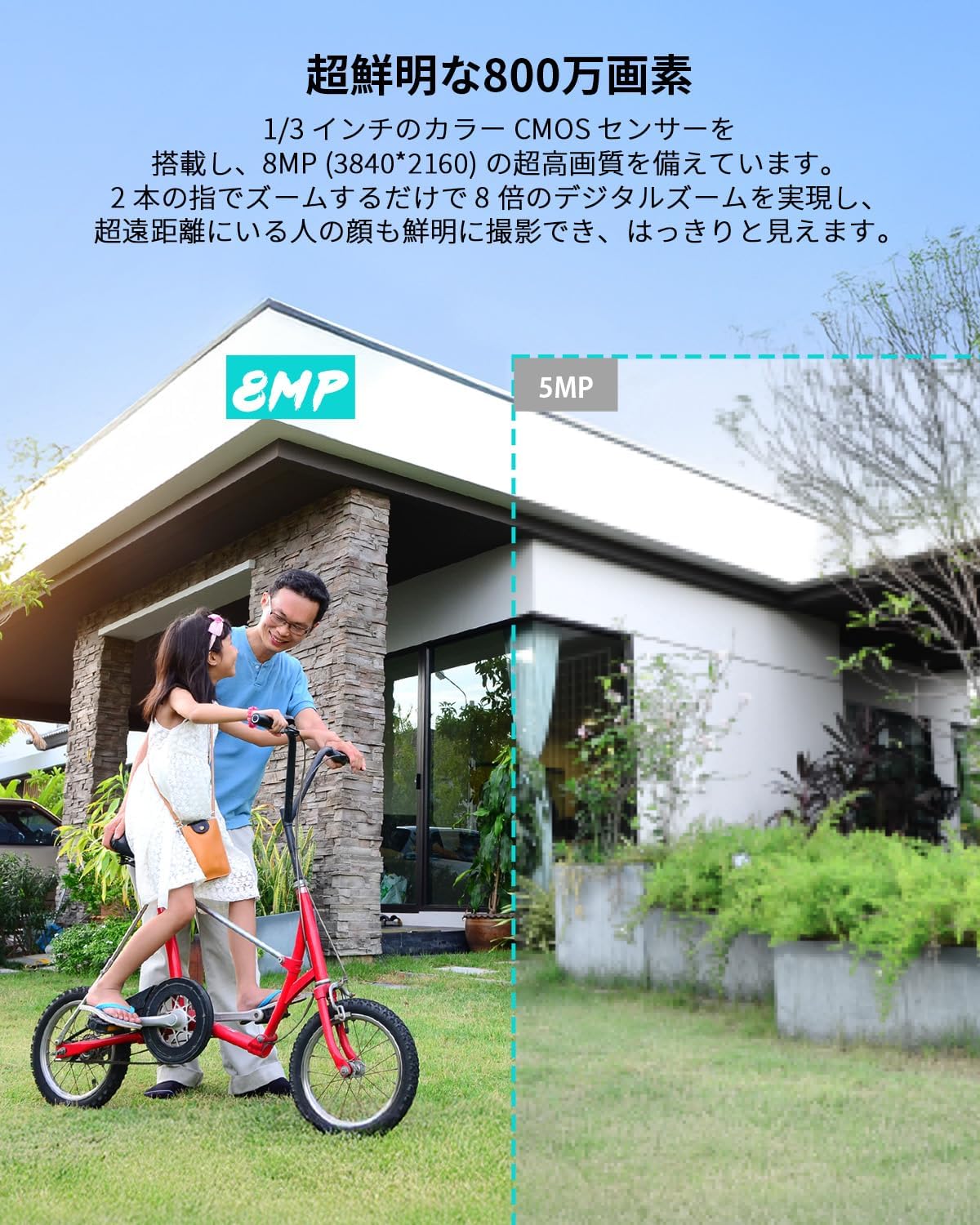
Comparison illustrating the superior clarity of 8MP resolution (3840x2160P) compared to 5MP, highlighting detailed image capture.
5.2 Dual-Mode Night Vision
The camera offers versatile night vision capabilities up to 25 meters. You can choose between:
- Infrared (B&W) Mode: Uses 3 infrared LEDs for clear black-and-white footage in complete darkness.
- Viżjoni bil-Lejl b'Kulur Sħiħ: Utilizes 3 white LEDs to provide color video even in low-light conditions.

Night vision comparison, demonstrating the enhanced detail of 8MP footage over 5MP, capturing a vehicle in low-light conditions.

Comparison of infrared night vision mode and full-color night vision mode in a large outdoor area.
5.3 Intelligent AI Detection & Auto-Tracking
The camera's AI can differentiate between people, pets, vehicles, and packages, significantly reducing false alarms. When a detected object moves, the camera's auto-tracking feature will follow it. An auto-reset function ensures the camera returns to its default position approximately 10 seconds after tracking stops, preventing blind spots.

Illustration of the camera's auto-tracking feature, following a person walking a dog, with PTZ movement indicated.

AI detection feature identifying a person on a bicycle, demonstrating intelligent object recognition.

AI detection distinguishing between a person and a pet, preventing false alarms from animals.
5.4 Sound and Light Deterrence
Upon detecting an intruder, the camera can activate a combination of sound and light alarms to actively deter them, enhancing your property's security.

Sound and light alarm system deterring an intruder, showcasing the camera's active defense capabilities.
5.5 Integrazzjoni ta' Alexa
Connect your camera to Alexa-enabled devices to view live feeds using voice commands, providing convenient, hands-free monitoring.

The camera integrated with Alexa, allowing voice commands to view foo ħajtage on a smart display.

A woman exercising while using Alexa to view the camera feed on a smart display, demonstrating hands-free operation.
6. Manutenzjoni
6.1 Reżistenza għat-Temp
The camera is rated IP66, meaning it is fully protected against dust ingress and can withstand powerful water jets. It is designed to operate reliably in outdoor conditions, including rain, snow, and wind, within an operating temperature range of -20°C (-4°F) to 50°C (122°F).

The COOAU security camera operating reliably in rainy conditions, demonstrating its IP66 waterproof and dustproof rating.

Icons representing the camera's weather resistance: snow, rain, dust, and wind.
6.2 Tindif
To maintain optimal image quality, periodically clean the camera lens with a soft, dry cloth. Avoid using harsh chemicals or abrasive materials that could scratch the lens or housing.
7 Issolvi l-problemi
- Ebda Qawwa: Kun żgur li l-adapter tal-enerġija huwa konness sew kemm mal-kamera kif ukoll ma' sokit tal-enerġija li jaħdem.
- Kwistjonijiet ta' Konnessjoni Wi-Fi: Verify your Wi-Fi network is active and the camera is within range. Ensure your router supports 2.4GHz Wi-Fi. If using Wi-Fi 6, ensure your router is compatible.
- Kwalità Fqira tal-Immaġni: Check for dirt or obstructions on the camera lens. Ensure the camera is positioned in an area with adequate lighting, especially for night vision.
- Allarmi Foloz: Adjust AI detection sensitivity and specific detection zones within the app to minimize unwanted notifications from non-human or non-vehicle movements.
- Auto-Tracking Malfunction: Kun żgur li l-kamp ta' azzjoni tal-kamera view is clear. If the camera does not return to its original position, check for obstructions or reset the camera.
- Problemi ta' Konnettività tal-App: Ensure your smartphone has a stable internet connection. Restart the app or reinstall it if issues persist.
8. Speċifikazzjonijiet
| Numru tal-Mudell | 737-812-872 |
| Riżoluzzjoni | 8 Megapixels (3840x2160P) |
| Konnettività | Wi-Fi (2.4GHz, Wi-Fi 6 compatible) |
| Medda tal-Viżjoni Lejl | 25-il metru |
| PTZ Functionality | Orizzontali 355°, Vertikali 90° |
| Sejbien AI | People, Pets, Vehicles, Packages |
| Awdjo Two-Way | Appoġġjati |
| Reżistenza għat-temp | IP66 |
| Ħażna | MicroSD card (up to 256GB), Cloud Storage (paid) |
| Sors tal-Enerġija | Corded Elettriku |
| Dimensjonijiet (LxWxH) | 14 x 8 x 8 ċm |
| Piż | 470 g |
| Temperatura operattiva | -20°C sa 50°C (-4°F sa 122°F) |
| Kulur | Iswed |
9. Garanzija u Appoġġ
This COOAU product comes with a Garanzija ta 'kwalità ta' 24-il xahar. For any inquiries, technical support, or warranty claims, please contact our customer support team. You can reach us through the following methods:
- Indirizz Uffiċjali tal-Email: [Insert Official Email Address Here]
- Amazon Order History: Contact us directly through your Amazon order history for assistance.
Please provide your product model number (737-812-872) and purchase details when contacting support to ensure efficient service.


