1. Introduzzjoni
This manual provides detailed instructions for the installation, operation, and maintenance of your YoLink FlowSmart All-in-One Smart Water Meter & Shutoff. Please read this manual thoroughly before installation and use to ensure proper function and safety. The YoLink FlowSmart system offers comprehensive water usage monitoring, advanced leak detection with auto-shutoff, and intelligent valve automation to protect your home and manage water resources efficiently.
2. Informazzjoni dwar is-Sigurtà
Always follow basic safety precautions when installing and operating this product to reduce the risk of fire, electric shock, and injury. Professional plumbing installation is recommended. Ensure the main water supply is turned off before any installation work. Do not attempt to repair the device yourself; refer to qualified service personnel.
3. Kontenut tal-Pakkett
Iċċekkja li l-komponenti kollha huma preżenti qabel tibda l-installazzjoni:
- YoLink FlowSmart All-in-One Smart Water Meter & Shutoff (YS5018)
- YoLink Hub (YS1603)
- Adapter tal-Enerġija għal Hub
- Ethernet Cable for Hub
- Installation Hardware (e.g., mounting brackets, screws, hex key for manual override)
- Manwal għall-Utent

Image 3.1: YoLink FlowSmart All-in-One device, YoLink Hub, and the mobile application interface.
4. Prodott Aktarview
4.1 Komponenti
- FlowSmart All-in-One Device: Integrates a water meter and an automatic shutoff valve.
- YoLink Hub: Connects your FlowSmart device to the internet and the YoLink cloud, enabling app control and notifications.
- Override manwali: Allows for physical opening or closing of the valve using a hex key.
- Display LCD: Provides local readings and status indicators.
4.2 Karatteristiċi ewlenin
- Comprehensive Water Usage Monitoring: Real-time meter readings and detailed logs (daily, monthly, last use statistics).
- Advanced Leak Detection & Auto-Shutoff: Customizable water usage and duration limits, instant alerts, and automatic valve closure.
- Seamless Offline Protection: Automatic valve closure during power or internet outages if a leak is detected or limits are exceeded.
- Intelligent Valve Automation and Scheduling: Programmable schedules and timers for auto-shutoff.
- Built-In Valve Maintenance Function: Regular self-maintenance to ensure reliable operation.
- Manual Valve Control: Direct physical control of the valve.
- Advanced Data Analysis and Export Options: Detailed consumption charts and data export for analysis.
- Enhanced Safety Alerts and Temperature Monitoring: High/low temperature alerts and continuous alarm notifications for leaks.
- Ħajja Estiża tal-Batterija: Up to 10 years with a non-rechargeable lithium battery.
- LoRa Technology: Long-range wireless connectivity up to 1320 feet (400 meters).
5. Setup
5.1 YoLink Hub Installation
- Connect the YoLink Hub to power using the provided power adapter.
- Connect the Hub to your internet router using the provided Ethernet cable.
- Wait for the Hub's indicator lights to show a stable connection (refer to Hub's specific manual for light status).

Image 5.1: A YoLink Hub is required to enable remote access and advanced features of the FlowSmart All-in-One.
5.2 FlowSmart Device Installation (Plumbing)
Importanti: Professional plumbing installation is highly recommended. Ensure the main water supply is turned off before proceeding.
- Choose an appropriate location on your main water line (0.5-inch pipes).
- Cut the pipe and install the FlowSmart device according to the flow direction indicated on the unit.
- Kun żgur li l-konnessjonijiet kollha huma reżistenti għall-ilma.
- Restore the main water supply and check for leaks.
5.3 App Setup and Device Pairing
- Download the YoLink app from your smartphone's app store.
- Oħloq kont jew idħol.
- Follow the in-app instructions to add your YoLink Hub.
- Once the Hub is added, follow the instructions to add the FlowSmart All-in-One device. This typically involves scanning a QR code on the device or entering its Device ID.
- Confirm successful pairing within the app.
6. Istruzzjonijiet Operattivi
6.1 Water Usage Monitoring
The YoLink app provides real-time water meter readings and historical data.
- Open the YoLink app and select your FlowSmart device.
- View current water usage, daily, monthly, and last use statistics.
- Access detailed water consumption charts to analyze usage patterns.

Image 6.1: Comprehensive water usage monitoring through the YoLink app.

Image 6.2: Real-time water monitoring provides immediate, accurate readings to your smartphone.
6.2 Leak Detection & Auto-Shutoff
Configure leak detection settings within the YoLink app:
- Set personalized water usage and duration limits.
- Customize detection thresholds for leaks.
- Receive instant alerts on your smartphone when limits are exceeded.
- The system automatically shuts off the valve to prevent damage from unexpected leaks or excessive water use.

Image 6.3: Advanced leak detection and auto-shutoff settings in the YoLink app.

Image 6.4: Intelligent leak response automatically shuts off water when a leak is detected.
6.3 Offline Protection
The FlowSmart All-in-One can automatically close the valve even during power or internet outages if a leak is detected or limits for water usage/duration are exceeded. This feature is enabled by default and can be customized in the app.

Image 6.5: Seamless offline protection ensures your home remains protected even without power or internet.

Image 6.6: The system continues to function and protect your home even during power or internet disruptions.
6.4 Valve Automation and Scheduling
Program valve settings for efficient water management:
- Set schedules or timers for automatic valve opening and closing.
- Use timers for specific tasks like irrigation or pool filling.

Image 6.7: Intelligent valve automation and scheduling through the YoLink app.

Image 6.8: Timer-based water management for scheduled water use.
6.5 Built-In Valve Maintenance
The FlowSmart All-in-One performs regular valve maintenance to ensure reliable operation. You can view or adjust the maintenance schedule within the YoLink app.

Image 6.9: Built-in valve maintenance function ensures optimal condition.
6.6 Manual Valve Control
In situations where smart control is not suitable or available, you can manually operate the valve using the provided hex key.
- Locate the manual override port on the FlowSmart device.
- Insert the hex key and turn to open or close the valve.

Image 6.10: Manual valve control provides a reliable backup option.
7. Karatteristiċi Avvanzati
7.1 Data Analysis and Export
The YoLink app allows for in-depth analysis of your water consumption data.
- View detailed charts of hourly, daily, and monthly water consumption.
- Export data for further analysis or budgeting purposes.

Image 7.1: Advanced data analysis and export options within the YoLink app.

Image 7.2: In-depth consumption analytics help identify usage patterns.

Image 7.3: Exportable data reports for comprehensive analysis.

Image 7.4: Visual usage trends help identify patterns and troubleshoot anomalies.
7.2 Customizable Notifications
Stay informed with various alert options:
- Phone Push Notification: Standard notifications to your smartphone.
- Critical Alert Push Notification: Works even if your phone is in silent or focus mode (iOS settings may vary).
- Email: Receive email alerts, including custom messages.
- SMS Text Message: Limited number of free SMS messages each month; subscription plans available for more.
- Device Action: Automatically trigger other YoLink devices (e.g., siren, light) upon an alert.
- Automated Phone Call: Optional subscription service for automated calls with text-to-speech alerts.

Image 7.5: Customizable notifications for efficient water management.
7.3 Monitoraġġ tat-Temperatura
The FlowSmart All-in-One provides high and low temperature alerts to protect your system from extreme conditions, helping to prevent pipe freezing or other temperature-related issues.
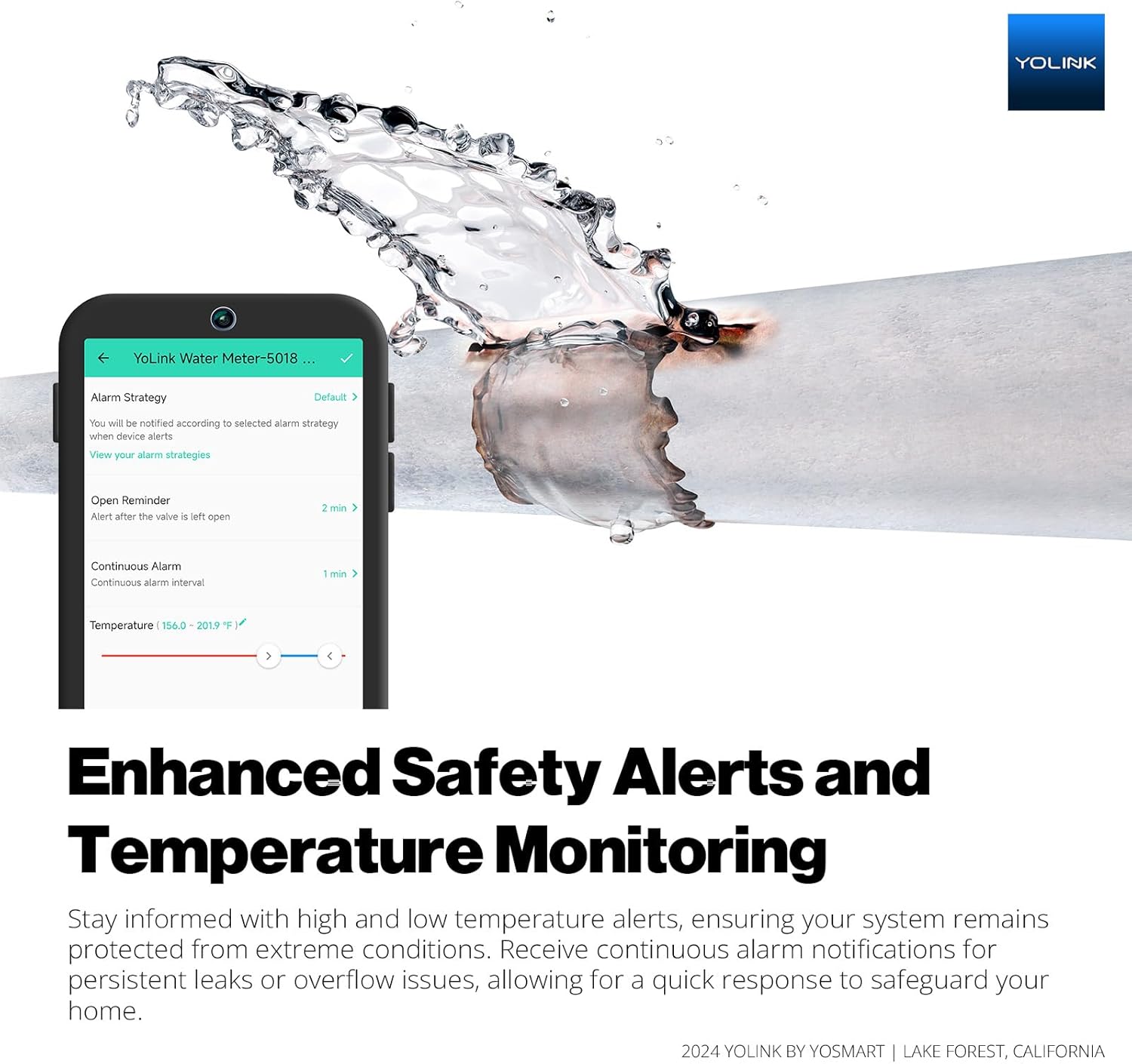
Image 7.6: Enhanced safety alerts and temperature monitoring.

Image 7.7: Safety protocols and alerts protect your home from environmental risks.
8. Manutenzjoni
The FlowSmart All-in-One is designed for minimal maintenance. The built-in valve maintenance function helps ensure its reliable operation. Regularly check the battery status in the YoLink app. The device uses a non-rechargeable lithium battery with an expected life of up to 10 years.

Image 8.1: Extended battery life provides long-lasting, maintenance-free operation.
9 Issolvi l-problemi
If you encounter issues with your YoLink FlowSmart device, consider the following:
- Apparat mhux Jirrispondi: Check the battery level in the app. Ensure the YoLink Hub is powered on and connected to the internet.
- No Water Flow/Valve Not Opening: Verify the valve status in the app. Check for manual override engagement. Ensure there are no active leak alerts triggering an auto-shutoff.
- Qari mhux eżatt: Ensure the device is installed correctly according to the flow direction.
- Ebda Notifiki: Check app notification settings on your phone and within the YoLink app. Ensure the Hub has a stable internet connection.
- Hub Offline: Check power and Ethernet cable connections to the Hub and router. Restart the Hub and router if necessary.
For further assistance, refer to the online resources or contact support.
10. Speċifikazzjonijiet
| Karatteristika | Speċifikazzjoni |
|---|---|
| Numru tal-Mudell | YS5018-15 |
| Daqs tal-pajp | 0.5 pulzieri |
| Metodu ta' Kontroll | App |
| Tip ta 'Immuntar | Tabletop Mount (for Hub), In-line (for FlowSmart device) |
| Teknoloġija tas-Sensers | Flow Sensor, Pressure Sensor |
| UPC | 810121542606 |
| Piż tal-oġġett | 3.8 liri |
| Dimensjonijiet tal-Prodott | 3.5"T x 4.7"W x 8"Għ |
| Batteriji | 1 batterija tal-Lithium Metal meħtieġa (inkluża) |
| Tip taċ-Ċellula tal-Batterija | Metall tal-litju |
| Voltage | 3.7 Volts (DC) |
| Sors tal-Enerġija | Mħaddma bil-batterija |
| Teknoloġija bla fili | LoRa (Long Range) |
| Firxa Wireless | Sa 1320 pied / 400 metri |
11. Garanzija u Appoġġ
11.1 Expert Support
For immediate assistance with setup or operational questions, reach out to our knowledgeable support team via phone or email.

Image 11.1: Expert support is available to assist you.
11.2 Riżorsi Online
Access detailed FAQs, troubleshooting guides, and user manuals anytime on our support site: www.yosmart.com/support-and-service

Image 11.2: Comprehensive online resources for support.
11.3 Commercial Platform
Commercial users can utilize the tailored Raedius platform for advanced management tools and analytics. More information is available on the dedicated web console.

Image 11.3: Customized Raedius platform for commercial users.


