Introduzzjoni
Welcome to the user manual for your new VAIO SX-R Laptop. This document provides essential information to help you set up, operate, maintain, and troubleshoot your device. Please read this manual thoroughly to ensure optimal performance and longevity of your laptop.
Prodott Overview
The VAIO SX-R is a high-performance laptop designed for productivity and creative tasks. It features an Intel Core Ultra 7 processor, a vibrant 14-inch WQXGA Touch Display, ample memory, and fast storage.
Karatteristiċi Ewlenin
- Proċessur: Intel Core Ultra 7 (16-Core, AI-Boosted) for enhanced speed and responsiveness.
- Wiri: 14-inch WQXGA Touch Display (2560x1600) offering high resolution and wide color gamut.
- Memorja: 32GB LPDDR5 RAM for superior multitasking.
- Ħażna: 1TB PCIe NVMe SSD for fast data access and ample ħażna.
- Sistema Operattiva: Windows 11 Pro with enterprise-grade security and productivity features.
- Sigurtà: Integrated IR Camera and Fingerprint Reader for secure login.
- Ix-xażi: Durable Carbon Fiber construction.
Komponenti u Portijiet tal-Laptop

Figure 1: VAIO SX-R Laptop, illustrating the overall design.
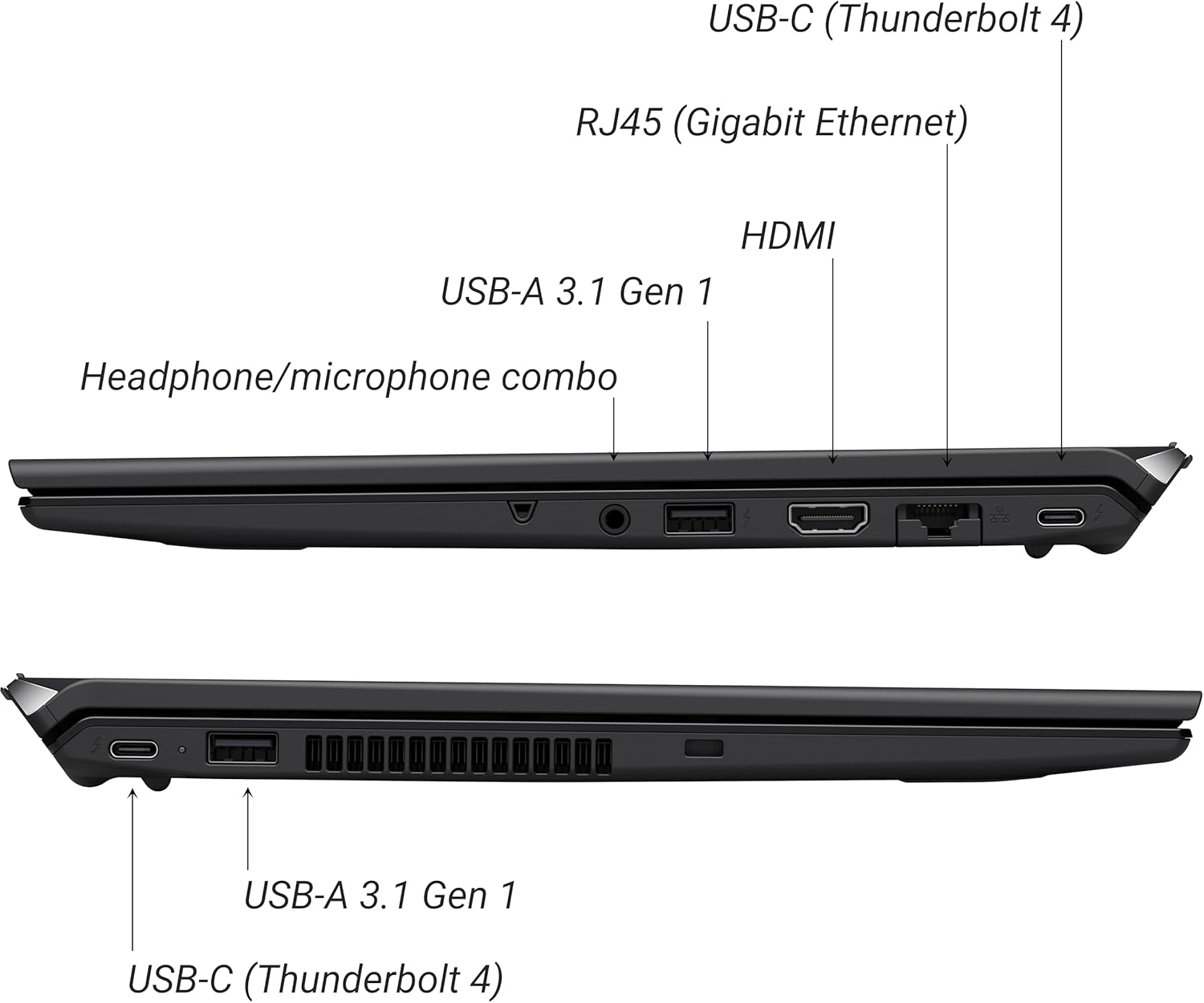
Figure 2: Port layout of the VAIO SX-R Laptop. The left side includes a headphone/microphone combo jack, USB-A 3.1 Gen 1, HDMI, RJ45 (Gigabit Ethernet), and USB-C (Thunderbolt 4). The right side features another USB-C (Thunderbolt 4) and USB-A 3.1 Gen 1 port.
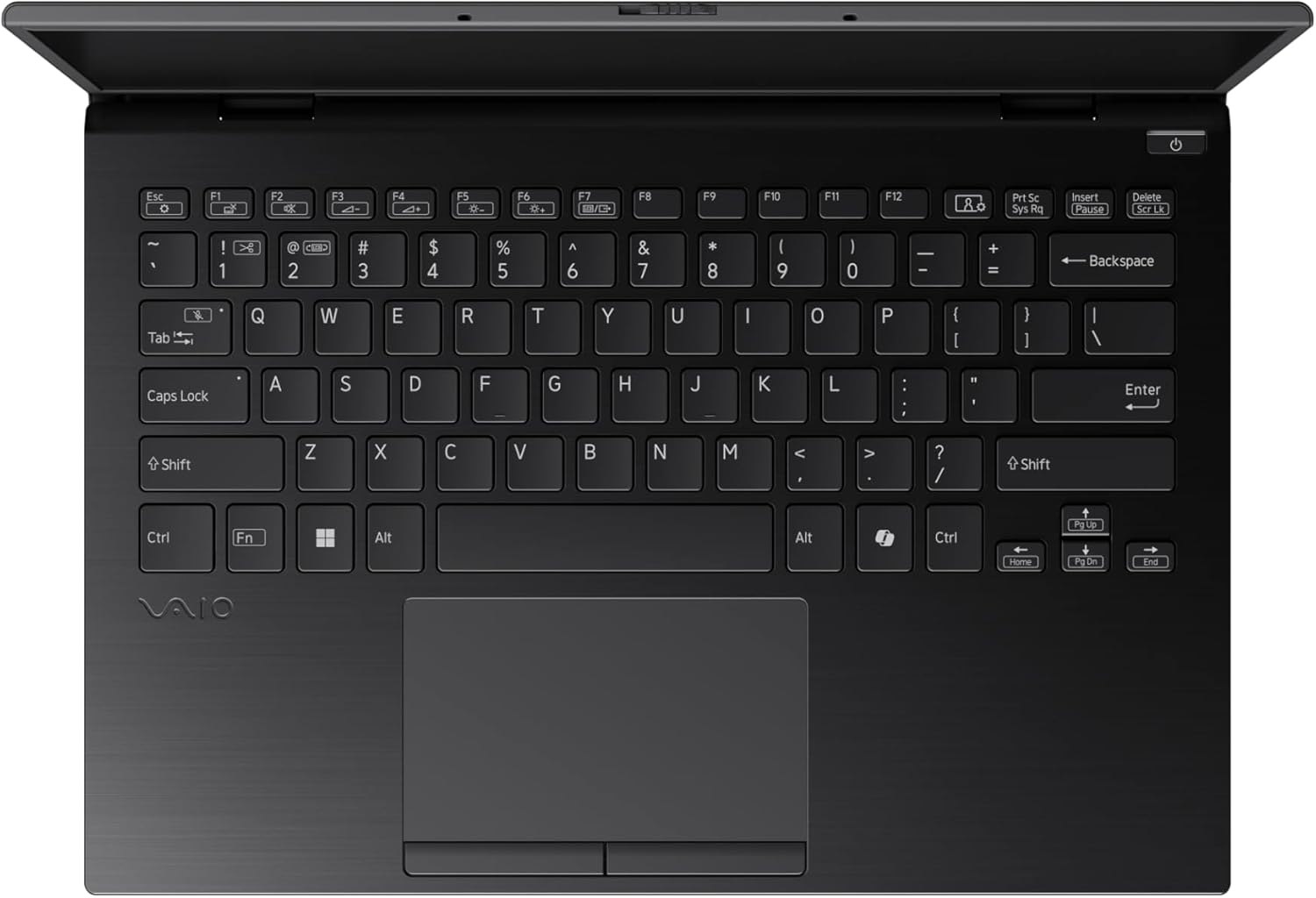
Figure 3: The VAIO SX-R Laptop keyboard and touchpad, featuring a backlit keyboard and integrated fingerprint sensor.
Setup
1. L-Ewwel Tixgħil
- Qabbad l-Enerġija: Ipplaggja l-adapter tal-AC fil-port tal-enerġija tal-laptop u mbagħad f'sokit tal-ħajt.
- Laptop Miftuħ: Iftaħ l-għatu tal-laptop bir-reqqa.
- Qawwa Mixgħul: Press the power button, typically located on the top right of the keyboard deck. The power indicator light will illuminate.
2. Konfigurazzjoni tal-Windows 11 Pro
Follow the on-screen instructions to complete the initial Windows 11 Pro setup. This includes:
- L-għażla tar-reġjun u d-disinn tat-tastiera tiegħek.
- Konnessjoni ma 'netwerk Wi-Fi.
- Aċċettazzjoni tal-ftehim tal-liċenzja.
- Creating or logging in with a Microsoft account.
- Setting up your PIN, fingerprint, or facial recognition (IR Camera).
3. Konnessjoni Periferali
You can connect external devices such as mice, keyboards, external monitors, and USB drives to the available ports as shown in Figure 2.
Operazzjoni
1. Użu Bażiku
- Tastiera: Use the integrated backlit keyboard for typing. Function keys (F1-F12) often have secondary functions accessible via the 'Fn' key.
- Touchpad: It-touchpad ta' preċiżjoni jappoġġja ġesti multi-touch għan-navigazzjoni.
- Touchscreen: Interact directly with the 14-inch WQXGA display using touch gestures.
2. Karatteristiċi tas-Sigurtà
- Qarrej tal-marki tas-swaba': Enroll your fingerprints through Windows Settings > Accounts > Sign-in options for quick and secure login.
- Kamera IR: Utilize Windows Hello facial recognition for convenient and secure access. Set this up in Windows Settings > Accounts > Sign-in options.
3. Ġestjoni tal-Enerġija
- Modalità Sleep: Close the lid or press the power button briefly to put the laptop to sleep.
- Itfi: Go to Start > Power > Shut down to turn off the laptop completely.
- Ibda mill-ġdid: Go to Start > Power > Restart to reboot the system.
Manutenzjoni
1. Tindif
- Skrin: Uża drapp ratba u mingħajr ħelu ftit dampLaħlaħ bl-ilma jew b'tindif tal-iskrin. Evita kimiċi ħarxa.
- Tastiera u Chassis: Uża drapp artab. Għal ħmieġ iebes, neħħi ftit drapp.amp Jista' jintuża drapp b'sapun ħafif, u jiżgura li l-ebda likwidu ma jidħol fil-fetħiet.
- Portijiet: Uża arja kkompressata biex tneħħi t-trab bil-mod mill-portijiet.

Figure 4: The VAIO SX-R features a water-resistant keyboard, designed to withstand minor spills.
2. Aġġornamenti tas-Software
Regularly update your Windows operating system and device drivers to ensure optimal performance, security, and compatibility. Access updates via Windows Settings > Windows Update.
3. Kura tal-batterija
- Evita temperaturi estremi.
- Tneħħix il-batterija kompletament ta' spiss.
- Għal ħażna fit-tul, iċċarġja l-batterija sa madwar 50-60%.
Issolvi l-problemi
Din it-taqsima tindirizza kwistjonijiet komuni li tista’ tiltaqa’ magħhom.
1. Il-Laptop Ma Jixgħelx
- Kun żgur li l-adapter tal-AC huwa konness sew kemm mal-laptop kif ukoll ma' sokit tal-enerġija li jaħdem.
- Iċċekkja jekk is-sokit tal-enerġija hux qed jaħdem billi tqabbad apparat ieħor.
- Jekk il-batterija tkun ixxotta kompletament, ħalliha tiċċarġja għal mill-inqas 30 minuta qabel ma tipprova tixgħelha.
2. Kwistjonijiet tal-Wiri
- Ebda Display: Qabbad monitor estern mal-port HDMI biex tivverifika jekk il-problema hijiex fid-displej intern tal-laptop.
- Wiri li jitteptep/jiddistorta: Update your graphics drivers. Adjust display resolution and refresh rate in Windows Settings > System > Display.
3. Wi-Fi Connectivity Problems
- Ensure Wi-Fi is enabled in Windows Settings > Network & internet > Wi-Fi.
- Erġa' ibda r-router u l-modem tiegħek.
- Mexxi l-Windows Network Troubleshooter.
4. Prestazzjoni bil-mod
- Agħlaq l-applikazzjonijiet bla bżonn li jkunu qed jaħdmu fl-isfond.
- Check Task Manager (Ctrl+Shift+Esc) for resource-intensive processes.
- Ensure your system is up to date and free from malware.
Speċifikazzjonijiet
Below are the detailed specifications for the VAIO SX-R Laptop (Model: VJS4R1X0511B).
| Karatteristika | Speċifikazzjoni |
|---|---|
| Brand | VAIO |
| Isem tal-Mudell | VAIO SX-R |
| Numru tal-Mudell tal-Oġġett | VJS4R1X0511B |
| Sistema Operattiva | Windows 11 Pro |
| Proċessur | Intel Core Ultra 7 (1.4 GHz) |
| Memorja RAM | 32 GB LPDDR5 |
| Hard Drive | SSD PCIe NVMe ta' 1 TB |
| Daqs tal-Iskrin | 14 Pulzier |
| Riżoluzzjoni tal-Iskrin | 2560 x 1600 pixel (WQXGA) |
| Karta Grafika | Grafika Intel integrata |
| Tip bla fili | 802.11bgn |
| Portijiet USB 3.0 | 3 |
| Ħajja Medja tal-Batterija | 10 Sigħat |
| Piż tal-oġġett | 3.1 liri |
| Dimensjonijiet tal-Prodott | 14.2 x 15 x 3.3 pulzieri |
| Karatteristiċi Speċjali | Backlit Keyboard, Fingerprint Reader, HD Audio, Memory Card Slot, Webcam |
Garanzija u Appoġġ
1. Informazzjoni dwar Garanzija
Your VAIO SX-R Laptop is covered by a manufacturer's warranty. Please refer to the warranty card included with your product packaging for specific terms, conditions, and duration. Keep your proof of purchase for warranty claims.
2. Appoġġ Tekniku
For technical assistance, troubleshooting beyond this manual, or service inquiries, please contact VAIO customer support. You can typically find contact information on the official VAIO website or in the documentation provided with your laptop.
- Appoġġ onlajn: Visit the official VAIO support website for FAQs, driver downloads, and contact options.
- Appoġġ tat-Telefon: Irreferi għad-dokumentazzjoni tal-prodott tiegħek għan-numri tat-telefon tal-appoġġ reġjonali.


