1. Introduzzjoni
The Rain Bird FG100 1-Inch Wired Flow Sensor is designed to provide accurate, real-time flow monitoring for your irrigation system. This device helps detect leaks, breaks, and other issues by continuously measuring water flow, enabling efficient water management and system protection. It features a durable plastic body with NPT threaded unions for straightforward installation into 1-inch piping.
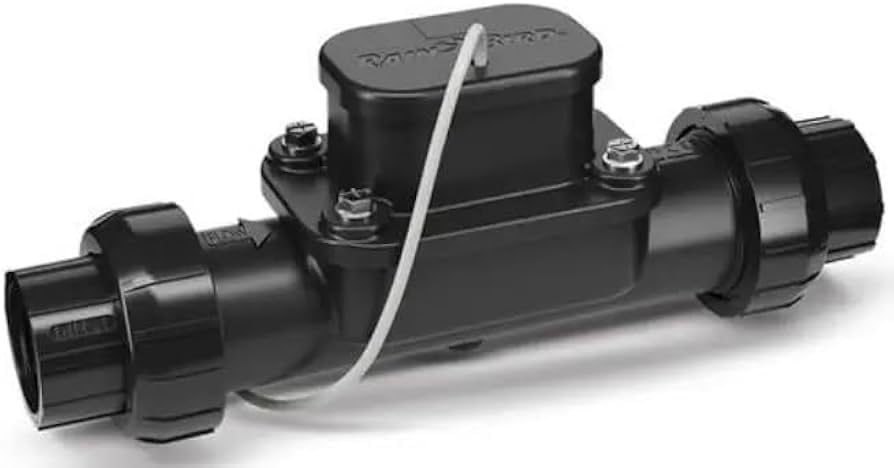
Figure 1: Rain Bird FG100 1-Inch Wired Flow Sensor. This image shows the compact design of the flow sensor with its threaded connections.
2. Informazzjoni dwar is-Sigurtà
Please read and understand all safety instructions before installing or operating the Rain Bird FG100 Flow Sensor. Failure to follow these instructions may result in property damage, injury, or death.
- Sigurtà Elettrika: Ensure all power to the irrigation controller and associated components is turned OFF before performing any wiring.
- Pressjoni tal-Ilma: Always relieve water pressure from the irrigation system before installing or servicing the flow sensor.
- Installazzjoni xierqa: Install the sensor according to local plumbing and electrical codes.
- Tfal u Pets: Keep the product and its components out of reach of children and pets.
- Użu Intenzjonat: Use this product only for its intended purpose of monitoring water flow in irrigation systems. Do not use for potable water applications unless specifically approved.
3. Kontenut tal-Pakkett
Ivverifika li l-oġġetti kollha huma preżenti fil-pakkett qabel tibda l-installazzjoni:
- Rain Bird FG100 1-Inch Wired Flow Sensor (Model: XCZPGA100PRF)
- Gwida għall-Installazzjoni / Manwal għall-Utent (dan id-dokument)
Note: Additional plumbing fittings, wiring, and irrigation controller are sold separately.
4. Setup u Installazzjoni
Proper installation is crucial for accurate flow monitoring. Follow these steps carefully:
- Plan Location: Select a suitable location in your main irrigation line, typically after the master valve and backflow preventer, but before any zone valves. Ensure there is sufficient straight pipe run (e.g., 10 pipe diameters upstream and 5 pipe diameters downstream) for accurate readings. The sensor is designed for wall mount if needed for support.
- Turn Off Water and Power: Close the main water supply to the irrigation system and turn off all power to the irrigation controller.
- Pajp Maqtugħ: Carefully cut a section of the 1-inch irrigation pipe to accommodate the flow sensor. Ensure clean cuts.
- Installa s-Sensor: Thread the Rain Bird FG100 Flow Sensor into the cut pipe section using the NPT threaded unions. Ensure the flow arrow on the sensor body points in the direction of water flow. Use appropriate thread sealant (e.g., PTFE tape or pipe dope) to ensure a watertight seal. Do not overtighten.
- Wiring: Connect the sensor's wires to your compatible irrigation controller's flow sensor input terminals. Refer to your irrigation controller's manual for specific wiring instructions. Typically, flow sensors use two wires for signal and a third for ground, but consult your controller's documentation. Ensure all connections are secure and waterproof.
- Irrestawra l-Ilma u l-Enerġija: Slowly open the main water supply, checking for leaks. Once confirmed leak-free, restore power to the irrigation controller.
- Configure Controller: Access your irrigation controller's settings (via the controller interface or a compatible app on your smartphone/tablet) to enable and calibrate the flow sensor. Follow the controller's instructions for flow sensor setup and calibration.
5. Istruzzjonijiet Operattivi
Once installed and configured with your irrigation controller, the Rain Bird FG100 Flow Sensor operates automatically to monitor water flow.
- Monitoraġġ f'ħin reali: The sensor continuously measures the rate of water flowing through your irrigation system. This data is transmitted to your connected irrigation controller.
- Sejbien ta' tnixxija: Your irrigation controller, using data from the flow sensor, can detect abnormal flow rates (e.g., flow when all zones are off, or excessively high flow during a zone's operation).
- Alerts and Shutdown: Upon detecting an anomaly, the controller can trigger alerts (e.g., via a smartphone app) and, if configured, automatically shut down the irrigation system to prevent water waste and property damage.
- Water Usage Reporting: Many compatible controllers and apps provide detailed reports on water usage, allowing you to track consumption and identify trends.
Refer to your irrigation controller's user manual for specific instructions on how to view flow data, set up alerts, and manage your system using the flow sensor input.
6. Manutenzjoni
The Rain Bird FG100 Flow Sensor is designed for minimal maintenance. However, periodic checks can ensure optimal performance and longevity.
- Spezzjoni Viżwali: Periodically inspect the sensor and its connections for any signs of leaks, physical damage, or debris accumulation.
- Indafa: If the sensor is exposed to the elements, ensure it remains free of excessive dirt or plant growth that could impede its function or damage wiring.
- Winterization: In regions subject to freezing temperatures, ensure the irrigation system, including the flow sensor, is properly winterized to prevent freeze damage. This typically involves draining water from the system.
- Kalibrazzjoni mill-ġdid: If you suspect inaccurate readings, consult your irrigation controller's manual for instructions on how to recalibrate the flow sensor.
7 Issolvi l-problemi
If you encounter issues with your Rain Bird FG100 Flow Sensor, refer to the following common problems and solutions:
| Problema | Kawża Possibbli | Soluzzjoni |
|---|---|---|
| No flow detected / Inaccurate readings |
|
|
| System reports a leak, but none is visible |
|
|
| Sensor not communicating with controller |
|
|
If problems persist, contact Rain Bird customer support or a qualified irrigation professional.
8. Speċifikazzjonijiet
| Karatteristika | Dettall |
|---|---|
| Numru tal-Mudell | XCZPGA100PRF |
| Daqs tal-pajp | 1-il pulzier |
| Tip ta' Konnessjoni | NPT Threaded Unions |
| Materjal tal-Korp | Plastik |
| Tip ta 'Immuntar | Wall Mount (optional support) |
| Teknoloġija tas-Sensers | Sensor Fotoelettriku |
| Piż tal-oġġett | 0.64 Kilogrammi (1.41 libbra) |
| Dimensjonijiet tal-Prodott | 11 x 3 x 4 pulzieri |
| Batteriji Meħtieġa | Nru |
| Apparati Kompatibbli | Smartphone, Tablet (via compatible controller) |
| Metodu ta' Kontroll | App (via compatible controller) |
9. Garanzija u Appoġġ
Informazzjoni dwar il-garanzija:
Rain Bird products are manufactured to high quality standards. Specific warranty terms and conditions for the FG100 Flow Sensor are typically provided with the product at the time of purchase or can be found on the official Rain Bird websit. Jekk jogħġbok żomm il-prova tax-xiri tiegħek għal talbiet ta' garanzija.
Appoġġ għall-Klijent:
For technical assistance, troubleshooting beyond this manual, or warranty inquiries, please contact Rain Bird customer support:
- Visit the official Rain Bird websit għal informazzjoni ta' kuntatt, FAQs, u riżorsi addizzjonali.
- Refer to the contact details provided on your product packaging or warranty card.


