1. Introduzzjoni
Thank you for choosing the Ewent EW3295 Backlit Wireless Keyboard. This full-size keyboard offers versatile connectivity options, including Bluetooth 5.0 and 2.4GHz wireless, allowing you to connect up to three devices simultaneously. Its slim design, silent keys, and adjustable backlight provide a comfortable and efficient typing experience. This manual provides detailed instructions for setup, operation, and maintenance to ensure optimal performance of your keyboard.

Figure 1.1: Slim and sturdy design of the EW3295 keyboard.
2. Karatteristiċi ewlenin
- Wireless Multi-Device Connection: Connect up to 3 devices simultaneously via Bluetooth 5.0 (x2) or wireless 2.4 GHz. Easily switch between devices with just one button.
- Backlight aġġustabbli: The keyboard's backlight is dimmable and can be turned off completely, ideal for various lighting conditions.
- Flat & Quiet Design: Flat, silent keys ensure a comfortable and low-noise typing experience, suitable for quiet environments.
- 12-il Ċwievet Multimedia: Quick access to functions like volume control, email, and other operations.
- Batterija rikarikabbli fit-tul: Equipped with a 300mAh lithium battery and intelligent energy-saving function for extended use.
- Kompatibilità Wiesgħa: Compatible with Windows (XP, 7, 8.1, 10, 11) and Android, suitable for PCs, laptops, and tablets.
- Disinn b'saħħtu u Durabbli: Made of high-density polycarbonate, lightweight yet durable, with a compact design.
- Italian Layout: Features an Italian QWERTY keyboard layout.
3. Kontenut tal-Pakkett
Jekk jogħġbok iċċekkja l-kontenut tal-pakkett meta tiftaħ il-kaxxa:
- Ewent EW3295 Backlit Wireless Keyboard
- USB-A 2.4GHz Wireless Receiver
- USB-C għal USB-A Charging Cable
- Manwal għall-Utent (dan id-dokument)
4. Gwida ta' Setup
4.1 Iċċarġjar tat-Tastiera
The EW3295 keyboard is equipped with a built-in rechargeable 300mAh lithium battery. Before first use, it is recommended to fully charge the keyboard.
- Locate the USB Type-C charging port on the rear panel of the keyboard.
- Connect one end of the provided USB-C charging cable to the keyboard's USB-C port.
- Connect the other end of the USB-A cable to a USB power source (e.g., computer USB port, USB wall adapter).
- The charging indicator light (if present) will illuminate during charging and turn off when fully charged. A full charge takes less than 1 hour and provides over 1 month of use.

Figure 4.1: Rear panel of the keyboard with charging port and receiver compartment.
4.2 Konnessjoni tat-Tastiera
The EW3295 keyboard supports three connection modes: 2.4GHz wireless and two Bluetooth 5.0 channels (BT1, BT2). You can connect up to three devices and switch between them.
Konnessjoni bla fili 4.2.1 2.4GHz
- Locate the USB-A wireless receiver, typically stored in a compartment on the rear panel of the keyboard.
- Plug the USB-A receiver into an available USB port on your computer or device.
- Agħfas il- fn+1 keys on the keyboard to switch to 2.4GHz mode. The indicator light for channel 1 will illuminate.
- It-tastiera għandha tikkonnettja awtomatikament mat-tagħmir tiegħek.

Figure 4.2: Ewent EW3295 keyboard and its USB wireless receiver.
4.2.2 Konnessjoni Bluetooth (BT1 / BT2)
- Agħfas il- fn+2 keys to select Bluetooth channel 1 (BT1) or fn+3 keys to select Bluetooth channel 2 (BT2). The corresponding indicator light will flash, indicating pairing mode.
- Fuq it-tagħmir tiegħek (PC, laptop, tablet), attiva l-Bluetooth u fittex tagħmir ġdid.
- Select "EW3295" or a similar name from the list of available Bluetooth devices.
- Follow any on-screen prompts to complete the pairing process. Once connected, the indicator light will stop flashing and remain solid.
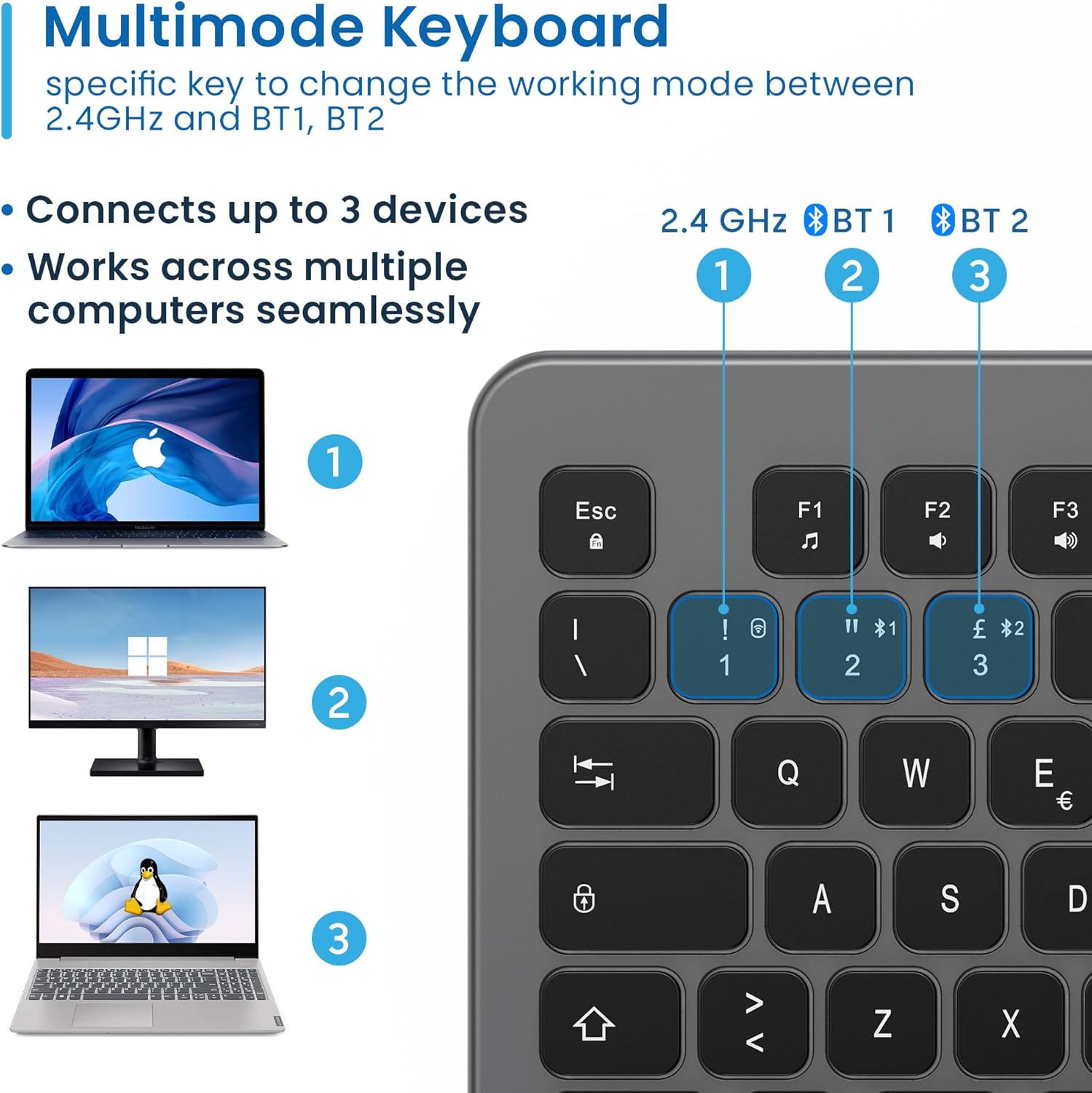
Figure 4.3: Multi-device connectivity options for the EW3295 keyboard.
4.2.3 Tibdil bejn Apparati Konnessi
Once multiple devices are paired, you can easily switch between them:
- Agħfas fn+1 to switch to the 2.4GHz connected device.
- Agħfas fn+2 to switch to the Bluetooth 1 connected device.
- Agħfas fn+3 to switch to the Bluetooth 2 connected device.
5. Istruzzjonijiet Operattivi
5.1 Ittajpjar Bażiku
The EW3295 features a full-size Italian QWERTY layout. Its flat and silent keys provide a comfortable and precise typing experience, reducing noise in quiet environments.

Figure 5.1: Illuminated Italian QWERTY Keyboard Layout.

Figure 5.2: Silent keys for reduced noise.
5.2 Kontroll tad-dawl ta' wara
The keyboard features an adjustable backlight for improved visibility in low-light conditions.
- Backlight ON/OFF: Agħfas il- Bloc Scorr key (often labeled with a lightbulb icon) to toggle the backlight on or off.
- Backlight Brightness Up: Agħfas Fn + Pag ↑ biex iżżid il-luminożità tad-dawl ta' wara.
- Backlight Brightness Down: Agħfas Fn + Pag ↓ biex tnaqqas il-luminożità tad-dawl ta' wara.
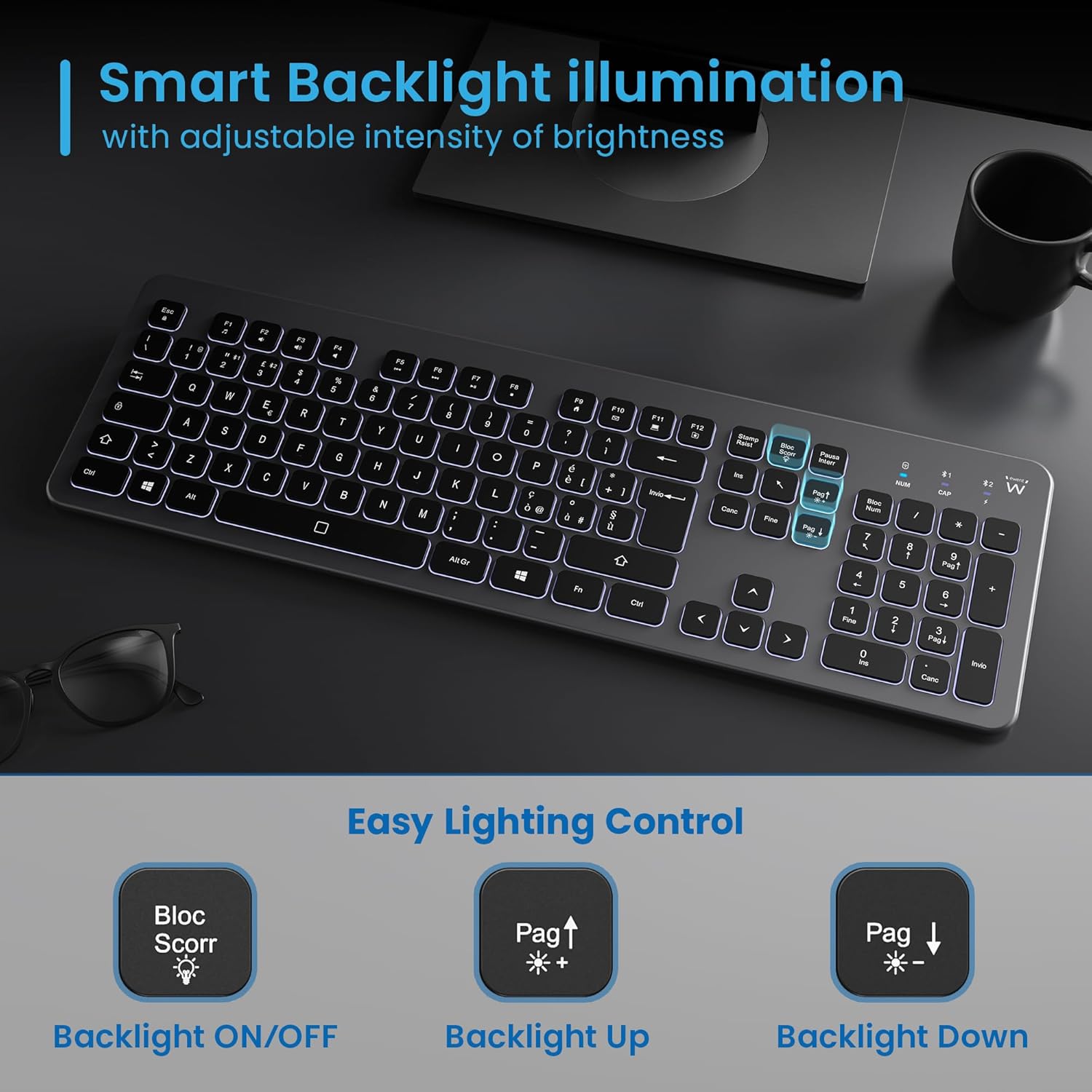
Figure 5.3: Backlight control keys.
5.3 Ċwievet Multimedjali
The keyboard includes 12 dedicated multimedia keys (F1-F12) that provide quick access to various functions. To use these functions, press the Fn ċavetta simultanjament mal-F-key mixtieqa.
| Kombinazzjoni taċ-ċavetta | Funzjoni |
|---|---|
| Fn + F1 | Media Player |
| Fn + F2 | Volum 'l isfel |
| Fn + F3 | Volum Up |
| Fn + F4 | Mute |
| Fn + F5 | Track Preċedenti |
| Fn + F6 | Track li jmiss |
| Fn + F7 | Play/Pawsa |
| Fn + F8 | Waqqaf |
| Fn + F9 | Home Page |
| Fn + F10 | |
| Fn + F11 | Il-Kompjuter Tiegħi |
| Fn + F12 | Kalkulatur |
6. Manutenzjoni u Kura
Manutenzjoni xierqa tiżgura l-lonġevità u l-prestazzjoni ottimali tat-tastiera tiegħek.
- Tindif: Uża drapp artab, niexef u mingħajr suf biex tnaddaf il-wiċċ tat-tastiera. Għal ħmieġ iebes, nixxef ftit.ampLaħlaħ id-drapp bl-ilma jew b'tindif ħafif u mhux abrażiv. Evita umdità eċċessiva.
- Evita Likwidi: Do not spill liquids on the keyboard. In case of accidental spills, immediately disconnect the keyboard and allow it to dry completely before re-using.
- Ħażna: Meta ma tkunx qed tużaha għal perjodi twal, aħżen it-tastiera f'post frisk u niexef 'il bogħod mix-xemx diretta u minn temperaturi estremi.
- Kura tal-batterija: To prolong battery life, avoid fully discharging the battery frequently. Charge the keyboard when the low battery indicator appears.
- Ħażna tar-Riċevitur: When transporting the keyboard, store the USB wireless receiver in its dedicated compartment on the rear panel to prevent loss.
7 Issolvi l-problemi
If you encounter issues with your EW3295 keyboard, please refer to the following common solutions:
| Problema | Kawża Possibbli | Soluzzjoni |
|---|---|---|
| Keyboard not responding (2.4GHz) | Low battery; Receiver not plugged in; Incorrect channel selected. | Charge the keyboard; Ensure USB receiver is securely plugged in; Press fn+1 to select 2.4GHz mode. |
| It-tastiera ma tirrispondix (Bluetooth) | Low battery; Bluetooth not enabled on device; Not paired; Incorrect channel selected. | Charge the keyboard; Enable Bluetooth on your device; Re-pair the keyboard (see Section 4.2.2); Press fn+2 or fn+3 biex tagħżel il-kanal Bluetooth korrett. |
| Backlight ma jaħdimx | Backlight turned off; Low battery. | Agħfas Bloc Scorr to turn on/off; Increase brightness with Fn + Pag ↑; Charge the keyboard. |
| Iċ-ċwievet huma mwaħħlin jew ma jirrispondux | Dirt or debris under keys; Physical damage. | Clean the keyboard (see Section 6); If physical damage, contact support. |
| Ħajja qasira tal-batterija | Frequent backlight use; Battery degradation over time. | Reduce backlight brightness or turn it off when not needed; Ensure full charge cycles. |
8. Speċifikazzjonijiet
| Karatteristika | Dettall |
|---|---|
| Isem tal-Mudell | Tastiera Wireless Retroilluminata EW3295 |
| Numru tal-Mudell tal-Oġġett | EW3295 |
| Brand | Ewent |
| Teknoloġija tal-Konnettività | Bluetooth 5.0 (x2), 2.4GHz Wireless |
| Deskrizzjoni tat-Tastiera | Multimedia, Full-size, Italian Layout |
| Apparati Kompatibbli | PC (Windows XP, 7, 8.1, 10, 11), Android |
| Tip ta 'batterija | Batterija tal-Litju 300mAh Rechargeable |
| Dawl ta' wara | Intensità aġġustabbli |
| Dimensjonijiet (L x W x H) | Appross. 432mm x 122mm x 22mm |
| Piż | Appross. 390g |
| Materjal | High-density Polycarbonate |

Figure 8.1: Keyboard dimensions and weight.
9. Informazzjoni dwar Garanzija
Ewent products are designed and manufactured to the highest quality standards. This product is covered by a limited warranty from the date of purchase. Please refer to the warranty card included with your product or visit the official Ewent websit għal termini u kundizzjonijiet dettaljati tal-garanzija speċifiċi għar-reġjun tiegħek. Il-garanzija tipikament tkopri difetti fil-materjali u x-xogħol taħt użu normali.
10. Appoġġ għall-Klijent
For technical support, troubleshooting assistance, or any questions regarding your Ewent EW3295 keyboard, please contact Ewent customer support. You can typically find contact information (phone, email, support portal) on the official Ewent websit jew fl-ippakkjar tal-prodott.
Please have your product model number (EW3295) and purchase details ready when contacting support.


