1. Introduzzjoni
Thank you for choosing the Socool Portable Car Fan. This manual provides essential information for the safe and effective use of your new fan. Please read it thoroughly before operation and retain it for future reference.
This versatile fan is designed for various cooling needs, featuring a 14500mAh rechargeable battery, dual high-speed turbo motors, and multiple mounting options including clip-on for car headrests, stick-on for dashboards, and wearable options as a waist or neck fan. It also includes an emergency power supply function and an LED light.
2. Informazzjoni dwar is-Sigurtà
- Do not disassemble, repair, or modify the fan yourself. Contact qualified service personnel for repairs.
- Keep the fan away from water, moisture, and high temperatures.
- Ensure the charging port cover is securely closed when not charging to protect against dust and water.
- Do not insert fingers or foreign objects into the fan outlets.
- Use only the provided Type-C charging cable and compatible USB power sources (5V-2A recommended).
- Żomm fejn ma jintlaħaqx mit-tfal.
- Avoid prolonged exposure to direct sunlight, especially when charging.
3. Kontenut tal-Pakkett
Jekk jogħġbok immarka l-kaxxa għall-oġġetti li ġejjin:
- Portable Car Fan
- Anti-Slip Mat
- C-Clamp mal-Bażi
- Lanyard
- Manwal għall-Utent
- Type-C Charging Cable (not explicitly listed in components but implied by charging method)

Figura 3.1: Contents of the Socool Portable Car Fan package, including the fan, anti-slip mat, C-clamp, and lanyard.
4. Setup u Installazzjoni
The Socool Portable Car Fan offers multiple installation options:
4.1 Car Seat Headrest Clip-on Installation
- Waħħal is-C-Clamp to the fan's clip slot.
- Securely clip the C-Clamp onto the car seat headrest post.
- Adjust the fan's angle using the 360° rotation and 90° vertical tilt features for optimal airflow.

Figura 4.1: The fan securely clipped onto a car seat headrest, providing cooling to the rear cabin.
4.2 Armrest or Center Console Placement
- Place the fan on the armrest or center console.
- Use the included non-slip mat under the fan to prevent it from sliding.
4.3 Independent Use (Waist, Neck, or Desk Fan)
- Waist Fan: Remove the bracket and clip the fan directly onto your clothes, shirt, or pants.
- Fann tal-għonq: Attach the lanyard to the fan and hang it around your neck.
- Fann tal-iskrivanija: Utilize the integrated kickstand to prop the fan up on any flat surface.

Figura 4.2: Demonstrates the fan's versatility, including clip-on, stick-on, waist, and neck fan configurations.
5. Istruzzjonijiet Operattivi
5.1 Aġġustament tal-Mixgħul/Mitfi u l-Veloċità
- Qawwa Mixgħul: Press the power button (usually indicated by a fan icon) to turn on the fan. The LED display will show the current battery percentage and speed setting.
- Aġġustament tal-veloċità: Repeatedly press the power button to cycle through the 4 adjustable speed levels.
- Storm Wind Mode: A dedicated button or a long press on the speed button activates the storm wind mode for maximum airflow.
- Itfi: Continue pressing the power button until the fan turns off, or long press the power button.
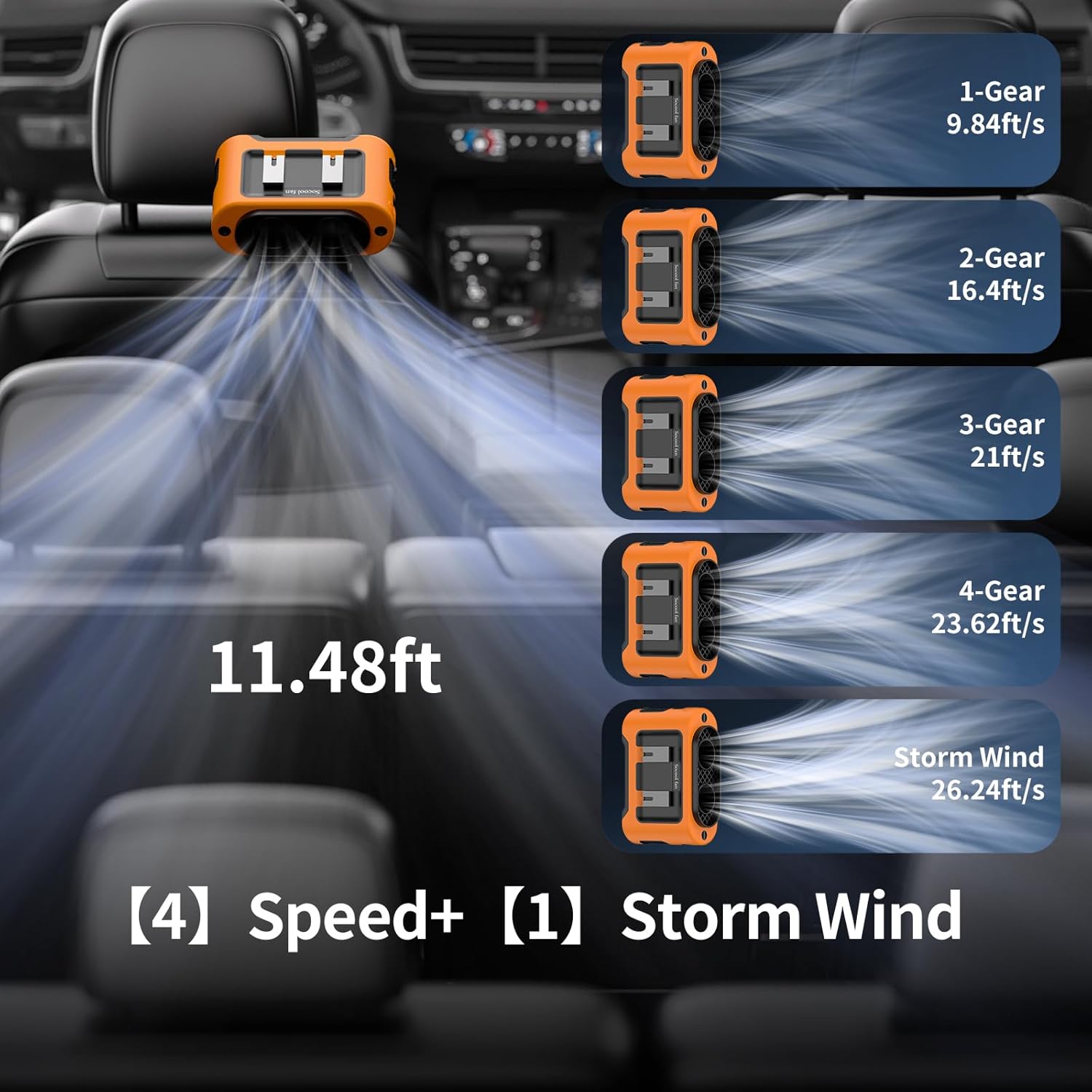
Figura 5.1: Fan speed levels and corresponding airflow, including the powerful Storm Wind mode.
5.2 Iċċarġjar tal-Fan
The fan is equipped with a 14500mAh rechargeable battery and supports Type-C charging.
- Connect the Type-C charging cable to the fan's charging port.
- Connect the other end of the cable to a USB power source such as a USB charger, laptop, computer, or car charger.
- The LED display will indicate charging status. A full charge takes approximately 6.5 hours.
- Il-fann jista' jintuża waqt li jkun qed jiċċarġja.

Figura 5.2: The fan being charged via its Type-C port in a car environment.
5.3 Emergency Power Supply (Power Bank Function)
The fan features a 5V-2A USB output port to charge your mobile devices.
- Locate the USB output port on the fan.
- Connect your device's charging cable to this port.
- Ensure the charging port cover is closed when not in use to protect it from dust and water.
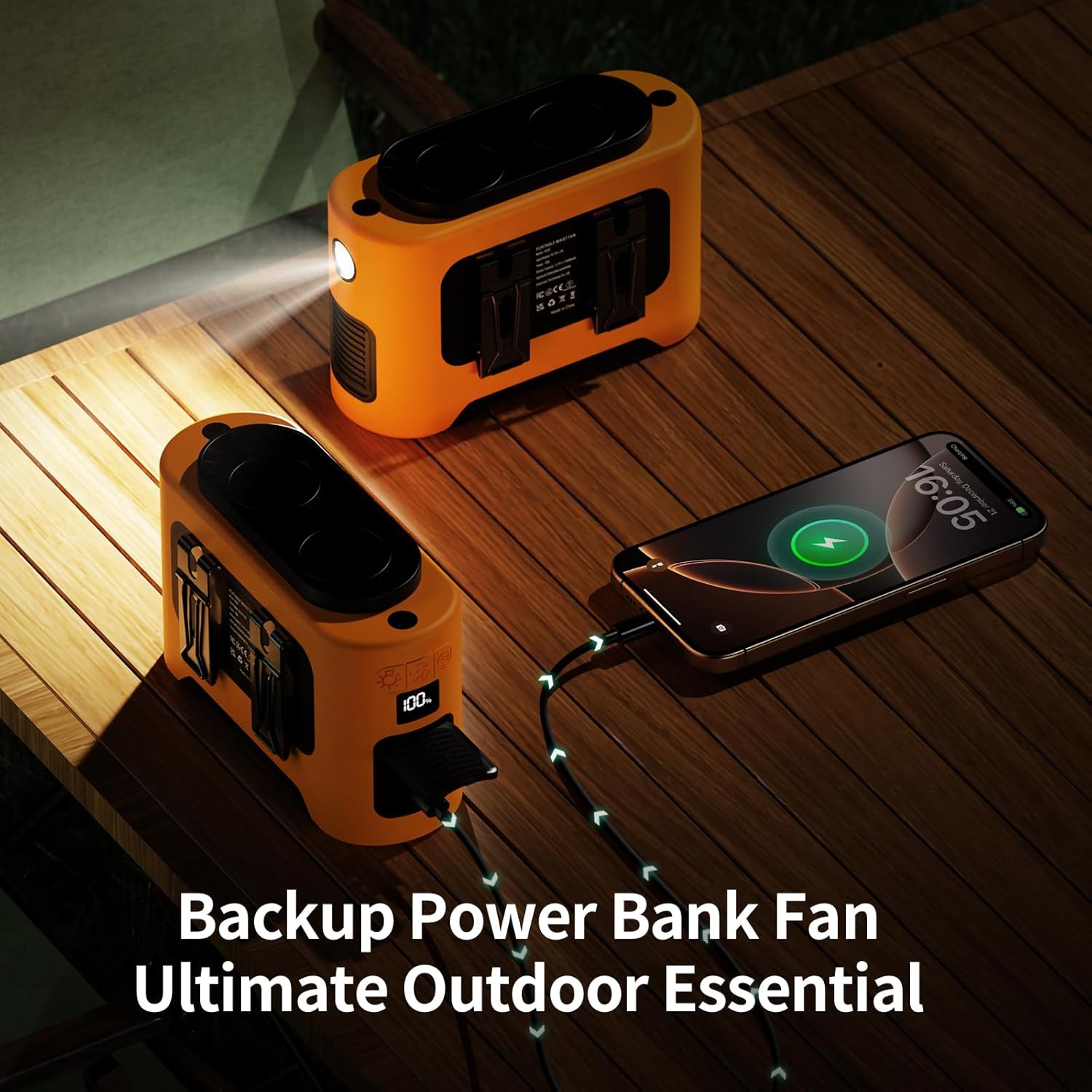
Figura 5.3: The fan's emergency power supply feature, charging a phone while its LED light is on.
5.4 LED Light and SOS Function
The fan includes a built-in LED light for illumination and an SOS function for emergencies.
- Dawl LED: Long press the dedicated light button to turn the LED light on or off.
- Funzjoni SOS: While the LED light is on, single quick press the light button to activate the SOS flashing mode.

Figura 5.4: The fan's LED light with normal and SOS modes, useful for outdoor activities.
6. Manutenzjoni
To ensure the longevity and optimal performance of your Socool Portable Car Fan, follow these maintenance guidelines:
- Tindif: Use a soft, dry cloth to wipe the exterior of the fan. Do not use abrasive cleaners or immerse the fan in water. For dust accumulation in the air outlets, use a soft brush or compressed air.
- Ħażna: Meta ma tkunx qed tużah għal perjodi twal, aħżen il-fann f'post frisk u niexef, 'il bogħod mix-xemx diretta u minn temperaturi estremi.
- Kura tal-batterija: To maintain battery health, fully charge the fan at least once every three months, even if not in regular use. Avoid completely draining the battery frequently.
7 Issolvi l-problemi
If you encounter issues with your Socool Portable Car Fan, please refer to the following common problems and solutions:
| Problema | Kawża Possibbli | Soluzzjoni |
|---|---|---|
| Il-fann ma jixgħelx. | Il-batterija hija eżawrita. | Charge the fan using the Type-C cable. |
| Il-buttuna tal-qawwa mhux ippressata sew. | Ensure a firm press on the power button. | |
| Fluss ta 'arja baxx. | Il-fann qiegħed fuq setting ta' veloċità baxxa. | Increase the fan speed using the speed adjustment button. |
| Air inlets/outlets are obstructed. | Clear any obstructions from the fan's air inlets and outlets. | |
| Il-fann mhux qed jiċċarġja. | Charging cable or adapter issue. | Try a different Type-C cable or USB power adapter. Ensure the adapter provides 5V-2A. |
| Charging port is dirty or damaged. | Gently clean the charging port. If damaged, contact support. | |
| Dawl LED ma jaħdimx. | Il-batterija hija baxxa wisq. | Iċċarġja l-fann. |
| Light button not pressed correctly. | Long press the light button to activate. |
8. Speċifikazzjonijiet
| Karatteristika | Speċifikazzjoni |
|---|---|
| Brand | Fann Socool |
| Isem tal-Mudell | K380 Portable Car Fan |
| Sors tal-Enerġija | Mħaddma bil-batterija |
| Kapaċità tal-batterija | 14500mAh (included) |
| Tip ta 'ċċarġjar | USB Type-C (5V-2A) |
| Ħin tal-Ħlas Sħiħ | Appross. 6.5 sigħat |
| Working Time (Low Speed) | Sa 40 sigħat |
| Working Time (Max Speed) | Sa 4 sigħat |
| Max Speed Rotation | 14600 RPM |
| Veloċità Massima tal-Fluss tal-Arja | 26.24 pied/s |
| Distanza tal-Provvista tal-Arja | 11.48 pied |
| Output (Power Bank) | 5V-2A USB |
| Dimensjonijiet tal-Prodott | 5.7"D x 2.48"W x 3.74"H |
| Piż tal-oġġett | 1.05 Liri |
| Karatteristiċi Speċjali | 360° Rotation & Tilt Adjustment, Dual Turbo Motors, LED Light, SOS Function, Versatile Usage (Clip-on, Stick-on, Waist, Neck, Desk) |
9. Garanzija u Appoġġ
For warranty information or technical support, please contact the manufacturer, Socool fan, through their official channels or the retailer where the product was purchased. Please retain your proof of purchase for any warranty claims.
Manufacturer: Shenzhen Luansheng Electronic Technology Co., Ltd.


