1. Introduzzjoni
This manual provides essential information for the safe and efficient operation of your DOOGEE Blade10 Energy rugged smartphone. Please read this manual thoroughly before using your device to ensure proper functionality and to prevent damage.
The DOOGEE Blade10 Energy is designed for durability and performance, featuring an Android 15 operating system, an octa-core processor, a 6.56-inch HD+ 90Hz display, a 16MP camera, and IP68/IP69K water and dust resistance.
2. Kontenut tal-Pakkett
Ivverifika li l-oġġetti kollha huma preżenti fil-pakkett:
- Telefon robust DOOGEE Blade 10 Energy
- Kejbil USB tat-Tip C
- Ċarġer tal
- Film Protettiv tal-Ħġieġ Ittemprat (Applikat minn qabel)
- Braga
- Manwal għall-Utent
- Karta ta' Garanzija
- Kawża Protettiva

Image: Contents of the DOOGEE Blade10 Energy retail package, including the phone, charger, cable, and accessories.
3. Layout tal-Apparat
Familiarize yourself with the physical components of your smartphone.
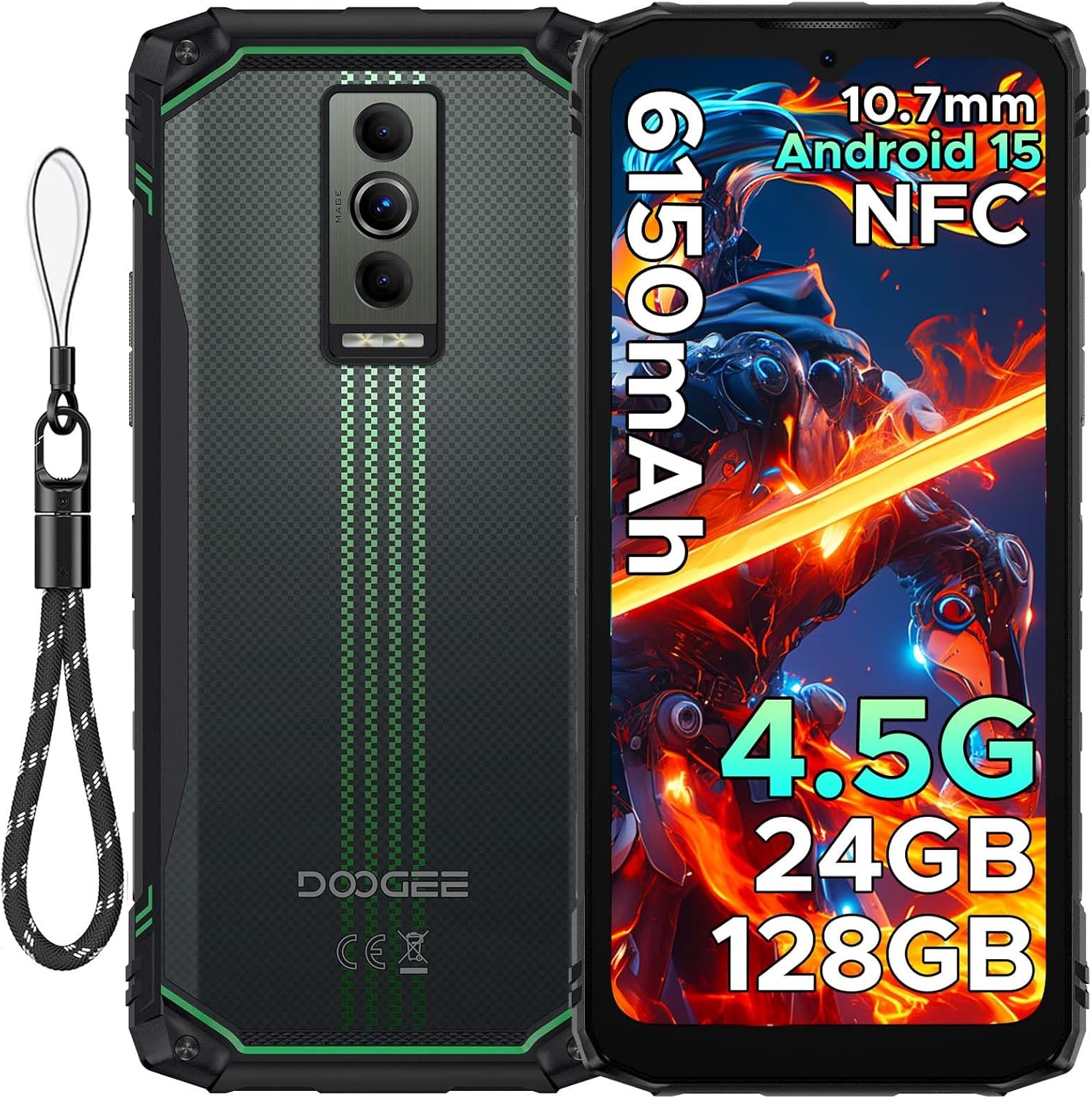
Immaġni: Quddiem u wara view of the DOOGEE Blade10 Energy smartphone, highlighting the display, cameras, and side buttons.
- Quddiem: 6.56" HD+ Display, 8MP Front Camera
- Wara: 16MP Main Camera, Flashlight
- Ġnub: Power Button, Volume Buttons, SIM/MicroSD Card Slot, USB Type-C Port
4. Setup
4.1. Installazzjoni tal-Karta SIM u l-Karta MicroSD
- Locate the SIM/MicroSD card slot on the side of the device.
- Uża l-għodda tal-ejector tas-SIM provduta biex tiftaħ it-trej.
- Carefully place your Nano-SIM cards and/or MicroSD card into the designated slots. Ensure correct orientation.
- Imbotta t-trej bil-mod lura fl-islott sakemm ikun laħlaħ mal-qafas tat-telefon.

Image: Close-up of the SIM/MicroSD card tray, illustrating the correct placement of cards.
4.2. Iċċarġjar Inizjali
Before first use, fully charge your device using the provided Type-C USB cable and charger.
- Qabbad il-kejbil tat-Tip Ċ mal-port tal-iċċarġjar tat-telefon.
- Qabbad it-tarf l-ieħor tal-kejbil mal-ċarġer, imbagħad daħħal il-ċarġer f'sokit tal-elettriku.
- L-indikatur tal-iċċarġjar se jidher fuq l-iskrin.

Image: The DOOGEE Blade10 Energy connected to its charger via a Type-C cable.
5. Istruzzjonijiet Operattivi
5.1. Ixgħel/Itfi u Erġa' Ibda
- Qawwa Mixgħul: Agħfas u żomm il-buttuna Power sakemm l-iskrin jixgħel.
- Itfi/Ibda mill-ġdid: Press and hold the Power button until the power options menu appears. Select "Power off" or "Restart".
5.2. Sistema Operattiva Android 15
Your DOOGEE Blade10 Energy runs on Android 15, offering enhanced performance, smarter interactions, and improved privacy features. Navigate through the interface using touch gestures.

Image: Screenshot of the Android 15 home screen and app icons on the DOOGEE Blade10 Energy.
5.3. Karatteristiċi tal-Wiri
The 6.56-inch HD+ display with a 90Hz refresh rate provides a smooth visual experience. Widevine L1 support ensures high-definition streaming content playback.

Image: The DOOGEE Blade10 Energy display showcasing vibrant colors and smooth motion.
5.4. Operazzjoni tal-Kamera
Capture photos and videos using the 16MP rear camera and 8MP front camera. The device also features an underwater shooting mode for aquatic environments.

Image: The DOOGEE Blade10 Energy camera interface, highlighting the underwater shooting mode.
5.5. Karatteristiċi tas-Sigurtà
Unlock your phone using Face ID for quick and secure access.

Image: An illustration of the Face ID recognition feature in use on the DOOGEE Blade10 Energy.
5.6. Funzjonalità tal-NFC
The NFC (Near Field Communication) feature allows for contactless payments, data sharing, and card emulation. Enable NFC in your phone's settings to use these functions.

Image: The DOOGEE Blade10 Energy being used for a contactless payment via NFC.
6. Karatteristiċi ta' Durabilità
The DOOGEE Blade10 Energy is built to withstand harsh environments with its IP68/IP69K and MIL-STD-810H certifications.
- IP68/IP69K: Provides dustproof and waterproof protection. The phone can withstand immersion in water up to 1.5 meters deep for 30 minutes.
- MIL-STD-810H: Ċertifikat għal reżistenza għal waqgħat sa 1.5 metri.

Image: The DOOGEE Blade10 Energy shown in various rugged scenarios, highlighting its dustproof, drop-proof, and waterproof design.
Video: This video demonstrates the IP68/IP69K waterproof capabilities of the DOOGEE Blade10 Energy.
7. Ġestjoni tal-batterija
The device is equipped with a 6150mAh silicon anode battery for extended usage. It also supports reverse charging.
Image: The DOOGEE Blade10 Energy showcasing its 6150mAh battery and the reverse charging capability with another device.
7.1. Iċċarġjar bil-maqlub
To use your phone as a power bank, connect a compatible device to your Blade10 Energy using a USB-C to USB-C cable or a USB-C to the appropriate cable for the other device. Ensure reverse charging is enabled in the settings if it doesn't start automatically.
Video: This video highlights the ultra-thin design and long battery life of the DOOGEE Blade 10 series, including the Blade10 Energy.
8. Konnettività
- 4.5G SIM Doppju: Supports dual SIM cards for flexible network usage.
- GPS: Integrated with Beidou, Galileo, GLONASS, and GPS for accurate positioning.
- Wi-Fi: Supports standard Wi-Fi connectivity.
9. Manutenzjoni
To ensure the longevity and optimal performance of your DOOGEE Blade10 Energy, follow these maintenance guidelines:
- Żomm l-apparat nadif billi timsaħ b'soft, damp drapp. Evita kimiċi ħarxa.
- Kun żgur li l-għotjien kollha tal-portijiet ikunu magħluqin sew meta l-apparat ikun espost għall-ilma jew għat-trab.
- Evita li tesponi l-apparat għal temperaturi estremi jew dawl tax-xemx dirett għal perjodi twal.
- Agħmel backup tad-dejta tiegħek regolarment biex tevita t-telf.
10 Issolvi l-problemi
Jekk tiltaqa' ma' problemi bit-tagħmir tiegħek, irreferi għas-soluzzjonijiet komuni li ġejjin:
| Problema | Soluzzjoni |
|---|---|
| L-apparat ma jixgħelx | Kun żgur li l-batterija hija ċċarġjata. Qabbad mal-ċarġer u stenna ftit minuti qabel ma tipprova tixgħelha mill-ġdid. |
| Sinjal tan-netwerk fqir | Iċċekkja l-installazzjoni tas-SIM card. Mur f'żona b'kopertura tan-netwerk aħjar. Erġa' ibda l-apparat. |
| Touchscreen ma jirrispondix | Restart the device. If the issue persists, perform a factory reset (note: this will erase all data). |
| Il-batterija tiskula malajr | Close unused applications. Reduce screen brightness. Disable unnecessary features like Wi-Fi, Bluetooth, or GPS when not in use. |
11. Speċifikazzjonijiet
| Karatteristika | Dettall |
|---|---|
| Isem tal-Mudell | Blade10 Energy |
| Sistema Operattiva | Android 15 |
| Mudell tas-CPU | Mediatek Dimensity 9000 (Octa-Core, 1.8 GHz) |
| RAM | 24 GB (4GB Bażiku + 20GB Estiż) |
| Ħażna Interna | 128 GB |
| Ħażna espansibbli | Up to 2 TB (MicroSD/TF card) |
| Daqs tal-Iskrin | 6.56 Pulzier |
| Riżoluzzjoni | 720 x 1600 (HD+) |
| Riffriskar Rata | 90 Hz |
| Kamera Prinċipali | 16 MP |
| Kamera ta' Quddiem | 8 MP |
| Kapaċità tal-batterija | 6150 mAh |
| Konnettività | 4.5G Dual SIM, Wi-Fi, NFC |
| Navigazzjoni | Beidou, Galileo, GLONASS, GPS |
| Durabilità | IP68/IP69K, MIL-STD-810H |
| Dimensjonijiet | 6.45 x 2.98 x 0.33 pulzieri |
| Piż | 6.9 uqija (195 Grammi) |
12. Garanzija u Appoġġ
Your DOOGEE Blade10 Energy comes with a two-year warranty. For technical support or warranty claims, please refer to the contact information provided on the warranty card included in your package or visit the official DOOGEE support websit.
The package includes a Warranty Card and a Service Card for your reference.


