1. Introduzzjoni
This manual provides essential instructions for the safe and efficient operation, maintenance, and troubleshooting of your DREAME L50 Ultra Robot Vacuum and Mop. Please read this manual thoroughly before using the product and retain it for future reference.
2. Informazzjoni dwar is-Sigurtà
To reduce the risk of injury or damage, read and follow all safety precautions when setting up, using, and maintaining your robot. This appliance can be used by children aged 8 years and above and persons with reduced physical, sensory or mental capabilities or lack of experience and knowledge if they have been given supervision or instruction concerning use of the appliance in a safe way and understand the hazards involved. Children shall not play with the appliance. Cleaning and user maintenance shall not be made by children without supervision.
- Kun żgur li r-robot ikun iċċarġjat kompletament qabel l-ewwel użu.
- Tużax ir-robot f'ambjenti mxarrbin jew ħdejn l-ilma.
- Remove loose cables, small objects, and fragile items from the floor before cleaning.
- Żomm ix-xagħar, il-ħwejjeġ laxki, is-swaba’, u l-partijiet kollha tal-ġisem 'il bogħod minn fetħiet u partijiet li jiċċaqilqu.
- Do not operate the robot in areas where there are open flames or explosive materials.
- Uża biss l-adapter tal-enerġija u d-dock tal-iċċarġjar speċifikati mill-manifattur.
- Do not use the robot to pick up large debris, broken glass, or corrosive liquids.
3. Kontenut tal-Pakkett
Iċċekkja li l-oġġetti kollha huma preżenti u f'kundizzjoni tajba meta tiftaħ il-kaxxa.

Immaġni: All components included in the DREAME L50 Ultra package. This includes the robot vacuum, base station, various brushes, mop pads, cleaning solution, and documentation.
- Vacuum Robot x1
- Stazzjon Bażi x1
- Pinzell Prinċipali (installat minn qabel) x1
- Protezzjoni tal-Pinzell (installata minn qabel) x1
- Xkupilja tal-ġenb (installata minn qabel) x1
- Scale Inhibitor (pre-installed) x1
- Dust Bags (pre-installed) x2
- Detenturi tal-Mopp Pad x2
- Kuxxinetti tal-Mopp x2
- Kaxxa tat-Trab (installata minn qabel, inkluż il-filtru) x1
- Soluzzjoni tat-Tindif ta' 200ml x1
- Stazzjon Bażi Ramp Estensjoni x1
- Gwida għall-Bidu Mgħaġġel x1
- Manwal għall-Utent x1
4. Prodott Aktarview
The DREAME L50 Ultra is an advanced robot vacuum and mop designed for comprehensive floor cleaning. It features powerful suction, intelligent navigation, and an all-in-one PowerDock for automated maintenance.

Immaġni: The DREAME L50 Ultra robot vacuum docked with its white base station, alongside a smartphone displaying the companion app icon.
Karatteristiċi ewlenin:
- Ġbid Vormax ta' 19,500Pa: Powerful suction for effective debris pickup.
- HyperStream Detangling DuoBrush: Bristled rubber brush and TPU rubber brush for efficient hair removal and tangle prevention.
- ProLeap System: Retractable legs for seamless crossing over door tracks and thresholds up to 6cm.
- AI Action and 3D Structured Light: Precise obstacle avoidance for over 180 types of objects.
- Dual Flex Arm Technology: Extendable side brush and mop for comprehensive edge-to-corner cleaning.
- All-in-One PowerDock: Features auto-empty (up to 100 days), hot water mop self-cleaning, hot air drying, auto solution refilling, and auto water tank refilling.
- Customizable Carpet Cleaning: 5 modes via the Dreamehome App for tailored carpet care.
- On-Demand Voice Control: Compatible with Alexa, Siri, and Google Assistant.
5. Setup
5.1 Tneħħija tal-kaxxa u l-ewwel tqegħid
Carefully remove all components from the packaging. Place the base station on a hard, level surface against a wall, ensuring there is adequate clearance around it (at least 0.5m on both sides and 1.5m in front). Connect the power cable to the base station and plug it into a power outlet.
Vidjow: A user unboxes the DREAME L50 Ultra, showing the components and initial setup of the robot and its base station. This video demonstrates the physical setup process.
5.2 Installazzjoni u Konnessjoni tal-App
Download the "Dreamehome" app from your smartphone's app store. Follow the in-app instructions to connect your DREAME L50 Ultra to your home Wi-Fi network. This process typically involves scanning a QR code on the robot and following prompts for network selection.
5.3 Filling Water Tanks and Solution
Open the top cover of the base station to access the clean water tank and cleaning solution compartment. Fill the clean water tank with tap water and the solution compartment with the provided DREAME cleaning solution. Ensure both are securely closed before operation.
6. Operazzjoni
6.1 Tibda u Twaqqif tat-Tindif
- Ibda: Press the power button on the robot or tap "Clean" in the Dreamehome app.
- Pawża: Press the power button during cleaning or tap "Pause" in the app.
- Ibda: Press the power button or tap "Resume" in the app.
- Ritorn lejn il-Moll: Press the home button on the robot or tap "Dock" in the app.
6.2 Modi tat-Tindif
The Dreamehome app allows you to select various cleaning modes:
- Vakwu Biss: Għal debris niexef fuq kull tip ta' art.
- Mopp Biss: Għat-tindif bl-imxarrab fuq pavimenti iebsin.
- Vacuum & Mop: Vacuum cleaner u mopping simultanji.
- Tindif tad-dwana: Define specific areas or rooms for cleaning with adjustable settings.
6.3 Tindif Skjedat
Set up recurring cleaning tasks through the Dreamehome app. You can specify start times, frequency (daily, weekly, custom), and cleaning parameters for the entire area or specific rooms.
Vidjow: This video demonstrates how to set up scheduled cleaning tasks using the Dreamehome app, allowing the robot vacuum to clean automatically at predefined times.
6.4 Obstacle Avoidance and Dynamic Cleaning
The DREAME L50 Ultra utilizes AI Action and 3D structured light for precise obstacle avoidance. It can detect and navigate around over 180 types of objects, including shoes, furniture, and cables.

Immaġni: A DREAME L50 Ultra robot vacuum navigating around various obstacles like a teddy bear, slippers, and cables, illustrating its smart obstacle detection capabilities.
Enable "Dynamic Obstacle Area Cleaning" in the app settings to allow the robot to remember skipped areas due to dynamic obstacles (like pets or people) and clean them later.
Vidjow: This video highlights the Dynamic Replenishment Sweeping Technology, showing how the robot avoids dynamic obstacles and then returns to clean those areas.
6.5 Edge and Corner Cleaning
The Dual Flex Arm technology with an extendable side brush and mop ensures thorough cleaning of corners and tight spots. Activate "AI-driven SideReach" and "AI-driven MopExtend" in the app settings for enhanced coverage.

Immaġni: A DREAME L50 Ultra robot vacuum cleaning along a wall and corner, demonstrating its ability to reach tight spaces with its extendable components.
Vidjow: This video illustrates the DREAME robot's corner and edge cleaning feature, showing how it extends its brush and mop to clean along walls and around furniture legs.
6.6 Carpet Cleaning Strategies
Customize carpet cleaning through the Dreamehome app with 5 available modes:
- Removable Mops: Detach mop pads to maintain dry carpets.
- Liftable Mops: Mops lift for low-pile carpets.
- Complete Carpet Avoidance: Robot avoids all carpets.
- Intensive Carpet Cleaning: Vacuums carpets twice for deeper cleaning.
- Suction Boost: Increases suction power on carpets.
6.7 Kontroll tal-Vuċi
Manage your cleaning routine using voice commands with Alexa, Siri, or Google Assistant. Link your DREAME L50 Ultra to your preferred voice assistant through the Dreamehome app.
7. Manutenzjoni
Regular maintenance ensures optimal performance and longevity of your DREAME L50 Ultra.
7.1 All-in-One PowerDock Maintenance
- Auto-Empty: The dock automatically empties the robot's dustbin for up to 100 days. Replace the dust bag in the dock when full.
- Mopp li Jnaddaf Awtomatikament: Mop pads are automatically rinsed with 167°F hot water.
- Tnixxif bl-Arja Sħuna: Mop pads are dried with hot air to prevent odors and mildew.
- Solution & Water Refilling: The dock automatically refills the robot's water tank and cleaning solution.
- Base Station Cleaning: The AceClean DryBoard system helps prevent dirt buildup in the washboard area. Periodically check and clean the washboard filter.
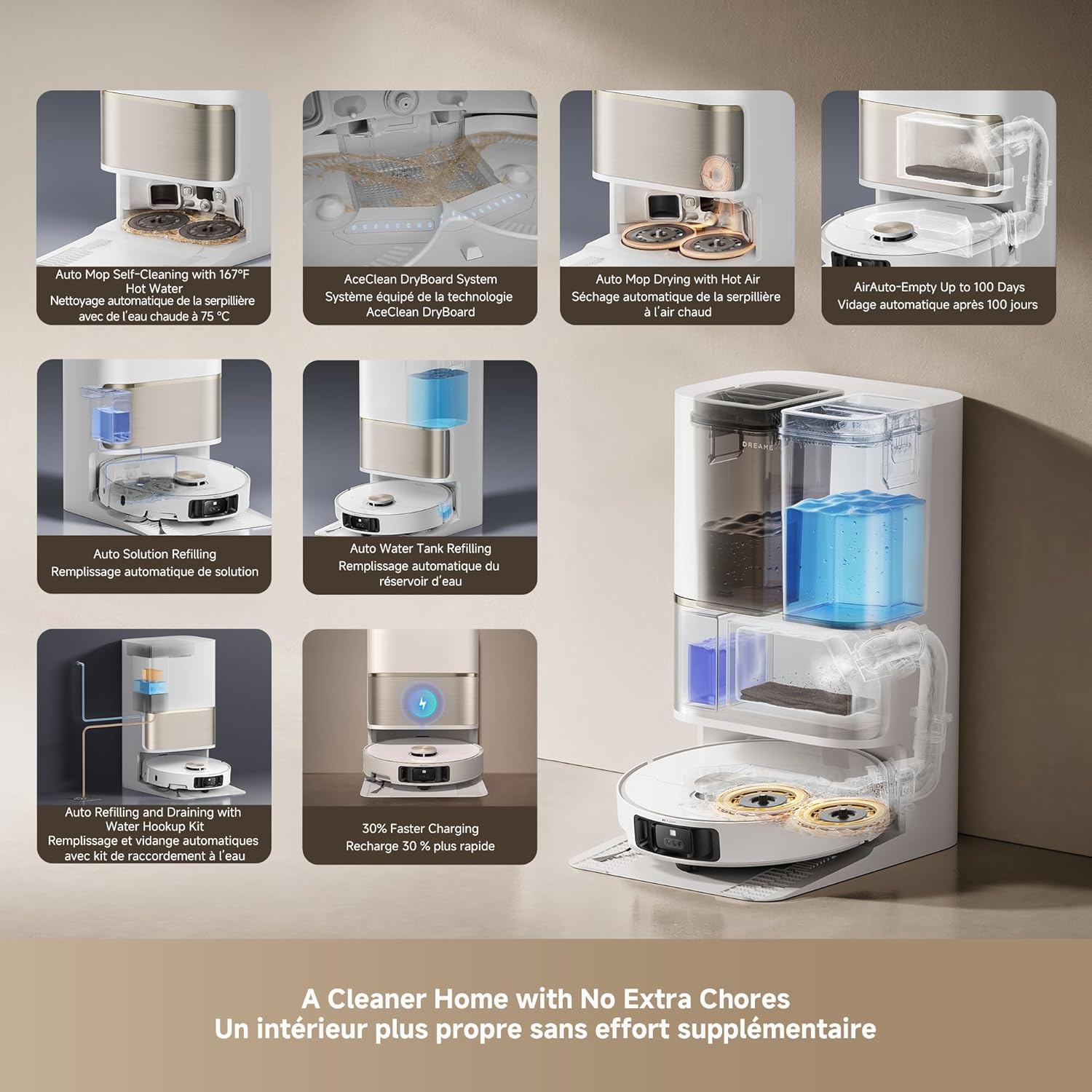
Immaġni: An infographic detailing the various automated functions of the DREAME L50 Ultra's PowerDock, including auto-empty, mop self-cleaning, hot air drying, and water/solution refilling.
7.2 Robot Vacuum Component Cleaning
- Trab tat-trab: Empty the robot's internal dustbin regularly, especially if not using the auto-empty feature.
- Pinzell Prinċipali: Remove the main brush and clean any tangled hair or debris. The HyperStream Detangling DuoBrush is designed to minimize tangles.
- Pinzell tal-Ġenb: Check for and remove any tangled hair or debris from the side brush.
- Filtri: Clean the dustbin filter periodically by tapping out debris. Replace as needed.
- Sensers: Wipe all sensors (cliff sensors, wall sensors, charging contacts) with a clean, dry cloth to ensure proper function.
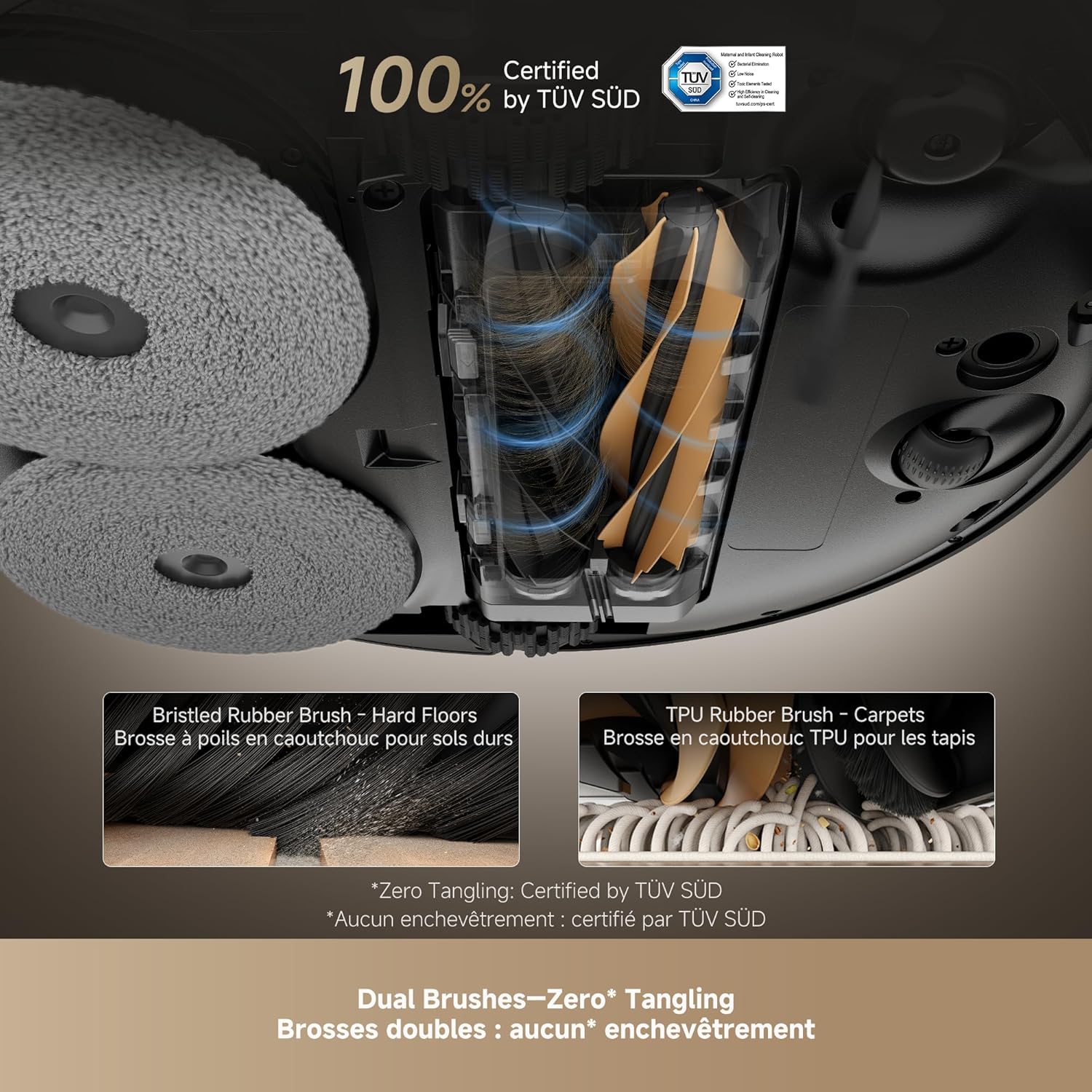
Immaġni: A close-up view of the DREAME L50 Ultra's dual brush system, showing a bristled rubber brush for hard floors and a TPU rubber brush for carpets, designed for effective hair removal.
Vidjow: This video shows the dirty water collected after two mopping cycles, demonstrating the effectiveness of the DREAME L50 Ultra's mopping function.
Vidjow: This video measures the sound level of the DREAME L50 Ultra during its self-empty cycle, providing an indication of its operational noise.
8 Issolvi l-problemi
If your DREAME L50 Ultra encounters an issue, refer to the following common solutions. For persistent problems, contact customer support.
| Problema | Kawża Possibbli | Soluzzjoni |
|---|---|---|
| Robot ma jixgħelx. | Batterija baxxa; Il-buttuna tal-qawwa mhux ippressata sew. | Place the robot on the charging dock; Press and hold the power button for 3 seconds. |
| Ir-robot ma jistax jiċċarġja. | Charging contacts are dirty; Power cable not connected. | Clean the charging contacts on both the robot and dock; Ensure the power cable is securely plugged in. |
| Ir-robot jeħel spiss. | Wisq ostakli; Is-sensuri huma maħmuġin. | Clear the cleaning area of clutter; Clean all sensors on the robot. |
| Prestazzjoni fqira tat-tindif. | Il-kontenitur tat-trab mimli; Ix-xkupilji mħabbtin; Il-filtru mblukkat. | Empty the dustbin; Clean the main and side brushes; Clean or replace the filter. |
| Il-mopps mhux qed inaddfu b'mod effettiv. | Mop pads dirty; Water tank empty; No cleaning solution. | Ensure mop pads are clean; Refill the clean water tank; Refill the cleaning solution. |
| Robot is too loud during self-empty. | Operazzjoni normali. | The self-empty function involves powerful suction and is inherently noisy. This is normal. |
8.1 Restarting the Robot
If the robot is unresponsive or behaving erratically, a simple restart may resolve the issue. Press and hold the power button on the robot for a few seconds until it powers off, then press it again to turn it back on.
Vidjow: This video demonstrates how to perform a simple restart on the DREAME L50 Ultra robot vacuum by pressing and holding the power button.
8.2 Irrisettja l-Fabbrika
A factory reset will restore the robot to its original settings and delete all saved maps and Wi-Fi connections. This should be used as a last resort for persistent issues.
- Kun żgur li r-robot huwa mixgħul.
- Iftaħ l-għatu ta' fuq tar-robot.
- Locate the small reset button (often a pinhole) near the Wi-Fi indicator.
- Using a small tool (like a SIM ejector tool or paperclip), press and hold the reset button for approximately 5 seconds until you hear a voice prompt confirming the factory reset.
- The robot will then restart with factory settings.
Vidjow: This video guides you through the process of performing a factory reset on the DREAME L50 Ultra robot vacuum, including locating the reset button and confirming the reset.
9. Speċifikazzjonijiet
| Karatteristika | Dettall |
|---|---|
| Brand | ĦOLMA |
| Isem tal-Mudell | Dreame L50 Ultra White |
| Numru tal-Mudell tal-Oġġett | RLL94CE |
| UPC | 810142561310 |
| Kulur | Abjad |
| Dimensjonijiet tal-Prodott | 17"T x 16"W x 27"Għ |
| Piż tal-oġġett | 42.1 liri |
| Qawwa tal-ġbid | Ġbid Vormax ta' 19,500Pa |
| Ħajja tal-batterija | minuti 180 |
| Voltage | 110 Volts |
| Metodu ta' Kontroll | App, Remote, Voice |
| Tip ta 'filtru | Fowm |
| Rakkomandazzjoni tal-wiċċ | Wood, Marble, Tile |
10. Garanzija u Appoġġ
DREAME products are covered by a limited warranty from the date of purchase. For specific warranty terms and conditions, please refer to the warranty card included in your package or visit the official DREAME websit.
Appoġġ għall-Klijent:
Jekk għandek xi mistoqsijiet, teħtieġ assistenza teknika, jew teħtieġ tirrapporta xi problema, jekk jogħġbok ikkuntattja lis-servizz tal-klijenti ta' DREAME permezz tal-kanali li ġejjin:
- Uffiċjali Websit: Żur l-uffiċjal DREAME websit għal FAQs, riżorsi ta' appoġġ, u informazzjoni ta' kuntatt.
- App Dreamehome: Aċċessa l-appoġġ direttament permezz tat-taqsima tal-għajnuna tal-app.
- Email/Telefon: Refer to your product's quick start guide or the official websit għal dettalji ta' kuntatt speċifiċi fir-reġjun tiegħek.
Please have your product model number (RLL94CE) and purchase information ready when contacting support.


