1. Introduzzjoni
This manual provides detailed instructions for the setup, operation, and maintenance of your MIKIBY AK980 Mechanical Keyboard. The AK980 features a 98% layout, tri-mode connectivity (Bluetooth 5.0, 2.4GHz wireless, and USB-C wired), a smart TFT display, a multi-function knob, hot-swappable switches, PBT keycaps, and customizable RGB backlighting. Please read this manual thoroughly to ensure optimal performance and longevity of your device.
2. Kontenut tal-Pakkett
Qabel ma tibda, jekk jogħġbok ivverifika li l-oġġetti kollha huma preżenti fil-pakkett:
- MIKIBY AK980 Mechanical Keyboard
- USB-C Cable
- Keycap & Switch Puller
- Manwal għall-Utent (dan id-dokument)
3. Prodott Aktarview
The MIKIBY AK980 is designed for versatility and performance. Key features include:
- TFT Smart Display & Knob: Displays date, time, battery level, connection mode, and allows for custom GIF images. The knob controls volume and backlight settings.
- Konnettività Tri-Modalità: Seamlessly switch between Bluetooth 5.0, 2.4GHz wireless (via USB dongle), and wired USB-C connections.
- Swiċċijiet li jistgħu jinbidlu bis-sħana: Supports 3-pin and 5-pin mechanical switches, allowing for easy customization without soldering.
- Batterija fit-tul: Equipped with an 8000mAh battery for extended wireless use.
- 98% Keyboard Layout: Compact design retaining essential keys including a numeric keypad and function row.
- RGB Backlight & Web Sewwieq: Features 20 pre-programmed lighting effects and web-based customization for lighting, key functions, and macros.
- Gasket Mounted Design: Provides a soft, elastic typing feel and reduces noise.
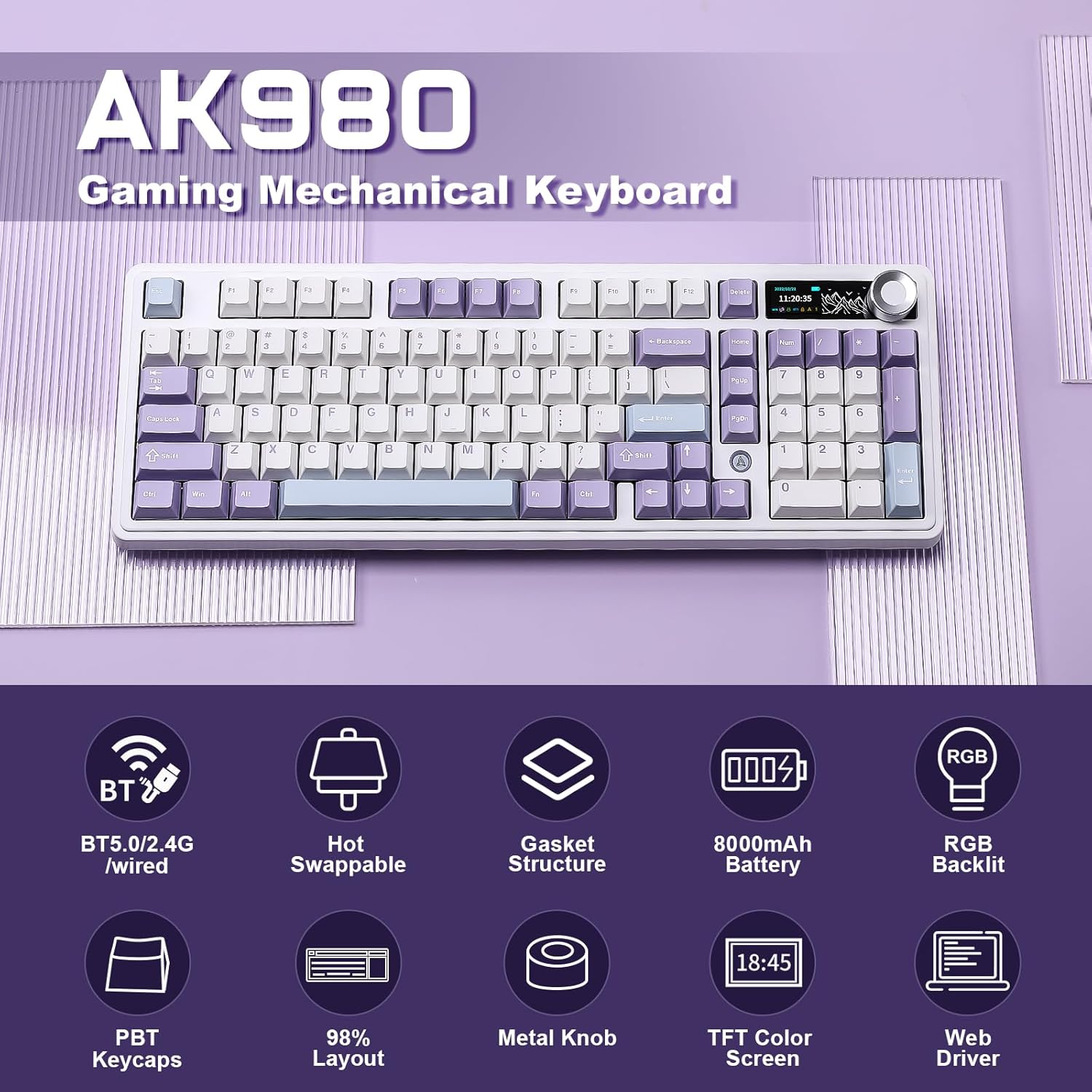
Figura 3.1: Aktarview of AK980 features including tri-mode connectivity, hot-swappable design, gasket structure, 8000mAh battery, RGB backlight, PBT keycaps, 98% layout, metal knob, TFT color screen, and web sewwieq.
4. Setup u Konnessjoni
4.1 Iċċarġjar inizjali
Before first use, connect the keyboard to a USB power source (e.g., computer USB port or USB wall adapter) using the provided USB-C cable. The TFT display will indicate charging status. A full charge can take several hours.
4.2 Modi ta' Konnettività
The AK980 supports three connection modes. Use the switch located on the back of the keyboard to select your desired mode:

Figure 4.1: Tri-mode connectivity options for the AK980 keyboard.
4.2.1 USB-C Wired Mode
- Set the mode switch on the back of the keyboard to 'USB'.
- Connect the USB-C cable to the keyboard and the other end to your computer's USB port.
- It-tastiera tiġi rikonoxxuta awtomatikament u tkun lesta għall-użu.
4.2.2 Modalità bla fili ta' 2.4GHz
- Set the mode switch on the back of the keyboard to '2.4G'.
- Locate the 2.4G USB receiver (dongle) stored in the keyboard's dedicated slot.
- Ipplaggja r-riċevitur USB f'port USB disponibbli fuq il-kompjuter tiegħek.
- The keyboard will automatically connect. The TFT display will show the 2.4G connection icon.
4.2.3 Modalità Bluetooth
- Set the mode switch on the back of the keyboard to 'BT'.
- The keyboard will enter pairing mode. The TFT display will show the Bluetooth icon blinking.
- On your device (computer, tablet, smartphone), open Bluetooth settings and search for new devices.
- Select 'AK980' from the list of available devices to pair.
- Once paired, the Bluetooth icon on the TFT display will become solid.
4.3 Operating System Switch (WIN/MAC)
Use the dedicated switch on the back of the keyboard to toggle between Windows (WIN) and macOS (MAC) layouts. This ensures proper key mapping for your operating system.
5. Operazzjoni
5.1 Smart TFT Display and Knob Functions
The AK980 features a smart TFT display and a multi-function knob for enhanced control.
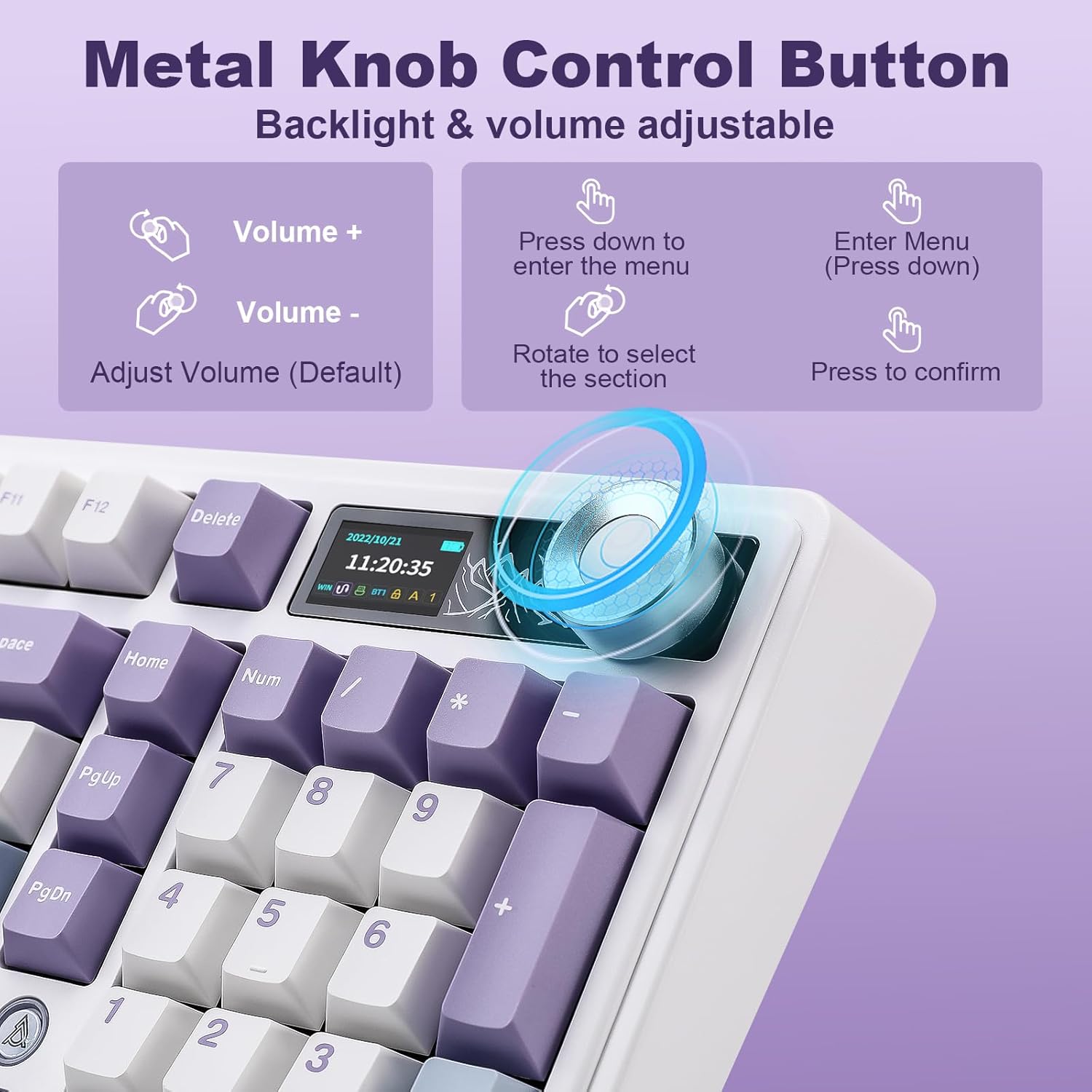
Figure 5.1: Metal Knob Control Button functions.
- Dawwar il-pum: Jaġġusta l-volum tas-sistema awtomatikament.
- Press Knob (Short Press): Mutes/unmutes audio in default mode. Enters/confirms menu selections when navigating the display.
- Press Knob (Long Press): Toggles between volume control and backlight adjustment modes.
The TFT display provides real-time information and access to various settings:

Figure 5.2: TFT Smart Display menu options.
- Skrin tad-dar: Displays date, time, battery level, WIN/MAC layout, and current connection mode.
- Modi RGB: Select from various pre-programmed RGB lighting effects.
- Kuluri RGB: Adjust the color of the RGB backlight.
- Veloċità RGB: Control the speed of dynamic RGB effects.
- Settings tal-Lingwa: Ibdel il-lingwa tal-wiri.
- GIF Image Display: Customize the GIF displayed on the screen (requires web driver software).
5.2 Kontroll tad-Dawl ta' Wara RGB
The keyboard features vibrant RGB backlighting with 20 pre-programmed effects. Use the following key combinations to control the backlight:
- Fn + \|: Iċċikla bejn il-modi tad-dawl RGB.
- Fn + ↑: Żid il-luminożità tad-dawl ta' wara.
- Fn + ↓: Naqqas il-luminożità tad-dawl ta' wara.
- Fn + ←: Change lighting direction/effect.
- Fn + →: Change lighting direction/effect.
- Fn + X: Turn backlight ON/OFF.
- Fn + C: Change backlight color (for static modes).
- Fn + < : Decrease lighting speed.
- Fn + > : Increase lighting speed.
For advanced customization, including macro recording, custom shortcut keys, and GIF display settings, download the official web driver software from the MIKIBY websit.
5.3 Swiċċijiet li jistgħu jinbidlu bis-sħana
The AK980 supports 3-pin and 5-pin hot-swappable mechanical switches, allowing you to easily change switches without soldering. Use the included keycap and switch puller for this process.

Figure 5.3: Hot-swappable switch replacement process.
- Neħħi l-għatu taċ-ċwievet bil-mod billi tuża l-puller tal-għatu taċ-ċwievet.
- Use the switch puller to grasp the switch firmly and pull it straight up to remove it.
- Allinja l-labar tas-swiċċ il-ġdid mat-toqob fuq il-PCB. Kun żgur li l-labar huma dritti.
- Press the new switch firmly into place until it clicks. Do not force it if there is resistance; check pin alignment.
- Ibdel il-għatu taċ-ċwievet.
5.4 Ġestjoni tal-batterija
The AK980 is equipped with an 8000mAh battery. Battery life varies depending on usage, especially RGB lighting. The TFT display shows the current battery level.

Figure 5.4: Battery endurance details.
- RGB On: Sa 28 sigħat ta 'użu kontinwu.
- Backlight Off (Sleeping Mode): Sa 110 sigħat.
- To charge, connect the keyboard via the USB-C cable to a power source. You can continue to use the keyboard while it charges.
6. Manutenzjoni
6.1 Tindif tat-Tastiera
- Skonnettja t-tastiera mis-sorsi kollha tal-enerġija qabel ma tnaddafha.
- Uża drapp ratba u mingħajr ħelu ftit dampImlaħlaħ bl-ilma jew b'soluzzjoni ħafifa tat-tindif biex timsaħ il-keycaps u x-chassis.
- Għat-trab u l-fdalijiet bejn il-keycaps, uża arja kkompressata jew pinzell żgħir.
- Evita li tuża kimiċi ħarxa, sustanzi li joborxu, jew solventi.
6.2 Kura tal-Keycap u s-Swiċċ
- When removing keycaps, use the provided keycap puller to avoid damaging the keycaps or switches.
- When replacing switches, ensure the pins are perfectly aligned to prevent bending or damage.
7 Issolvi l-problemi
If you encounter issues with your MIKIBY AK980 keyboard, please refer to the following common solutions:
| Problema | Soluzzjoni Possibbli |
|---|---|
| It-tastiera ma tirrispondix fil-modalità mingħajr fili. |
|
| TFT display is blank or not updating. |
|
| Id-dawl ta' wara RGB mhux qed jaħdem jew huwa mwaħħal. |
|
| Date/Time on display is incorrect. |
|
| Keys are not registering or feel inconsistent. |
|
8. Speċifikazzjonijiet
| Karatteristika | Dettall |
|---|---|
| Numru tal-Mudell | AK980 |
| Teknoloġija tal-Konnettività | Bluetooth 5.0, Wireless 2.4GHz, USB-C bil-wajer |
| Deskrizzjoni tat-Tastiera | Mekkaniċi |
| Numru ta' Ċwievet | 97 |
| Backlighting | RGB |
| Kapaċità tal-batterija | 8000mAh (1 Nonstandard Battery included) |
| Apparati Kompatibbli | Konsol tal-Logħob, Laptop, PC, Smartphone, Tablet |
| Karatteristiċi Speċjali | Backlit, Ergonomic, Hot-Swappable, Volume Roller, Smart TFT Display |
| Piż tal-oġġett | 3.23 liri |
| Dimensjonijiet tal-Pakkett | 17.87 x 7.76 x 2.32 pulzieri |
| Manifattur | MIKIBY |
9. Garanzija u Appoġġ
9.1 Informazzjoni dwar Garanzija
The MIKIBY AK980 Mechanical Keyboard comes with a standard manufacturer's warranty. Please refer to the warranty card included in your product packaging or visit the official MIKIBY websit għal termini u kundizzjonijiet dettaljati tal-garanzija. Żomm il-prova tax-xiri tiegħek għal talbiet ta' garanzija.
9.2 Appoġġ għall-Klijent
For technical assistance, troubleshooting beyond this manual, or warranty inquiries, please contact MIKIBY customer support through their official website or the contact information provided with your product. Ensure you have your product model number (AK980) and purchase details ready when contacting support.


