Monarch 1131-01 Price Gun
Manwal ta' Istruzzjoni
Introduzzjoni
This manual provides comprehensive instructions for the setup, operation, and maintenance of your Monarch 1131-01 Price Gun. Designed for efficiency and durability, this one-line labeler is ideal for pricing, date coding, and general labeling tasks. Please read this manual thoroughly before use to ensure proper function and longevity of your device.
Kontenut tal-Pakkett
Meta tiftaħ il-pakkett, jekk jogħġbok ivverifika li l-oġġetti kollha elenkati hawn taħt huma preżenti:
- Monarch 1131-01 Price Gun
- One Sleeve (8 Rolls = 20,000 Labels) of White Genuine Monarch Labels (#000239)
- Label Scraper
- Ink Roller (one included with labeler purchase)

Image: The Monarch 1131-01 Price Gun, accompanied by a roll of white labels, a label scraper, and a replacement ink roller, demonstrating the complete package contents.
Setup
1. It-Tagħbija tat-Tikketti
- Open the label compartment door. Red "touch points" on the labeler guide this process.
- Place the roll of labels onto the label spindle, ensuring the labels feed from the bottom of the roll.
- Thread the first few labels through the feed mechanism, following the indicated path. Ensure the labels are flat and not creased.
- Close the label compartment door securely.

Immaġni: Naħa waħda view of the Monarch 1131-01 Price Gun, showing the label compartment where the roll of labels is inserted for operation.
2. Installing/Replacing Ink Roller
The ink roller is designed for easy replacement. Red "touch points" assist in this task.
- Locate the ink roller compartment, typically near the print head.
- If replacing, gently remove the old ink roller by pulling it out.
- Unpack the new ink roller.
- Insert the new ink roller into its designated slot until it clicks into place. Ensure it is seated correctly for clear printing.
Istruzzjonijiet Operattivi
1. Setting Characters
The Monarch 1131-01 features one line of print with a maximum of 8 characters. Use the dial on the side of the gun to adjust the characters.
- Locate the character adjustment dial, usually on the top or side of the labeler.
- Rotate the dial to select the desired characters (numbers, symbols, etc.) for each position.
- Verify the selected characters by printing a test label on a scrap surface.
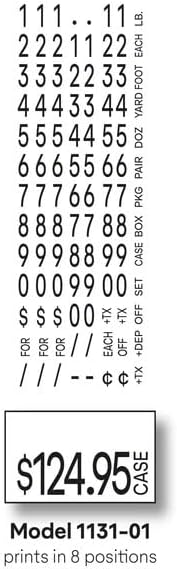
Image: A visual representation of the available characters for the Monarch 1131-01, including numbers and symbols, alongside an example of a printed label showing "124.95 CASE".
2. Applying Labels
- Hold the price gun firmly with the label exit facing the surface you wish to label.
- Squeeze the trigger handle completely to print and dispense a label.
- Release the trigger. The label will be applied to the surface with strong adhesive.
- For optimal adhesion, ensure the surface is clean and dry.
Manutenzjoni
Tindif
Regular cleaning helps maintain optimal performance and extends the life of your price gun.
- Periodically wipe the exterior of the gun with a soft, damp drapp.
- Remove any adhesive residue from the label exit area using the provided label scraper or a non-abrasive tool.
- Ensure no dust or debris accumulates in the label feed mechanism.
Ink Roller Replacement
Replace the ink roller when prints become faint or inconsistent. Refer to the "Installing/Replacing Ink Roller" section under Setup for detailed steps. One ink roller is included with the labeler purchase.
Issolvi l-problemi
| Problema | Kawża Possibbli | Soluzzjoni |
|---|---|---|
| Faint or Inconsistent Prints | Low ink in roller; improperly seated ink roller. | Replace ink roller; ensure ink roller is correctly installed. |
| Labels Not Feeding | Labels improperly loaded; label jam; empty label roll. | Reload labels correctly; clear any jams (refer to red "touch points"); replace label roll. |
| Tikketti Mhux Imwaħħlin | Surface is dirty, wet, or oily; labels are old or damaged. | Clean and dry surface before application; use fresh, genuine Monarch labels. |
| Characters Not Changing | Dial mechanism stuck or damaged. | Gently try to free the dial; if persistent, contact customer support. |
Note: Instructional videos are easily accessed by scanning the QR code conveniently located on the labeler for common tasks like loading, clearing jams, and removing ink rollers.
Speċifikazzjonijiet
| Mudell: | Monarch 1131-01 |
| Ditta: | Avery Dennison |
| Lines of Print: | 1 |
| Maximum Characters per Line: | 8 |
| Daqs tat-Tikketta: | 0.78" x 0.44" (20mm x 11mm) |
| Label Part #: | 000239 |
| Materjal: | Plastik |
| Kulur tal-linka: | Iswed |
| Magħmul fi: | USA |
Garanzija u Appoġġ
Informazzjoni dwar Garanzija
The Monarch 1131-01 Price Gun comes with a Garanzija Limitata ta' sena. This warranty covers defects in materials and workmanship under normal use. It does not cover damage resulting from misuse, accidents, or unauthorized modifications.
Għal talbiet ta' garanzija jew servizz, jekk jogħġbok żomm il-prova tax-xiri tiegħek.
Appoġġ għall-Klijent
For further assistance, technical support, or to purchase genuine Monarch labels and ink rollers, please visit the Avery Dennison Store on Amazon jew irreferi għall-informazzjoni ta' kuntatt ipprovduta mal-imballaġġ tal-prodott tiegħek.


