Introduzzjoni
The TEEHO WiFi Smart Lock TE012W is an advanced keyless entry system designed to enhance home security and convenience. Featuring built-in Wi-Fi connectivity, fingerprint recognition, keypad access, and traditional key entry, this smart deadbolt offers multiple secure ways to manage access to your property. It integrates seamlessly with smart home ecosystems like Alexa and Google Assistant, providing remote control and monitoring capabilities.

Figura 1: TEEHO WiFi Smart Lock TE012W and its accompanying mobile application interface.
Informazzjoni dwar is-Sigurtà
- Aqra l-istruzzjonijiet kollha bir-reqqa qabel l-installazzjoni u l-użu.
- Tippruvax tiżżarma jew timmodifika s-serratura. Dan jista' jannulla l-garanzija u jikkomprometti s-sigurtà.
- Use only specified batteries (8 AA batteries, not included). Do not mix old and new batteries or different types of batteries.
- Keep physical keys in a secure location away from the lock.
- Regularly check battery levels and replace batteries when low battery alerts are issued.
- Ensure the door frame and door are in good condition and properly aligned for optimal lock performance.
- Protect your PIN codes and fingerprints from unauthorized access.
Kontenut tal-Pakkett
Iċċekkja li l-komponenti kollha huma preżenti qabel tibda l-installazzjoni:
- 1 x Wifi Fingerprint Deadbolt Door Lock (Exterior and Interior Assemblies)
- 2 x Ċwievet tal-Backup
- 1 x Pjanċa tal-Immuntar
- Viti (daqsijiet varji għall-installazzjoni)
- 1 x Lukkett
- 1 x Strike Plate
- 1 x Manwal tal-Istruzzjonijiet (dan id-dokument)
- 1 x User Manual (additional guide)
Speċifikazzjonijiet
| Karatteristika | Deskrizzjoni |
|---|---|
| Brand | TEEHO |
| Isem tal-Mudell | TE012W Wifi fingerprint smart lock |
| Tip Lock | Wifi fingerprint smart lock |
| Materjal | Aluminju |
| Dimensjonijiet (L x W x H) | 5.12 x 2.95 x 1.3 pulzieri |
| Piż tal-oġġett | 2.01 liri |
| Karatteristiċi Speċjali | Anti-Peeping Password, Auto-Lock, Back-Lit Keypad, Battery Indicator, Break-in Detection, Fingerprint, One-Touch Unlock, Weather Resistant (IP55) |
| Metodu ta' Kontroll | App, Push Button, Remote, Voice (Alexa/Google) |
| Sors tal-Enerġija | 8 Batteriji AA (mhux inklużi) |
| Konnettività | Built-in 2.4GHz Wi-Fi (no hub required) |
| Sigurtà | AES128 encryption, Local data storage, BHMA certified |
Installazzjoni
The TEEHO Smart Lock is designed for easy installation, typically taking about 15 minutes with no special tools required. Ensure your door meets the following specifications:
- Ħxuna tal-Bieb: 1-3/8" sa 2" (35mm-50mm)
- Dahar lura: 2-3/8" to 2-3/4" (60mm-70mm)
- Dijametru tat-toqba: 1" (25.4mm)
- Dijametru tat-Toqba tal-Bieb: 1-1/2" jew 2-1/8" (38mm jew 54mm)

Figura 2: Key door measurements required for compatibility with the TE012W Smart Lock.
Kontroll ta' Qabel l-Installazzjoni
Before starting, confirm your door is not a Rim Cylinder, Mortise, or Integrated type, as these are not compatible. The lock fits standard 38mm or 54mm bore holes. If your door has a 1-1/2" (38mm) hole, you will need to remove the spacer from the lock's interior assembly.

Figura 3: Visual guide for preparing the lock for installation based on door hole diameter.
Passi ta' Installazzjoni (Fuqview)
For detailed step-by-step instructions, please refer to the included Installation Manual (PDF) or the official installation video. The process generally involves:
- Install the Latch into the door edge.
- Install the Exterior Assembly onto the door.
- Install the Mounting Plate on the interior side.
- Connect the cable from the Exterior Assembly to the Interior Assembly.
- Install the Interior Assembly and secure it with screws.
- Daħħal 8 batteriji AA fil-kompartiment tal-batterija.
- Perform the door handing identification process.
Vidjo 1: An unboxing and installation overview of the TEEHO WiFi Smart Lock TE012W, demonstrating the product components and the general installation process.
Setup
1. Installazzjoni tal-batterija
The lock requires 8 AA batteries (not included). Open the battery cover on the interior assembly and insert the batteries, ensuring correct polarity. The lock will provide low-battery alerts when replacement is needed.
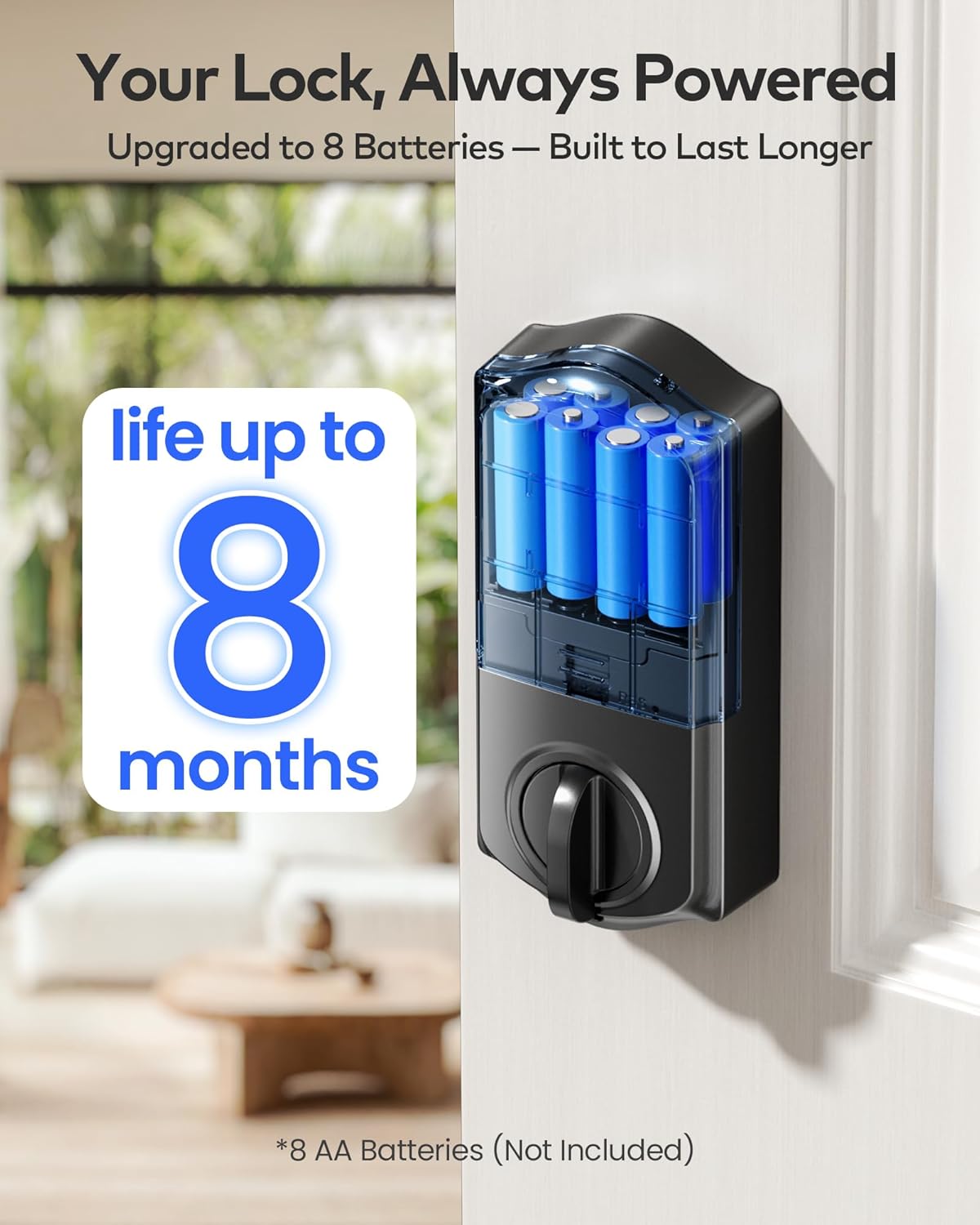
Figura 4: The battery compartment of the TE012W Smart Lock, designed for 8 AA batteries for extended life.
2. App Download and Wi-Fi Connection
Download the "KK Home App" from your smartphone's app store. Follow the in-app instructions to create an account and add your TE012W Smart Lock. The lock connects directly to your 2.4GHz Wi-Fi network, eliminating the need for an additional hub.

Figura 5: The TE012W Smart Lock features built-in Wi-Fi for remote control and monitoring.
3. User Management (Fingerprints & PIN Codes)
Through the KK Home App, you can easily manage users and access methods:
- Marki tas-swaba': Store up to 20 unique fingerprints for quick and secure access.
- PIN Codes: Create up to 100 PIN codes, including Permanent, Recurring, Duration, or One-Time passcodes.
- Code Sharing: Share lock permissions and codes with family, friends, or temporary visitors directly from the app.
- Aċċess Logs: Review access history to see who entered and when.

Figura 6: The KK Home App provides comprehensive control over your smart lock, including user and code management.
Istruzzjonijiet Operattivi
Metodi ta' Ftuħ u Qfil
The TEEHO TE012W Smart Lock offers five convenient ways to unlock and lock your door:
- Applikazzjoni KK Home: Remotely lock or unlock your door from anywhere using the app.
- Marka tas-swaba ': Place your registered finger on the sensor for instant access.
- Kodiċi PIN: Enter your personalized PIN code on the backlit keypad. The anti-peep feature allows you to enter random digits before or after your actual code for added security.
- Ċwievet Fiżiċi: Use the provided backup keys for traditional manual unlocking.
- Kontroll tal-Vuċi: Integrate with Alexa or Google Assistant to lock or unlock your door using voice commands.

Figura 7: Multiple secure access options for the TE012W Smart Lock.
Karatteristika Auto-Lock
Enable the auto-lock function via the KK Home App to automatically lock your door after a set period (e.g., 10 seconds, 40 seconds, 3 minutes). This ensures your home is always secure, even if you forget to lock it manually.

Figura 8: Configure the auto-lock timer through the KK Home App for enhanced security.
Away Mode and Vacation Mode
The lock supports various modes for different scenarios:
- Modalità Barra: When activated, any attempt to unlock the door via mechanical key or thumb turn will trigger an alarm, enhancing security when you are away.
- Modalità Vacation: This mode can be set for extended periods when the property will be vacant, disabling all regular access methods until deactivated.

Figura 9: The TE012W Smart Lock offers robust features for various environmental conditions and security needs.
Manutenzjoni
Sostituzzjoni tal-batterija
When the lock issues a low-battery alert, replace all 8 AA batteries promptly. Using fresh, high-quality alkaline batteries will ensure optimal performance and battery life of up to 8 months.
Tindif
Naddaf il-barra tas-serratura b'drapp artab u dryer.amp drapp. Evita li tuża prodotti tat-tindif jew solventi li joborxu li jistgħu jagħmlu ħsara lill-finitura jew lill-komponenti elettroniċi.
Issolvi l-problemi
For common issues and solutions, refer to the Troubleshooting Guide (PDF) provided with your product. Here are some general tips:
- Is-serratura ma tirrispondix: Check battery levels. Ensure batteries are inserted correctly.
- Marka tas-swaba' mhux rikonoxxuta: Kun żgur li subgħajk ikun nadif u niexef. Erġa' rreġistra l-marka tas-swaba' tiegħek jekk il-problemi jippersistu.
- Il-kodiċi PIN mhux qed jaħdem: Verify the code is correct. Ensure the keypad is clean. Check for lockout mode after multiple failed attempts.
- Problemi ta' konnettività tal-app: Ensure your Wi-Fi network is 2.4GHz and stable. Restart your router and the lock if necessary.
- Allinjament tal-bieb: If the deadbolt struggles to extend or retract, check the door and frame alignment. Adjust the strike plate if needed.
Garanzija u Appoġġ
TEEHO offers a garanzija ta 'sena for the TE012W WiFi Smart Lock, covering product support from day one. Additionally, lifetime customer support is available to assist with any questions or issues you may encounter.
Ikkuntattja l-Appoġġ:
- Email: 24/7 email service is available.
- Telefon: Monday to Friday, 9 AM to 5 PM PST.
For specific contact details, please refer to the contact information provided in your product packaging or the official TEEHO websit.