1. Introduzzjoni
This manual provides comprehensive instructions for the setup, operation, maintenance, and troubleshooting of your EPOMAKER EA75 75% RGB Gaming Mechanical Keyboard. Please read this manual thoroughly to ensure proper use and to maximize your keyboard's potential.
The EPOMAKER EA75 is a compact 75% layout mechanical keyboard featuring 81 keys and a rotary knob. It supports tri-mode connectivity (Bluetooth, 2.4GHz wireless, and USB-C wired), dynamic RGB backlighting, hot-swappable switches, and a gasket-mounted structure for a comfortable typing experience.
2. Kontenut tal-Pakkett
Ivverifika li l-oġġetti kollha huma preżenti fil-pakkett tiegħek:
- EPOMAKER EA75 Mechanical Keyboard
- USB-C Cable
- Riċevitur bla fili ta' 2.4GHz (USB Dongle)
- Keycap Puller
- Manwal għall-Utent (dan id-dokument)
3. Prodott Aktarview
The EPOMAKER EA75 keyboard features a compact 75% layout, integrating essential keys while maintaining a smaller footprint. It includes a multi-function rotary knob and RGB lighting for both keys and side bars.
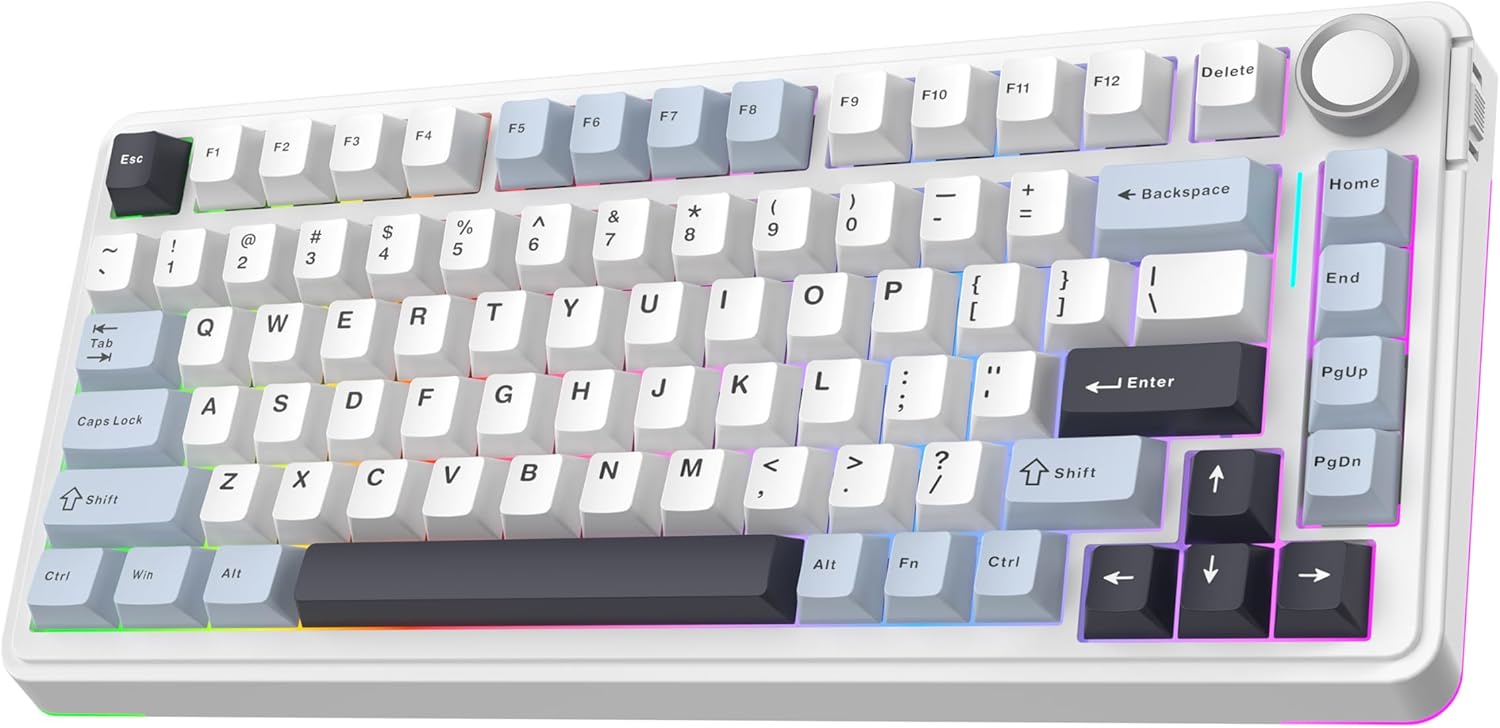
Immaġni: Prinċipali view of the EPOMAKER EA75 mechanical keyboard, showcasing its 75% layout with white and light blue keycaps, a rotary knob, and RGB lighting.

Immaġni: Fuqview highlighting key features of the EA75 keyboard, including 3 modes connection, hot-swappable switches, full RGB backlit, gasket structure, PBT keycaps, and custom software.
3.1 Komponenti Ewlenin
- Tqassim ta' 81-Ċavetta: Standard alphanumeric keys, function row, navigation cluster, and arrow keys.
- Pum li jdur: Located in the top right corner, primarily for volume and backlight control.
- Connectivity Toggle: A switch on the side to select between Bluetooth, 2.4GHz wireless, and wired modes.
- Port USB-C: Għal konnessjoni bil-fili u ċċarġjar.
- Adjustable Kickstands: Tliet stage adjustable feet for ergonomic typing angles.

Image: Illustrates the sleek design and dimensions of the EA75 keyboard (33.3cm width, 14.7cm depth), along with close-ups of the volume/backlight control knob, RGB side light, and adjustable kickstand.
4. Setup
4.1 Iċċarġjar tat-Tastiera
Before first use, it is recommended to fully charge the keyboard. Connect the supplied USB-C cable to the keyboard's USB-C port and the other end to a powered USB port on your computer or a wall adapter. The keyboard is equipped with a 4000mAh battery.

Image: Shows the keyboard with an overlay indicating a 4000mAh battery, offering up to 260 hours of usage in standby mode with RGB backlight off, and 20 hours with RGB backlight on.
4.2 Konnessjoni tat-Tastiera
The EA75 supports three connection modes: USB-C wired, 2.4GHz wireless, and Bluetooth. Use the toggle switch on the side of the keyboard to select your desired mode.

Image: Illustrates the tri-mode wireless capabilities of the EA75 keyboard, supporting USB-C, 2.4GHz, and Bluetooth connections, compatible with tablets, laptops, PCs, and phones.
4.2.1 Konnessjoni bil-Wajer USB-C
- Set the connectivity toggle switch to the 'Wired' position.
- Connect the USB-C cable to the keyboard and your computer.
- It-tastiera tiġi rikonoxxuta awtomatikament mis-sistema tiegħek.
Konnessjoni bla fili 4.2.2 2.4GHz
- Set the connectivity toggle switch to the '2.4G' position.
- Plug the 2.4GHz wireless receiver (USB dongle) into an available USB port on your computer.
- The keyboard should connect automatically. The '~' key will act as an indicator light.
4.2.3 Konnessjoni Bluetooth
The EA75 can connect to up to three Bluetooth devices. The '1', '2', and '3' keys serve as intuitive connection indicator lights.
- Set the connectivity toggle switch to the 'BT' position.
- On your keyboard, press and hold fn+1 (jew fn+2, fn+3) for 3-5 seconds until the corresponding key's backlight flashes rapidly, indicating pairing mode.
- On your device (PC, laptop, smartphone, tablet), enable Bluetooth and search for new devices.
- Select 'EPOMAKER EA75' from the list of available devices to pair.
- Once paired, the key's backlight will stop flashing and remain steadily lit.
- Biex taqleb bejn apparati Bluetooth imqabbdin, sempliċement agħfas fn+1, fn+2, jew fn+3.
5. Istruzzjonijiet Operattivi
5.1 Funzjonijiet Bażiċi tat-Tastiera
- Rollover tal-N-Key (NKRO): The keyboard supports NKRO, allowing multiple keys to be pressed simultaneously without ghosting or missed inputs. This is active in 2.4GHz and wired modes.
- Kontra l-Ghosting: Ensures accurate registration of every key press, even during rapid typing or gaming.

Image: Highlights the ergonomic design for a superior typing experience and the N-Key Rollover feature, ensuring accurate key registration even during heavy use.
5.2 Funzjonalità tal-Pum li Jdur
The rotary knob on the top right corner controls multimedia and lighting settings:
- Dawwar: Adjusts system volume by default.
- Agħfas: Mutes/unmutes audio by default.
- The knob's function can be customized using the EPOMAKER software.
5.3 Backlighting RGB
The EA75 features dynamic RGB backlighting with per-key LEDs and two side light bars. You can adjust various lighting parameters:
- Luminożità: Adjust the intensity of the backlight.
- Veloċità: Control the animation speed of dynamic lighting effects.
- Hue/Saturation: Fine-tune the color output.
- Specific key combinations (e.g., Fn + ←/→) are typically used to cycle through lighting effects and colors. Refer to the quick start guide or software for detailed key commands.
5.4 Swiċċijiet li jistgħu jinbidlu bis-sħana
The EA75 keyboard is hot-swappable, allowing you to change mechanical switches without soldering. It supports 3-pin and 5-pin mechanical switches.

Image: Demonstrates the hot-swappable feature of the EA75 keyboard, showing a switch being removed with a switch puller. Insets show south-facing LEDs, a lubed switch, hot-swappable PCB, and fine-tuned stabilizers.
5.4.1 Replacing Switches
- Itfi t-tastiera jew skonnettjaha mit-tagħmir tiegħek.
- Use the provided keycap puller to carefully remove the keycap from the switch you wish to replace.
- Use a switch puller (not included, but often bundled with switches or available separately) to gently grip the top and bottom clips of the switch.
- Iġbed is-swiċċ dritt 'il fuq biex tneħħih mill-PCB.
- Allinja l-labar tas-swiċċ il-ġdid mat-toqob fuq il-PCB. Kun żgur li l-labar huma dritti biex tevita li jitgħawġu.
- Agħfas bil-mod is-swiċċ il-ġdid f'postu sakemm jikklikkja sew.
- Erġa' waħħal il-keycap.
5.5 Programming Software
The EPOMAKER EA75 can be customized using dedicated software. This software allows for:
- Rimapping taċ-ċavetta: Assign different functions to individual keys.
- Editjar tal-Makro: Create and assign complex sequences of key presses.
- Personalizzazzjoni tad-dawl ta' wara: Advanced control over RGB effects, colors, and patterns.
- Issettjar tat-Tastiera: Adjust polling rate and other performance parameters.
Download the latest software from the official EPOMAKER websit.
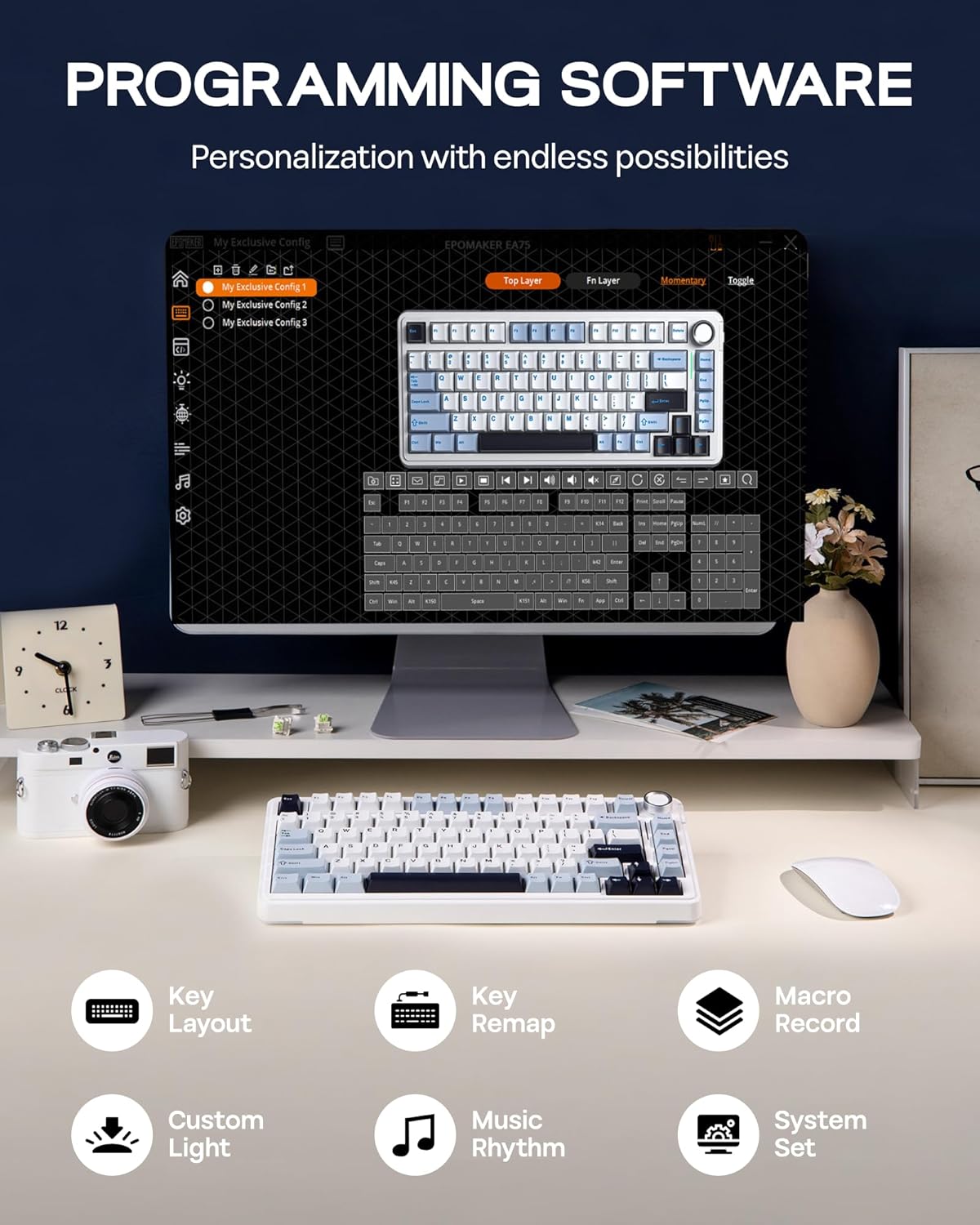
Image: Displays the user interface of the EPOMAKER programming software, showing options for key layout, key remapping, macro recording, custom light effects, music rhythm, and system settings, enabling extensive personalization.
6. Manutenzjoni
6.1 Tindif tat-Tastiera
Regular cleaning helps maintain the keyboard's performance and appearance:
- Skonnettja t-tastiera mis-sorsi kollha tal-enerġija.
- Uża bott ta' arja kkompressata biex tneħħi t-trab u l-fdalijiet minn bejn il-keycaps.
- For surface cleaning, gently wipe the keycaps and chassis with a soft, lint-free cloth dampened with a small amount of water or a mild, non-abrasive cleaning solution.
- Evita li tisprejja likwidi direttament fuq it-tastiera.
6.2 Keycap and Switch Care
The PBT keycaps are durable, but can be removed for deeper cleaning or replacement. Refer to section 5.4.1 for instructions on removing switches and keycaps.
7 Issolvi l-problemi
If you encounter issues with your EPOMAKER EA75 keyboard, refer to the following common problems and solutions:
- It-tastiera ma tirrispondix:
- Kun żgur li t-tastiera hija ċċarġjata.
- Check the connectivity toggle switch is in the correct position (Wired, 2.4G, or BT).
- Għal konnessjoni bil-fili, ipprova port jew kejbil USB differenti.
- For 2.4GHz, ensure the dongle is securely plugged in and try re-pairing.
- For Bluetooth, ensure the keyboard is paired correctly (Fn + 1/2/3) and your device's Bluetooth is enabled. Try re-pairing.
- Ċwievet mhux qed jirreġistraw jew qed jittajpjaw darbtejn:
- This could indicate a faulty switch. Since the keyboard is hot-swappable, try replacing the problematic switch (refer to section 5.4.1).
- Kun żgur li s-swiċċ ikun imwaħħal sew fil-PCB.
- Id-dawl RGB mhux qed jaħdem jew mhux korrett:
- Check the brightness settings using the rotary knob or keyboard shortcuts.
- Kun żgur li t-tastiera mhix f'modalità ta' enerġija baxxa li tiddiżattiva d-dawl.
- Use the programming software to reset or reconfigure lighting effects.
- 2.4GHz or Bluetooth connection unstable:
- Ensure there are no strong interferences (e.g., other wireless devices, large metal objects) between the keyboard and the receiver/device.
- Ersaq eqreb lejn ir-riċevitur/apparat.
- Try updating your computer's wireless drivers.
8. Speċifikazzjonijiet
| Karatteristika | Speċifikazzjoni |
|---|---|
| Numru tal-Mudell | EA75 |
| Tqassim | 75% (81 Ċwievet + 1 Pumi) |
| Konnettività | 2.4GHz Wireless, Bluetooth, USB-C Wired |
| Swiċċijiet | Hot-Swappable (3/5-pin mechanical switches) |
| Tappijiet ewlenin | PBT, Cherry Profile |
| Backlighting | Full RGB with Side Light Bars |
| Kapaċità tal-batterija | 4000mAh Lithium Ion |
| Dimensjonijiet tal-Prodott | 5.79 x 13.11 x 1.34 pulzieri (14.7 x 33.3 x 3.4 ċm) |
| Piż tal-oġġett | 2.88 liri (1.3 kg) |
| Apparati Kompatibbli | PC, Mac, Laptop, Smartphone, Tablet, Gaming Console |
| Manifattur | EPOMAKER |
9. Garanzija u Appoġġ
Għal informazzjoni dwar il-garanzija u appoġġ tekniku, jekk jogħġbok irreferi għall-EPOMAKER uffiċjali webis-sit jew ikkuntattja lis-servizz tal-konsumatur tagħhom direttament. Żomm l-irċevuta tax-xiri tiegħek għal talbiet ta' garanzija.
Żur il- Ħanut EPOMAKER fuq Amazon għal aktar prodotti u informazzjoni.


