1. Introduzzjoni
The Beafon Silverline ML10 LTE Desk Phone is designed for ease of use and reliability, offering essential communication features with enhanced safety options. This manual provides detailed instructions for setting up, operating, and maintaining your device.
Il-karatteristiċi ewlenin jinkludu:
- 4G LTE Desk Phone connectivity
- Hearing Aid Compatible (HAC M4/T4)
- Programmable SOS emergency numbers with included SOS wristband/necklace (433 MHz range)
- Three quick dial keys for photos or symbols
- Digital announcement when pressing keys
- Extra-large XXL digits on display
- Extra loud ringer (90 dB) and earpiece volume (+40 dB)
- Hands-free function and Bluetooth LE
- SMS functionality and Audio Booster button

2. Informazzjoni Importanti dwar is-Sigurtà
Please read all safety instructions before using the device to prevent injury or damage. Keep this manual for future reference.
- Tesponix l-apparat għal temperaturi estremi, dawl tax-xemx dirett, jew umdità.
- Uża biss aċċessorji u adapters tal-enerġija approvati.
- Evita li twaqqa’ jew tissuġġetta l-apparat għal impatti qawwija.
- Tippruvax tiżżarma jew issewwi l-apparat int stess. Ikkuntattja persunal tas-servizz kwalifikat.
- Keep the device away from medical devices, such as pacemakers, to avoid interference.
3. Kontenut tal-Pakkett
Kun żgur li l-oġġetti kollha huma preżenti fil-pakkett:
- Beafon Silverline ML10 LTE Desk Phone unit
- Handset u korda mkebba
- Adapter tal-enerġija
- USB charger cable (USB-C)
- SOS wristband
- SOS necklace
- Lithium-ion battery (pre-installed or separate)
- Manwal għall-Utent (dan id-dokument)
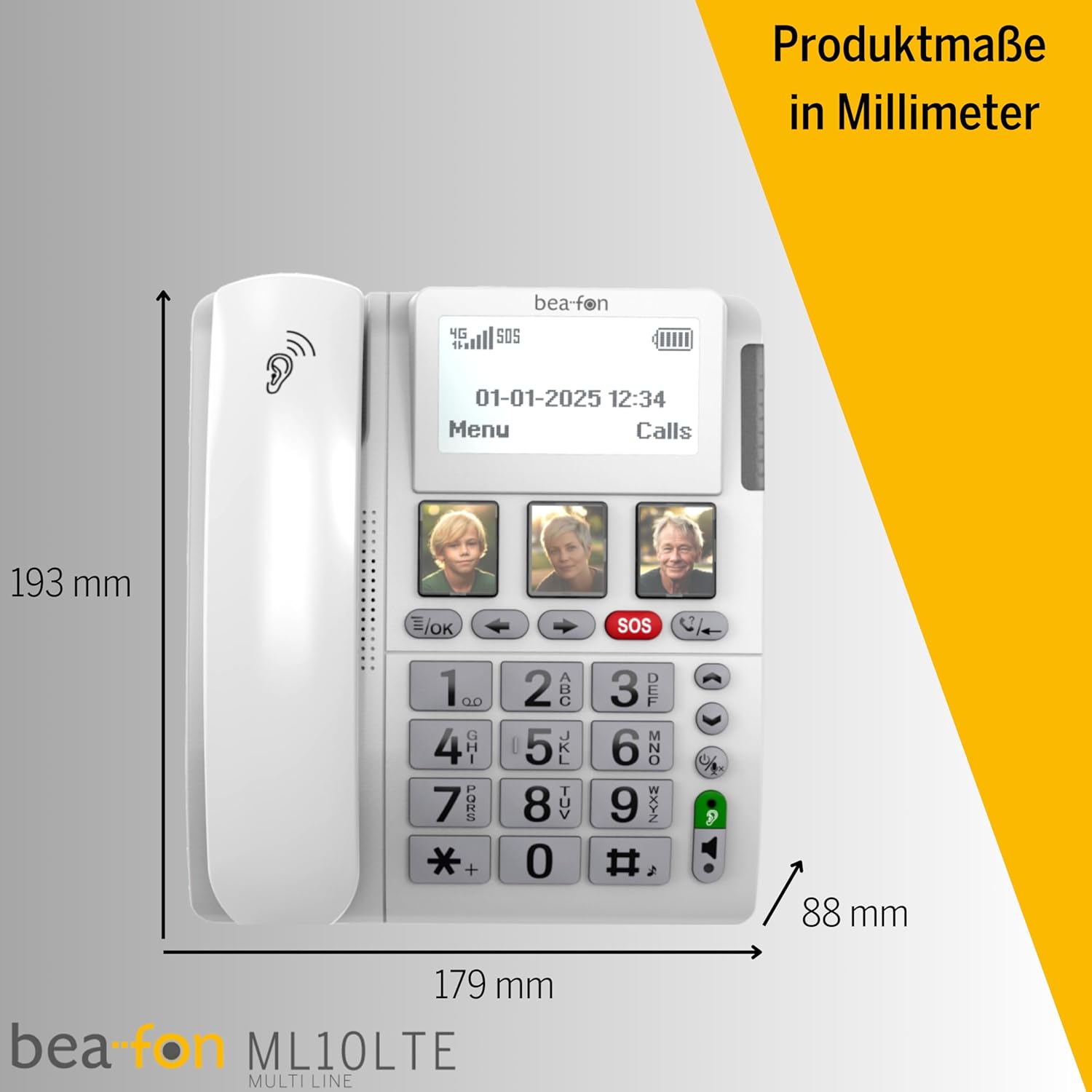
4. Prodott Aktarview
Familiarize yourself with the various parts of your Beafon ML10 desk phone.


5. Setup
5.1. Daħħal is-SIM Card
- Ensure the phone is powered off and disconnected from the power source.
- Locate the SIM card slot, usually on the back or side of the device.
- Insert a Nano SIM card into the designated slot, ensuring correct orientation.
- Agħlaq l-għatu tas-slott tal-kard SIM sew.
5.2. Qawwa tal-Konnessjoni
- Connect the USB-C charger cable to the phone's charging port.
- Ipplaggja l-adapter tal-enerġija f'iżbokk tal-ħajt.
- The phone can operate on battery power via 4G LTE, eliminating the need for a fixed line connection.
5.3. L-Ewwel Tixgħil u l-Għażla tal-Lingwa
- Press and hold the Power button until the display turns on.
- Segwi l-istruzzjonijiet fuq l-iskrin biex tagħżel il-lingwa preferuta tiegħek.
- The phone will automatically search for a 4G LTE network.

6. Istruzzjonijiet Operattivi
6.1. Tagħmel u Riċeviment Sejħiet
- Tagħmel Sejħa: Lift the handset, dial the number using the large keypad, and press the green call button.
- Jirċievu Sejħa: When the phone rings (up to 90 dB), lift the handset or press the hands-free button to answer.
- Funzjoni Ħieles bl-Idejn: Press the dedicated hands-free button to activate speakerphone during a call.
6.2. Quick Dial Keys
The phone features three programmable quick dial keys (I, II, III) that can be customized with photos or symbols for easy access to frequently called contacts.
- Programmazzjoni: Navigate to the phone's menu, select 'Quick Dial Settings', and assign a contact number to each key. You can also associate a photo or symbol.
- Bl-użu: Simply press the desired quick dial key to call the assigned contact.
6.3. Funzjoni ta' Emerġenza SOS
The SOS function allows you to quickly contact pre-selected emergency numbers. It includes an SOS button on the phone and a separate SOS wristband/necklace.
- Programming SOS Numbers: Access the 'SOS Settings' in the menu to program up to five emergency contact numbers.
- Activating SOS (Phone): Press and hold the red SOS button on the phone. The phone will automatically call the programmed numbers in sequence until an answer is received.
- Activating SOS (Wristband/Necklace): Press the button on the SOS wristband or necklace. This will trigger the phone to initiate the emergency call sequence. The wristband/necklace has a range of 433 MHz.


6.4. Funzjonijiet Oħra
- SMS: The phone supports sending and receiving text messages. Access the 'Messages' menu to compose or read SMS.
- Audio Booster: Press the Audio Booster button during a call to temporarily increase the earpiece volume for clearer audio.
- Bluetooth LE: Use Bluetooth Low Energy to connect compatible wireless accessories.
- HAC Compatibility: The phone is certified HAC M4/T4, making it suitable for users with hearing aids.
7. Manutenzjoni
7.1. Tindif tal-Apparat
Biex iżżomm it-telefon tiegħek f'kundizzjoni ottimali:
- Imsaħ il-wiċċ tat-telefon b'ċarruta ratba uamp drapp.
- Tużax kimiċi ħarxa jew tindif li joborxu.
- Ensure no moisture enters openings such as the microphone or speaker.
7.2. Kura tal-batterija
The phone is powered by a Lithium-ion battery. To prolong battery life:
- Evita li tiċċarġja l-batterija kompletament ta' spiss.
- Charge the phone regularly, especially if not in use for extended periods.
- Aħżen l-apparat f'post frisk u niexef meta ma jkunx qed jintuża.
8 Issolvi l-problemi
If you encounter issues with your Beafon ML10, refer to the following common problems and solutions:
| Problema | Soluzzjoni Possibbli |
|---|---|
| It-telefon ma jixgħelx | Check if the power adapter is correctly connected and the battery is charged. Ensure the battery is properly inserted. |
| Ma nistax nagħmel jew nirċievi telefonati | Verify that the SIM card is correctly inserted and activated. Check for network signal strength on the display. Restart the phone. |
| Il-funzjoni SOS mhux qed taħdem | Ensure SOS numbers are correctly programmed. Check the battery level of the SOS wristband/necklace. Verify the wristband/necklace is within range (433 MHz). |
| Kwalità fqira tal-awdjo | Adjust the earpiece volume. Ensure the microphone is not blocked. If using hands-free, ensure you are close to the phone. |
| Id-displej huwa vojt jew iffriżat | Try restarting the phone by holding the power button. If unresponsive, disconnect power and re-connect. |
9. Speċifikazzjonijiet
Technical details of the Beafon Silverline ML10 LTE Desk Phone:
| Karatteristika | Dettall |
|---|---|
| Brand | Beafon |
| Numru tal-Mudell | 15031162187 |
| Sistema Operattiva | RTOS |
| Tip tat-Telefon | Nano SIM |
| Konnettività | 4G LTE, Bluetooth LE |
| Kompożizzjoni tal-batterija | Lithium-ion (1 inkluż) |
| Sors tal-Enerġija | Mħaddma bil-batterija |
| Volum Ringer | Sa 90 dB |
| Earpiece Volume | +40 dB |
| Kompatibbiltà tal-Għajnuniet tas-Smigħ | HAC M4/T4 |
| SOS Wristband/Necklace Range | 433 MHz |
| Piż | 210 Gramm |
| ID ta' min iċempel | Iva |
| Operazzjoni b'ħafna linji | Operazzjoni b'Linja Unika |
10. Garanzija u Appoġġ
Information regarding the specific warranty period and detailed support contact information for the Beafon Silverline ML10 LTE Desk Phone is not available in the provided product data. Please refer to the product packaging or the manufacturer's official website for the most current warranty terms and customer support details.


