1. Introduzzjoni
This manual provides detailed instructions for the setup, operation, maintenance, and troubleshooting of your PROZOR 4-Channel Stereo Audio Mixer. This passive mixer is designed to combine up to four stereo RCA audio sources into a single stereo RCA output, offering independent volume control for each input channel. Its robust metal construction and passive design ensure a clean audio signal without requiring external power.
2. Prodott Aktarview
The PROZOR 4-Channel Stereo Audio Mixer is a compact and durable device for managing multiple audio inputs. It is ideal for home audio setups, small studios, or DJ performances where combining various line-level audio sources is required.
Karatteristiċi ewlenin:
- 4-Channel RCA Audio Mixer: Integrates audio from devices such as TVs, PCs, CD players, and instruments.
- Kontroll tal-Volum Indipendenti: Each channel features a dedicated knob for precise level adjustment.
- Disinn Passiv: Operates without external power, minimizing noise interference and delivering an uncolored audio experience.
- Kompatt u portabbli: Designed for easy integration and transport.
- Kostruzzjoni Durabbli: Features a metal housing and gold-plated connectors for longevity and signal integrity.

Quddiem u fuq view of the PROZOR 4-Channel Stereo Audio Mixer, showcasing its four input channels, independent volume controls, and RCA input/output ports.

Diagram illustrating the versatile RCA connectivity of the mixer, showing connections to various audio sources like PCs, CD players, TVs, streaming devices, and turntables, and outputs to speakers, soundbars, headphones, DJ mixers, and ampliifikaturi.

Close-up view of the mixer in a studio environment, emphasizing its durable metal housing and gold-plated RCA connectors for reliable signal transmission.
3. Istruzzjonijiet ta' Setup
The PROZOR 4-Channel Stereo Audio Mixer is a plug-and-play device that does not require external power. Follow these steps to set up your mixer:
- Identify Inputs and Outputs: Locate the four stereo RCA input pairs (IN1, IN2, IN3, IN4) and the single stereo RCA output pair (OUT) on the mixer.
- Qabbad Sorsi Awdjo: Connect your audio source devices (e.g., TV, PC, CD player, instrument) to the desired input channels (IN1-IN4) using stereo RCA cables. Ensure left (white) and right (red) channels are correctly matched.
- Qabbad Output tal-Awdjo: Connect the mixer's OUT port to your audio receiving device (e.g., amplifier, soundbar, powered speakers) using a stereo RCA cable.
- Issettjar tal-Volum Inizjali: Before playing audio, set all independent volume control knobs on the mixer to their minimum position (fully counter-clockwise).

The PROZOR mixer connected to a television and speakers via RCA cables, demonstrating a typical plug-and-play setup without external power.
4. Istruzzjonijiet Operattivi
Once connected, operate the mixer using the independent volume controls:
- Apparat ta' Qawwa: Turn on all connected audio source devices and your audio receiving device.
- Aġġusta l-Volum Prinċipali: Set the volume on your audio receiving device (amplifier, soundbar, etc.) to a moderate listening level.
- Control Input Volumes: Gradually turn the volume knob for each active input channel on the mixer clockwise to increase its level. Adjust each channel independently to achieve the desired mix and balance between your audio sources.
- Passive Operation Note: As a passive device, this mixer does not amplify the audio signal. It can only attenuate (reduce) the signal. If your audio sources have very low output levels, you may experience a lower overall volume. In such cases, an external pre-amplifier might be necessary before the mixer or a powerful amplifier after it.
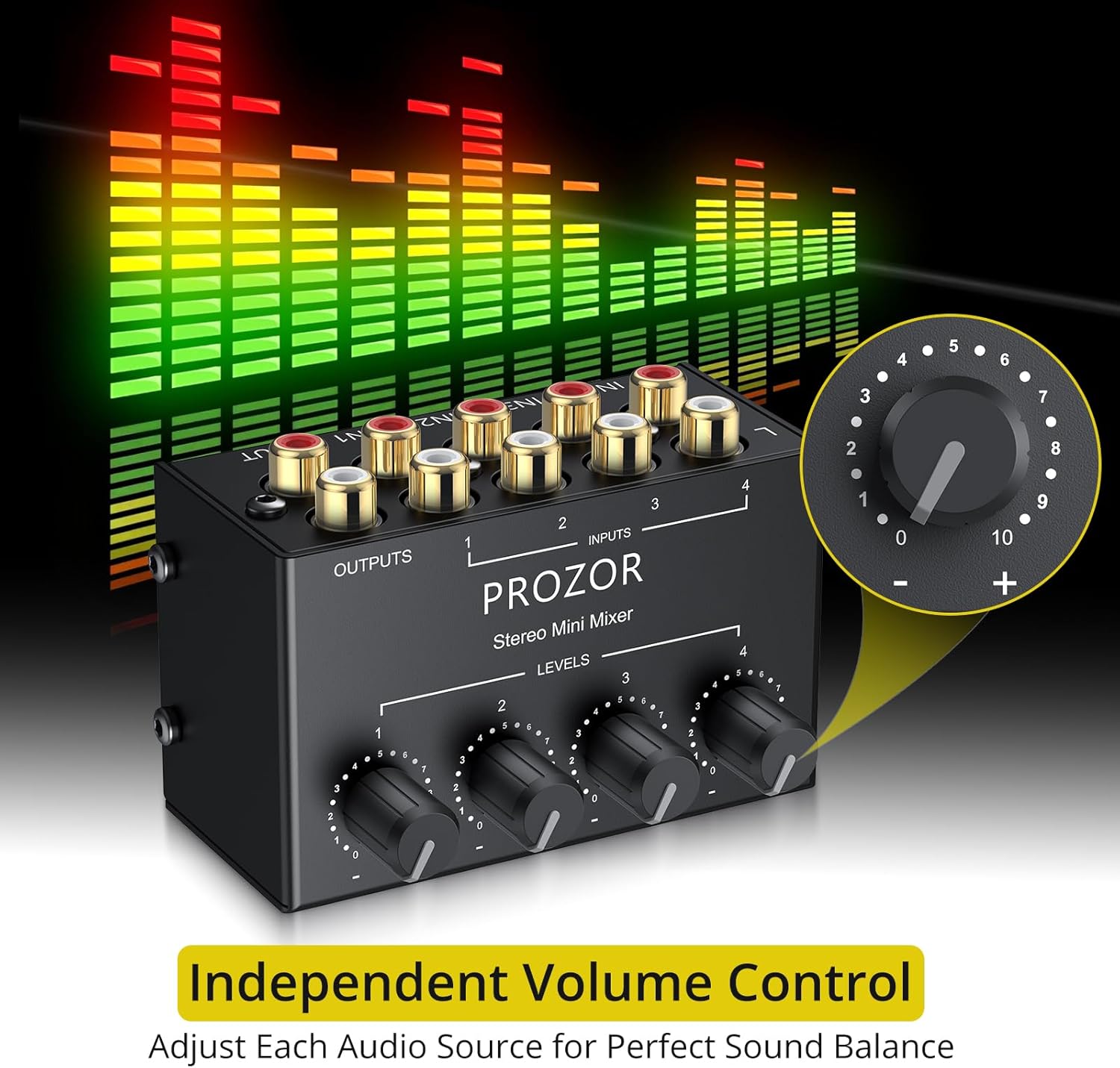
Detail of the independent volume control knobs on the mixer, with a magnified view of a single knob showing its 0-10 level markings for precise audio adjustment.
5. Manutenzjoni
To ensure the longevity and optimal performance of your PROZOR 4-Channel Stereo Audio Mixer, follow these maintenance guidelines:
- Tindif: Use a soft, dry cloth to clean the exterior of the mixer. Avoid using liquid cleaners, solvents, or abrasive materials, as these can damage the finish or internal components.
- Kura tal-Konnettur: Periodically inspect the RCA connectors for dust or debris. Use a small, soft brush or compressed air to clean them if necessary. Avoid bending or forcing connections.
- Ħażna: When not in use for extended periods, store the mixer in a cool, dry place away from direct sunlight and extreme temperatures.
- Immaniġġjar: While the metal housing is durable, avoid dropping the unit or subjecting it to strong impacts, which could damage internal circuitry or connectors.
6 Issolvi l-problemi
If you encounter issues with your mixer, refer to the following troubleshooting steps:
- Ebda Ħsejjes tal-Ħsejjes:
- Ensure all RCA cables are securely connected to both the mixer and the audio source/receiving devices.
- Verify that all connected audio sources are powered on and playing audio.
- Check that the volume knobs on the mixer for the active channels are turned up.
- Confirm that the volume on your audio receiving device (amplifier, soundbar) is adequately set.
- Ħoss Distort jew Mhux Ċar:
- Ensure that the audio source levels are not excessively high, which could cause clipping or distortion. Adjust the source device's volume if possible.
- Check for damaged or faulty RCA cables. Try swapping cables to isolate the issue.
- Verify that the mixer's volume knobs are not set too high, especially if the input signal is already strong.
- Unbalanced Audio Levels Between Channels:
- Use the independent volume control knobs for each channel to balance the audio levels as desired.
- Note that different audio sources may have varying output levels. Adjust accordingly.
- Low Overall Volume:
- Remember that this is a passive mixer and does not provide amplification. If your audio sources have very low output levels, the combined signal may also be low.
- Consider using a pre-amplifier for your low-level audio sources before connecting them to the mixer, or ensure your receiving amplifier has sufficient gain.
7. Speċifikazzjonijiet
Technical specifications for the PROZOR 4-Channel Stereo Audio Mixer:
| Karatteristika | Speċifikazzjoni |
|---|---|
| Impedenza tad-dħul | 10K ohms sa 47K ohms |
| Impedenza tal-ħruġ | 2.5K ohms sa 10K ohms |
| Gwadan | -12dB MAX (Passive attenuation) |
| Piż Nett tal-Prodott | 0.2 kg (7.05 oz) |
| Product Weight (with packaging) | 0.32 kg (11.29 oz) |
| Dimensjonijiet tal-Prodott (L x W x H) | 83mm x 52mm x 38mm (3.27" x 2.05" x 1.5") |
| Numru ta 'Kanali | 4 |
| Sors tal-Enerġija | No Power Required (Passive) |
| Teknoloġija tal-Konnettività | RCA |

Image displaying the product dimensions (length, width, height) and the contents of the box, including the mixer, user manual, and traceless tape.

A hand holding the compact PROZOR mixer next to a laptop and smartphone, illustrating its portable size and ease of placement in various setups.
8. Garanzija u Appoġġ
For warranty information or technical support regarding your PROZOR 4-Channel Stereo Audio Mixer, please refer to the warranty card included with your product or contact PROZOR customer service directly through their official webis-sit jew il-bejjiegħ bl-imnut minn fejn inxtara l-prodott. Żomm l-irċevuta tax-xiri tiegħek għal talbiet ta’ garanzija.


