1. Introduzzjoni
The ALLmeter Digital Angle Finder with Laser, Model ALL066, is a high-precision inclinometer designed for accurate angle measurements in various applications, including woodworking, construction, and general DIY tasks. This device combines advanced digital measurement technology with practical features to enhance efficiency and accuracy.
Karatteristiċi ewlenin:
- High-Precision Measurement: Achieves 0.05° resolution and ±0.2° accuracy for reliable readings.
- Bażi Manjetika bi 4 Fawċiet: Equipped with strong rare-earth magnets on all four sides for secure attachment to metal surfaces, enabling hands-free operation.
- Dual Laser Lines: Features two Class 2 certified laser lines (less than 1mW power) for extended projection and precise alignment.
- USB-C Rechargeable: Integrated 340mAh rechargeable battery provides up to 7 hours of operation and charges fully in approximately 2.5 hours via Type-C port.
- Backlit Reversible Display: High-contrast black-on-white display ensures clear visibility in various lighting conditions. The display automatically rotates for easy reading from any orientation.
- Funzjonijiet addizzjonali: Includes data hold, degrees/percentage conversion, zeroing for relative measurements, and automatic shut-off.
- Disinn Durabbli: IP54 rated for dust and light rain resistance.

Figure 1: ALLmeter Digital Angle Finder and included accessories.
2. Kontenut tal-Pakkett
- ALLmeter Digital Angle Finder (Model ALL066)
- Cable tal-Iċċarġjar tal-USB-C
- Wettaq Bag
- Manwal għall-Utent

Figura 2: Il-kontenut sħiħ tal-pakkett.
3. Setup
3.1 Iċċarġjar tal-Apparat
Before initial use, fully charge the Digital Angle Finder. Connect the provided USB-C cable to the charging port on the device and to a standard USB power source (e.g., computer, wall adapter). The battery indicator on the display will show charging status. A full charge takes approximately 2.5 hours.

Figure 3: Connecting the USB-C charging cable.
4. Istruzzjonijiet Operattivi
4.1 Power On/Off
Agħfas il- ON/OFF button to turn the device on. The backlit display will illuminate. To turn off the device, press and hold the ON/OFF button. The device also features an automatic shut-off function after 3 minutes of inactivity to conserve battery life.
4.2 Kejl Bażiku tal-Angolu
Place the base of the Digital Angle Finder firmly on the surface you wish to measure. The display will show the angle relative to gravity. The display automatically rotates for easy reading when the device is inverted.

Figure 4: Clear and readable backlit display.
4.3 Zeroing for Relative Measurement
To measure a relative angle, place the device on your reference surface and press the ŻERO button. The display will reset to 0.00°, allowing you to measure the angle of subsequent surfaces relative to your chosen reference.
4.4 Unit Conversion (Degrees / Percentage)
Agħfas il- Tilt% button to switch between angle measurement in degrees (°) and percentage (%).

Figure 5: Switching between degrees and percentage kejl.
4.5 Funzjoni ta' Żamma tad-Data
To freeze the current reading on the display, briefly press the ŻOMM button. Press it again to release the hold and resume live measurement.
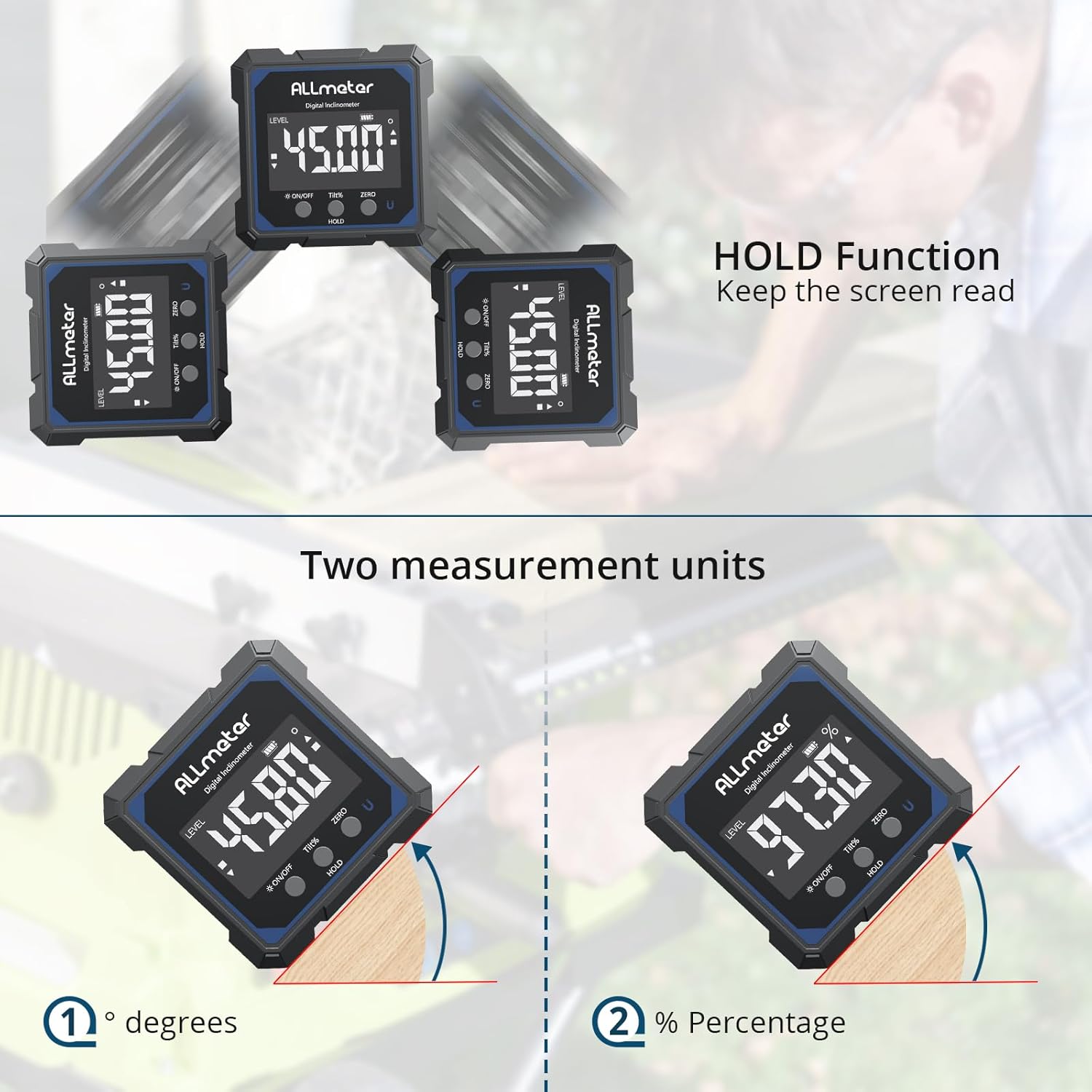
Figure 6: Using the HOLD function to save a reading.
4.6 Using the Laser Lines
The device features dual laser lines for extended alignment. To activate the laser, press the ON/OFF button multiple times:
- Press once: Activates the right laser.
- Press twice: Activates the left laser.
- Press three times: Activates both lasers (right + left).
- Press four times: Disables all lasers.
The laser lines are useful for aligning objects such as shelves, tiles, or long boards over a distance.

Figure 7: Dual laser lines in use for precise alignment.
Video 1: Demonstration of the ALLmeter Digital Angle Finder's magnetic base and laser functions.
4.7 Bażi manjetika
The ALLmeter Digital Angle Finder features strong magnets on all four sides, allowing it to securely attach to various metal surfaces. This enables hands-free operation, which is particularly useful when working on saw blades, metal beams, or pipes.

Figure 8: Magnetic base attachment to a metal frame.
5. Manutenzjoni
5.1 Tindif
Wipe the device with a soft, dry cloth. Do not use abrasive cleaners or solvents. Ensure the charging port cover is securely closed to maintain IP54 rating.
5.2 Reżistenza għall-Ilma u t-Trab
The device is IP54 rated, meaning it is protected against dust ingress and splashing water from any direction. It is suitable for use in environments with light rain or dust, but it should not be submerged in water.

Figure 9: IP54 rating for dust and water resistance.
6 Issolvi l-problemi
6.1 "ERR" Display
If the display shows "ERR", it indicates that the angle of the measuring face is inclined by more than 30 degrees from the back or front. Adjust the device's position to be within the operational range.

Figure 10: "ERR" message indicating excessive tilt.
6.2 L-Apparat Mhux Qed Jixgħel
- Kun żgur li l-batterija hija ċċarġjata. Qabbad l-apparat ma' sors ta' enerġija billi tuża l-kejbil USB-C.
- Agħfas u żomm il- ON/OFF buttuna għal ftit sekondi.
6.3 Qari Mhux Preċiż
- Ensure the measurement surface is clean and free of debris.
- Perform a zero calibration on a known level surface.
- Avoid strong magnetic fields that could interfere with the device's sensors.
7. Speċifikazzjonijiet
| Karatteristika | Speċifikazzjoni |
|---|---|
| Numru tal-Mudell | KOLLHA066 |
| Medda ta' Kejl | 0-360° |
| Riżoluzzjoni | 0.05° |
| Eżattezza | ± 0.2° |
| Tip ta' Laser | Klassi 2, <1mW |
| Tip ta 'batterija | 340mAh Lithium Ion (rikarikabbli, inkluż) |
| Port tal-Iċċarġjar | USB-C |
| Ħajja tal-batterija | Sa 7 sigħat |
| Ħin tal-Iċċarġjar | Appross. 2.5 sigħat |
| Itfi Awtomatiku | 3 minuti ta 'inattività |
| Materjal | ABS + Liga tal-Aluminju |
| Dimensjonijiet | 2.6 x 1.26 x 2.6 pulzieri |
| Piż | 5.6 uqija |
| Klassifikazzjoni tal-IP | IP54 |
8. Garanzija u Appoġġ
8.1 Informazzjoni dwar Garanzija
The ALLmeter Digital Angle Finder (Model ALL066) comes with an 18-month manufacturer's warranty from the date of purchase. This warranty covers defects in materials and workmanship under normal use. It does not cover damage caused by misuse, accidents, unauthorized modifications, or improper maintenance.
8.2 Appoġġ għall-Klijent
For technical assistance, warranty claims, or any questions regarding your ALLmeter Digital Angle Finder, please contact ALLmeter customer support through the retailer's platform or the official ALLmeter website. Please have your purchase receipt and product model number (ALL066) available when contacting support.

