1. Introduzzjoni
Thank you for choosing the ORSDA Intelligent Voice Timing Touch Control Cat Toy Ball. This interactive toy is designed to engage your cat with automatic movement, various sounds, and intelligent features. Please read this manual carefully to ensure proper use and maintenance of your product.
2. Informazzjoni dwar is-Sigurtà
- This product is intended for pet use only. Keep out of reach of small children.
- Inspect the toy regularly for damage. Discontinue use if any part is broken or detached to prevent choking hazards.
- Kun żgur li l-port tal-iċċarġjar ikun niexef qabel ma tqabbad il-kejbil tal-iċċarġjar.
- Do not attempt to disassemble or repair the toy yourself. Contact customer support if issues arise.
3. Kontenut tal-Pakkett
Ivverifika li l-oġġetti kollha huma preżenti fil-pakkett tiegħek:
- 1x ORSDA Cat Toy Ball Body
- 2x Interchangeable Accessory Tails
- 1x Type-C Charging Cable (not explicitly listed but implied by 'Type-C interface')
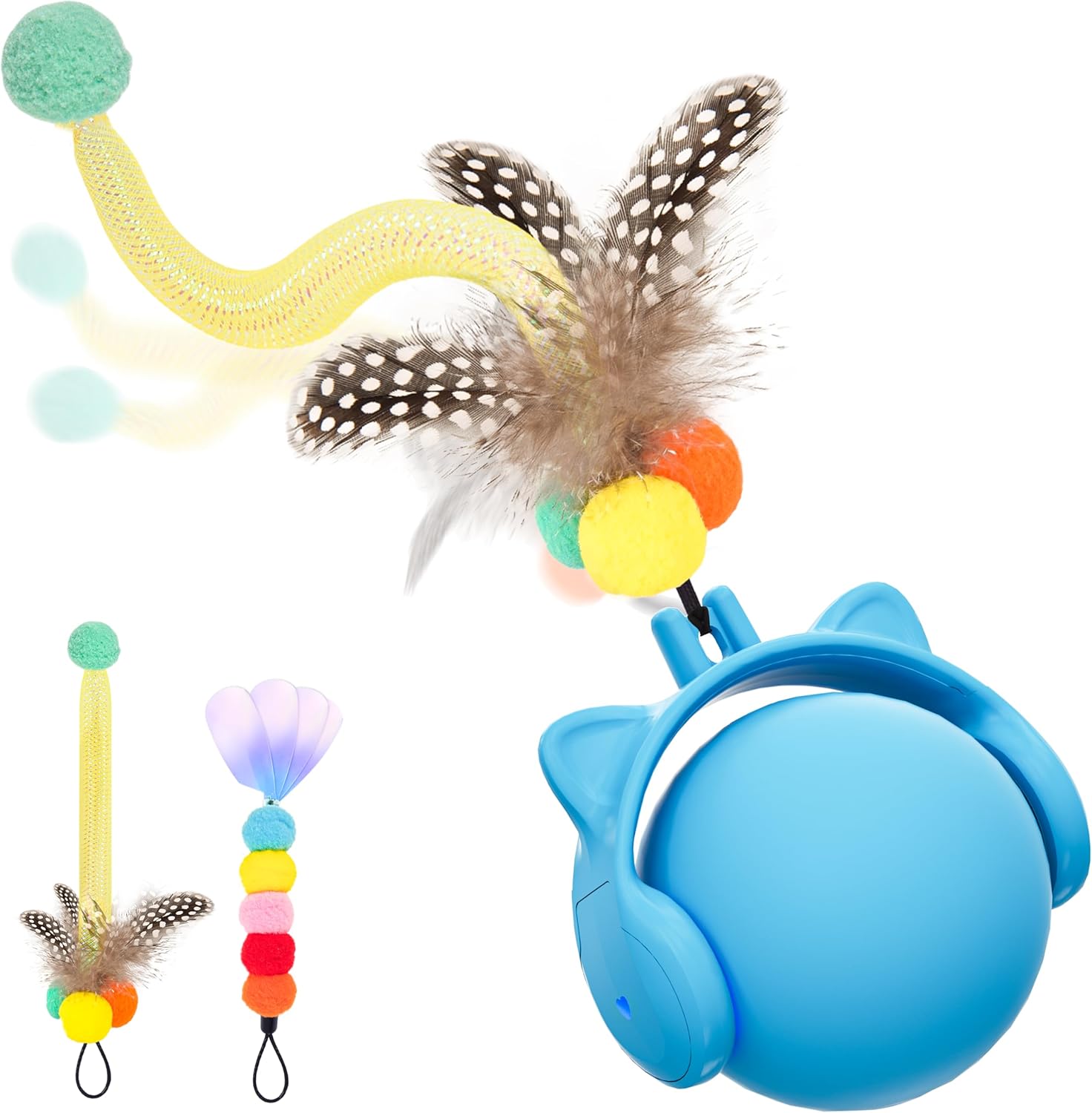
Image 3.1: The ORSDA Cat Toy Ball with its included accessory tails.
4. Setup
4.1 Charging the Toy
The ORSDA Cat Toy Ball features a built-in lithium-ion rechargeable battery. Before first use, fully charge the toy.
- Locate the Type-C charging port on the toy.
- Connect the provided Type-C charging cable to the toy and a compatible USB power source (e.g., computer, wall adapter).
- The indicator light will show charging status (refer to product packaging or quick start guide for specific light indicators).
- Ladarba tkun iċċarġjata kompletament, skonnettja l-kejbil.
4.2 Attaching Accessory Tails
The toy comes with two interchangeable tails to vary playtime.
- Select your desired accessory tail.
- Align the attachment point of the tail with the designated slot on the toy ball.
- Gently push and twist until the tail is securely fastened.
5. Istruzzjonijiet Operattivi
5.1 Activation Modes
The toy offers multiple ways to activate and engage your cat:
- Mess Attivat: The toy is equipped with a sensitive touch sensor. A light touch from your cat's paw will activate the ball, causing it to start moving.
- Attivazzjoni bil-ħin: The toy features a timer function. It will automatically activate for 1 minute every 3 hours. If your cat continues to play with the ball, it will remain active.
- Voice Activated (Easy Search): If the ball gets lost or stuck, simply clap your hands within approximately 3.3 feet (1 meter) to activate it. The ball will start moving again, making it easier to locate.

Image 5.1: The ORSDA Cat Toy Ball activates via touch, voice, or automatically every 3 hours.

Image 5.2: The toy ball is designed with a sensitive chip for paw activation.
5.2 Sound Attraction
The toy incorporates four distinct sound effects to stimulate your cat's senses:
- Mouse Squeaks
- Sejħiet għasafar
- Frog Croaks
- Food Dropping Sounds

Image 5.3: The toy produces four engaging sounds to attract cats.
5.3 Movement Modes
The toy offers three interaction modes designed for different cat personalities:
- Veloċità Mgħaġġla: Ideal for brave and energetic cats or energetic puppies.
- Veloċità bil-mod: Suitable for cats trying the toy for the first time or those who prefer a calmer pace.
- Interactive Mode: For outgoing and energetic cats, providing varied and engaging movement patterns.

Image 5.4: The toy features three distinct movement modes.
5.4 Automatic Obstacle Avoidance
The toy is equipped with an automatic obstacle avoidance function. When it encounters an obstacle, it will intelligently reroute itself to continue playing, preventing it from getting stuck under furniture.
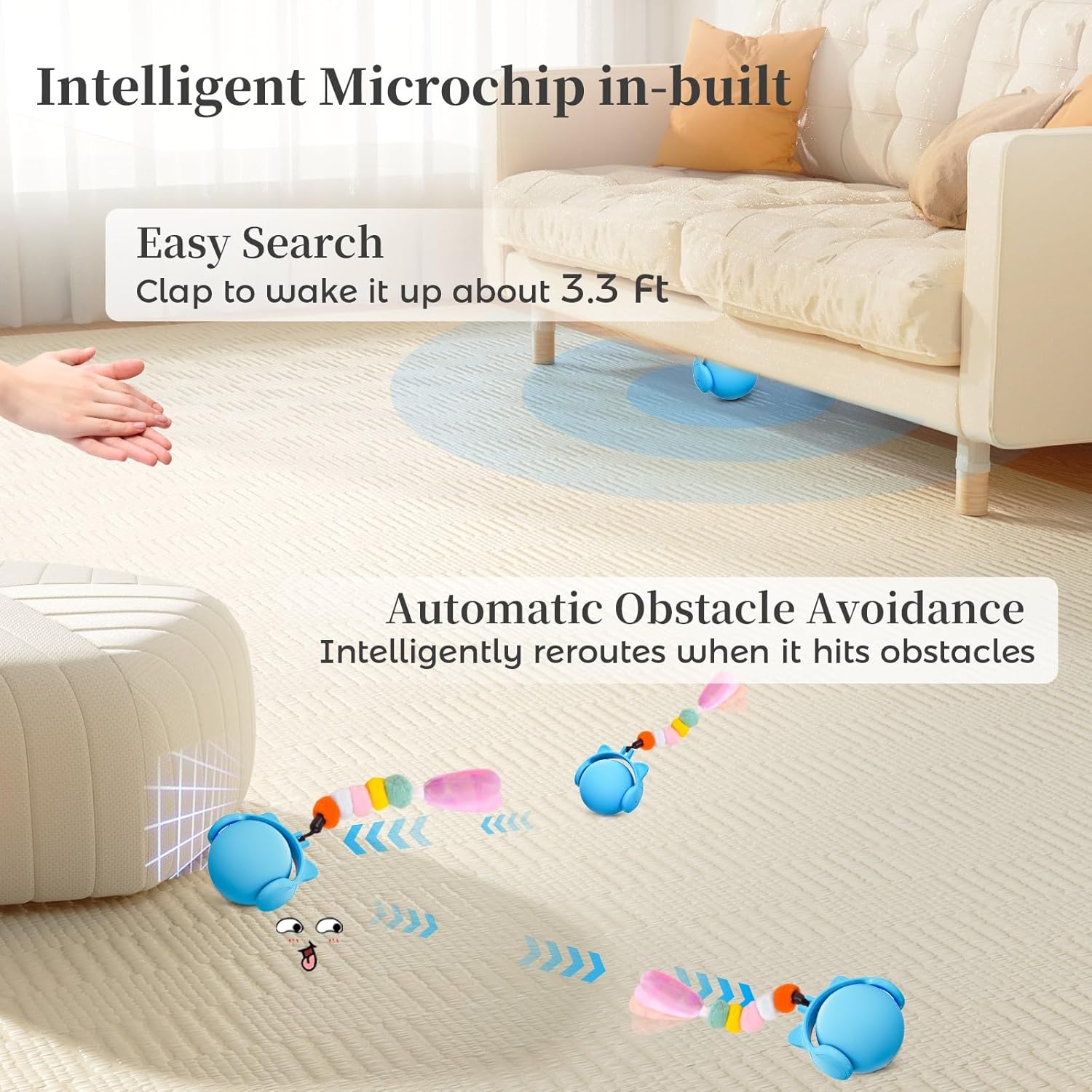
Image 5.5: The toy's intelligent microchip enables automatic obstacle avoidance and easy search.
5.5 Modalità Tfixkilx
To ensure peaceful sleep for both you and your pet, the toy includes a 'Do Not Disturb' mode. In this mode, the ball will not activate automatically at night, and sound and light features are suppressed.

Image 5.6: The 'Do Not Disturb' mode prevents activation during nighttime hours.
6. Manutenzjoni
6.1 Cleaning Hair
Over time, pet hair may accumulate on the toy's moving parts. Follow these steps to clean it:
- Gently pull off the cover of the toy.
- Carefully remove any accumulated hair from the internal mechanism.
- Reinstall the cover, ensuring it is securely in place.
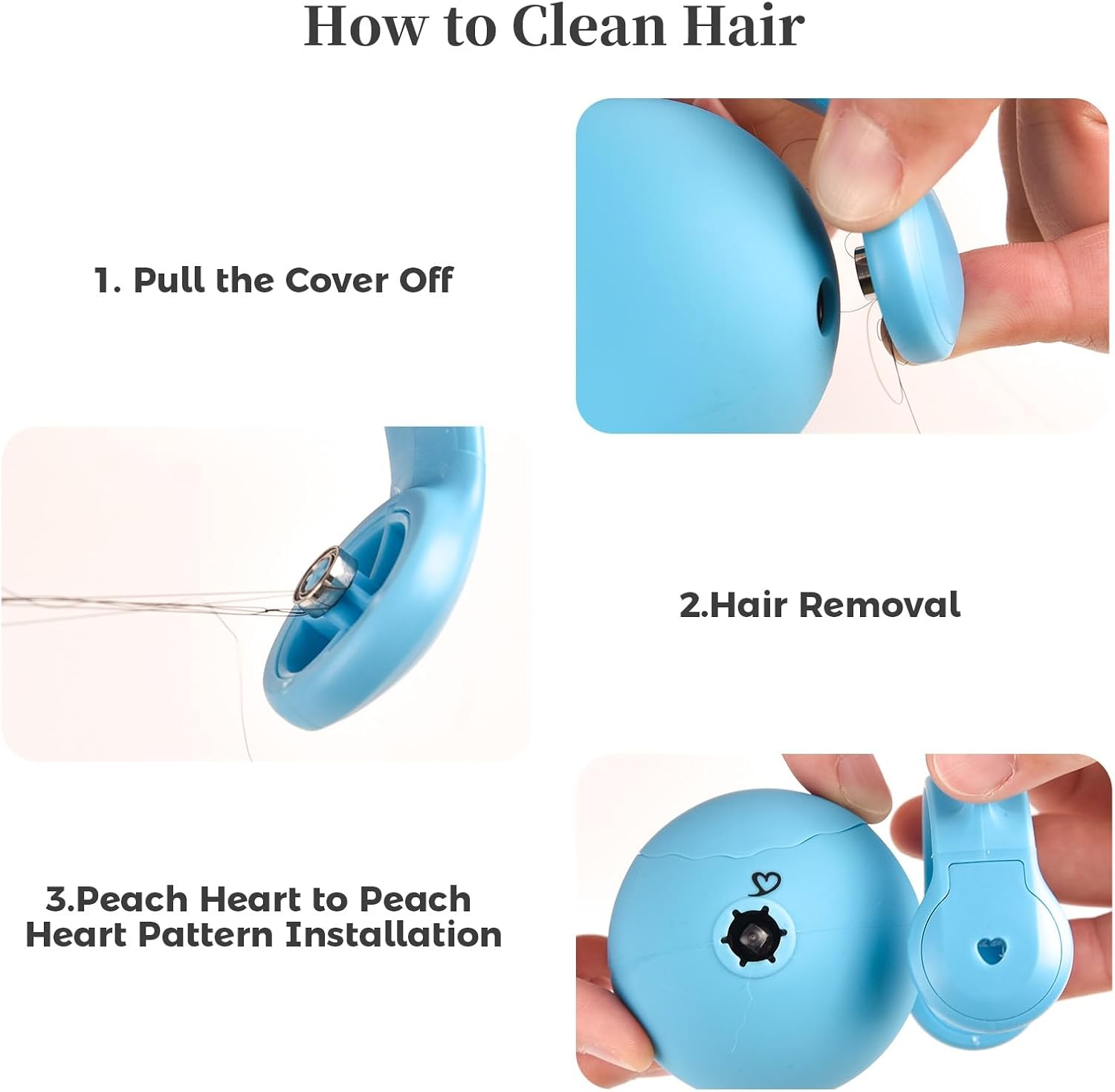
Image 6.1: Instructions for cleaning pet hair from the toy's mechanism.
7 Issolvi l-problemi
- Toy not moving: Ensure the toy is fully charged. Activate by touching it or clapping within 3.3 feet.
- Toy gets stuck frequently: While the toy has obstacle avoidance, ensure the play area is relatively clear of excessive clutter.
- Toy activates at night: Verify that the 'Do Not Disturb' mode is active.
- Sounds are not working: Check battery level. If fully charged and sounds are still absent, contact customer support.
8. Speċifikazzjonijiet
| Karatteristika | Speċifikazzjoni |
|---|---|
| Isem tal-Mudell | T93 |
| Piż tal-oġġett | 4.8 uqija |
| Dimensjonijiet tal-oġġett (LxWxH) | 2.3 x 1.5 x 3.9 pulzieri |
| Materjal | Ġel tas-silika |
| Sors tal-Enerġija | Built-in Lithium-ion Rechargeable Battery (Type-C charging) |
| Metodi ta' Attivazzjoni | Touch, Voice (Clap), Timed (1 min every 3 hours) |
| Effetti tal-Ħsejjes | Mouse Squeaks, Bird Calls, Frog Croaks, Food Dropping |
| Karatteristiċi Speċjali | Automatic Obstacle Avoidance, Do Not Disturb Mode |
9. Garanzija u Appoġġ
ORSDA provides a standard warranty for this product. For detailed warranty information, product support, or to report any issues, please refer to the warranty card included with your purchase or visit the official ORSDA websit. Jekk jogħġbok żomm il-prova tax-xiri tiegħek għal talbiet ta' garanzija.


