1. Introduzzjoni
Grazzi tax-xiriasing the COLSUR K8-WHITE Portable Bluetooth CD Player. This device is designed to provide versatile audio entertainment, combining CD playback with modern features like Bluetooth connectivity, FM radio, and a multi-level table lamp. Please read this manual thoroughly before use to ensure proper operation and to maximize your enjoyment of the product.
2. Informazzjoni dwar is-Sigurtà
- Tesponix l-apparat għax-xita, umdità, jew temperaturi estremi.
- Evita li tpoġġi l-apparat ħdejn sorsi tas-sħana jew fid-dawl tax-xemx dirett.
- Tiżżarmax jew tippruvax issewwi l-apparat int stess. Irreferi għal kull manutenzjoni f'idejn persunal kwalifikat.
- Żomm l-apparat 'il bogħod minn kampi manjetiċi qawwija.
- Use only the provided Type-C charging cable and a compatible power adapter (not included) for charging.
- Aċċerta ruħek li jkun hemm ventilazzjoni xierqa meta tħaddem l-apparat.
3. Kontenut tal-Pakkett
Jekk jogħġbok iċċekkja l-pakkett għall-oġġetti li ġejjin:
- COLSUR K8-WHITE Portable Bluetooth CD Player
- Kejbil tal-Iċċarġjar tat-Tip C
- Manwal għall-Utent
- Kit tal-Immuntar mal-Ħajt (jekk applikabbli)
- Stand tal-Mejda (jekk applikabbli)
4. Prodott Aktarview
The COLSUR K8-WHITE is a versatile audio device designed for various listening experiences. It features a compact design suitable for tabletop placement or wall mounting.
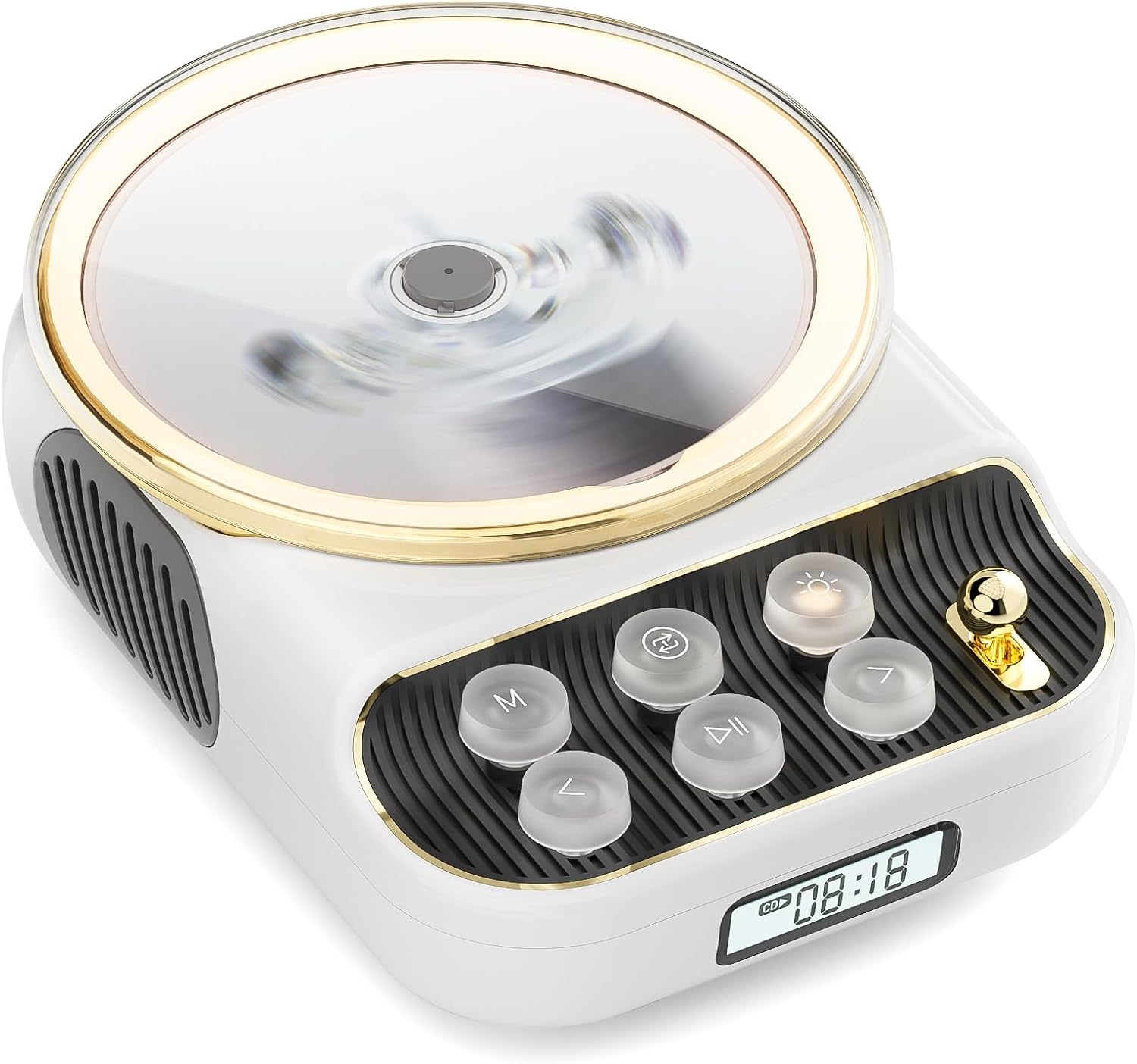
Quddiem view of the COLSUR K8-WHITE Portable Bluetooth CD Player, showcasing its circular CD compartment, control buttons, and digital display.

This image illustrates the multifunctionality of the COLSUR K8-WHITE, highlighting its capabilities for CD playback, Bluetooth mode, FM radio, TF card speaker, 3.5mm audio jack, and night light function.
Kontroll tat-Tqassim

A detailed diagram showing the various buttons, ports, and features of the COLSUR K8-WHITE CD Player, including the CD cover, function buttons, display, Type-C charging port, TF card interface, and speaker.
- Kompartiment tas-CD: Għall-inseriment ta' CDs awdjo.
- Wiri: Shows current mode, track number, time, or FM frequency.
- Buttuni tal-Funzjoni: (M) Mode, (Loop) Repeat, (Light) Light/Bluetooth Transmit, (Play/Pause), (Previous/Volume Down), (Next/Volume Up).
- Buttuna tal-Volum: Jaġġusta l-volum tal-awdjo.
- Port tal-Iċċarġjar tat-Tip C: For power input and charging the internal battery.
- Interface tal-Karta TF: For playing music from a TF card.
- Ħruġ Awdjo 3.5mm: Għall-konnessjoni ta' headphones jew kelliema esterni.
5. Setup
5.1 Iċċarġjar tal-Apparat
The device has a built-in 4000mAh rechargeable Lithium-ion battery. Before first use, fully charge the device.
- Connect the provided Type-C charging cable to the Type-C port on the device.
- Qabbad it-tarf l-ieħor tal-kejbil ma' adapter tal-enerġija USB kompatibbli (5V/2A rakkomandat, mhux inkluż).
- The charging indicator on the display will show charging status. It will turn off or change color when fully charged.
5.2 Tixgħel/Jitfi
To power on the device, press and hold the Power button (often integrated with Play/Pause or a dedicated button, refer to the control layout diagram). To power off, press and hold the Power button again.
5.3 Għażliet ta' Tqegħid
The COLSUR K8-WHITE can be used as a tabletop device or mounted on a wall.
- Użu fuq il-mejda: Place the device on a stable, flat surface. Ensure the non-slip feet are securely positioned.
- Immuntar tal-ħajt: Use the provided wall mount kit (if included) to securely attach the device to a wall. Follow the instructions provided with the wall mount kit for safe installation.
6. Istruzzjonijiet Operattivi
6.1 Daqq ta' CD

The image shows the COLSUR K8-WHITE CD Player on a wooden table, playing a CD, and a separate image illustrating its use as a Bluetooth speaker connected to a smartphone.
The player supports CD, CD-R, CD-RW, MP3, and WMA formats.
- Iftaħ l-għatu tal-kompartiment tas-CD.
- Carefully place a CD onto the spindle, ensuring it is seated correctly.
- Agħlaq il-qoxra tal-kompartiment tas-CD.
- Agħfas il- M (Modalità) button repeatedly until "CD" mode is displayed.
- Agħfas il- Play/Pawsa buttuna biex tibda d-daqq.
- Uża l- Preċedenti/Volum Down u Li jmiss / Volum 'il fuq buttuni biex taqbeż il-binarji.
- Aġġusta l-volum billi tuża Buttuna tal-Volum.
- Agħfas il- Loop button to cycle through repeat modes (e.g., repeat one, repeat all, random).
6.2 Modalità Riċevitur Bluetooth
Connect your smartphone, tablet, or other Bluetooth-enabled devices to stream audio wirelessly. The device features Bluetooth version 5.3 for stable connection.
- Agħfas il- M (Modalità) button repeatedly until "BT" (Bluetooth) mode is displayed. The device will enter pairing mode, indicated by a flashing Bluetooth icon or specific sound.
- Fuq l-apparat estern tiegħek, attiva l-Bluetooth u fittex apparati disponibbli.
- Select "COLSUR K8-WHITE" (or similar name) from the list to pair.
- Once paired, you can play music from your external device, and the audio will output through the CD player's speakers.
6.3 Modalità tar-Radju FM

The COLSUR K8-WHITE CD Player is shown on a desk, with its display showing an FM radio frequency, indicating its radio function.
Enjoy your favorite radio stations with the built-in FM tuner (frequency range: 76 MHz to 108 MHz).
- Agħfas il- M (Modalità) button repeatedly until "FM" mode is displayed.
- Agħfas u żomm il- Play/Pawsa button to initiate an automatic scan for FM stations. The device will save found stations.
- Uża l- Preċedenti/Volum Down u Li jmiss / Volum 'il fuq buttuni biex tinnaviga fl-istazzjonijiet salvati.
- Aġġusta l-volum billi tuża Buttuna tal-Volum.
Daqq tal-Karta TF 6.4
Play mużika filedirettament minn kard TF (MicroSD).
- Insert a TF card (with MP3/WMA files) fl-islott tal-kard tat-TF.
- Agħfas il- M (Modalità) button repeatedly until "TF" mode is displayed. The device should automatically start playing music from the card.
- Uża l- Preċedenti/Volum Down u Li jmiss / Volum 'il fuq buttuni biex taqbeż il-binarji.
- Aġġusta l-volum billi tuża Buttuna tal-Volum.
6.5 Input AUX
Connect external audio devices (e.g., MP3 players, older phones) via the 3.5mm AUX jack.
- Connect one end of a 3.5mm audio cable (not included) to the AUX port on the CD player.
- Qabbad it-tarf l-ieħor mal-output tal-awdjo tat-tagħmir estern tiegħek.
- Agħfas il- M (Modalità) button repeatedly until "AUX" mode is displayed.
- Control playback from your external device. Adjust volume using the Buttuna tal-Volum on the CD player.
6.6 Output tal-headphones
For private listening, connect headphones to the 3.5mm audio output jack.
- Plug your headphones into the 3.5mm audio output jack.
- The internal speakers will automatically mute.
- Aġġusta l-volum billi tuża l- Buttuna tal-Volum.
6.7 Tabella Lamp Function and Bluetooth Transmission

The COLSUR K8-WHITE CD Player is shown on a bedside table, emitting a soft glow, functioning as a night light while a person sleeps in the background.
The device includes a table lamp with three brightness levels and a Bluetooth transmission mode.
- Short Press the Light Button:
- First press: Activates a warm light (low brightness).
- Second press: Activates a flashing light (medium brightness).
- Third press: Turns off the light. The lights will cycle through these states.
- Long Press the Light Button: Activates the device's Bluetooth transmission mode. In this mode, the CD player can transmit audio to wireless headphones or other Bluetooth speakers.
7. Manutenzjoni
- Tindif: Uża drapp artab u niexef biex tnaddaf il-barra tal-apparat. Tużax prodotti tat-tindif likwidi jew materjali li joborxu.
- CD Care: Handle CDs by their edges. Clean CDs with a soft, lint-free cloth, wiping from the center outwards.
- Ħażna: Meta ma tkunx qed tużah għal perjodi twal, aħżen l-apparat f'post frisk u niexef.
8 Issolvi l-problemi
| Problema | Kawża Possibbli | Soluzzjoni |
|---|---|---|
| L-apparat ma jixgħelx. | Il-batterija hija eżawrita. | Connect the device to a power source using the Type-C cable and charge it. |
| L-ebda ħoss mill-kelliema. | Volume is too low or muted. Headphones are connected. Incorrect mode selected. | Increase volume. Disconnect headphones. Ensure correct mode (CD, BT, FM, TF, AUX) is selected. |
| Is-CD ma jdoqqx jew jaqbeż. | CD is dirty, scratched, or inserted incorrectly. CD format not supported. | Clean the CD. Ensure the CD is inserted correctly. Try a different CD. Verify CD format compatibility. |
| Tqabbil Bluetooth ifalli. | Device is not in pairing mode. External device Bluetooth is off or out of range. | Ensure the CD player is in Bluetooth mode and flashing. Move external device closer. Restart both devices. |
| Ir-riċeviment tar-radju FM huwa fqir. | Sinjal dgħajjef. Interferenza. | Reposition the device. Extend any external antenna if available. Try scanning again. |
9. Speċifikazzjonijiet
- Ditta: COLSUR
- Mudell: K8-WHITE
- Kulur: Abjad
- Teknoloġija tal-Konnettività: Bluetooth 5.3, AUX (3.5mm jack), Type-C (charging)
- Supported Media Formats: Audio CD, CD-R, CD-RW, MP3, WMA (from CD or TF card)
- Frekwenza tar-Radju FM: 76 MHz - 108 MHz
- Batterija: 4000mAh Lithium-ion (Riċarġabbli)
- Karatteristiċi Speċjali: Built-in speaker, Table lamp with 3 brightness levels, TF card slot, Headphone output
- Apparati Kompatibbli: Headphones, Bluetooth speakers, Amplifiers, Bluetooth audio receivers
10. Garanzija u Appoġġ
For warranty information or technical support, please refer to the documentation included with your purchase or contact the retailer/manufacturer directly. Keep your proof of purchase for warranty claims.


