Introduzzjoni
This manual provides essential instructions for setting up, operating, maintaining, and troubleshooting your AT&T 6723D Cingular Flex 2 unlocked phone. Please read this guide thoroughly to ensure optimal performance and longevity of your device.
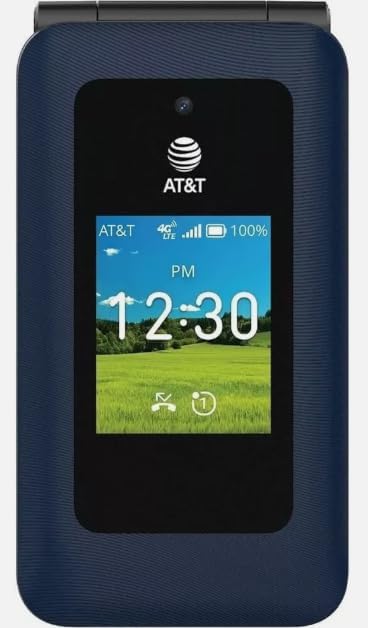
Immaġni: Quddiem view of the AT&T 6723D Cingular Flex 2 phone in Classic Navy, showing the external display with time and network status.
Setup
1. Unboxing u Spezzjoni Inizjali
Carefully remove all items from the packaging. Verify that the phone and the included power adapter are present and undamaged.
2. Installazzjoni ta' SIM Card
- Sib is-slott tal-kard SIM, tipikament fuq il-ġenb jew taħt l-għatu tal-batterija.
- Insert your activated Nano-SIM card into the designated slot with the gold contacts facing down. Ensure it clicks into place.
3. Iċċarġjar tal-Batterija
- Connect the power adapter to the USB Type C port on your phone.
- Ipplaggja l-adapter tal-enerġija f'iżbokk tal-ħajt.
- Ħalli t-telefon jiċċarġja kompletament qabel l-ewwel użu. L-indikatur tal-batterija fuq l-iskrin se juri l-istatus tal-iċċarġjar.
4. Tixgħel u Konfigurazzjoni Inizjali
- Agħfas u żomm il-buttuna Power sakemm l-iskrin jixgħel.
- Segwi l-istruzzjonijiet fuq l-iskrin biex tagħżel il-lingwa u r-reġjun tiegħek, u tikkonnettja ma' netwerk Wi-Fi.
- Complete any necessary KaiOS account setup or updates.
Istruzzjonijiet Operattivi
1. Navigazzjoni Bażika
- Pad Direzzjonali: Use the up, down, left, and right keys to navigate through menus and options.
- Ċavetta taċ-Ċentru: Jagħżel oġġetti enfasizzati.
- Soft Keys: The keys directly below the screen perform functions indicated by the on-screen labels.
- Ċavetta Lura/Ċar: Jirritorna għall-iskrin preċedenti jew iħassar il-karattri.
2. Tagħmel u Riċeviment Sejħiet
- Biex Tagħmel Sejħa: Open the phone application, dial the number using the keypad, and press the Call key (green button).
- Biex Twieġeb Sejħa: When the phone rings, press the Call key.
- Biex Intemm Sejħa: Agħfas il-buttuna Tmiem is-Sejħa (buttuna ħamra).
3. Tibgħat u Tirċievi Messaġġi
- Navigate to the Messages application.
- Select 'New Message' or 'Compose'.
- Daħħal in-numru tar-riċevitur jew agħżel mill-kuntatti.
- Ittajpja l-messaġġ tiegħek billi tuża t-tastiera.
- Agħfas 'Ibgħat'.
4. Konnessjoni man-Netwerks
- Wi-Fi: Go to Settings > Network & Connectivity > Wi-Fi. Turn Wi-Fi on, select your desired network, and enter the password if required.
- Dejta Mobbli (4G/LTE): Ensure your SIM card is active and has a data plan. Go to Settings > Network & Connectivity > Cellular & Data to enable mobile data.
5. Użu tal-kamera
- Open the Camera application from the main menu.
- Ifrejmja x-xbieha tiegħek billi tuża l-iskrin bħala viewfinder
- Press the Center key to capture a photo.

Immaġni: Wara view of the AT&T 6723D Cingular Flex 2 phone, showing the textured Classic Navy finish and speaker grille.
Manutenzjoni
1. Tindif tal-Apparat
Uża drapp artab u mingħajr suf biex timsaħ bil-mod l-iskrin u l-qafas tat-telefon. Evita li tuża kimiċi ħarxa jew materjali li joborxu.
2. Kura tal-batterija
- Evita li tesponi t-telefon għal temperaturi estremi.
- Tħallix it-telefon jiċċarġja għal perjodi twal wara li jkun iċċarġjat kompletament.
- Use only the original or certified compatible power adapter.
3. Aġġornamenti tas-Software
Regularly check for and install software updates to ensure your phone has the latest features and security enhancements. Go to Settings > Device > Software Update.
4. Ġestjoni tal-Ħażna
With 64 GB of internal storage, regularly review u ħassar bla bżonn files, photos, and applications to maintain optimal performance. You can check storage usage in Settings > Storage.
Issolvi l-problemi
1. It-Telefon Mhux Mixgħul
- Kun żgur li l-batterija hija ċċarġjata. Qabbad it-telefon mal-ċarġer għal mill-inqas 15-il minuta.
- Agħfas u żomm il-buttuna tal-Qawwa għal 10-15 sekondi.
2. L-ebda Konnessjoni man-Netwerk
- Iċċekkja jekk is-SIM card tiddaħħalx sew.
- Verify that mobile data is enabled in Settings.
- Ibda mill-ġdid it-telefon.
- Contact your service provider to confirm your SIM card and plan are active.
3. Kwistjonijiet ta' Iċċarġjar
- Ensure the power adapter and cable are securely connected to both the phone and the power outlet.
- Try using a different compatible charger and cable.
- Iċċekkja l-port tal-iċċarġjar għal xi debris.
4. Phone Freezing or Unresponsive
- Press and hold the Power button for approximately 10 seconds to force a restart.
- Jekk il-problema tippersisti, ikkunsidra li tagħmel reset tal-fabbrika (Twissija: Dan se jħassar id-dejta kollha fuq it-telefon tiegħek. Agħmel backup tal-informazzjoni importanti l-ewwel).
Speċifikazzjonijiet
| Karatteristika | Dettall |
|---|---|
| Isem tal-Mudell | Cingular Flex 2 |
| Numru tal-Mudell tal-Oġġett | 6723D |
| Brand | AT&T |
| Sistema Operattiva | KaiOS |
| Trasportatur Wireless | Jinfetaħ |
| Teknoloġija Ċellulari | 4G, LTE |
| Riżoluzzjoni tal-Wiri | 720 x 1280 |
| Kapaċità tal-Ħżin tal-Memorja | 64 GB |
| Kapaċità tal-batterija | 1400 Milliamp Sigħat |
| Awdjo Jack | USB Tip Ċ |
| Kulur | Classic Navy |
| X'hemm fil-kaxxa | Adapter tal-Enerġija |
Informazzjoni dwar Garanzija
For specific warranty details, please refer to the documentation provided with your purchase or contact the seller directly. Standard manufacturer warranties typically cover defects in materials and workmanship under normal use.
Appoġġ
If you encounter issues not covered in this manual or require further assistance, please contact your point of purchase or the AT&T customer support for your region. Have your device model number (6723D) and purchase information ready.


