Warm Audio WA-C1 Analog Chorus Vibrato Pedal User Manual
Model: WA-C1
Introduzzjoni
The Warm Audio WA-C1 is an all-analog chorus and vibrato pedal designed to deliver classic modulated tones. This manual provides detailed instructions for setting up, operating, and maintaining your WA-C1 pedal to ensure optimal performance.
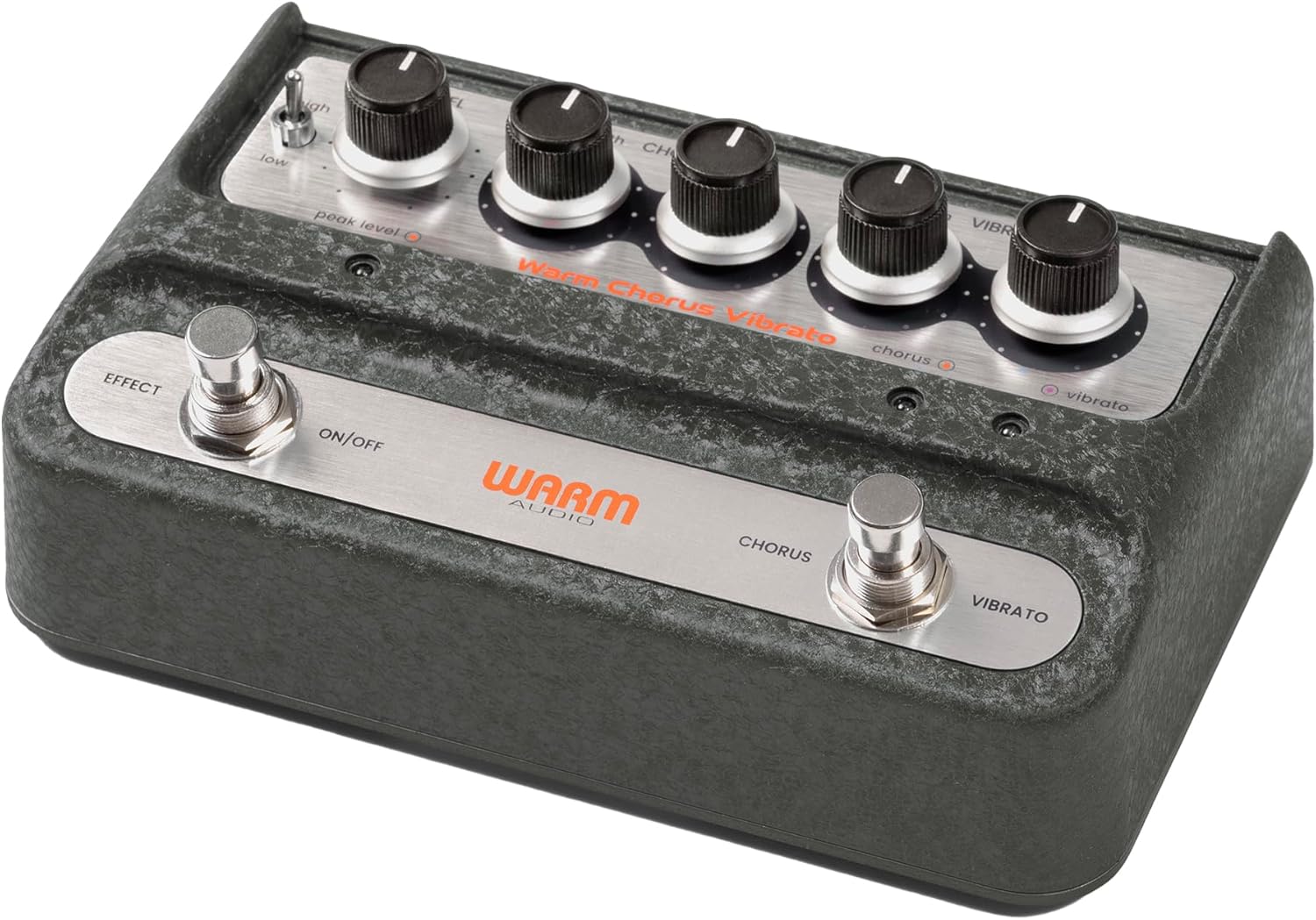
Immaġni: B'mod ġenerali view of the Warm Audio WA-C1 Analog Chorus Vibrato pedal.
Istruzzjonijiet Importanti dwar is-Sigurtà
- Aqra sew dawn l-istruzzjonijiet qabel l-użu.
- Żomm dawn l-istruzzjonijiet għal referenza futura.
- Oqgħod attent għat-twissijiet kollha fuq il-prodott u f’dan il-manwal.
- Tużax dan l-apparat ħdejn l-ilma.
- Naddaf biss b'ċarruta niexfa.
- Timblokkax il-fetħiet tal-ventilazzjoni. Installa skont l-istruzzjonijiet tal-manifattur.
- Tinstallax ħdejn xi sorsi tas-sħana bħal radjaturi, reġistri tas-sħana, stufi, jew apparat ieħor (inkluż amplifiers) li jipproduċu sħana.
- Uża biss aċċessorji/aċċessorji speċifikati mill-manifattur.
- Spluggja dan l-apparat waqt maltempati tas-sajjetti jew meta ma jintużax għal perjodi twal.
- Irreferi l-manutenzjoni kollha lil persunal tas-servizz kwalifikat. Is-servizz huwa meħtieġ meta l-apparat ikun ġie bil-ħsara b'xi mod, bħal korda tal-provvista tal-enerġija jew plagg ikun bil-ħsara, likwidu jkun inxtered jew oġġetti jkunu waqgħu fl-apparat, l-apparat ikun ġie espost għax-xita jew umdità, ma jaħdimx b'mod normali , jew twaqqgħet.
Karatteristiċi
- Faithful recreation of a classic all-analog chorus/vibrato circuit.
- Premium all-analog preamp for responsive tone.
- Independent Depth and Rate controls for Chorus.
- Authentic Vibrato section.
- Switchable Hi-Z input for optimizing guitar clarity.
- Mono and Stereo output options.
Kontrolli u Konnessjonijiet
Kontrolli tal-Panew ta' Quddiem

Immaġni: Minn fuq għal isfel view of the WA-C1 pedal's front panel, showing all control knobs and footswitches.
- Pum tal-LIVELL: Jaġġusta l-volum ġenerali tal-ħruġ tal-pedala.
- DEPTH (Chorus) Knob: Controls the intensity or sweep range of the chorus effect.
- RATE (Chorus) Knob: Jikkontrolla l-veloċità tal-modulazzjoni tal-korus.
- DEPTH (Vibrato) Knob: Controls the intensity or sweep range of the vibrato effect.
- RATE (Vibrato) Knob: Controls the speed of the vibrato modulation.
- EFFECT ON/OFF Footswitch: Engages or bypasses the entire pedal effect. The associated LED indicates the effect status.
- CHORUS/VIBRATO Footswitch: Toggles between Chorus and Vibrato modes when the effect is active. The associated LEDs indicate the selected mode.
- HIGH/LOW Switch: A two-position switch that adjusts the input gain, allowing for optimal signal handling from various instruments.
- PEAK LEVEL LED: Illuminates to indicate signal clipping or excessive input level. Adjust the HIGH/LOW switch or input signal to prevent clipping.
Konnessjonijiet tal-Panew ta' wara

Immaġni: Wara view of the WA-C1 pedal, showing the power input, Hi-Z switch, input jack, and output jacks.
- POWER 9V Input: Connect a standard 9V DC power adapter (center negative, 2.1mm barrel connector). Ensure the power supply meets the pedal's requirements.
- HI-Z Switch: This switch adjusts the input impedance. Set to 'ON' for higher impedance instruments like guitars to enhance clarity in the high-end. Set to 'OFF' for lower impedance sources like keyboards.
- Jack INPUT: Connect your instrument (guitar, keyboard, etc.) to this 1/4-inch mono input.
- STEREO OUTPUT Jack: Use this 1/4-inch output for a stereo signal path, typically connecting to two amplifiers or a stereo effects loop.
- MONO OUTPUT Jack: Use this 1/4-inch output for a mono signal path, connecting to a single amplifier or the next pedal in your chain.
Setup
- Konnessjoni tal-Enerġija: Connect a compatible 9V DC (center negative) power adapter to the POWER 9V input on the rear panel. Do not use an incompatible power supply.
- Konnessjoni tal-Istrument: Connect your instrument to the INPUT jack on the rear panel using a standard 1/4-inch instrument cable.
- Konnessjoni tal-Output:
- For mono operation, connect the MONO OUTPUT jack to your amplifier jew il-pedala li jmiss fil-katina tas-sinjali tiegħek.
- For stereo operation, connect both the MONO OUTPUT and STEREO OUTPUT jacks to two separate amplifiers or a stereo input device.
- Hi-Z Switch: If using a guitar, set the HI-Z switch to 'ON' for optimal high-end clarity. For other instruments like keyboards, set it to 'OFF'.
- Settings Inizjali: Start with all DEPTH and RATE knobs at their minimum (fully counter-clockwise) and the LEVEL knob at noon (12 o'clock) for initial sound adjustments.
Istruzzjonijiet Operattivi
- Involvu l-Effett: Press the EFFECT ON/OFF footswitch to activate the pedal. The corresponding LED will illuminate.
- Għażla tal-Modalità: With the effect active, press the CHORUS/VIBRATO footswitch to toggle between Chorus and Vibrato modes. The respective LED will indicate the active mode.
- Adjusting Chorus: In Chorus mode, use the DEPTH (Chorus) and RATE (Chorus) knobs to dial in your desired modulation intensity and speed.
- Adjusting Vibrato: In Vibrato mode, use the DEPTH (Vibrato) and RATE (Vibrato) knobs to dial in your desired modulation intensity and speed.
- Riżultat Livell: Use the LEVEL knob to adjust the overall output volume of the pedal. Ensure it matches or slightly boosts your bypassed signal level.
- Qligħ tal-Input: If your instrument's signal is too hot or too weak, use the HIGH/LOW switch to optimize the input gain. Monitor the PEAK LEVEL LED to avoid clipping.
Manutenzjoni
- Tindif: Clean the pedal's exterior with a soft, dry cloth. Do not use liquid cleaners or solvents.
- Ħażna: Aħżen il-pedala f'ambjent niexef u frisk 'il bogħod mix-xemx diretta u minn temperaturi estremi.
- Provvista tal-Enerġija: Always use the correct 9V DC (center negative) power supply. Incorrect power can damage the unit and void the warranty.
- Footswitches and Jacks: Periodically check connections for any loose cables or debris.
Issolvi l-problemi
| Problema | Kawża Possibbli | Soluzzjoni |
|---|---|---|
| L-ebda ħoss meta l-pedala tkun attivata. |
|
|
| L-effett huwa sottili wisq jew intens wisq. |
|
|
| Distortion or unwanted noise. |
|
|
Speċifikazzjonijiet
- Mudell: WA-C1
- Tip ta' Effett: Analog Chorus / Vibrato
- Format tas-Sinjal: Analogu
- Rekwiżit ta' Enerġija: 9V DC, Center Negative (Power adapter not included)
- Input: 1/4-inch Mono Jack
- Outputs: 1/4-inch Mono Jack, 1/4-inch Stereo Jack
- Kontrolli: Level, Chorus Depth, Chorus Rate, Vibrato Depth, Vibrato Rate, High/Low Switch, Hi-Z Switch
- Dimensjonijiet: Madwar 8 x 5.25 x 4 pulzieri (Dimensjonijiet tal-Pakkett)
- Piż: Madwar 2 liri (Piż tal-Oġġett)
Garanzija u Appoġġ
Warm Audio products are designed for reliability and performance. For warranty information and technical support, please refer to the official Warm Audio webis-sit jew ikkuntattja lin-negozjant awtorizzat tiegħek. Żomm l-irċevuta tax-xiri tiegħek bħala prova tax-xiri għal talbiet ta' garanzija.
Għal aktar għajnuna, żur: www.warmaudio.com/support


