1. Introduzzjoni
Thank you for choosing the Johgee 4 Zones Water Timer. This programmable garden hose timer is designed to simplify your watering tasks, offering independent control over four separate zones. With features like automatic and manual watering, rain delay, and child lock, it provides efficient and flexible irrigation for your lawn, garden, and plants. Please read this manual thoroughly before operation to ensure proper use and longevity of your device.
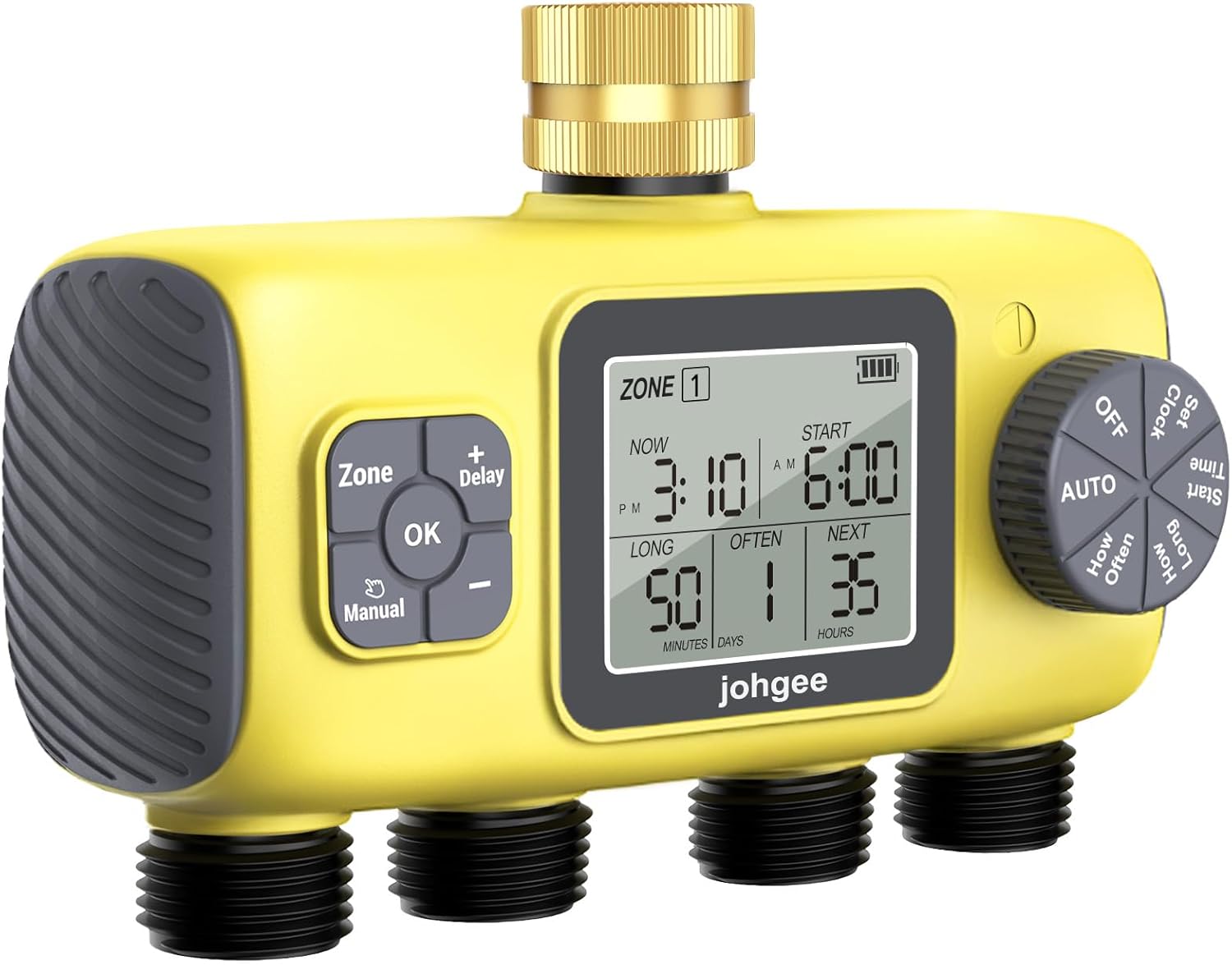
Figure 1.1: Johgee 4 Zones Water Timer, showing the main unit with four outlets and a digital display.
2. Informazzjoni dwar is-Sigurtà
- Do not immerse the timer in water. The unit is IPX5 waterproof, meaning it is resistant to water jets, but not submersion.
- Uża biss 4 batteriji alkalini AA ta' 1.5V. Tħallatx batteriji qodma ma' batteriji ġodda, jew tipi differenti ta' batteriji.
- Remove batteries if the timer will not be used for an extended period or during freezing temperatures to prevent damage.
- Ensure all connections are tight to prevent leaks. Use the provided sealing washer and thread sealing tape.
- Keep out of reach of children and pets when not in use, or activate the child lock feature during operation.
3. Kontenut tal-Pakkett
Jekk jogħġbok iċċekkja l-pakkett għall-oġġetti li ġejjin:
- 1 x Johgee 4 Zones Water Timer
- 1 x Sealing Washer (pre-installed or separate)
- 1 x Roll of Thread Sealing Tape
- 4 x Hose Adapters (for connecting standard garden hoses)

Figura 3.1: Aċċessorji inklużi u dimensjonijiet tal-prodott.
4. Karatteristiċi tal-prodott
The Johgee 4 Zones Water Timer offers a range of features for convenient and efficient watering:
- 4 Independently Programmable Outputs: Flexible watering settings can be adjusted for each of the four zones, ideal for different watering needs.
- Custom Watering Time: In automatic mode, watering duration can be set from 1 to 360 minutes. Frequency options include 1, 3, 6, 12 hours, or 1 to 30 days.
- Funzjoni ta' Dewmien għax-Xita: Suspend watering for 1 to 15 days to conserve water during rainy periods.
- Modalità ta' Tisqija Manwali: Allows temporary watering from 1 to 360 minutes without interrupting preset schedules.
- State-of-the-Art Leak-proof Construction: Designed to withstand water pressure from 0.05Mpa to 0.8Mpa, with sealing washer and thread sealing tape to prevent leaks.
- Modalità tas-Serratura tat-Tfal: Prevents unintentional changes to settings by children or pets, avoiding water waste.
- Indikatur tal-Istat tal-batterija: A warning light flashes when battery level is low.
- Enhanced Water Inlet: Features a 100% reinforced brass inlet with a 360° higher and thicker neck and a built-in metal filter.
- Faċli biex Twaqqaf: Large LCD display, intuitive button and knob design, and tool-free installation.

Figure 4.1: Key features of the Johgee 4 Zones Water Timer.

Figure 4.2: Detail of the reinforced brass inlet with integrated filter.
5. Setup
5.1 Installazzjoni tal-batterija
- Sib il-kompartiment tal-batterija fuq wara tat-tajmer.
- Żerżaq tiftaħ il-qoxra tal-batterija.
- Insert 4x 1.5V AA alkaline batteries, ensuring correct polarity (+/-).
- Close the battery cover securely. The screen should light up.
5.2 Connecting the Timer to Faucet
- Ensure the faucet is turned off.
- Apply the provided thread sealing tape to the threads of your outdoor faucet.
- Screw the brass inlet of the water timer onto a standard 3/4" garden faucet. Hand-tighten firmly. Do not overtighten.
- Ensure the sealing washer is properly seated inside the timer's inlet to prevent leaks.
5.3 Konnessjoni tal-Pajpijiet
- Attach your garden hoses to the four independent outlets at the bottom of the timer.
- If needed, use the provided hose adapters for compatibility.
- Ensure each hose connection is secure.

Figure 5.1: The timer installed and ready with four independent watering zones.

Figure 5.2: The timer's user-friendly interface and easy installation.
6. Istruzzjonijiet Operattivi
The timer features a large LCD display and a combination of buttons and a rotary knob for easy programming.
6.1 Issettjar tal-Arloġġ
- Turn the rotary knob to the 'Clock' position.
- Use the '+' and '-' buttons to set the current time (24-hour format). Long press for faster adjustment.
- Press 'OK' to confirm.
6.2 Automatic Watering (Programming Schedules)
You can program each of the four zones independently.
- Turn the rotary knob to 'Set Time'.
- Use the 'Zone' button to select the desired watering zone (1-4).
- Use the '+' and '-' buttons to set the 'Start Time' for the selected zone. Press 'OK' to confirm.
- Turn the rotary knob to 'How Long'. Use '+' and '-' to set the watering duration (1 to 360 minutes). Press 'OK'.
- Turn the rotary knob to 'How Often'. Use '+' and '-' to set the watering frequency (e.g., every 1, 3, 6, 12 hours, or every 1-30 days). Press 'OK'.
- Repeat steps 2-5 for other zones as needed.
- Once programming is complete, turn the rotary knob to 'AUTO' to activate the schedules.

Figure 6.1: Steps for setting automatic watering schedules.
6.3 Tisqija manwali
Manual mode allows for immediate watering without affecting your programmed schedules.
- Press the 'Manual' button.
- Use the '+' and '-' buttons to set the desired manual watering duration (1 to 360 minutes).
- Press 'OK' to start manual watering. All active zones will water sequentially for the set duration.
- To stop manual watering, press 'Manual' again or turn the knob to 'OFF' and then back to 'AUTO'.
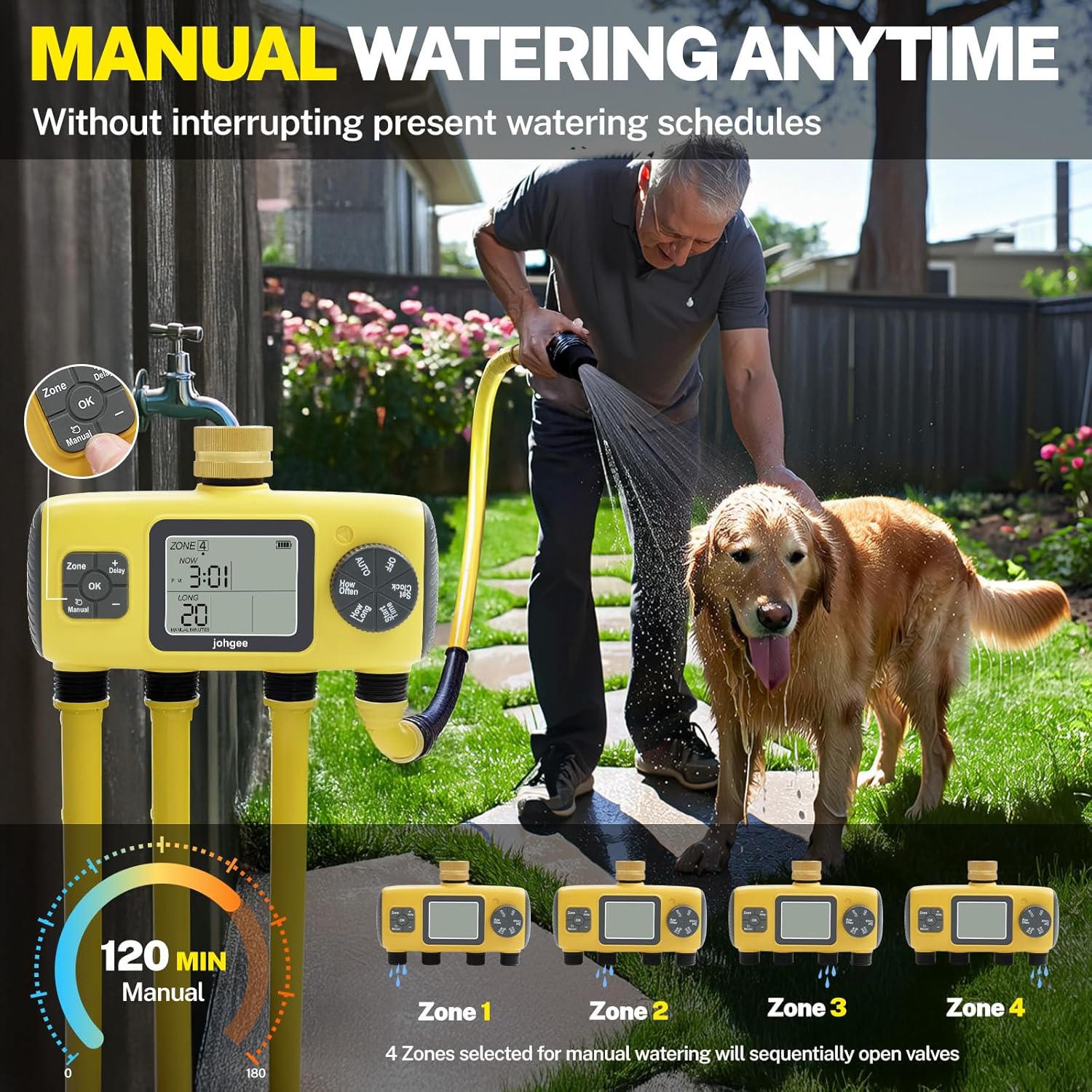
Figure 6.2: Using the manual watering function.
6.4 Funzjoni ta' Dewmien għax-Xita
This feature allows you to pause your watering schedule for a set period during rainy weather.
- Kun żgur li t-tajmer huwa fil-modalità 'AUTO'.
- Agħfas il-buttuna 'Dewmien'.
- Use the '+' and '-' buttons to select the desired delay duration (1 to 15 days).
- Press 'OK' to activate the rain delay. The display will show the remaining delay time.
- To cancel the rain delay, press 'Delay' again and set the delay to '0' or turn the knob to 'OFF' and then back to 'AUTO'.

Figure 6.3: Activating the rain delay function.
6.5 Modalità tas-Serratura tat-Tfal
To prevent accidental changes to your settings:
- To activate: While in 'AUTO' mode, press and hold the 'OK' button for 3 seconds until a lock icon appears on the display.
- To deactivate: Press and hold the 'OK' button for 3 seconds until the lock icon disappears.
7. Manutenzjoni
7.1 Tindif
- Imsaħ il-barra tat-tajmer b'reklamaramp drapp. Tużax tindif li joborxu.
- Periodically check and clean the metal filter inside the brass inlet to prevent debris from entering the timer.
7.2 Sostituzzjoni tal-batterija
- When the low battery indicator flashes, replace all four AA batteries promptly.
- Ensure the battery compartment is sealed tightly after replacement to maintain waterproof integrity.

Figure 7.1: IPX5 waterproof design and battery features.
7.3 Winterization
- Before the first frost, disconnect the timer from the faucet and hoses.
- Neħħi l-batteriji.
- Store the timer indoors in a dry, frost-free location.
8 Issolvi l-problemi
| Problema | Kawża Possibbli | Soluzzjoni |
|---|---|---|
| Timer not turning on/display blank | Batteriji mejta jew installati ħażin. | Replace batteries with new 1.5V AA alkaline batteries. Ensure correct polarity. |
| Ilma li jnixxi mill-konnessjonijiet | Loose connections, missing/damaged washer, insufficient thread tape. | Ensure connections are hand-tight. Check that the sealing washer is properly seated. Apply more thread sealing tape if necessary. |
| Valves not shutting off completely / continuous flow | Debris in valve, internal mechanism issue, or temporary software glitch. | Turn off the faucet. Remove batteries for 30 seconds, then reinsert them to perform a reset. If the issue persists, check for debris in the outlets. |
| Timer not watering at scheduled time | Incorrect clock setting, schedule not set, timer not in 'AUTO' mode, rain delay active, low battery. | Verify current time and programmed schedules. Ensure the knob is set to 'AUTO'. Check if rain delay is active. Replace batteries if low. |
| Water pressure too low/high | Incompatible water pressure. | Ensure your water pressure is within the operating range of 0.05Mpa to 0.8Mpa. |
9. Speċifikazzjonijiet
| Speċifikazzjoni | Dettall |
|---|---|
| Numru tal-Mudell | YZD04-T |
| Brand | johgee |
| Kulur | Isfar |
| Materjal | Metall, plastik |
| Dimensjonijiet tal-Prodott | 6 x 20 x 12 ċm |
| Piż tal-oġġett | 920 g |
| Provvista tal-Enerġija | 4x Batteriji Alkalini AA ta' 1.5V (mhux inklużi) |
| Pressjoni tax-Xogħol | 0.05Mpa to 0.8Mpa (7.25-116psi) |
| Temperatura tax-Xogħol | 4.5°C-45°C (40.1°F-113°F) |
| Klassifikazzjoni li ma jgħaddix ilma minnha | IPX5 |
| Konnessjoni tat-Tektek tal-Manka | Standard 3/4" External Thread Outlet |
| Numru ta' Settings | 10 (referring to various programmable options) |
10. Garanzija u Appoġġ
Johgee products are designed for reliability and performance. This product comes with a standard manufacturer's warranty. For detailed warranty information, technical support, or any questions regarding your Johgee 4 Zones Water Timer, please contact Johgee customer service through the retailer's platform or the official Johgee website. Please have your model number (YZD04-T) and purchase information ready when contacting support.


