1. Introduzzjoni
This manual provides instructions for the proper use and maintenance of your ttec SoundFlow OWS Wireless Bluetooth Earphones, model KM156. Please read this manual thoroughly before using the product to ensure optimal performance and longevity.
The ttec SoundFlow OWS earphones feature an open-ear design for situational awareness, dynamic acoustic system for clear sound, and Bluetooth 5.4 for stable wireless connectivity.
2. Kontenut tal-Pakkett
Ivverifika li l-oġġetti kollha huma preżenti fil-pakkett tal-prodott tiegħek:
- ttec SoundFlow OWS Wireless Bluetooth Earphones (Left and Right)
- Kawża tal-Iċċarġjar
- Cable tal-Iċċarġjar tal-USB-C
- Manwal għall-Utent
3. Prodott Aktarview
Familiarize yourself with the components of your ttec SoundFlow OWS earphones.

Image 3.1: ttec SoundFlow OWS Earphones and Charging Case. The image displays the two black earphones with ear hooks, positioned above their open black charging case.
Earphone Components:
- Ganċ tal-widna: Jipprovdi tajbin sigur u komdu fuq il-widna.
- Unità tal-Ispeaker: Jagħti output tal-awdjo.
- Mikrofonu: Għal sejħiet u kmandi tal-vuċi.
- Touch Sensor Area: For controlling music, calls, and other functions.
- Kuntatti tal-Iċċarġjar: Connects with the charging case for power.

Image 3.2: Close-up of an earbud highlighting the touch sensor area. The image shows a detailed view of the earbud's outer surface, indicating the touch-sensitive zone for controls.
Komponenti tal-Kaxxa tal-Iċċarġjar:
- Earphone Slots: Securely holds and charges the earphones.
- Port tal-Iċċarġjar USB-C: Għall-iċċarġjar tal-każ.
- Indikatur LED: Juri l-istatus tal-iċċarġjar u l-livell tal-batterija.
4. Setup
4.1 Iċċarġjar tal-Earphones u l-Kaxxa
Qabel l-ewwel użu, iċċarġja l-earphones u l-kaxxa tal-iċċarġjar kompletament.
- Place the earphones into the charging case. Ensure the charging contacts align.
- Qabbad il-kejbil tal-iċċarġjar USB-C mal-port tal-iċċarġjar fuq il-kaxxa u t-tarf l-ieħor ma' sors tal-enerġija (eż., adapter tal-ħajt USB, port USB tal-kompjuter).
- The LED indicator on the case will show the charging status. Once fully charged, the indicator will change or turn off.
A full charge provides up to 6 hours of earphone use, and the charging case provides up to 30 hours of additional battery life. The Charge&Go feature allows 2.5 hours of use from a 15-minute charge.
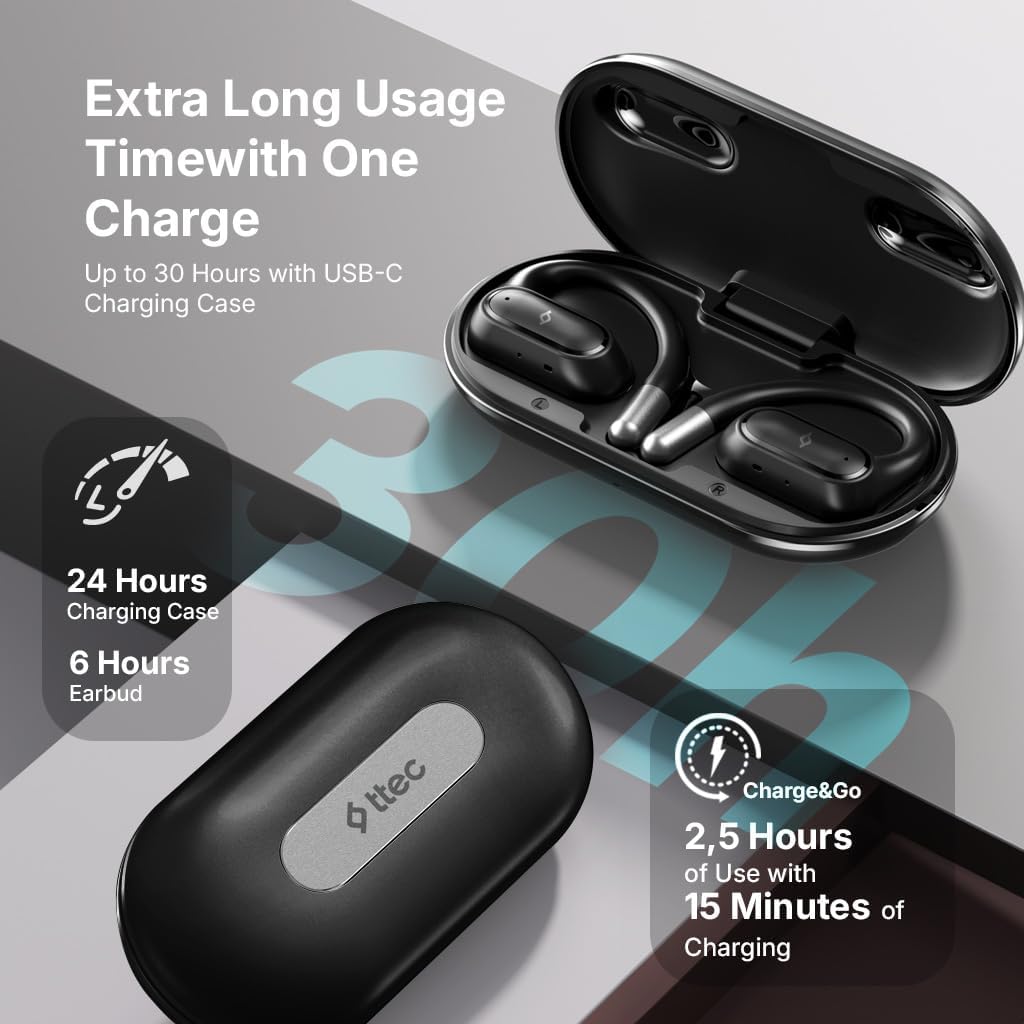
Image 4.1: Charging case displaying battery life. The image illustrates the charging case with text indicating 24 hours from the charging case, 6 hours from earbuds, and 2.5 hours of use from 15 minutes of charging.
4.2 Tqabbil ma' Apparat Bluetooth
To connect your earphones to a smartphone or other Bluetooth-enabled device:
- Kun żgur li l-earphones huma ċċarġjati u mqiegħda fil-kaxxa tal-iċċarġjar.
- Open the charging case. The earphones will automatically enter pairing mode, and their LED indicators will flash.
- Fuq it-tagħmir tiegħek, ippermetti l-Bluetooth u fittex tagħmir disponibbli.
- Select "ttec SoundFlow" from the list of found devices.
- Once connected, the earphone LED indicators will stop flashing or turn off, and you will hear a confirmation tone.
Il-earphones jerġgħu jikkonnettjaw awtomatikament mal-aħħar apparat imqabbad meta jitneħħew mill-kaxxa, jekk il-Bluetooth ikun attivat fuq l-apparat.
5. Istruzzjonijiet Operattivi
5.1 L-Ilbies tal-Earphones
Gently place the ear hook over your ear and position the speaker unit comfortably in front of your ear canal. The open-ear design allows you to remain aware of your surroundings.

Image 5.1: A person cycling while wearing the ttec SoundFlow OWS earphones. The image highlights the open-ear design, allowing the user to stay connected to their surroundings.

Image 5.2: A woman wearing a ttec SoundFlow earbud, demonstrating the comfortable and secure fit. The image also indicates the lightweight design: 8.2g per earbud and 52g for the charging case.
5.2 Kontrolli touch
The earphones feature touch sensors for easy control of various functions:
| Azzjoni | Funzjoni |
|---|---|
| Tektek Waħda (X/L) | Daqq/Pawża l-Mużika, Wieġeb is-Sejħa |
| Tektek Doppju (L) | Track Preċedenti |
| Tektek Doppju (R) | Track li jmiss |
| Tektek Tlieta (Xellug/Lemin) | Attiva l-Assistent tal-Vuċi |
| Agħfas Twil (X/R) | Reject Call, End Call |
5.3 Modalità Logħba
The earphones feature a low-latency game mode for an enhanced gaming and video experience. This mode reduces audio delay to 50ms.
- To activate Game Mode: Refer to the specific instructions in the quick start guide or product packaging for the exact touch gesture to enable/disable game mode. (Typically a specific tap sequence or long press).
- When Game Mode is active, you may notice a slight change in audio profile, optimized for lower latency.

Image 5.3: ttec SoundFlow earphones and charging case, surrounded by gaming console symbols, highlighting the 50ms low latency feature for an optimized gaming and video experience.
6. Manutenzjoni
6.1 Tindif
- Wipe the earphones and charging case with a soft, dry, lint-free cloth.
- Tużax prodotti tat-tindif li joborxu, alkoħol, jew solventi kimiċi.
- Kun żgur li l-kuntatti tal-iċċarġjar huma nodfa u niexfa biex tevita problemi bl-iċċarġjar.
6.2 Reżistenza għall-Ilma u l-Għaraq
The ttec SoundFlow OWS earphones are IPX6 rated, meaning they are resistant to high-pressure water jets from any direction. This makes them suitable for use during workouts and in light rain.
- Tgħaddix il-earphones fl-ilma.
- Ensure the earphones are dry before placing them back into the charging case to prevent damage.

Image 6.1: A man running outdoors, illustrating the sweat and water-resistant design of the ttec SoundFlow earphones, which are IPX6 rated.
6.3 Ħażna
Meta ma tkunx qed tużahom, aħżen il-earphones fil-kaxxa tal-iċċarġjar tagħhom biex tipproteġihom u żżommhom iċċarġjati. Aħżen f'post frisk u niexef 'il bogħod minn temperaturi estremi.
7 Issolvi l-problemi
If you encounter issues with your earphones, refer to the following common solutions:
| Problema | Soluzzjoni |
|---|---|
| Il-earphones mhux qed jitqabbdu | Ensure earphones are charged. Turn off and on Bluetooth on your device. Forget the device in your Bluetooth settings and re-pair. |
| Earphone wieħed biss jaħdem | Place both earphones back in the case, close the lid, then open again. Ensure both are charged. |
| L-ebda ħoss | Check device volume. Ensure earphones are connected. Try playing different audio. |
| Kwistjonijiet ta' ċċarġjar | Ensure charging cable is securely connected. Clean charging contacts on earphones and case. Try a different USB-C cable or power source. |
Jekk il-problema tippersisti, jekk jogħġbok ikkuntattja l-appoġġ għall-klijenti.
8. Speċifikazzjonijiet
| Karatteristika | Dettall |
|---|---|
| Isem tal-Mudell | SoundFlow |
| Numru tal-Mudell | KM156 |
| Teknoloġija tal-Konnettività | Mingħajr fili (Bluetooth 5.4) |
| Fattur tal-Formola | True Wireless, Open-Ear |
| Piż tal-Earbud | 8.2 grammi (kull wieħed) |
| Piż tal-Każ tal-Iċċarġjar | 52 gramma |
| Ħajja tal-Batterija tal-Earbud | Sa 6 sigħat (ċarġ wieħed) |
| Ħajja Totali tal-Batterija (bil-kaxxa) | Sa 30 sigħat |
| Iċċarġjar Mgħaġġel | 15 min charge for 2.5 hours use (Charge&Go) |
| Reżistenza għall-Ilma | Klassifikazzjoni IPX6 (Reżistenti għall-Għaraq u l-Ilma) |
| Latenza Baxxa | 50ms (Modalità tal-Logħob) |
| Manifattur | ttec |
9. Garanzija u Appoġġ
Your ttec SoundFlow OWS Wireless Bluetooth Earphones are covered by a manufacturer's warranty. For detailed warranty information, please refer to the warranty card included in your product packaging or visit the official ttec websit.
For technical support, troubleshooting assistance, or to inquire about replacement parts, please contact ttec customer service through their official channels. Contact information can typically be found on the product packaging or the official ttec websit.


