1. Introduzzjoni
Thank you for choosing the Daakro AK30 Mini Bluetooth Amplifier. This compact and powerful 2.0 channel audio amplifier is designed to deliver high-fidelity sound to your passive speakers. Featuring multiple input options including Bluetooth, AUX, USB, and Optical, it offers versatile connectivity for various audio devices. This manual provides detailed instructions for setup, operation, and maintenance to ensure you get the best performance from your ampaktar ħaj.
2. X'hemm fil-Kaxxa
- 1 x AK30 Ampaktar ħaj
- 1 x DC12V/5A Power Adapter
- 1 x USB Type-C Cable
- 1 x 3.5mm AUX Cable
- 1 x Kejbil RCA għal 3.5mm AUX
- 1 x Adapter tat-Tip C għal USB
- 1 x Manwal ta 'Istruzzjoni

Image: All items included in the Daakro AK30 Mini Bluetooth Amplifier package.
3. Karatteristiċi tal-prodott
- Awdjo ta' Prestazzjoni Għolja: Utilizes Texas Instruments TPA3116 chips for reliable performance, delivering 50W+50W maximum output power when paired with 4-ohm passive speakers. Achieves an SNR exceeding 92dB and THD below 0.04%, with a frequency range of 20Hz to 20kHz.
- Disinn kompatt u Durabbli: Features a sturdy black alloy case with a minimalist design.
- Intuitive Single-Knob Control: All functions are integrated into one knob for easy operation:
- Press and release: Play/Pause music.
- Press and hold: Switch between input modes.
- Rotate: Adjust volume.
- Multiple Input Methods: Supports Bluetooth, 3.5mm AUX, USB, and Optical (OPT) inputs for broad compatibility with devices like mobile phones, tablets, laptops, and MP3 players.
- Kompatibilità Wiesgħa: Compatible with various devices, though it does not support Amazon Echo, Alexa, or Bose speakers.

Immaġni: Interna view highlighting the TPA3116D2 chip.

Immaġni: Interna view highlighting the QCC3040 Bluetooth 5.0 chip.
4. Setup
4.1 Konnessjoni ta' Kelliema
The AK30 amplifier supports passive speakers. Connect your speakers to the binding posts on the rear of the amplifier. You can use either banana plugs or bare speaker wire. Ensure correct polarity (positive to positive, negative to negative) for optimal sound quality.

Image: Speaker connection options for the AK30 ampaktar ħaj.
4.2 Konnessjoni tal-Enerġija
Connect the provided DC12V/5A power adapter to the 'DC9V-24V IN' port on the rear of the amplifier, then plug the adapter into a power outlet. The amplifier is designed for reliable performance with the included power supply.
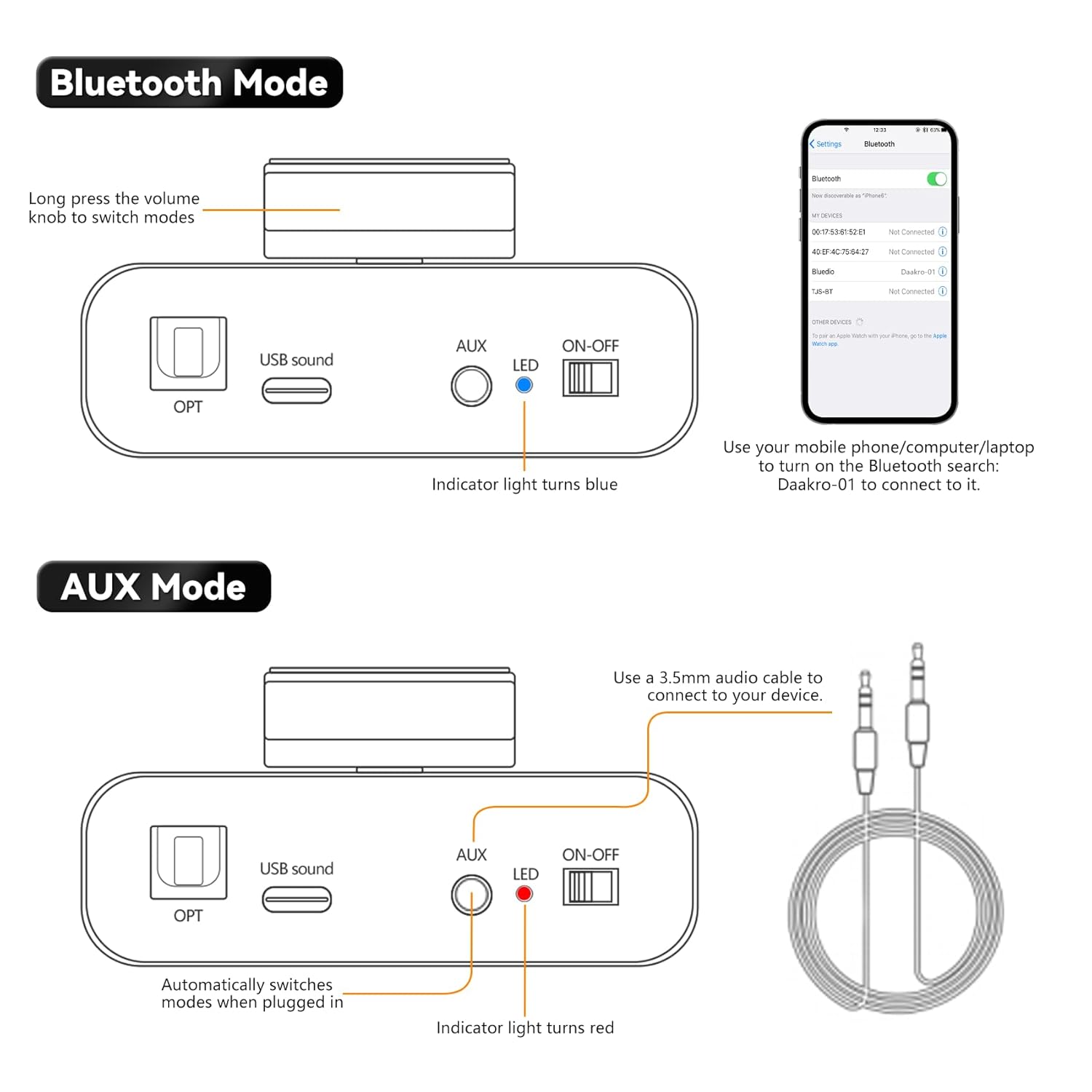
Image: Rear panel connections including power input.
4.3 Konnessjoni tas-Sors tad-Dħul
The AK30 offers multiple input options:
- Bluetooth: For wireless connection from your smartphone, tablet, or laptop.
- AUX: Use the 3.5mm AUX cable to connect devices like MP3 players or older audio sources.
- USB: Connect a USB drive or a computer via the USB-C port for digital audio playback.
- OPT: Use an optical fiber cable for high-quality digital audio from TVs or other optical output devices.

Image: Front panel inputs and controls.
Video: Official Daakro AK30 Mini Audio Amplifier fuqview and setup guide. This video demonstrates the unboxing, connections, and basic operation of the amplifier with various input sources.
5. Istruzzjonijiet Operattivi
5.1 Pum Multifunzjonali
The single knob on the front panel controls all primary functions:
- Dawwar Xellug/Lemin: Increases/Decreases volume. A beep sound indicates minimum/maximum volume.
- Click (Press and Release): Play/Pause music (available in Bluetooth & USB modes).
- Long Press (Press and Hold): Switch between input modes (Blue: Bluetooth, Red: AUX, Green: USB, Purple: OPT).

Image: Multifunctional knob controls.
5.2 Modalità Bluetooth
Long press the volume knob to switch to Bluetooth mode (indicator light turns blue). On your device (phone, computer, laptop), search for "Daakro-01" in Bluetooth settings and connect.
5.3 Modalità AUX
Plug a 3.5mm audio cable into the AUX input. The amplifier automatically switches to AUX mode (indicator light turns red) when a cable is detected.
5.4 Modalità USB
Connect a USB stick directly or use the Type-C to USB adapter to connect a USB device to the USB Sound port. The amplifier automatically switches to USB mode (indicator light turns green).
5.5 OPT Mode
Press and hold the volume knob to switch to OPT mode (indicator light turns purple). Connect an optical fiber cable to the OPT input.

Image: USB and OPT mode connections.
6. Speċifikazzjonijiet
| Karatteristika | Speċifikazzjoni |
|---|---|
| Brand | Daakro |
| Numru tal-Mudell | AK30 |
| Numru ta 'Kanali | 2 |
| Qawwa tal-Ħruġ | 100 Watts (50W+50W @ 4Ω) |
| Voltage | 12 Volts (DC) |
| Provvista Massima Voltage | 12 Volts (DC) |
| Provvista Minima Voltage | 12 Volts (DC) |
| Materjal | Liga |
| Tip ta 'Immuntar | Freestanding |
| Piż tal-oġġett | 1.15 liri |
| Dimensjonijiet tal-Pakkett | 6.57 x 6.3 x 2.52 pulzieri |

Image: Power output table.
7 Issolvi l-problemi
- Ebda Ħsejjes:
- Ensure the power adapter is securely connected and the amplifier huwa mixgħul.
- Check all audio cables for secure connections and correct polarity.
- Verify the correct input mode is selected on the amplifier (indicated by LED color).
- Żid il-volum fuq iż-żewġ amplifier u l-apparat tas-sors tal-awdjo tiegħek.
- Ensure speakers are properly connected and functional.
- Kwistjonijiet ta' Konnessjoni Bluetooth:
- Tiżgura l- amplifier is in Bluetooth mode (blue LED).
- Keep your device within 32ft/10m of the amplifier (6.5ft/2m for PC devices) without obstructions.
- Forget "Daakro-01" from your device's Bluetooth list and try pairing again.
- Erġa' ibda t-tnejn amplifer u t-tagħmir Bluetooth tiegħek.
- Ħoss Mgħawġ:
- Naqqas il-volum fuq iż-żewġ amplifier u s-sors tal-awdjo.
- Check speaker connections for loose wires or incorrect polarity.
- Kun żgur li s-sors tal-awdjo mhux qed jibgħat sinjal żejjed.
- Awdjo Intermittenti:
- Iċċekkja għal konnessjonijiet tal-kejbil maħlula.
- For Bluetooth, ensure no interference from other wireless devices and maintain close proximity.
8. Manutenzjoni
- Tindif: Uża drapp ratba u niexfa biex tnaddaf il- amplifier's exterior. Avoid using liquid cleaners or solvents.
- Ventilazzjoni: Tiżgura l- amplifier has adequate ventilation to prevent overheating. Do not block any vents.
- Ħażna: Meta ma tkunx qed tużaha għal perjodi twal, aħżenha amplifier f'post frisk u niexef 'il bogħod mix-xemx diretta u minn temperaturi estremi.
- Immaniġġjar: Handle the unit with care to avoid physical damage.
9. Garanzija u Appoġġ
The Daakro AK30 Mini Bluetooth Amplifier jiġi ma 'a Politika ta' rifużjoni/sostituzzjoni ta' 30 jum. For any product inquiries, technical assistance, or warranty claims, please contact Daakro customer support. Our team is dedicated to providing online customer service and ensuring 100% customer satisfaction.
Għal aktar għajnuna, jekk jogħġbok żur il- Daakro Store.


