1. Introduzzjoni
Thank you for choosing the PROVISION ISR 4MP IP PoE Camera. This manual provides essential information for the proper installation, operation, and maintenance of your security camera. Please read this manual thoroughly before using the product to ensure optimal performance and safety. This camera is designed for both indoor and outdoor surveillance, offering high-definition video, advanced night vision, and robust weather protection.
2. Informazzjoni dwar is-Sigurtà
- Ensure the power supply meets the camera's specifications (PoE or 12V DC).
- Tesponix il-kamera għal temperaturi estremi barra mill-medda operattiva tagħha (-30°C sa 60°C).
- Avoid direct exposure to strong light sources, which may affect image quality.
- Tippruvax tiżżarma jew timmodifika l-kamera. Irreferi għal kull manutenzjoni f'idejn persunal kwalifikat.
- Clean the camera lens with a soft, dry cloth. Avoid harsh chemicals.
3. Kontenut tal-Pakkett
Ivverifika li l-oġġetti kollha huma preżenti fil-pakkett:
- Korp tal-Kamera PROVISION ISR 4MP IP PoE
- Manwal ta' Istruzzjoni
4. Setup
4.1. Installazzjoni
The PROVISION ISR 4MP IP PoE Camera is designed for ceiling mount installation. Ensure the mounting surface is strong enough to support the camera's weight.
- Agħżel post adattat għal kopertura ta' sorveljanza ottimali.
- Uża l-mudell tal-immuntar ipprovdut (jekk applikabbli) biex timmarka t-toqob tat-tħaffir fuq is-saqaf.
- Ħaffer toqob pilota u daħħal ankri tal-ħajt jekk meħtieġ.
- Waħħal il-bażi tal-kamera mal-wiċċ tal-immuntar billi tuża viti.
- Aġġusta l-kamera viewing angolu kif meħtieġ.

Image: Simple Installation. This image shows a person installing the camera on a ceiling, demonstrating the ease of physical setup.
4.2. Konnettività
This camera supports Power over Ethernet (PoE) for simplified installation, allowing both power and data transmission over a single Ethernet cable. Alternatively, it can be powered via a 12V DC power adapter (not included).
- Konnessjoni PoE: Connect an Ethernet cable from a PoE-enabled NVR or PoE switch to the camera's Ethernet port.
- Konnessjoni Standard: Connect an Ethernet cable to the camera's Ethernet port and a 12V DC power adapter to the camera's power input.

Image: Easy Integration with PoE. This diagram illustrates how the camera integrates with an NVR system using PoE, highlighting its plug-and-play capability.
4.3. Konfigurazzjoni Inizjali
After physical installation and connection, configure the camera via its web interface or an NVR system.
- Aċċess Web Interface: Use a network scanner tool to find the camera's IP address. Enter the IP address into a web browser to access the camera's login page.
- Integrazzjoni tal-NVR: Refer to your NVR's manual for instructions on adding IP cameras. The camera supports ONVIF for broad compatibility.
5. Joperaw
5.1. Karatteristiċi ewlenin
- Riżoluzzjoni Għolja ta' 4MP: Provides clear and detailed video at 2560x1440 resolution.
- IR 40m Night Vision: Ensures clear imaging up to 40 meters in complete darkness.
- Mikrofonu inkorporat: Jaqbad l-awdjo flimkien mal-vidjow għal sorveljanza komprensiva.
- Sejbien tal-Mozzjoni bl-AI: Utilizes advanced algorithms to accurately detect human movement and reduce false alarms.
- Kompressjoni H.265+: Efficiently compresses video to save storage space without compromising quality.
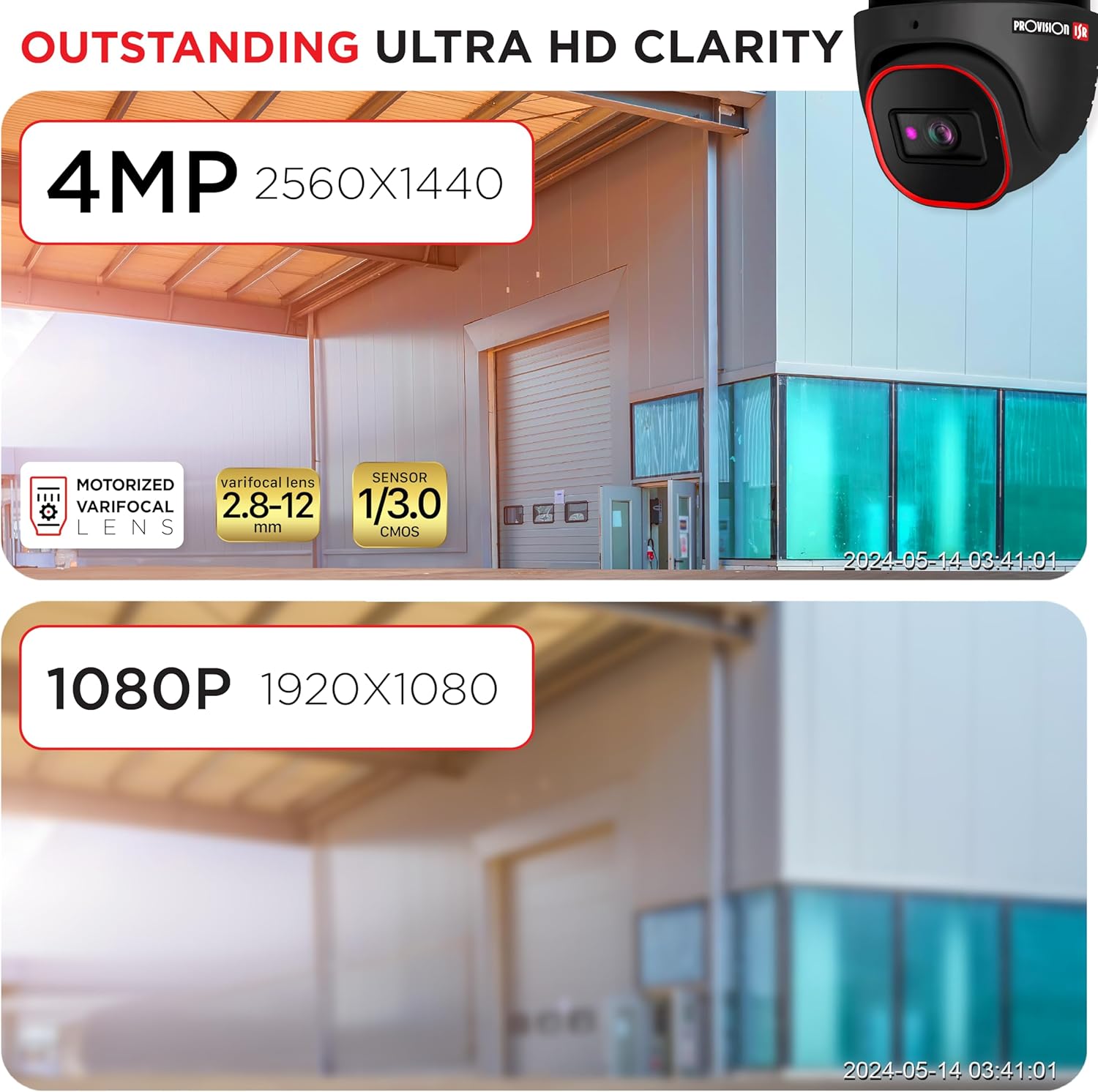
Image: Outstanding Ultra HD Clarity. This image visually compares the superior clarity of 4MP resolution (2560x1440) against 1080P (1920x1080).

Image: Built-in Microphone & Audio. This image highlights the camera's integrated microphone and audio input feature, enabling sound recording.
5.2. Aċċess mill-bogħod
Aċċess live footage and recordings remotely via mobile devices or PCs.
- Applikazzjoni mobbli: Download the official PROVISION ISR mobile app from your device's app store. Follow the in-app instructions to add and view kamera tiegħek.
- Aċċess għall-PC: Use the IP camera web interface or dedicated VMS (Video Management Software) for comprehensive monitoring and management.

Image: Remote Access with AI-Powered Detection. This image shows a smartphone displaying multiple live camera feeds, demonstrating remote monitoring capabilities and AI detection.
5.3. Modi ta' Reġistrazzjoni
The camera supports various recording modes to suit your surveillance needs:
- Reġistrazzjoni manwali: Start and stop recording manually through the web interfaċċja jew NVR.
- Reġistrazzjoni Skedata: Set specific times or days for continuous recording.
- Line-Crossing Recording: Trigger recording when an object crosses a predefined virtual line.
- Reġistrazzjoni ta 'Sejbien tal-Moviment: Record only when motion is detected, saving storage space.
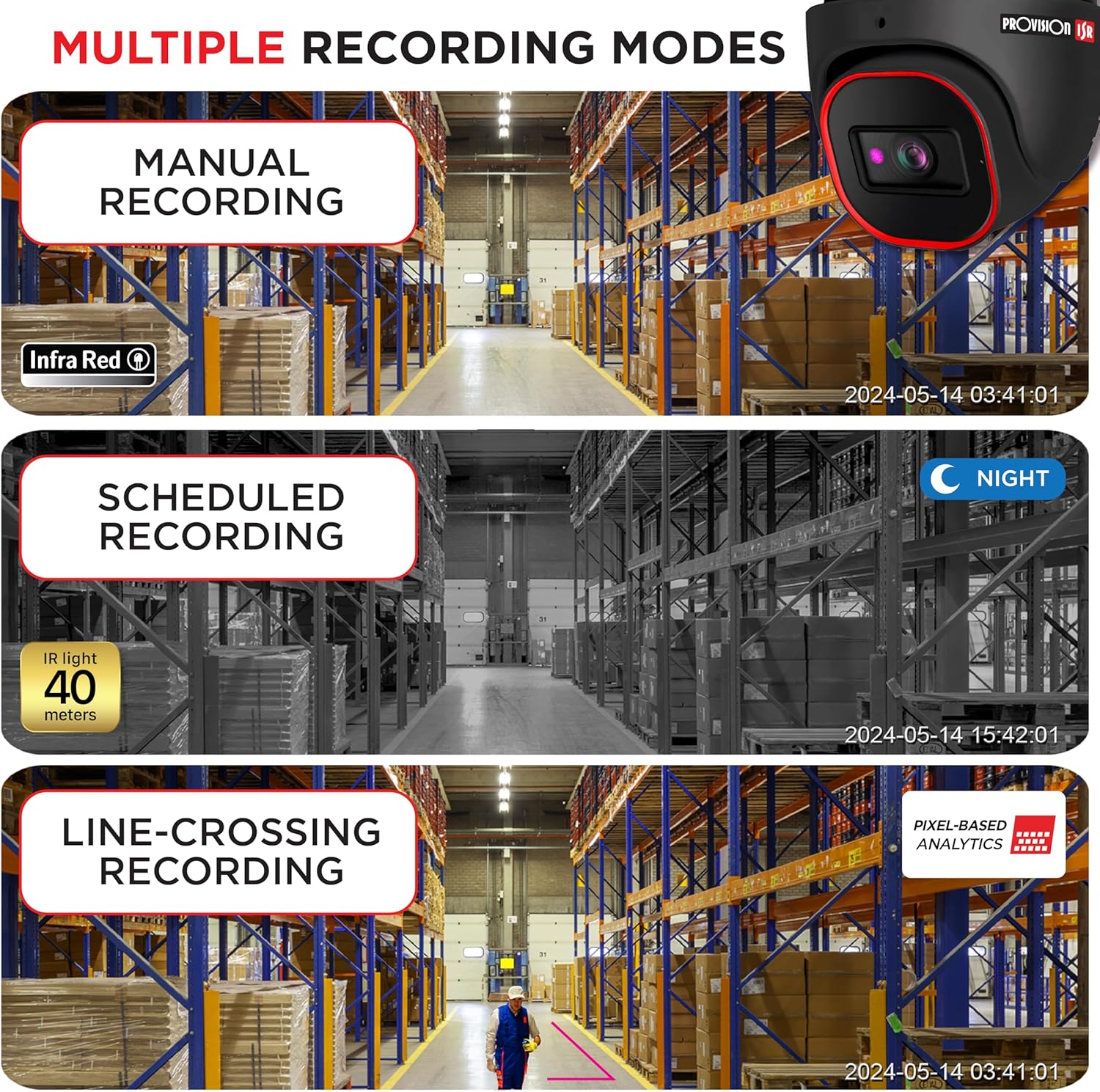
Image: Multiple Recording Modes. This image illustrates different recording options: manual, scheduled (night vision), and line-crossing triggered recording.

Image: Pixel Based Analytics. This diagram demonstrates the camera's ability to detect line crossing and sterile area intrusions using pixel-based analytics, providing real-time alerts.
6. Manutenzjoni
Manutenzjoni regolari tiżgura l-lonġevità u l-prestazzjoni ottimali tal-kamera tiegħek.
- Tindif: Naddaf il-lenti u l-kaxxa tal-kamera perjodikament b'drapp artab u dryer.amp drapp. Tużax tindif li joborxu.
- Aġġornamenti tal-Firmware: Check the PROVISION ISR website for the latest firmware updates. Keeping your firmware updated ensures access to new features and security enhancements.
- Protezzjoni Ambjentali: The camera has an IP67 waterproof rating, protecting it from dust and water ingress. Ensure all cable connections are properly sealed to maintain this rating.

Image: Durable Design & Waterproof. This image highlights the camera's IP67 rating, indicating its durability and resistance to water and dust, along with its operational temperature range.
7 Issolvi l-problemi
Jekk tiltaqa' ma' problemi bil-kamera tiegħek, irreferi għall-problemi u s-soluzzjonijiet komuni li ġejjin:
| Problema | Kawża Possibbli | Soluzzjoni |
|---|---|---|
| L-ebda output ta' immaġni/vidjo | No power; Network cable issue; Incorrect IP address | Check power connection; Verify Ethernet cable integrity; Ensure correct IP configuration |
| Kwalità ta 'immaġni fqira | Dirty lens; Insufficient lighting; Incorrect resolution settings | Clean the lens; Ensure adequate lighting or enable IR; Adjust resolution settings in web interface |
| Ma nistax naċċessa l-kamera mill-bogħod | Network configuration; Firewall settings; Incorrect port forwarding | Verify network settings (router, port forwarding); Check firewall rules; Ensure stable internet connection |
| Is-sejbien tal-moviment mhux qed jaħdem | Sensitivity too low; Detection area not configured; Firmware outdated | Adjust motion detection sensitivity; Configure detection zones; Update camera firmware |
8. Speċifikazzjonijiet
Detailed technical specifications for the PROVISION ISR 4MP IP PoE Camera:
| Karatteristika | Speċifikazzjoni |
|---|---|
| Isem tal-Mudell | Kamera tas-Sigurtà |
| Użu fuq ġewwa/barra | Barra, Ġewwa |
| Riżoluzzjoni tal-Qbid tal-Vidjo | 4MP (2560x1440) |
| Medda tal-Viżjoni Lejl | 40 Meters |
| Teknoloġija tal-Konnettività | Bil-fili (Ethernet) |
| Sors tal-Enerġija | Corded Electric (PoE supported) |
| Klassifikazzjoni tal-IP | IP67 Waterproof |
| Fattur tal-Formola | Koppla |
| Tip ta 'Immuntar | Muntatura tal-Limitu |
| ViewIng Angolu | 94 Grad |
| Dimensjonijiet (L x W x H) | 6.25 x 5.5 x 5.5 pulzieri |
| Kulur | Iswed |
| Apparati Kompatibbli | Desktop, NVR, Smartphone |
| Tip ta' Kontrollur | NVR, Android |
| UPC | 619317412736 |
| Numru tal-Mudell tal-Oġġett | DI-340IPS-MVF-G |
9. Garanzija u Appoġġ
For warranty information and technical support, please contact PROVISION ISR directly or refer to their official websit. Pjanijiet ta’ protezzjoni jistgħu jkunu disponibbli għal kopertura estiża.
Manufacturer: Provision ISR


