Introduzzjoni
This manual provides comprehensive instructions for the setup, operation, and maintenance of your Genmitsu 3020-PRO Ultra CNC Router Machine. This all-metal engraver is designed for precision work on various materials including metal, wood, acrylic, PCB, and MDF, featuring an upgraded 710W spindle and a built-in motherboard fan for enhanced performance and stability.

Figure 1: Genmitsu 3020-PRO Ultra CNC Router Machine. This image displays the complete CNC router setup, highlighting its compact and robust design.
Karatteristiċi Ewlenin
- 710W Spindle: Equipped with a 1/8” ER11 collet, suitable for solid wood, metal, acrylic, carbon fiber, and soft titanium. Features an adjustable speed range (6500-30000 RPM) with 6-speed settings and constant torque control for consistent performance.

Figura 2: Dettaljat view of the 710W Spindle Motor, showing its ER-11 collet, ON/OFF switch, and fast heat dissipation design.
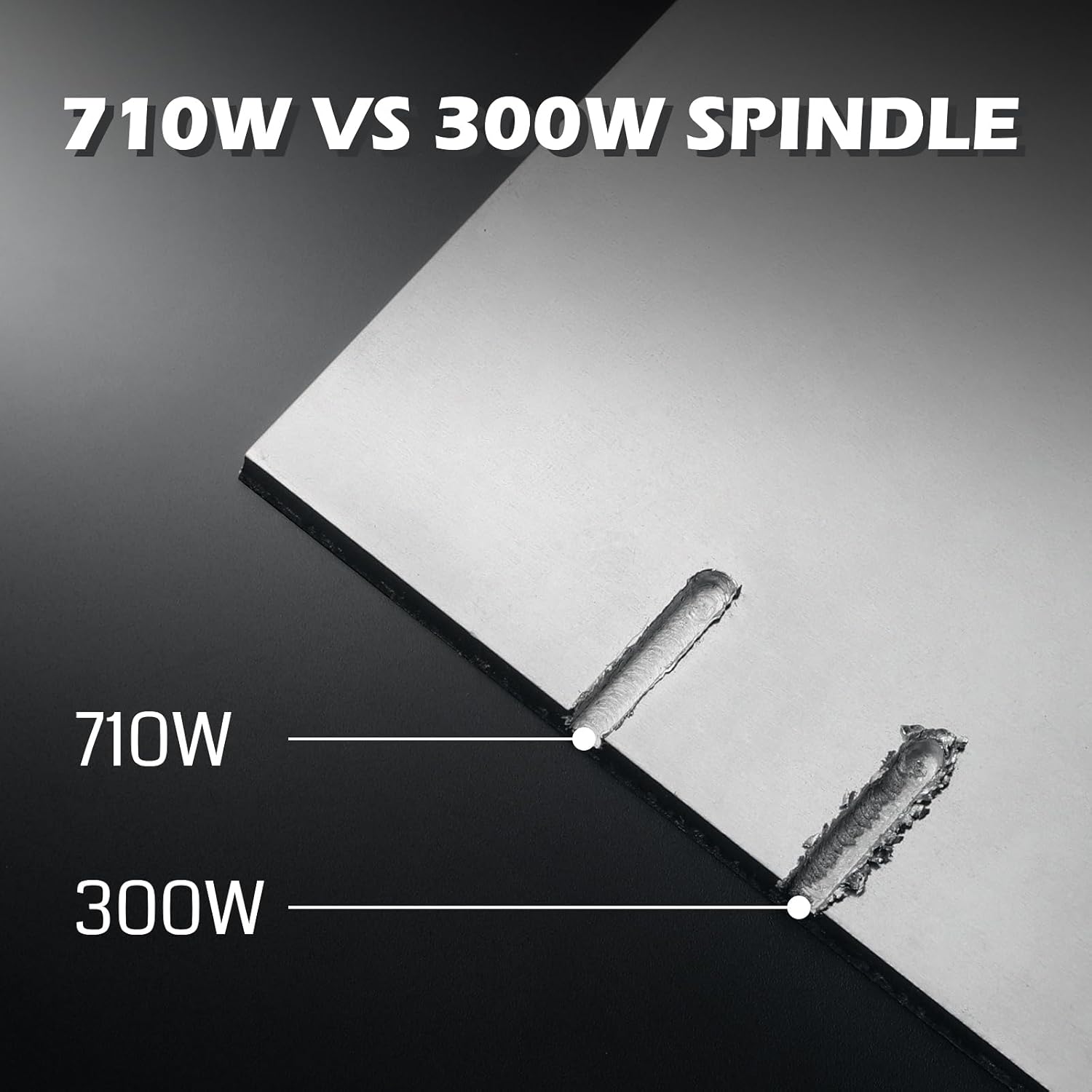
Figure 3: Comparison illustrating the cutting capability difference between a 710W and a 300W spindle, demonstrating the enhanced power of the 710W unit.
- Kostruzzjoni kollha tal-metall: Built with a solid all-metal frame, including dual linear rails and a lead screw on the X-axis, 10mm polished rods on the Z-axis, and 12mm polished rods with T8 trapezoidal lead screws on the Y-axis. Enclosed mold materials and a reinforced X-axis backplate ensure stability.

Figure 4: Diagram highlighting the integrated all-metal structure, fully enclosed housing protection, added X-axis black plate, and customized aluminum spoilboard.
- Unmatched Cutting Power: XYZ-axis equipped with powerful 60mm stepper motors, delivering 7.3 Nm of torque. Capable of achieving deeper cuts in aluminum, up to 1.5mm in one pass.

Figura 5: Close-up view of the 7.3N.M XYZ-Axis Stepper Motors, indicating a 30% increase in torque for improved cutting performance.

Figure 6: Illustration demonstrating the machine's capability for a 1.5mm deep cut in aluminum in a single pass.
- Disinn Integrat: Eliminates the need for a heavy power box by integrating a cooling fan with the motherboard, ensuring streamlined and secure operation.

Figure 7: Image showing the upgraded motherboard with an integrated cooling fan for enhanced safety and stability.
- Versatile Spindle Compatibility: Includes a Φ65mm spindle holder and a Φ52mm adapter, allowing easy switching between different spindles and laser modules. Compatible with Φ69mm spindle brackets for expanded capabilities.

Figure 8: Visual representation of the various spindle and laser module compatibility options, including Φ65mm, Φ52mm, and Φ69mm adapters.
Setup Istruzzjonijiet
The Genmitsu 3020-PRO Ultra CNC Router features a modular assembly design, allowing for quick and straightforward installation. Most components are pre-assembled, significantly reducing setup time.
- Spakkjar: Neħħi bir-reqqa l-komponenti kollha mill-imballaġġ. Ivverifika li l-partijiet kollha elenkati fil-lista tal-ippakkjar huma preżenti u mhux imħassra.
- Assemblaġġ tal-Bażi: The base frame is largely pre-assembled. Ensure all screws are securely tightened.
- Installazzjoni tal-Gantry: Attach the gantry assembly to the base. This typically involves aligning the pre-assembled gantry with the base and securing it with the provided fasteners.

Figure 9: Simplified diagram showing the three main steps for assembly: Base, Gantry, and Spindle attachment, indicating a quick setup process.
- Spindle Attachment: Mount the 710W spindle to the gantry. Ensure it is securely fastened and properly aligned.
- Konnessjonijiet tal-Wiring: Connect all necessary cables, including power, motor, and limit switch wires. The machine's integrated design simplifies these connections.
- Installazzjoni tas-Softwer: Install the necessary control software (e.g., Candle, Universal Gcode Platform) from the provided flash drive or the official Genmitsu website. Ensure you download the latest drivers compatible with your operating system.
- Kalibrazzjoni Inizjali: Perform initial calibration steps as outlined in the software's documentation to set up the machine's home position and workspace limits.
Istruzzjonijiet Operattivi
Operating the Genmitsu 3020-PRO Ultra involves preparing your design, setting up the material, and initiating the carving process.
- Tħejjija tad-Disinn: Create or import your design using CAD/CAM software. Generate the G-code file that the CNC machine will interpret.
- Material Setup: Securely mount your material onto the work area using the provided clamps. The work area measures 11.8" x 8.1" x 3.1" (300mm x 205mm x 78mm).

Figure 10: Diagram illustrating the precise dimensions of the machine's work area, including X, Y, and Z axes.
- Installazzjoni tal-għodda: Insert the appropriate end mill into the ER11 collet of the spindle. Ensure it is tightened securely.
- Zeroing the Axes: Use the control software to set the X, Y, and Z zero points relative to your material. This is crucial for accurate carving.
- Spindle Speed Adjustment: Adjust the spindle speed (6500-30000 RPM) according to the material being carved and the specific cutting requirements.
- Initiate Carving: Tagħbija l-kodiċi G file into the control software and start the carving process. Monitor the machine during operation.
Video 1: Demonstration of the Genmitsu 3020-PRO Ultra CNC Router Machine in operation, showcasing its precision carving capabilities on aluminum. This video highlights the machine's smooth movement and the quality of the finished product.

Figura 11: Eżamples of high-precision carving results on various materials, demonstrating the machine's capability to produce intricate designs.

Figure 12: A collage of various sample carving projects, showcasing the versatility of the CNC router across different materials and design complexities.
Manutenzjoni
Manutenzjoni regolari tiżgura l-lonġevità u l-prestazzjoni ottimali tar-router CNC tiegħek.
- Tindif: After each use, clean the work area, lead screws, and linear rails to remove dust, chips, and debris. A soft brush or compressed air can be used. Consider using a dust shoe for better debris management.

Figura 13: Aktarview of the complete accessory ecosystem, including a dust shoe, which can aid in maintaining machine cleanliness.
- Lubrikazzjoni: Periodically lubricate the lead screws and linear rails with appropriate machine oil to ensure smooth movement and prevent wear.
- Kura tal-magħżel: Keep the spindle clean and free of debris. Ensure the cooling fan on the motherboard is not obstructed to prevent overheating.
- Konnessjonijiet elettriċi: Regularly check all electrical connections for tightness and signs of wear.
- Spezzjoni bit: Inspect carving bits for sharpness and damage before each use. Replace dull or damaged bits to ensure clean cuts and prevent strain on the spindle.
Issolvi l-problemi
Din it-taqsima tindirizza kwistjonijiet komuni li tista’ tiltaqa’ magħhom u tipprovdi soluzzjonijiet.
| Problema | Kawża Possibbli | Soluzzjoni |
|---|---|---|
| Il-magna ma tirrispondix għall-kmandi tas-softwer. | Incorrect driver installation, software configuration issues, loose USB connection. | Verify correct driver installation from the official Genmitsu website. Check software settings (e.g., COM port, baud rate). Ensure USB cable is securely connected. Restart both the machine and computer. |
| Spindle not rotating. | Spindle power not connected, ON/OFF switch off, spindle motor fault. | Ensure the spindle's separate power cord is plugged in and its ON/OFF switch is in the 'ON' position. Check spindle connections to the mainboard. |
| Inaccurate carving or poor cut quality. | Dull bit, loose material, incorrect G-code, insufficient spindle speed or feed rate, loose belts/lead screws. | Replace dull bits. Ensure material is firmly clamped. Verify G-code for errors. Adjust spindle speed and feed rate based on material. Check and tighten all mechanical components. |
| Il-magna tieqaf ħesrem waqt it-tħaddim. | Limit switch triggered, E-stop pressed, power interruption, overheating. | Check if any limit switches are activated or if the E-stop button is pressed. Ensure stable power supply. Verify motherboard cooling fan is functioning correctly. |
| Difficulty generating custom designs or G-code. | Lack of familiarity with CAD/CAM software, software compatibility issues. | Refer to the documentation for your chosen CAD/CAM software. Explore online tutorials and communities for specific software (e.g., Fusion 360, Easel, Carbide Create). Ensure your software outputs G-code compatible with GRBL-based CNC machines. |
Speċifikazzjonijiet
| Attribut | Dettall |
|---|---|
| Brand | Genmitsu |
| Numru tal-Mudell | 3020PU |
| Materjal | Metall |
| Sors tal-Enerġija | Corded Elettriku |
| Voltage | 230 Volts |
| Dimensjonijiet tal-Prodott (W x H) | 11.8" x 3.1" (Work Area) |
| Piż tal-oġġett | 15.3 Kilogrammi (33.7 libbra) |
| Veloċità ta' Rotazzjoni Massima | 30000 RPM |
| Tip ta' Bażi | Fiss |
| UPC | 810168143705 |
| Komponenti Inklużi | 3020-PRO Ultra Router Kit |
Garanzija u Appoġġ
Għal informazzjoni dwar il-garanzija u appoġġ tekniku, jekk jogħġbok irreferi għall-websajt uffiċjali ta' Genmitsu webis-sit jew ikkuntattja s-servizz tal-konsumatur tagħhom. Żomm l-irċevuta tax-xiri tiegħek għal talbiet ta’ garanzija.
Official Genmitsu Store: Visit the Genmitsu Store on Amazon


