1. Introduzzjoni
This manual provides detailed instructions for the proper setup, operation, and maintenance of your Daakro AK45 Home Audio Amplifier. Please read this manual thoroughly before using the device to ensure optimal performance and safety. The AK45 is a 2-channel stereo amplifier designed for passive speakers, featuring Bluetooth 5.4 connectivity, multiple input options, and adjustable audio controls.

Figure 1: Daakro AK45 Home Audio Amplifier u Kontroll mill-Bogħod
2. Prodott Aktarview
2.1 Kontrolli ta' Front Panel

Figura 2: Layout tal-Panew ta 'quddiem
- Swiċċ tal-Enerġija: Jaqleb il- amplifier mixgħul jew mitfi.
- USB/SD Input: Ports for connecting USB flash drives or SD cards for media playback.
- Kontroll tat-Triple: Adjusts the high-frequency audio output (±12dB).
- Kontroll tal-bass: Adjusts the low-frequency audio output (±12dB).
- Kontroll tal-Volum tal-Mikrofonu: Adjusts the volume level for connected microphones.
- Inputs tal-Mikrofonu (MIC1, MIC2): Two 1/4" (6.5mm) jacks for connecting microphones.
- Kontroll tal-Volum Master: Adjusts the overall output volume (0-32dB).
- Buttuna tal-Modalità: Cycles through input sources (Bluetooth, RCA, USB, SD, FM).
- Kontrolli tal-daqq: Buttons for previous track, play/pause, next track.
- Wiri LED: Juri l-mod attwali, il-livell tal-volum, u l-informazzjoni dwar it-trakka.
2.2 Konnessjonijiet tal-Panew ta' wara
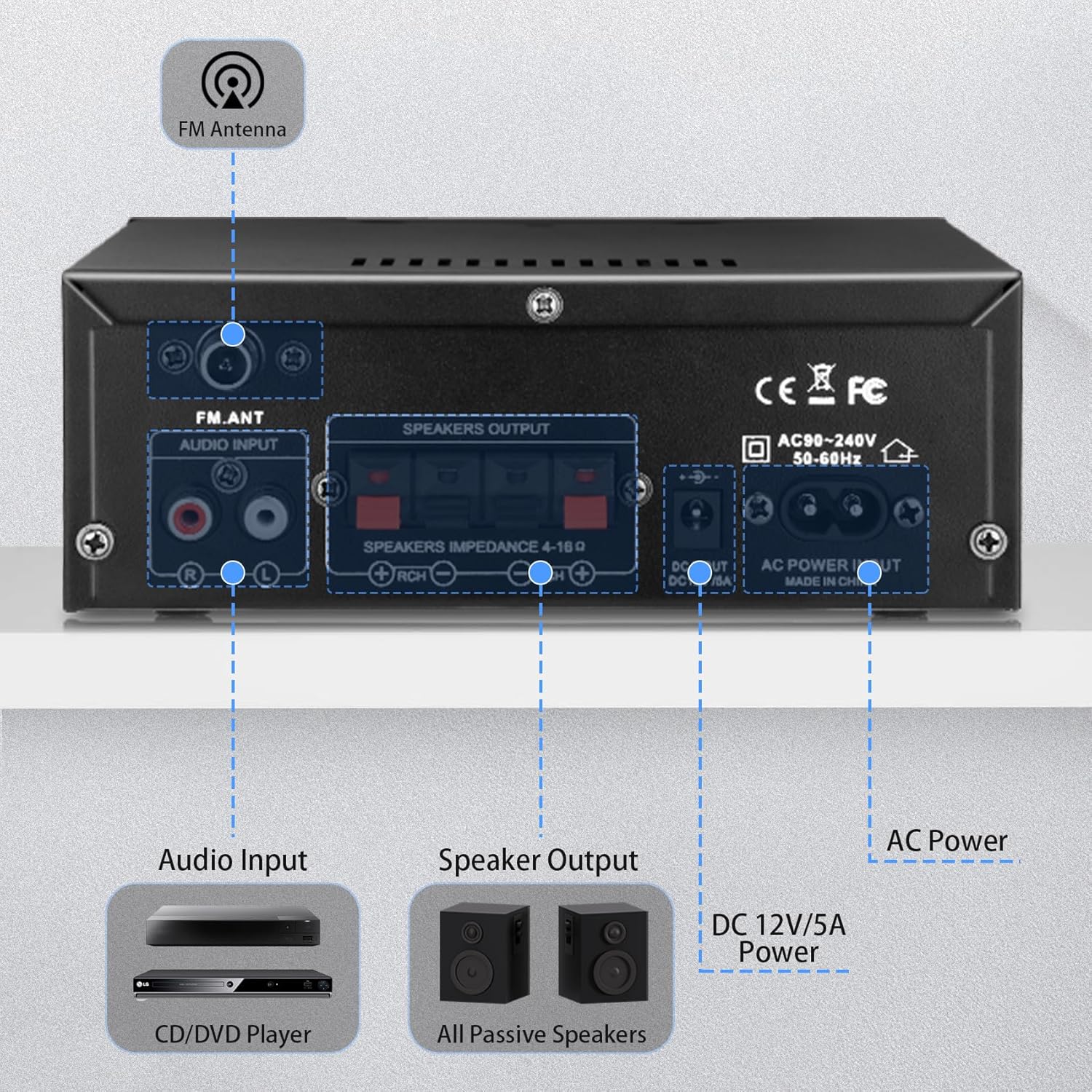
Figura 3: Konnessjonijiet tal-Panel ta' Wara
- Input ta' l-antenna FM: Jgħaqqad l-antenna FM inkluża għar-riċeviment tar-radju.
- Input tal-Awdjo (RCA): Red and white RCA jacks for connecting external audio sources like CD players or tape decks.
- Riżultat tal-Kelliem: Terminals for connecting passive speakers (4-16Ω impedance). Ensure correct polarity (+ to + and - to -).
- Dħul tal-Enerġija DC 12V/5A: Connects to a 12V/5A DC power adapter (not included).
- Input tal-Enerġija AC: Connects the included AC power cable (AC90-240V, 50-60Hz).
2.3 Kontroll mill-Bogħod
Il-kontroll remot inkluż jippermetti tħaddim konvenjenti tal- amplifier from a distance. Functions include power on/off, mode selection, volume adjustment, track control, and EQ settings (if available).
Figura 4: Kontroll mill-bogħod
Nota: Remove the isolation plastic sheet from the battery compartment of the remote control before first use.
3. Setup
- Qabbad l-Ispeakers: Connect your passive speakers to the 'SPEAKERS OUTPUT' terminals on the rear panel. Ensure the positive (+) terminal of the amplifier connects to the positive (+) terminal of the speaker, and the negative (-) terminal connects to the negative (-). The ampL-ilifier jappoġġja kelliema b'impedenza ta' 4-16Ω.
- Qabbad Sorsi Awdjo:
- Input RCA: Use an RCA cable to connect devices like CD players or tape decks to the 'AUDIO INPUT' jacks.
- Karta USB/SD: Insert a USB flash drive or SD card into the respective slots on the front panel.
- Bluetooth: For Bluetooth connection, ensure the amplifier is powered on and in Bluetooth mode.
- Qabbad l-Antenna tal-FM: Attach the included FM antenna to the 'FM_ANT' connector on the rear panel for improved radio reception.
- Qabbad il-Mikrofoni: If using microphones, plug them into the 'MIC1' or 'MIC2' 1/4" jacks on the front panel.
- Konnessjoni tal-Enerġija: Connect the AC power cable to the 'AC POWER INPUT' on the rear panel and then to a wall outlet. Alternatively, if using a DC power source, connect a 12V/5A DC adapter to the 'DC 12V/5A' input.
4. Istruzzjonijiet Operattivi
4.1 Tixgħel/Jitfi
Agħfas is-swiċċ 'POWER' fuq il-pannell ta' quddiem biex tixgħel ampIl-lifer mixgħul jew mitfi. Id-displej LED jixgħel meta l-unità tkun mixgħula.
4.2 L-Għażla tal-Modalità tad-Dħul
Press the 'MODE' button on the front panel or remote control to cycle through the available input sources: Bluetooth (BLUE), RCA (AUX), USB, SD, and FM radio.
4.3 Tqabbil tal-Bluetooth
- Aqleb il- amplifier to Bluetooth mode using the 'MODE' button. The LED display will show 'BLUE'.
- Fuq l-apparat tiegħek (smartphone, tablet, kompjuter), attiva l-Bluetooth u fittex apparati disponibbli.
- Select 'AK45' from the list of devices to pair. A confirmation sound will indicate successful pairing.
Nota: Maintain a distance of within 30ft/10m between the device and amplifier without obstructions for optimal Bluetooth performance. For TV or PC connections, keep the distance within 15ft/5m.

Figura 5: Konnettività Bluetooth 5.4
4.4 Adjusting Audio Levels
- Volum Master: Rotate the large 'VOLUME' knob on the front panel or use the volume buttons on the remote control to adjust the overall sound level.
- Treble / Bass: Use the 'TREBLE' and 'BASS' knobs to fine-tune the high and low frequencies according to your preference.
- Volum tal-Mic: Adjust the 'MIC/VOL' knob to control the volume of connected microphones.
4.5 Daqq tal-Karta USB/SD
When a USB drive or SD card is inserted, the ampIl-lifer jaqleb awtomatikament għall-modalità USB/SD u jibda jdoqq awdjo kompatibbli files. Use the playback controls (previous, play/pause, next) on the front panel or remote to manage your music.
4.6 Użu tal-Mikrofonu
Connect up to two microphones to the 'MIC1' and 'MIC2' inputs. Adjust the 'MIC/VOL' knob to control microphone volume. This feature is suitable for home karaoke or public address applications.
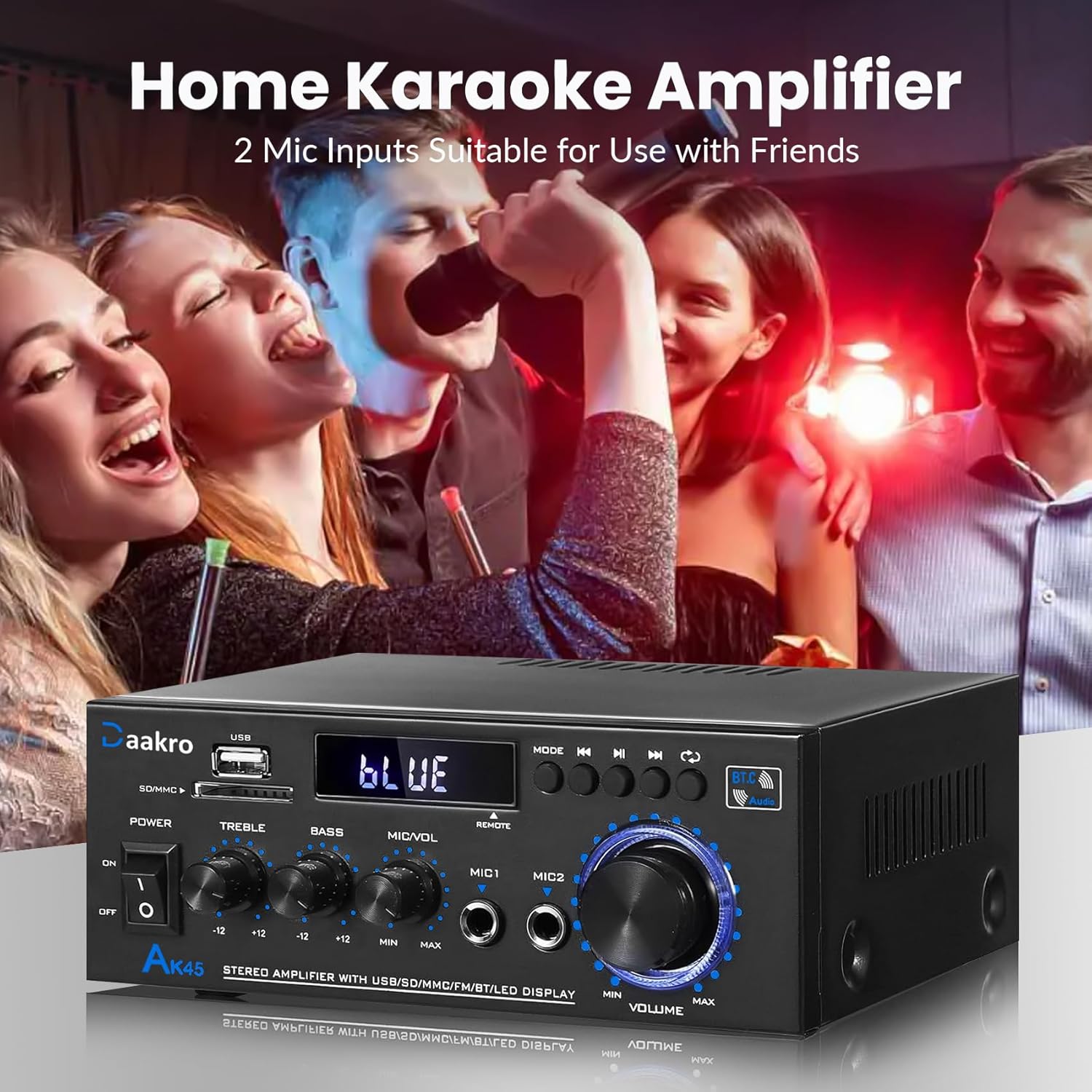
Figure 6: Home Karaoke Application
5. Manutenzjoni
- Tindif: Uża drapp ratba u niexfa biex tnaddaf il-barra tal- ampEvita li tuża prodotti tat-tindif likwidi jew solventi, għax jistgħu jagħmlu ħsara lill-finitura jew lill-komponenti interni.
- Ventilazzjoni: Tiżgura l- amplifier has adequate ventilation. Do not block the ventilation openings on the top or sides of the unit.
- Ħażna: Meta ma tkunx qed tużaha għal perjodi twal, aħżenha amplifier f'post frisk u niexef 'il bogħod mix-xemx diretta u minn temperaturi estremi.
- Skonnettjar tal-Enerġija: Always disconnect the power cable from the wall outlet before performing any cleaning or maintenance.
6 Issolvi l-problemi
- Ebda Qawwa:
- Iċċekkja jekk il-kejbil tal-enerġija huwiex imqabbad sew maż-żewġ amplifier u s-sokit tal-ħajt.
- Ensure the power switch on the front panel is in the 'ON' position.
- Ivverifika li s-sokit tal-ħajt qed jaħdem billi tqabbad apparat ieħor.
- Ebda Ħsejjes:
- Confirm that speakers are correctly connected to the 'SPEAKERS OUTPUT' terminals with correct polarity.
- Check that the correct input mode is selected (Bluetooth, RCA, USB, SD, FM).
- Increase the 'MASTER VOLUME' knob and ensure it is not at minimum.
- Verify that the audio source device is playing and its volume is turned up.
- Ensure passive speakers are used, as the AK45 is not compatible with active speakers.
- Kwistjonijiet ta' Konnessjoni Bluetooth:
- Tiżgura l- amplifier is in Bluetooth mode ('BLUE' on display).
- Delete 'AK45' from your device's Bluetooth list and attempt to re-pair.
- Reduce the distance between your device and the amplifier, and remove any obstructions.
- Erġa' ibda t-tnejn amplifer u t-tagħmir Bluetooth tiegħek.
- Poor Sound Quality (Distortion, Low Volume):
- Check speaker connections for loose wires or incorrect polarity.
- Adjust 'TREBLE' and 'BASS' controls.
- Kun żgur li s-sors awdjo qed jipprovdi sinjal nadif.
- Verify that the speaker impedance is within the supported 4-16Ω range.
- Il- amplifier uses an upgraded TPA3116 chip for clear audio.

Figure 7: TPA3116D2 Chip for Enhanced Audio Performance
- USB/SD Card Not Reading:
- Kun żgur li l-USB drive jew il-kard SD iddaħħlu sew.
- Iċċekkja li l- files on the USB/SD card are in a compatible audio format.
- Ipprova USB drive jew SD card differenti.
- Il-Kontroll mill-bogħod Mhux Jaħdem:
- Ensure the isolation plastic sheet has been removed from the battery compartment.
- Ibdel il-batterija fil-kontroll remot.
- Point the remote directly at the ampsensur tal-pannell ta' quddiem tal-lifer.
7. Speċifikazzjonijiet
- Mudell: AK45
- Qawwa tal-Ħruġ: 50W + 50W (Theoretical, at 24V/5A, 4-8Ω impedance)
- AmpĊippa lifier: TPA3116
- Verżjoni Bluetooth: 5.4 (QCC3040 core)
- Interfaces tad-dħul: 1x RCA, 2x 1/4" Microphone, 1x USB, 1x SD Card Slot, Bluetooth 5.4, FM Radio
- Impedenza tal-Ispeaker: 4-16Ω (Passive Speakers Only)
- Rispons tal-Frekwenza: 20Hz - 20kHz
- Kontroll tat-Tone: Treble ±12dB, Bass ±12dB
- Provvista tal-Enerġija: AC90-240V, 50-60Hz (or DC 12V/5A)
- Dimensjonijiet: 8.78 x 8.31 x 3.7 pulzieri
- Piż tal-oġġett: 1.94 liri
7.1 Output Power vs. Power Supply and Impedance

Figure 8: Power Output Table
| Provvista tal-Enerġija | Impedenza tal-Ispeaker | Max Output Power |
|---|---|---|
| 9V | 4Ω | 15W |
| 6Ω | 12W | |
| 8Ω | 10W | |
| 12V | 4Ω | 20W |
| 6Ω | 15W | |
| 8Ω | 12W | |
| 18V | 4Ω | 30W |
| 6Ω | 20W | |
| 8Ω | 15W | |
| 22V | 4Ω | 40W |
| 6Ω | 30W | |
| 8Ω | 20W | |
| 24V | 4Ω | 50W |
| 6Ω | 40W | |
| 8Ω | 30W |
8. X'hemm fil-Kaxxa
Upon opening your Daakro AK45 Home Audio Amplifier package, you should find the following items:
- 1x Daakro AK45 Home Audio AmpUnità lifier
- 1x Kontrollur Remot
- 1x AC Power Cable
- 1x Antenna FM
- 1x Manwal tal-Istruzzjonijiet (dan id-dokument)
Figura 9: Kontenut tal-Pakkett
9. Garanzija u Appoġġ
Daakro is committed to providing high-quality audio equipment and customer satisfaction.
- Garanzija: Dan il-prodott jiġi b'garanzija ta' 30 jum mid-data tax-xiri.
- Servizz tal-Klijent: We offer 24-hour online customer service to assist with any inquiries or issues you may encounter.
- Garanzija ta' Sodisfazzjon: We strive for 100% customer satisfaction.
For support, please refer to the contact information provided with your purchase or visit the official Daakro store on Amazon.


