1. Introduzzjoni
Thank you for choosing the Dprofy Golf Caddie Pro Smart Golf GPS Range Finder. This device is designed to enhance your golf experience by providing precise distance measurements and game analysis. The system includes two lightweight GPS devices that work in conjunction with the Dprofy mobile application to offer real-time course information, voice broadcasts, and performance tracking.
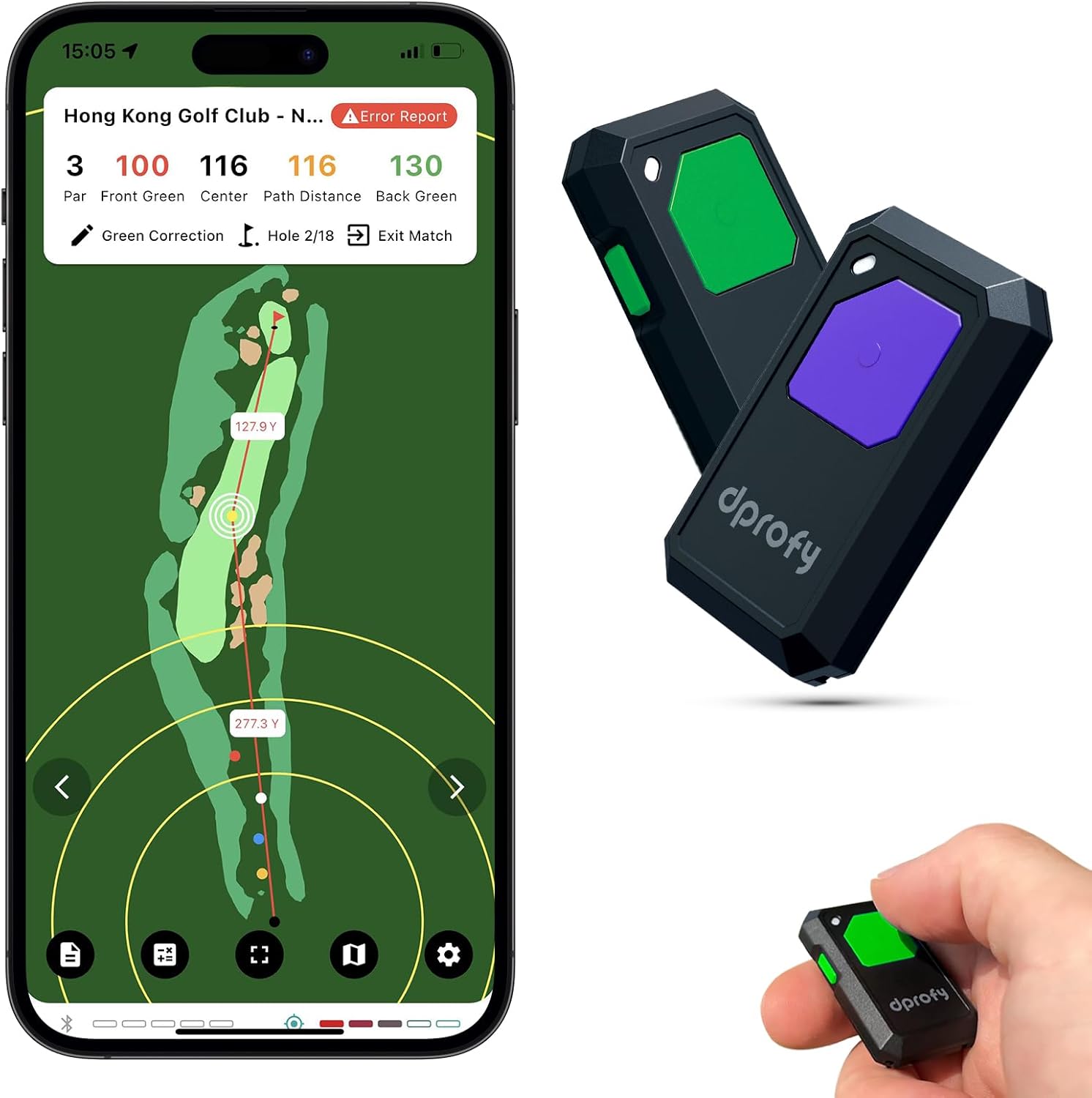
Image 1.1: The Dprofy Golf Caddie Pro devices alongside the Dprofy mobile application interface, showing course layout and distance information.
2. Setup
2.1 X'hemm fil-Kaxxa
- 2 x Dprofy Golf Caddie Pro GPS Devices
- Charging Cables (USB-C, assumed)
- Manwal għall-Utent (dan id-dokument)
2.2 Installazzjoni tal-App
- Niżżel il- Dprofy APP from your smartphone's app store (iOS App Store or Google Play Store).
- Installa l-applikazzjoni fuq it-tagħmir mobbli tiegħek.
- Create an account or log in if you are an existing user.
2.3 Tqabbil tal-Apparat
- Ensure both Dprofy Golf Caddie Pro devices are sufficiently charged.
- Turn on the devices by pressing and holding the main button (specific button not detailed, assume standard power button).
- Open the Dprofy APP on your smartphone.
- Navigate to the 'Devices' or 'Connect' section within the app.
- Follow the on-screen prompts to pair your Dprofy Golf Caddie Pro devices via Bluetooth. Ensure your phone's Bluetooth is enabled.
- The devices should be kept within approximately 30 feet (9 meters) of your smartphone for optimal performance and voice broadcast functionality.
3. Istruzzjonijiet Operattivi
3.1 Tibda Rawnd
- Launch the Dprofy APP and select your desired golf course.
- Confirm the starting hole and other game settings within the app.
- Ensure your Dprofy devices are connected and within range of your phone.
3.2 Dual-Button Voice Broadcast
The Dprofy Golf Caddie Pro devices feature two distinct buttons for voice broadcast functions:
- Button 1 (Green): Press this button to hear information about the current hole. On the tee, it announces hole details. On the fairway, it provides the distance to the green center. Pin distance can be adjusted via the Dprofy app for more precise measurements.
- Button 2 (Purple/Side): Press this button to receive alerts about hazards located within 30 yards of the green. This assists in strategic shot planning.

Image 3.1: Illustration of the Dprofy device's two buttons and their respective voice broadcast functions for hole information, green distance, and hazard alerts.
3.3 Screen-Off Operation
The Dprofy Golf Caddie Pro is designed for convenience. Once a game is started in the app, the GPS devices can continue to broadcast distance information even if your phone's screen is off or the app is running in the background. This allows you to focus on your game without constantly checking your phone, while conserving phone battery.
3.4 Real-Time Scorecard & Analytics
The Dprofy APP provides a comprehensive real-time scorecard and advanced analytics features:
- Score Tracking: Record scores for each hole, including total strokes, putts, and club usage.
- Shot Distances: Automatically track and log shot distances.
- Performance Stats: Analyze fairway statistics, green statistics (e.g., Green in Regulation), and putting statistics.
- Post-Game Analysis: Utilize detailed reports to identify areas for improvement in your game.

Image 3.2: Various screens of the Dprofy app showing real-time scorecard, course map with distances, and shot tracking features.
3.5 Sharing with a Friend
The Dprofy Golf Caddie Pro comes with two devices, allowing you to share one with a playing partner. To enable shared play:
- Ensure your friend has downloaded and installed the Dprofy APP on their smartphone.
- Within the Dprofy APP, use the 'Add Friends' or 'Share Device' function (specific menu name may vary). This may involve scanning a QR code or sending an invitation.
- Once connected, both players can utilize a device and track their game collaboratively or competitively.

Image 3.3: Two individuals on a golf course, each with a Dprofy device, demonstrating the shared play functionality of the system.
4. Karatteristiċi ewlenin
- Kejl ta' Preċiżjoni: Provides real-time distance measurements to the green center with an accuracy of ±1 yard, aiding in shot selection.
- Dual-Button Voice Broadcast: Dedicated buttons for instant audio feedback on hole information, green distances, and hazard alerts.
- Convenient Screen-Off Operation: Maintains functionality and voice broadcasts even when the connected smartphone's screen is off or the app is in the background.
- Share with a Friend: Includes two devices, enabling two players to use the system simultaneously for competitive or collaborative play.
- Real-Time Scorecard & Advanced Analytics: Tracks scores, shot distances, and performance statistics during and after rounds, offering insights for improvement.

Image 4.1: A golfer on the course, with the Dprofy device and app illustrating the precision measurement feature for distances to the green.
5. Manutenzjoni
5.1 Tindif
To maintain the longevity and performance of your Dprofy Golf Caddie Pro devices:
- Imsaħ l-apparati b'ċarruta ratba u damp cloth to remove dirt or debris after use.
- Avoid using harsh chemicals, solvents, or abrasive cleaners, as these can damage the device's casing and internal components.
- Ensure the charging ports are clean and dry before connecting charging cables.
5.2 Ħażna
- Aħżen l-apparati f'post frisk u niexef 'il bogħod mix-xemx diretta u minn temperaturi estremi.
- If storing for an extended period, ensure the devices are partially charged (around 50%) to preserve battery health. Avoid storing them fully charged or completely depleted.
5.3 Kura tal-Batterija
- Charge the devices using the provided charging cables or compatible USB-C chargers.
- Avoid overcharging or completely draining the battery frequently, as this can reduce battery lifespan.
6 Issolvi l-problemi
| Problema | Kawża Possibbli | Soluzzjoni |
|---|---|---|
| L-apparat mhux qed jikkonnettja mal-app | Bluetooth off, device out of range, app not running, low battery. | Ensure phone Bluetooth is on. Keep devices within 30ft of phone. Open Dprofy APP. Charge devices. Restart device and app. |
| Qari mhux preċiż tad-distanza | Poor GPS signal, phone GPS issues, app calibration needed. | Ensure strong GPS signal on your phone. Check phone's location services settings. Calibrate the app if an option is available. Update the app. |
| Ix-xandir bil-vuċi mhux qed jaħdem | Device not connected, phone volume low, app settings, phone in silent mode. | Verify device connection. Increase phone volume. Check Dprofy APP audio settings. Disable silent mode on phone. |
| App displays incorrect language/characters | App language settings, software bug. | Check language settings within the Dprofy APP. Ensure the app is updated to the latest version. Contact Dprofy support if the issue persists. |
| Requires constant cell signal | The Dprofy APP relies on your phone's GPS and potentially map data. | While the devices work with the screen off, the app itself may require a cell signal for initial course loading or map updates. Consider downloading course maps for offline use if the app supports it (check app documentation). |
7. Speċifikazzjonijiet
| Karatteristika | Dettall |
|---|---|
| Brand | Dprofy |
| Mudell | Golf Caddie Pro |
| Dimensjonijiet tal-Pakkett | 6.1 x 3.19 x 0.86 pulzieri |
| Piż tal-oġġett | 1.76 uqija |
| Teknoloġija tal-Konnettività | Bluetooth (works with app) |
| Applikazzjoni Appoġġjata | Dprofy APP |
| Karatteristiċi Speċjali | Smart, Voice-activated, Real-time Scorecard, Advanced Analytics, Dual-device support |
| Materjal | Plastik |
| X'hemm fil-Kaxxa | 2pcs golf GPS devices |
8. Garanzija u Appoġġ
For warranty information, technical support, or customer service inquiries regarding your Dprofy Golf Caddie Pro, please refer to the official Dprofy website or contact their customer support directly. Specific warranty terms and conditions may vary and are typically provided with your purchase documentation or on the manufacturer's websit.
Manufacturer: Dprofy


